

ACCRINT Function (Calligra Sheets)
Calculate accrued interest with Calligra ACCRINT, including its ignored first-interest argument, day-count limitations and reproducible worksheet checks.
Verification status: See the evidence and test scope described in this guide. How formula examples are checked
Quick answer: =ACCRINT(DATE(2025;1;1);DATE(2025;7;1);DATE(2025;7;1);0.1;1000;2;3) is expected to return 49.5890410959. The independent check is 1000 × 0.1 × 181 / 365; the selected native result agrees.
Important Calligra limitation: The inspected implementation does not use the second, first-interest-date argument. Its frequency factors cancel from the returned value. Do not treat this implementation as a coupon-schedule model for irregular first periods.
Availability and verification scope
- Introduced: The original introduction release is not established by the inspected sources. Do not read the version checked here as the introduction date.
- Availability: Registered in Calligra Sheets 26.08.2. The relevant first-party released source was retrieved again on October 18, 2026.
- Retired or deprecated: Neither retirement nor deprecation is established by these sources; registration remains present. These terms are not interchangeable.
- Evidence: Source reviewed for 26.08.2. Selected formulas were executed in the Calligra Sheets 25.04.2 GUI on October 18, 2026 by opening the fixture XLSX, recalculating and saving ODS. The native-observation section distinguishes those results from independent expectations. This is not 26.08.2 execution or a general file-compatibility guarantee.
- Entry conventions: English function names, semicolon argument separators and decimal points. Use the installed function chooser if local entry conventions differ. Optional-argument brackets in syntax are explanatory and must not be typed.
Syntax and exact argument roles
=ACCRINT(issue; first_interest; settlement; rate; par; frequency[; basis])
| Argument | Required? | Meaning and checked behavior |
|---|---|---|
| issue | Yes | Start date; must precede settlement in the function’s explicit check |
| first_interest | Yes | First coupon date in the documented interface; not read by this implementation |
| settlement | Yes | End date for the accrued interval |
| rate | Yes | Positive annual decimal rate, for example 0.1 for 10% |
| par | Yes | Face amount; there is no omitted-par default in this function |
| frequency | Yes | Handbook documents 1, 2 or 4 payments per year; use these values |
| basis | No | Day-count selector 0–4; omitted means 0 |
The registration accepts six or seven arguments. Source validation actually accepts nonzero integer divisors of 12, rather than enforcing only the handbook’s 1, 2 and 4. That broader implementation behavior is not a recommendation to use unsupported coupon frequencies. There is no eighth calculation-method argument. Registration and implementation; calculation body.
Build a small accrual worksheet
- In A1:B7 enter the labels and inputs below. Date constructors avoid ambiguous date text.
- In B9 enter
=ACCRINT(B1;B2;B3;B4;B5;B6;B7). - Display B9 with at least eight decimal places while checking. Currency formatting to two places shows 49.59 but does not change the stored value.
- Independently count the elapsed dates: January 1 to July 1, 2025 is 181 days, excluding the start date.
| Cell | Input |
|---|---|
| B1 | =DATE(2025;1;1) |
| B2 | =DATE(2025;7;1) |
| B3 | =DATE(2025;7;1) |
| B4 | 0.1 |
| B5 | 1000 |
| B6 | 2 |
| B7 | 3 |
Expected B9: 49.5890410958904. As a separate arithmetic control, =B5*B4*181/365 should give the same amount to normal floating-point tolerance. This is a simple-interest accrual, not a security’s total price or its compounded return.
Compare basis and frequency deliberately
| Change to the worksheet | Expected amount | Why |
|---|---|---|
| Keep basis 3; set frequency to 1 | 49.5890410959 | Frequency cancels from this implementation |
| Keep basis 3; set frequency to 4 | 49.5890410959 | Same elapsed-day fraction |
| Set basis to 0 | 50 | 180/360 year fraction for these dates |
| Set basis to 2 | 50.2777777778 | 181/360 year fraction |
Set first_interest to =DATE(2026;1;1) |
Unchanged from the chosen basis | Source-derived prediction: argument is unused |
The independent arithmetic supports the amounts. The changed-first-interest test was also executed in Calligra 25.04.2 and left the result unchanged. It is an important regression probe when switching software or versions.
Day-count basis: inspect the implementation, not only the label
| Basis | Handbook label | Released implementation used here |
|---|---|---|
| 0 | US 30/360, default | 30 times the month difference plus the day difference, with a special adjustment for a February start and a non-February end in the same year |
| 1 | Actual days | Actual elapsed days divided by 365 or 366 according to the issue year |
| 2 | Actual/360 | Actual elapsed days divided by 360 |
| 3 | Actual/365 | Actual elapsed days divided by 365 |
| 4 | European 30/360 | 30 times the month difference plus the day difference |
The 0 and 4 helpers do not implement a general end-of-month normalization. Basis 1 does not split a multiyear interval into separate calendar-year fractions. These are material limits for month ends, February and leap-year crossings. A name such as “US 30/360” is not proof that every market convention is implemented. The examples deliberately use ordinary dates and explicit basis 3 when actual days matter. See the day-count helpers.
Advanced case: reconcile the cash accrual ledger
Suppose a face amount of 25,000 accrues at 6% from January 1 to April 1, 2025. Use =ACCRINT(DATE(2025;1;1);DATE(2025;7;1);DATE(2025;4;1);0.06;25000;2;3). The independent expectation is 369.8630136986, from 25000 × 0.06 × 90 / 365. For a ledger rounded to cents, that is 369.86. Keep the unrounded amount for reconciliation; record the chosen basis alongside the entry.
If the contract has a short or long first coupon, changing first_interest will not make this implementation prorate a coupon schedule. Establish the contract’s required method separately before using the figure in a real settlement. The example teaches the software calculation, not a market-pricing or accounting determination.
Errors and edge cases
- The source returns
#VALUE!for issue on or after settlement, invalid basis, zero frequency, a frequency that does not divide 12, nonpositive rate or negative par. - Zero par differs from ACCRINTM: ACCRINT does not reject zero par in its explicit check; with other valid inputs the arithmetic predicts zero.
- The first-interest argument is required by arity even though its value is unused. Do not omit its position.
- Supply valid date values and integer frequency/basis inputs. Native behavior for invalid date text, fractional selectors and imported error values has not been established here.
- A numerical result alone does not establish compliance with a market day-count convention. Inspect month-end and leap-year cases independently.
Compatibility and aliases
The released Financial module registers COM.SUN.STAR.SHEET.ADDIN.ANALYSIS.GETACCRINT as an alternate name for the same function. It does not need a separate tutorial. This registration is not an import/export test. Do not paste an eight-argument formula from another spreadsheet and assume that Calligra supports its extra option; the inspected registration is limited to seven.
Related guides and official sources
- YEARFRAC explains a separate year-fraction function; it is not the helper used by ACCRINT.
- SUM can total independently checked accrual amounts.
- KDE ACCRINT handbook documents the interface.
- Versioned Financial source is the basis for the implementation cautions above.
Selected native results and screenshot
The following values were observed in Calligra Sheets 25.04.2, not 26.08.2. The workbook was recalculated in the native application and saved as ODS; stored values and displayed error strings were read back from that saved workbook. Independent expected values elsewhere in this guide remain separate evidence. All other scenarios are source analysis or independent mathematics unless explicitly listed here.
| Entered formula | Native saved result |
|---|---|
=ACCRINT(DATE(2025;1;1);DATE(2025;7;1);DATE(2025;7;1);0.1;1000;1;3) |
49.5890410958904 |
=ACCRINT(DATE(2025;1;1);DATE(2025;7;1);DATE(2025;7;1);0.1;1000;2;3) |
49.5890410958904 |
=ACCRINT(DATE(2025;1;1);DATE(2025;7;1);DATE(2025;7;1);0.1;1000;4;3) |
49.5890410958904 |
=ACCRINT(DATE(2025;1;1);DATE(2026;1;1);DATE(2025;7;1);0.1;1000;2;3) |
49.5890410958904 |
=ACCRINT(DATE(2025;1;1);DATE(2025;7;1);DATE(2025;7;1);0.1;1000;2) |
50.0 |
=ACCRINT(DATE(2025;1;1);DATE(2025;7;1);DATE(2025;7;1);0.1;1000;5;3) |
#VALUE! |
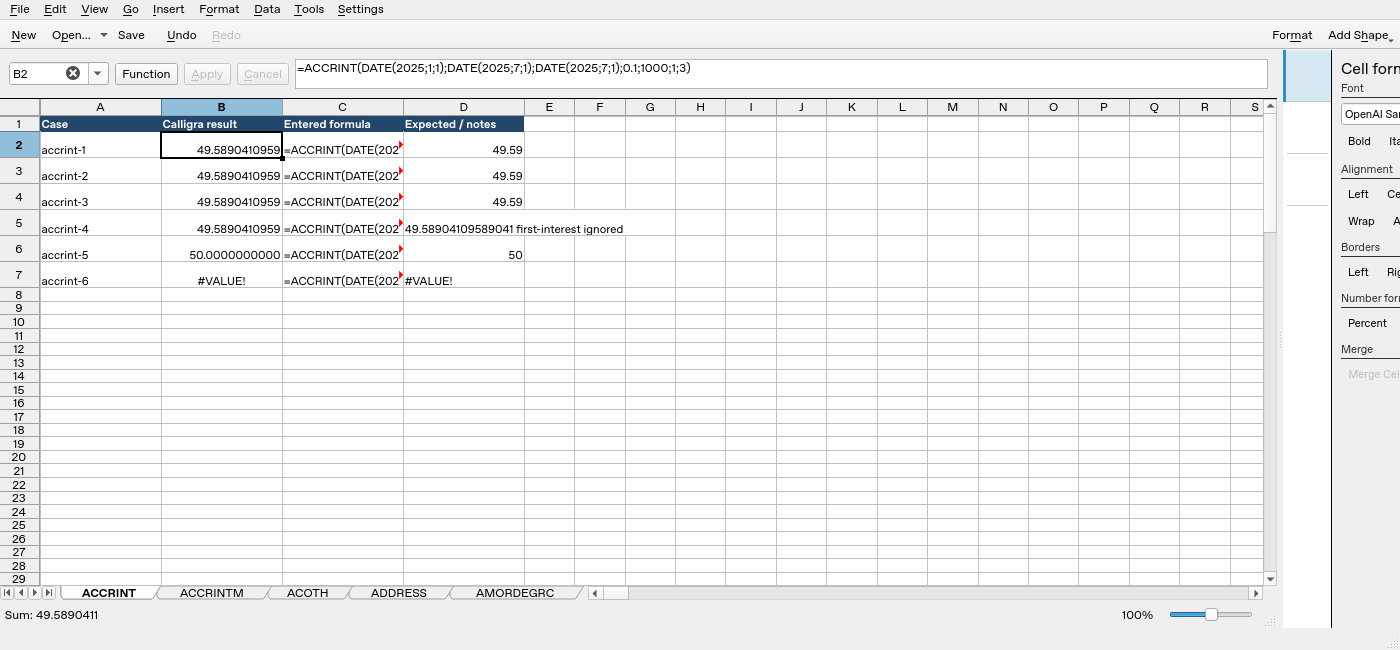
Screenshot: Genuine native 25.04.2 capture. Cell B2 contains =ACCRINT(DATE(2025;1;1);DATE(2025;7;1);DATE(2025;7;1);0.1;1000;1;3) and displays 49.5890410959. Column B is the application result; column D contains fixture expectations and notes, not a second independent application run. The formula bar shows the selected formula in full.
Relevant released function source was independently compared byte-for-byte between 25.04.2 and 26.08.2. That supports the source discussion but does not turn this older-version GUI run into a 26.08.2 test. No other platform, locale, endpoint behavior or workbook round trip is certified.