

Your software learning hub
Calligra Sheets
Practical formulas and workflows for KDE’s spreadsheet application
Beginner-friendly Calligra Sheets lessons for formulas, sorting, conditional styles and embedded charts.

Illustrative worksheet · Not an application screenshot
Start with one practical task
Enter a budget, calculate totals and check a changed expense.
Applies to: Calligra Sheets desktop handbook; current interface may differ.
Evidence: Documentation and arithmetic checked; native workflow not tested.
What would you like to do?
Choose a task to explore the published guides.
About Software
An introduction to this program and the learning material available here.
Overview · Learning paths Explore the toolsFeatures Reference
Browse practical feature tutorials organized by category.
Categorized feature guides Find the right formulaFunction Guides
Find syntax, worked examples and notes for individual functions.
Function A–Z Learn by doingTutorials
Follow practical lessons for everyday spreadsheet tasks.
Step-by-step workflows Get unstuckTroubleshooting & Error Reference
Find published guides for diagnosing errors and unexpected results.
Troubleshooting guides Compare your optionsCompatibility & Migration
Compare formulas across programs and check documented differences and research gaps.
Cross-software formula comparisons Start with a useful workbookTemplates & Downloads
Browse published templates, practice files and downloadable resources.
Reusable spreadsheet resources Check what applies to youVersions & Availability
Find published version and platform guidance for this program.
Version and platform guidanceAbout Calligra Sheets
Calligra Sheets is an alternative desktop spreadsheet application in KDE’s Calligra suite. KDE’s application overview describes calculations for business records such as income, expenditure and working hours, along with formulas, templates and drawing shapes. It is a practical setting for learning how a small table of inputs becomes a recalculating model, rather than treating a displayed total as an unexplained answer.
Work from cells to a checkable model
The official basics chapter introduces numbered rows, lettered columns and formulas beginning with an equals sign. It also explains relative references: copying a calculation into the next column can change the cells it refers to. Keep source amounts separate from totals, inspect copied references and change one input deliberately to check that the intended result responds.
Begin with a simple expense tracker, then study absolute cell references before extending a model with fixed rates or budgets. Browse the Calligra tutorial directory for complete tasks, the function directory for calculation syntax and the feature reference for workbook tools.
Match the guide to your installation
The project download guidance points to Linux distribution packages and Flatpak, while describing Windows support as work in progress. KDE also records interface changes and removal of the older Kross scripting system in the Qt6 transition. Use versions and availability to distinguish current packages from historical instructions. Do not treat an old screenshot or an engine result as evidence for today’s graphical workflow.
The guides cite documentation, including KDE’s official references. Evidence varies by guide: some examples include execution through a named Calligra calculation-engine version, while others use documentation or independent calculations. Engine tests do not establish graphical-interface or workbook-import behavior. Read each guide’s verification and version notes; current-version interface testing remains pending.
For unexpected results, use troubleshooting and the error reference. Check compatibility and migration before exchanging files, preserving the original. Templates and downloads explain the available practice resources and their verification limits; their presence does not remove those limits.
Worked example: Check a monthly summary
A summary should respond when a source changes. After reopening this example and changing March Travel from 110 to 115, Travel totals 325 and the grand total becomes 605. The formula bar references all three months. Follow the monthly consolidation tutorial for the source layout and restoration checks.
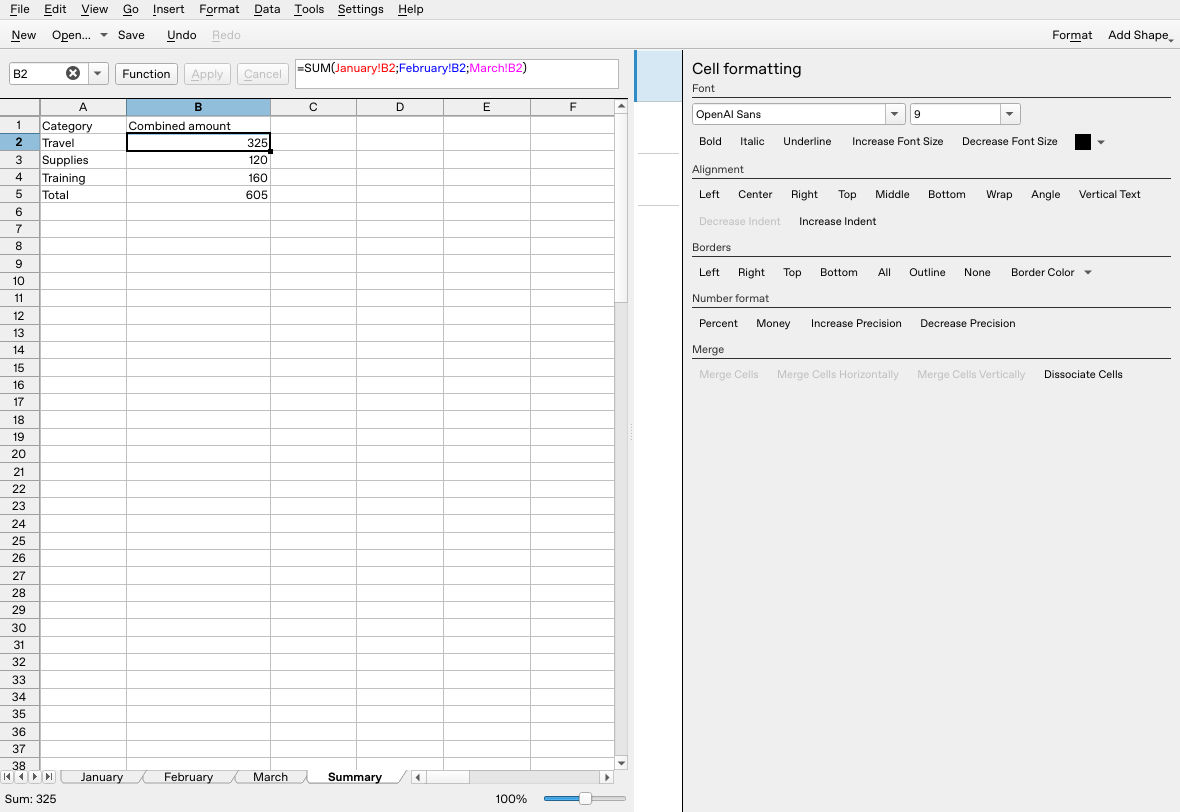
Calligra Sheets 25.04.2 on Debian 13 Linux with Qt 6.8.2; native capture from 16 October 2026. This is not a capture of the separately reviewed 26.08.2 source. Select the image for full size.
This reuses an existing guide’s historical native screenshot; adding it to this overview involved no new application run or capture. Its evidence applies to the selected example and recorded build, not every version or platform.