

Your software learning hub
Apache OpenOffice Calc
Master Every Cell
Learn formulas, functions, data tools, formatting, and advanced spreadsheet techniques for Apache OpenOffice Calc.
Illustrative worksheet · Not an application screenshot
Start with one practical task
Enter four tasks, check their total and make long notes readable.
Applies to: Apache OpenOffice Calc 4.1 desktop; English menus.
Evidence: Documentation-based; native workflow not tested.
What would you like to do?
Choose a task to explore the published guides.
About Software
An introduction to this program and the learning material available here.
Overview · Learning paths Explore the toolsFeatures Reference
Browse practical feature tutorials organized by category.
Categorized feature guides Find the right formulaFunction Guides
Find syntax, worked examples and notes for individual functions.
Function A–Z Learn by doingTutorials
Follow practical lessons for everyday spreadsheet tasks.
Step-by-step workflows Get unstuckTroubleshooting & Error Reference
Find published guides for diagnosing errors and unexpected results.
Troubleshooting guides Compare your optionsCompatibility & Migration
Compare formulas across programs and check documented differences and research gaps.
Cross-software formula comparisons Start with a useful workbookTemplates & Downloads
Browse published templates, practice files and downloadable resources.
Reusable spreadsheet resources Check what applies to youVersions & Availability
Find published version and platform guidance for this program.
Version and platform guidanceAbout Apache OpenOffice Calc
Apache OpenOffice Calc is the spreadsheet application in the Apache OpenOffice desktop suite. It is for organising records, calculating totals and comparing alternatives in a workbook, rather than editing a text document. The official Calc overview describes cell formatting, summary tables, scenarios and a solver. Practical starting tasks include an expense list, a stock count or a table of work hours; advanced analysis is easier to check after the underlying records are consistent.
Understand the workbook before adding features
Keep one kind of record per row and a descriptive heading above each column. Separate inputs from calculated cells so that changing an amount does not overwrite a formula. Start with a small range you can total independently, then enlarge it deliberately. These are learning recommendations, not a claim that every imported workbook already follows this structure.
Calc supports OpenDocument spreadsheets and Excel file exchange, but opening an Excel file is not proof of identical formulas, formatting or automation. Keep an original copy and use the compatibility and migration guide before relying on a converted workbook. A PDF is useful for sharing a fixed report, not for preserving an editable calculation model. This hub concerns Apache OpenOffice Calc; instructions for another product also named Calc should not be assumed interchangeable.
A useful first learning path
Begin with readable tables and reusable styles: enter a small task list, check its total and save an ODS copy. Then use the SUM guide to understand the calculation and sorting and filtering to inspect records without replacing the source data.
Use the function directory for formula syntax, the feature reference for tools and the tutorial directory for complete exercises. If results differ, start with troubleshooting and the error reference, recording the formula, inputs and file type. Templates and downloads provide practice resources; versions and availability explain official installation routes and platform limits. Follow each guide’s verification notes: this overview does not establish new native execution, screenshots or cross-program parity.
Worked example: Maintain a status dropdown
A dropdown can offer new choices without rewriting old entries. Here the reopened task sheet offers On hold while the existing B4 value remains Blocked. Follow the cross-sheet dropdown tutorial to define the source range and test invalid entries.
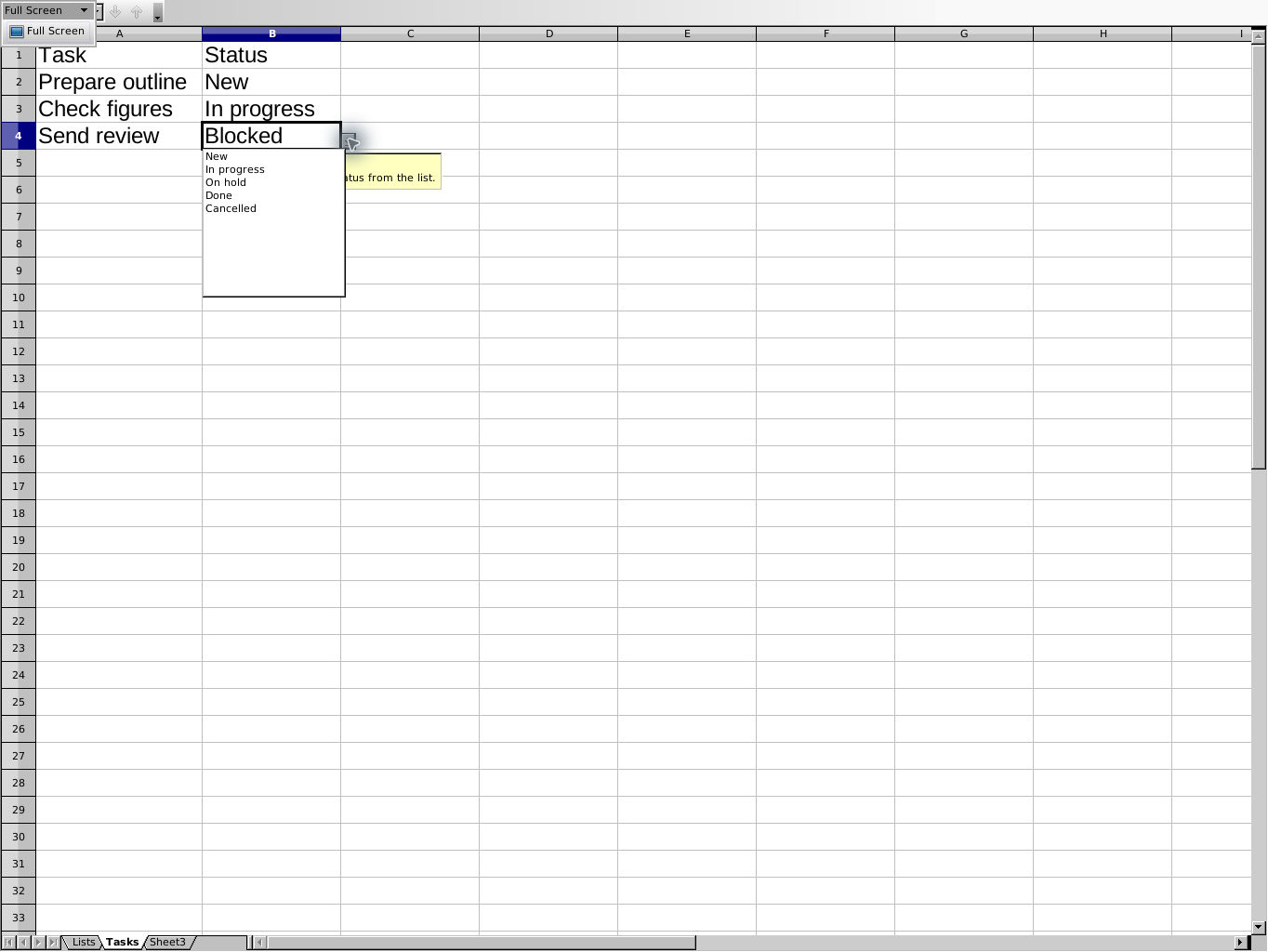
Apache OpenOffice Calc 4.1.17, AOO4117m2 Build 9818, on Linux x86_64; native capture from 16 October 2026 in application Full Screen view. Select the image for full size.
This reuses an existing guide’s historical native screenshot; adding it to this overview involved no new application run or capture. Its evidence applies to the selected example and recorded build, not every version or platform.