

OpenOffice Calc · Data entry and validation · Beginner
Create a Drop-Down from Another Sheet in OpenOffice Calc
Build a named-range dropdown with Data Validity in Apache OpenOffice Calc, reject invalid typing and update the source list safely.
Use Data → Validity → Cell range and point the source at a named range on another sheet. For a maintained status list, define StatusOptions once and reuse it across the input cells.
Requirements and sample data
This guide targets Apache OpenOffice Calc 4.1 desktop with English menu labels, checked against 4.1.16 Help source. The synthetic named-range example was tested in Apache OpenOffice Calc 4.1.17 on Linux x86_64 with English UI on October 16, 2026; the precise tested scope and limitations appear below. The commands below are OpenOffice commands; they are not LibreOffice’s current named-range menu paths.
Create two sheets in the same workbook named Lists and Tasks. On Lists, enter:
| Cell | Value |
|---|---|
| A1 | Status |
| A2 | New |
| A3 | In progress |
| A4 | Blocked |
| A5 | Done |
On Tasks, enter Task in A1 and Status in B1. Enter Prepare outline, Check figures, and Send review in A2:A4. Leave B2:B4 blank.
Optional downloads: status choices CSV and tasks CSV. Open each as comma-separated UTF-8 text, then copy its cells to the named sheets in one workbook. CSV contains values only; it does not create names, dropdowns or validity rules.
Define the source name
- On Lists, select A2:A5, excluding the heading.
- Choose Insert → Names → Define.
- Enter StatusOptions as the name. Check that Assigned to identifies
$Lists.$A$2:$A$5. - Click Add, then OK.
The absolute sheet and cell references keep the source anchored when the rule is reused. The name is a readable label for that fixed range; it does not automatically mean “all future statuses.” 4.1.16 Help: Define Names.
Apply the dropdown and error rule
- Select Tasks.B2:B20.
- Choose Data → Validity, then the Criteria tab.
- Set Allow to Cell range and enter
StatusOptionsin Source. - Enable Show selection list. Leave Sort entries ascending off to retain the order New, In progress, Blocked, Done.
- On Input Help, enable the help message and explain: “Choose a status from the list.”
- On Error Alert, enable Show error message when invalid values are entered, select Stop, and enter a generic message such as “Choose a status from the list.”
- Confirm with OK, select B2, and open its selection list. Choose New.
OpenOffice explicitly supports a named range for Cell range validity. If you prefer no name, the same source can be entered directly as $Lists.$A$2:$A$5; the official FAQ documents this sheet-qualified absolute syntax. Criteria Help and cross-sheet dropdown FAQ.
Check the behavior before using real tasks
Choose In progress in B3 and Blocked in B4. Type Waiting directly into B4: with the enabled Stop alert, the expected outcome is rejection and restoration of the previous value. Warning and Information alerts can allow the invalid value to remain when accepted, so they are not equivalent to Stop. Error Alert Help.
Check both B2 and B20 to verify that the rule covers the entire selected range. Existing entries and bulk paste operations deserve a separate audit; a dropdown is an entry aid, not a guarantee that every stored value is valid.
Maintain the source without changing history accidentally
Change Lists.A4 from Blocked to On hold. The available choice should update, but the old Blocked in Tasks.B4 is not automatically rewritten. Decide whether that older status should stay as history or be changed deliberately.
To add Cancelled, put it in Lists.A6, reopen Insert → Names → Define, select StatusOptions, extend its reference to $Lists.$A$2:$A$6, click Modify, then OK. Recheck a dropdown. Merely typing below A5 does not change the original fixed reference. Custom Input Help and Error Alert wording is static: it does not automatically follow renamed or added choices. Update any enumerated wording, or use a generic message such as “Choose a status from the list.” In the native test, the original error text still listed Blocked after that choice was renamed, so it was changed to the generic message.
Troubleshooting and saving
- Header appears as a choice: exclude A1 from the named range.
- Dropdown missing: check Show selection list and make sure the active cell has the rule.
- Source is rejected: check the exact name, sheet spelling and reference; try the absolute direct reference above.
- Copied rule points elsewhere: inspect its source and use an absolute reference or the anchored name.
- Data looks correct but old statuses remain: review them explicitly; changing the source is not a data-cleaning operation.
Save the working file as OpenDocument Spreadsheet (.ods) to retain the sheets and rule. Do not use CSV as the maintained workbook. For a summary of task statuses, see COUNTIF.
Native example and test limits
Tested in Apache OpenOffice Calc 4.1.17, AOO4117m2, Build 9818, revision 49c05bc6fd, on Linux x86_64, with English UI and the default English (USA) number setting, on October 16, 2026. The sample values were entered manually into Lists and Tasks. The named source, original unsorted choice order, Input Help, B2 and B20 dropdowns, and Stop rejection of a directly typed Waiting were verified.
After renaming Blocked to On hold and extending the source name through A6, the list offered New, In progress, On hold, Done and Cancelled while the historical Tasks.B4 value remained Blocked. Saving as ODS, closing and reopening retained the five choices, named range and old status. A new invalid entry after reopening was rejected with the generic error text and the prior New value restored.
Select a screenshot to open the full-size image.
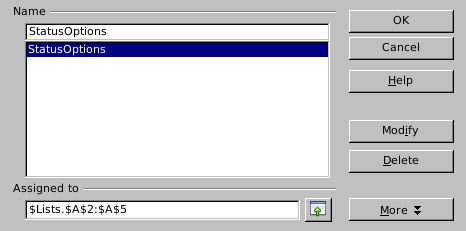
Native 4.1.17: the original four-choice named range excludes its header.
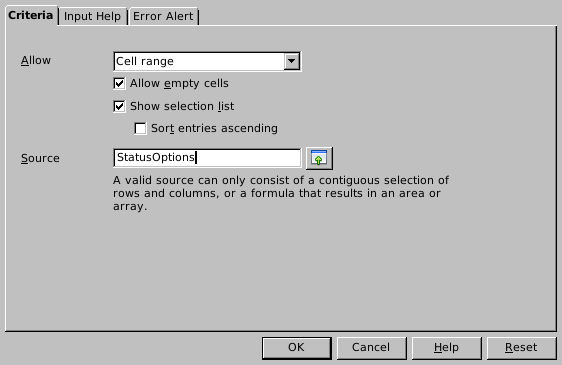
Native 4.1.17: named-range validity retains source order; Allow empty cells remained enabled in this test.
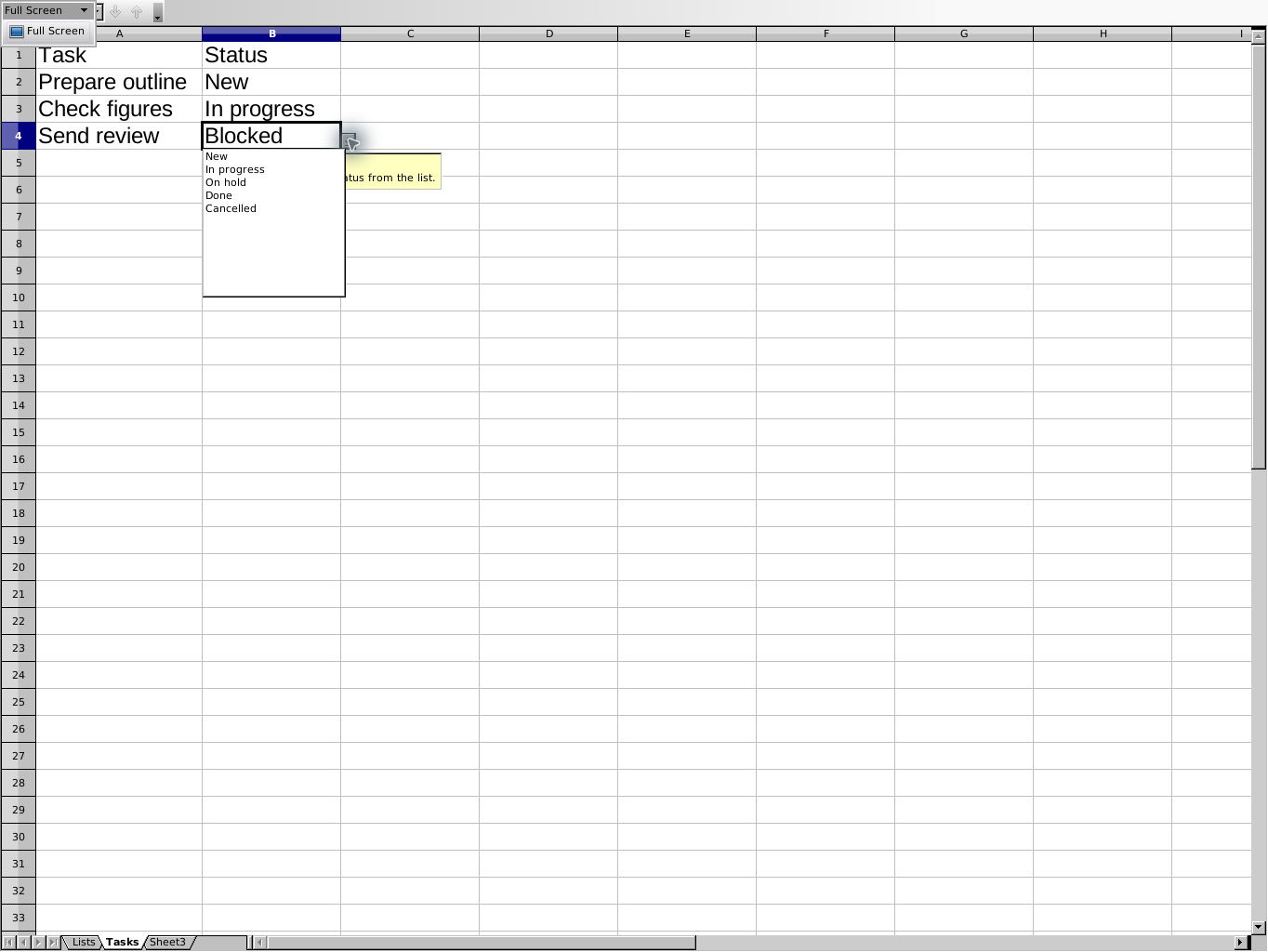
Native 4.1.17 after ODS reopen: updated choices coexist with the historical value. The application’s Full Screen view was used to capture the popup clearly.
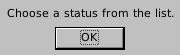
Native 4.1.17 after ODS reopen: the enabled Stop alert uses generic text that remains accurate as choices change.
Evidence and limits: The documented workflow and independent fixture checks are separate from this native test. Screenshots are genuine, unmodified captures. The direct absolute-reference alternative, Warning/Information alerts, bulk paste, existing-data audits, CSV import/roundtrip and other platforms or locales were not tested. No intermediate dropdown was opened between adding A6 and extending the name. A dropdown does not guarantee validity through every entry route.