

AMORDEGRC Function (Calligra Sheets)
Model Calligra AMORDEGRC depreciation with coefficient bands, partial first periods, whole-unit rounding and explicit terminal-period cautions.
Verification status: See the evidence and test scope described in this guide. How formula examples are checked
Quick answer: =AMORDEGRC(10000;DATE(2025;1;1);DATE(2025;7;1);1000;0;0.1;3) is expected to return 1240 for period 0. The independent calculation is ROUND(10000 × 0.25 × 181/365;0): the annual input rate 0.1 is multiplied by the function’s 2.5 coefficient.
AMORDEGRC is documented for degressive depreciation in the French accounting system. Its output is one period’s depreciation charge. It is not the remaining book value, and a software result alone does not establish compliance with a particular accounting or tax rule.
Availability and verification scope
- Introduced: The original introduction release is not established by the inspected sources. Do not read the version checked here as the introduction date.
- Availability: Registered in Calligra Sheets 26.08.2. The relevant first-party released source was retrieved again on October 18, 2026.
- Retired or deprecated: Neither retirement nor deprecation is established by these sources; registration remains present. These terms are not interchangeable.
- Evidence: Source reviewed for 26.08.2. Selected formulas were executed in the Calligra Sheets 25.04.2 GUI on October 18, 2026 by opening the fixture XLSX, recalculating and saving ODS. The native-observation section distinguishes those results from independent expectations. This is not 26.08.2 execution or a general file-compatibility guarantee.
- Entry conventions: English function names, semicolon argument separators and decimal points. Use the installed function chooser if local entry conventions differ. Optional-argument brackets in syntax are explanatory and must not be typed.
Syntax and parameters
=AMORDEGRC(cost; purchase_date; first_period_end; salvage; period; rate[; basis])
| Argument | Meaning |
|---|---|
| cost | Initial asset cost |
| purchase_date | Acquisition/start date |
| first_period_end | End date for the initial prorated period |
| salvage | Residual value used by the later-period calculation |
| period | Period number: 0 is the initial prorated period, 1 is the next |
| rate | Annual depreciation rate before applying the coefficient |
| basis | Optional day-count selector; omitted means 0 |
Six or seven arguments are accepted. Rate is the sixth argument; an old C++ comment omits it, but both the actual function body and the XML syntax include it. Use the implemented signature, not that stale comment. Supply positive cost and rate, nonnegative integer periods, sensible ordered dates and a nonnegative salvage below cost. Those are modeling guardrails; the source does not explicitly enforce all of them. Registration and implementation.
How the coefficient and rounding work
The source first calculates nominal life as 1/rate, chooses a coefficient, then multiplies the input rate by it:
| Nominal life | Coefficient |
|---|---|
| Less than 3 | 1 |
| At least 3 but less than 5 | 1.5 |
| At least 5 and no more than 6 | 2 |
| Greater than 6 | 2.5 |
For rate 0.1, nominal life is 10, so the effective rate is 0.25. The initial charge is the cost multiplied by this effective rate and the first-period year fraction, rounded to zero decimal places. Subsequent ordinary charges use the declining book value, again rounded to whole units. Displaying two decimal places does not change that internal whole-unit rounding.
For the explicit basis 3 used below, the year fraction is actual elapsed days divided by 365. The other selectors are 0 for the helper’s US 30/360 default, 1 for its actual-year method, 2 for actual/360 and 4 for European 30/360. AMORDEGRC uses ValueCalc::yearFrac, not the simpler financial.cpp helpers used by ACCRINT/ACCRINTM. See yearFrac helper and rounding helper.
Build the partial-first-period example
- Enter the following parameter cells in a blank sheet.
- Enter period numbers 0, 1, 2 and 3 in A9:A12.
- In B9 enter
=AMORDEGRC($B$1;$B$2;$B$3;$B$4;A9;$B$5;$B$6)and copy through B12. - Display B9:B12 as whole numbers. Compare every row with the independent schedule below.
| Cell | Value |
|---|---|
| B1 | 10000 |
| B2 | =DATE(2025;1;1) |
| B3 | =DATE(2025;7;1) |
| B4 | 1000 |
| B5 | 0.1 |
| B6 | 3 |
| Period | Starting book value | Independent calculation | Expected charge | Expected closing value |
|---|---|---|---|---|
| 0 | 10000 | Round 10000 × 0.25 × 181/365 | 1240 | 8760 |
| 1 | 8760 | Round 8760 × 0.25 | 2190 | 6570 |
| 2 | 6570 | Round 6570 × 0.25 | 1643 | 4927 |
| 3 | 4927 | Round 4927 × 0.25 | 1232 | 3695 |
At period 2 the unrounded charge is 1642.5. The inspected rounding helper rounds the positive half unit upward, giving 1643. These values were derived separately with decimal arithmetic and the source’s recurrence; the separately recorded 25.04.2 native run agrees on all four charges. They describe this particular dataset before the terminal branch is reached.
Advanced case: compare acquisition timing
Keep cost 10000, salvage 1000, input rate 0.1 and basis 3, but set the first period end to =DATE(2026;1;1). January 1, 2025 to January 1, 2026 is exactly 365 days. Independently expected period-0 depreciation is 2500, closing book value is 7500, and period-1 depreciation is 1875.
Compare this with the partial-period example: the first charge falls from 2500 to 1240, leaving a larger base for the following ordinary charge (2190 rather than 1875). Do not reuse a previous row’s charge as the function’s cost input; each call expects the original acquisition cost and computes through to the requested period internally. Changing the cost argument on each row would change the modeled asset and double-apply the decline.
For a reconciliation column, start with the original cost and subtract each independently checked charge. Keep the salvage input visible and examine the closing values. This makes unintended timing changes and terminal behavior easier to notice than a single isolated formula result.
Terminal-period behavior requires care
The source tracks a remaining depreciable amount after the first charge. In its subsequent-period loop, if the next charge makes that amount negative, it returns half the current book value, rounded, when the requested period is the immediate crossing period; if the requested period lies farther ahead, it returns zero.
That branch is not a simple “cap the charge at book value minus salvage” rule. The first prorated charge also has no explicit salvage cap. Do not claim that every generated schedule stops exactly at salvage or that changing a period number is equivalent to continuing a standard textbook schedule. Terminal, very short-life and unusually high-salvage cases are held for dedicated native tests before any exact UI output is promised.
Invalid inputs and surprising boundaries
- There is no explicit validation block for zero/negative rate, cost, salvage, period or basis in this function body. Avoid borrowing a
#NUM!table from another spreadsheet. - Rate zero enters
1/ratewhen choosing a coefficient. This guide does not establish a safe or meaningful native result for that input. - The period is converted to an integer. Use whole nonnegative periods; negative or fractional inputs are outside this guide’s tested-model assumptions.
- The shared year-fraction helper swaps reversed dates rather than preserving a negative interval. Validate purchase_date ≤ first_period_end yourself; a numeric charge does not prove the dates were sensible.
- The year-fraction helper routes unrecognized basis integers through its default 30/360 branch. That is source behavior, not permission to use arbitrary selectors.
- Whole-unit rounding can materially affect small assets or many-period reconciliation. Currency formatting does not undo it.
- Imported text dates and number coercion have not been checked in the native application. DATE constructors and numeric cells make a reproducible starting point.
Compatibility, aliases and related guides
The alternate name COM.SUN.STAR.SHEET.ADDIN.ANALYSIS.GETAMORDEGRC points to the same registered function. It is not a second method or a separate page candidate. File-import and cross-program agreement are unverified. Coefficient bands, rounding, day-count handling and the terminal branch must all match before two programs’ schedules can be considered equivalent.
- DDB is a distinct declining-balance calculation with its own interface.
- DB is another depreciation method; do not substitute it solely because the first charge looks similar.
- YEARFRAC provides context for the year-fraction helper.
- KDE AMORDEGRC handbook states the documented purpose and signature.
- Released financial implementation is the authority for coefficient selection and terminal behavior.
Selected native results and screenshot
The following values were observed in Calligra Sheets 25.04.2, not 26.08.2. The workbook was recalculated in the native application and saved as ODS; stored values and displayed error strings were read back from that saved workbook. Independent expected values elsewhere in this guide remain separate evidence. All other scenarios are source analysis or independent mathematics unless explicitly listed here.
| Entered formula | Native saved result |
|---|---|
=AMORDEGRC(10000;DATE(2025;1;1);DATE(2025;7;1);1000;0;0.1;3) |
1240.0 |
=AMORDEGRC(10000;DATE(2025;1;1);DATE(2025;7;1);1000;1;0.1;3) |
2190.0 |
=AMORDEGRC(10000;DATE(2025;1;1);DATE(2025;7;1);1000;2;0.1;3) |
1643.0 |
=AMORDEGRC(10000;DATE(2025;1;1);DATE(2025;7;1);1000;3;0.1;3) |
1232.0 |
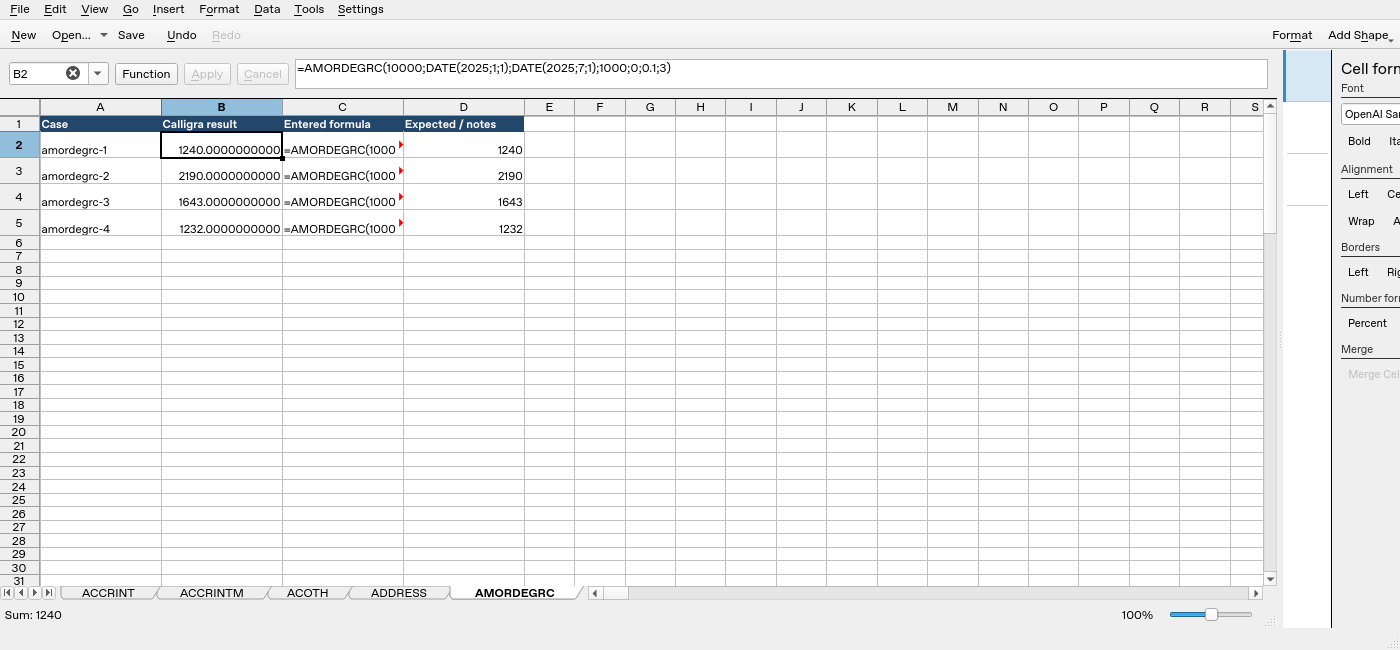
Screenshot: Genuine native 25.04.2 capture. Cell B2 contains =AMORDEGRC(10000;DATE(2025;1;1);DATE(2025;7;1);1000;0;0.1;3) and displays 1240.0000000000. Column B is the application result; column D contains fixture expectations and notes, not a second independent application run. The formula bar shows the selected formula in full.
Relevant released function source was independently compared byte-for-byte between 25.04.2 and 26.08.2. That supports the source discussion but does not turn this older-version GUI run into a 26.08.2 test. No other platform, locale, endpoint behavior or workbook round trip is certified.