

AMORLINC in Calligra Sheets: Build a Linear Depreciation Schedule With a Short First Period
Learn Calligra Sheets AMORLINC with exact arguments, reproducible inputs, independently checked results and implementation-specific cautions.
Verification status: See the evidence and test scope described in this guide. How formula examples are checked
Quick answer
AMORLINC returns one period’s depreciation, using a prorated first period followed by a constant amount based on original cost and the rate, with a final remainder. It is useful for illustrating the French-accounting linear-depreciation calculation in a worksheet. The formula does not decide which accounting policy or tax treatment applies to your asset.
Syntax, defaults and alias
=AMORLINC(cost;purchase_date;first_period_end;salvage;period;rate[;basis])
The brackets describe an optional argument; do not type them. The implementation requires six or seven arguments.
| Argument | Meaning |
|---|---|
| cost | Initial cost, a positive number in the chosen currency |
| purchase_date | Acquisition date; use a date value such as DATE(2025;1;1) |
| first_period_end | End date of the initial accounting interval |
| salvage | Residual value, in the same currency as cost |
| period | Zero for the initial prorated interval; positive whole numbers for subsequent periods |
| rate | Depreciation rate as a fraction; 0.2 means 20% |
| basis | Optional day-count convention; default 0 |
The shared year-fraction implementation uses 0 for US/NASD 30/360, 1 for actual days with its actual-year denominator calculation, 2 for actual/360, 3 for actual/365, and 4 for European 30/360. Basis changes the initial fraction; later full depreciation is cost × rate. This guide uses explicit basis 3 to make the arithmetic easy to audit.
The release also registers COM.SUN.STAR.SHEET.ADDIN.ANALYSIS.GETAMORLINC as an alternate name for the same implementation. It belongs to this guide, not a second function page. Do not confuse it with AMORDEGRC, which is a different depreciation method. A nearby source comment omits rate; the actual argument reads and XML help establish the seven-position syntax above.
Reproduce a schedule
- Put the following inputs into A1:B6, with labels in A and values/formulas in B.
| Cell | Input | Value to enter |
|---|---|---|
| B1 | Cost | 1000 |
| B2 | Purchase | =DATE(2025;1;1) |
| B3 | First period end | =DATE(2025;7;1) |
| B4 | Salvage | 100 |
| B5 | Annual rate | 0.2 |
| B6 | Basis | 3 |
- Put period numbers 0 through 6 into D2:D8.
- In E2 enter the formula below and fill down to E8. Absolute references keep the inputs fixed while D2 advances.
=AMORLINC($B$1;$B$2;$B$3;$B$4;D2;$B$5;$B$6)
| Period | Expected depreciation, six decimals |
|---|---|
| 0 | 99.178082 |
| 1 | 200.000000 |
| 2 | 200.000000 |
| 3 | 200.000000 |
| 4 | 200.000000 |
| 5 | 0.821918 |
| 6 | 0.000000 |
There are 181 actual days between the dates. Initial depreciation is 1000 × 0.2 × 181/365 = 99.1780821918. The depreciable amount is 900. Four full 200 periods fit after the initial amount; the remainder is 0.8219178082. These values were independently calculated from dates and arithmetic and compared with the release algorithm. Selected native cases are recorded below.
Advanced check: reconcile to the salvage value
In F2 enter =$B$1-E2. In F3 enter =F2-E3 and fill down through F8. These are the closing carrying amounts. After period 5, the expected amount is 100, and period 6 leaves it unchanged. Independently, =SUM(E2:E8) should be 900 before display rounding.
This reconciliation catches a common mistake: using (cost-salvage)*rate for every full period. The inspected AMORLINC algorithm instead uses cost*rate, then limits the schedule through its final remainder. Format values as currency for display, but do not round every intermediate amount unless your chosen accounting policy requires it; rounding each row can create a reconciliation difference.
Errors and safe input limits
Use positive cost and rate, an integer period of zero or greater, salvage between zero and cost, valid ordered dates, and a supported integer basis. The implementation does not provide a complete explicit validation layer for invalid economics. In particular, a zero rate or zero cost makes its full-period calculation divide by zero before the final branch; do not use either as a harmless shortcut. Negative periods and out-of-range basis values must not be treated as validated inputs simply because a build displays a number.
A period is not a calendar year. Period 0 is the initial interval, so substituting 2025 for the period argument is wrong. Keep rates numeric: 20 means 2000%, not 20%. Use DATE expressions to avoid ambiguous day/month text parsing. Do not infer a particular runtime error label for invalid inputs from another spreadsheet.
Compatibility
Calligra’s registered long alias helps identify imported add-in formulas, but does not guarantee an entire imported workbook is equivalent. Verify date values, date-system handling, basis and rounding in the destination program. AMORLINC and straight-line SLN answer different questions: SLN does not take acquisition/end dates or a period index. The KDE AMORLINC handbook entry supplies a reference example, while the release implementation supplies optional-basis behavior and the detailed schedule rule.
Availability and verification
- Release checked: Calligra Sheets 26.08.2, using KDE’s release source package and release information, inspected on October 18, 2026. Relevant locations:
sheets/functions/financial.cpplines 107–110 and 826–865;sheets/engine/ValueCalc.cpplines 2672 onward;sheets/tests/TestFinancialFunctions.cpplines 127–132. - Introduced: The original introduction version is not established by these sources. Current registration establishes presence in 26.08.2, not the first release.
- Lifecycle: Registered in the inspected release; no retirement or deprecation marker was found in this function’s registration. Retirement (removed support) and deprecation (discouraged but retained support) are different claims; neither is asserted here.
- Native testing: Selected examples were recalculated and saved in Calligra Sheets 25.04.2. The source discussion concerns 26.08.2; these are different evidence scopes. Other examples and edge cases remain source-derived or independently calculated.
Related guides and sources
- SLN
- YEARFRAC
- DDB
- Calligra function guide index
- KDE formula entry instructions, checked October 18, 2026. Examples use leading
=and semicolons, with a period for decimal numbers. Confirm regional separators in your installation before pasting.
Selected native results and screenshot
The following results were observed in Calligra Sheets 25.04.2 after loading a corrected ODS fixture, recalculating and saving it. Saved formula expressions were read back and checked against the displayed results. An earlier XLSX import had rewritten range references incorrectly; those results are excluded. This confirms these selected cases, not a successful XLSX round trip or a native test of 26.08.2.
| Executed expression shown in native notation | Native displayed result |
|---|---|
=AMORLINC(1000;DATE(2025;1;1);DATE(2025;7;1);100;0;0.2;3) |
99.1780821918 |
=AMORLINC(1000;DATE(2025;1;1);DATE(2025;7;1);100;1;0.2;3) |
200.0000000000 |
=AMORLINC(1000;DATE(2025;1;1);DATE(2025;7;1);100;4;0.2;3) |
200.0000000000 |
=AMORLINC(1000;DATE(2025;1;1);DATE(2025;7;1);100;5;0.2;3) |
0.8219178082 |
=AMORLINC(1000;DATE(2025;1;1);DATE(2025;7;1);100;6;0.2;3) |
0.0000000000 |
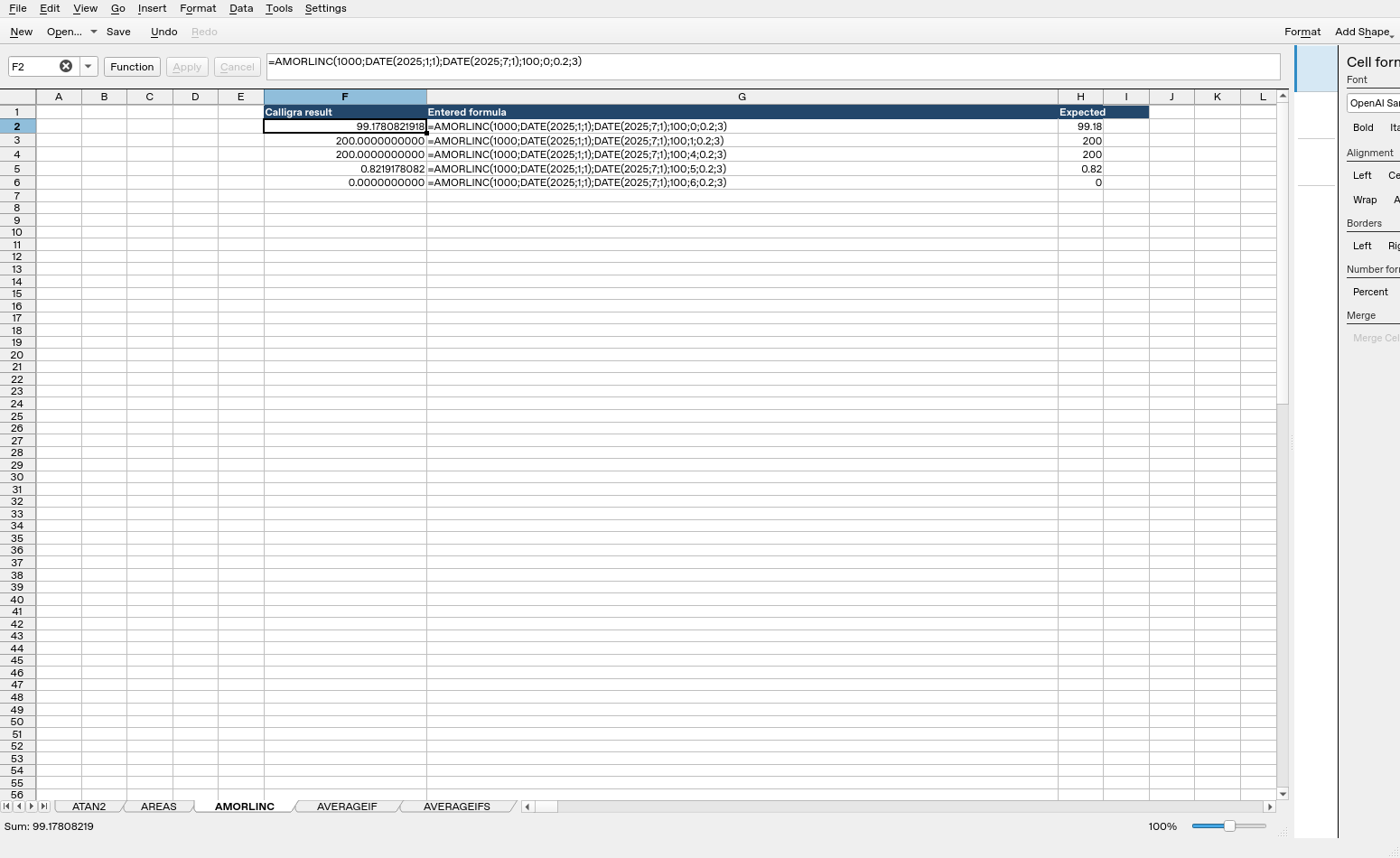
Screenshot: Genuine native 25.04.2 capture. Cell F2 shows =AMORLINC(1000;DATE(2025;1;1);DATE(2025;7;1);100;0;0.2;3) and displays 99.1780821918. Column F contains native results; column G contains fixture labels and column H contains reference expectations, sometimes rounded to two decimals, not additional application calculations.
Relevant released function source was independently compared between 25.04.2 and 26.08.2 and found byte-identical for the inspected implementations. This supports the source discussion without upgrading an older-version GUI run into a 26.08.2 native test. Other platforms, locales and unlisted edge cases remain unverified.