

ATAN2 in Calligra Sheets: Find a Vector Direction Without Losing Its Quadrant
Learn Calligra Sheets ATAN2 with exact arguments, reproducible inputs, independently checked results and implementation-specific cautions.
Verification status: See the evidence and test scope described in this guide. How formula examples are checked
Quick answer
=ATAN2(x;y) returns the direction of the vector (x,y) in radians, measured from the positive x-axis. Unlike ATAN(y/x), it retains the signs of both coordinates and works for a vertical nonzero vector without dividing by zero. Use it for displacement, map-grid offsets and engineering direction calculations.
Exact syntax and argument order
=ATAN2(x;y)
Both arguments are required numeric coordinates in the same units; neither is an angle. There are no optional arguments or defaults. The first argument is horizontal x and the second is vertical y. The handbook’s generic parameter labels are unhelpful here, but its numerical examples and the release implementation agree: func_atan2 sends the second argument as y and the first as x to ValueCalc::atan2.
The result is a signed radian direction, usually described within −π to +π. The sign at the negative-x-axis boundary can depend on signed-zero handling; avoid using that boundary to establish cross-platform bitwise equality. Convert to degrees with DEGREES, rather than multiplying the input coordinates by a degree conversion factor.
Reproduce six directions
- Enter
x,y,Radians,Degreesinto A1:D1. - Enter the coordinate pairs below into A2:B7 as numbers.
- In C2 enter
=ATAN2(A2;B2)and fill down through C7. - In D2 enter
=DEGREES(C2)and fill down through D7. - Display six decimals in C and D. The following are rounded independent Python
math.atan2(y,x)expectations; selected native results are recorded below.
| Row | A: x | B: y | Expected C radians | Expected D degrees |
|---|---|---|---|---|
| 2 | 1 | 1 | 0.785398 | 45.000000 |
| 3 | -1 | 1 | 2.356194 | 135.000000 |
| 4 | -1 | -1 | -2.356194 | -135.000000 |
| 5 | 0 | 1 | 1.570796 | 90.000000 |
| 6 | 1 | 0 | 0.000000 | 0.000000 |
| 7 | 3 | -4 | -0.927295 | -53.130102 |
Rows 2 and 4 both have y/x = 1. A single-argument arctangent would lose their different quadrants. Row 5 demonstrates why forming the ratio first is unnecessary.
Advanced example: normalize a surveyed displacement
A starting point has easting 100 and northing 200; an ending point has easting 103 and northing 196. Put those values in F2:G3, with the starting point in row 2. The displacement is x = 3 and y = −4:
=DEGREES(ATAN2(F3-F2;G3-G2))
Expected: −53.130102°. To express the same mathematical direction in the interval from 0 up to 360 degrees, use:
=MOD(DEGREES(ATAN2(F3-F2;G3-G2));360)
Expected: 306.869898°. This is counterclockwise from east, not a navigation bearing clockwise from north. Name the output column with the convention and units so another person does not read it as a compass bearing.
Errors and edge cases
- Both coordinates zero: the vector has no direction. The inspected implementation calls the platform arctangent without a special zero-vector error check. Do not promise
#DIV/0!, or interpret a displayed zero as meaningful. Reject the zero displacement in your input validation. - Swapped coordinates:
ATAN2(1;2)andATAN2(2;1)are different. A plausible-looking angle is not evidence of the correct order. - Text or units in cells: enter numeric 3 and −4, not text such as
3 m. Conversion of malformed text is not part of these tested expectations. - Round only for presentation: keep the full angle in calculation cells if later trigonometric calculations depend on it.
- Different coordinate units: convert them first. Kilometres on x and metres on y describe the wrong direction.
Compatibility
The source is specifically spreadsheet-style x-then-y. Many programming libraries, including the Python library used for the independent check, accept y-then-x. Copying a programming call verbatim reverses the arguments. Matching the mathematical result does not establish spreadsheet-file import/export compatibility or identical behavior for zero, text and signed-zero inputs.
The KDE ATAN2 reference was checked October 18, 2026; the release source resolves the argument order that its generic parameter labels obscure.
Availability and verification
- Release checked: Calligra Sheets 26.08.2, using KDE’s release source package and release information, inspected on October 18, 2026. Relevant locations:
sheets/functions/trig.cppregistration and lines 251–254;sheets/engine/ValueCalc.cpplines 1000–1005. - Introduced: The original introduction version is not established by these sources. Current registration establishes presence in 26.08.2, not the first release.
- Lifecycle: Registered in the inspected release; no retirement or deprecation marker was found in this function’s registration. Retirement (removed support) and deprecation (discouraged but retained support) are different claims; neither is asserted here.
- Native testing: Selected examples were recalculated and saved in Calligra Sheets 25.04.2. The source discussion concerns 26.08.2; these are different evidence scopes. Other examples and edge cases remain source-derived or independently calculated.
Related guides and sources
- ATAN
- DEGREES
- MOD
- Calligra function guide index
- KDE formula entry instructions, checked October 18, 2026. Examples use leading
=and semicolons, with a period for decimal numbers. Confirm regional separators in your installation before pasting.
Selected native results and screenshot
The following results were observed in Calligra Sheets 25.04.2 after loading a corrected ODS fixture, recalculating and saving it. Saved formula expressions were read back and checked against the displayed results. An earlier XLSX import had rewritten range references incorrectly; those results are excluded. This confirms these selected cases, not a successful XLSX round trip or a native test of 26.08.2.
| Executed expression shown in native notation | Native displayed result |
|---|---|
=ATAN2(1;1) |
0.7853981634 |
=ATAN2(-1;1) |
2.3561944902 |
=ATAN2(-1;-1) |
-2.3561944902 |
=ATAN2(0;1) |
1.5707963268 |
=ATAN2(1;0) |
0.0000000000 |
=ATAN2(3;-4) |
-0.9272952180 |
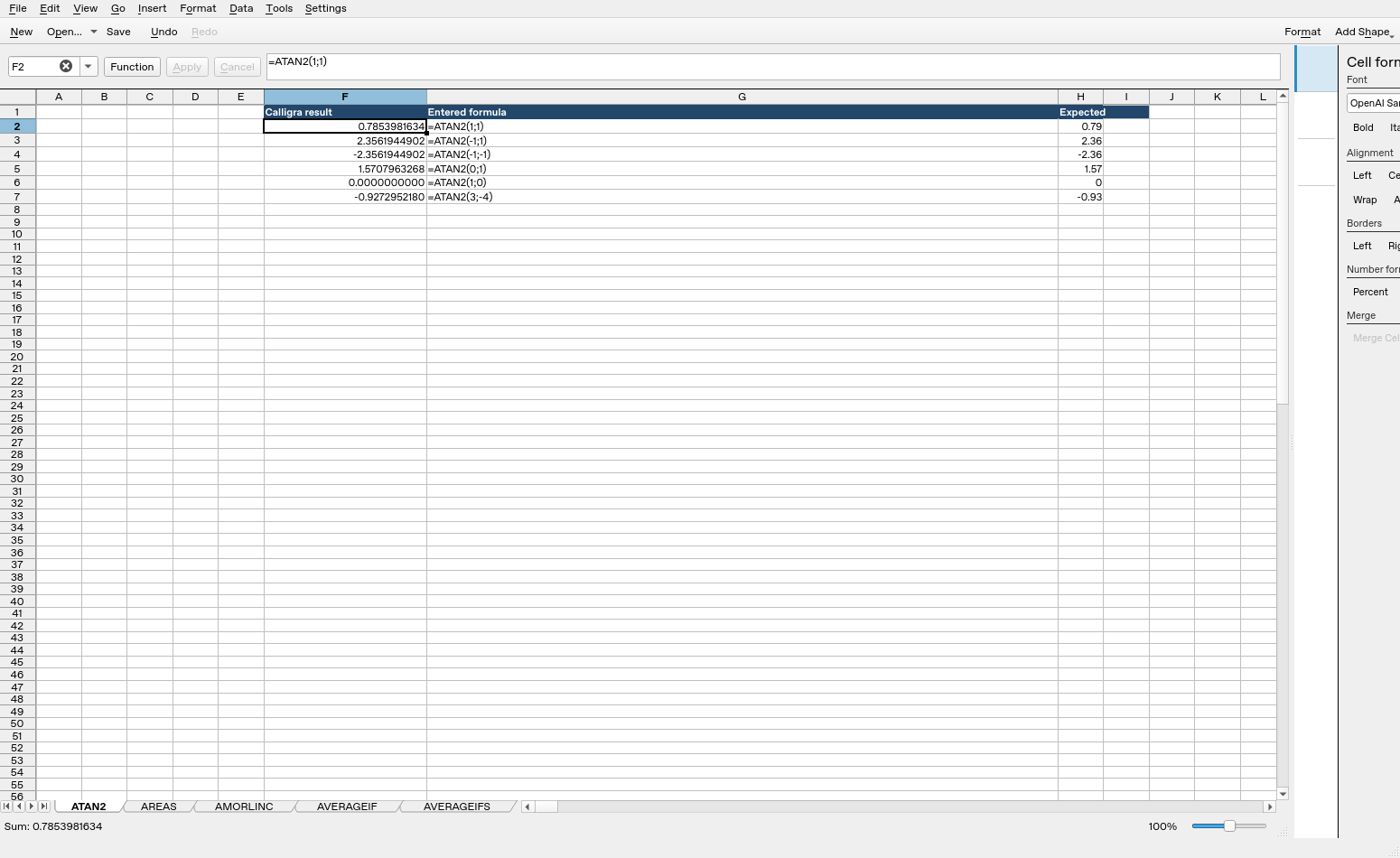
Screenshot: Genuine native 25.04.2 capture. Cell F2 shows =ATAN2(1;1) and displays 0.7853981634. Column F contains native results; column G contains fixture labels and column H contains reference expectations, sometimes rounded to two decimals, not additional application calculations.
Relevant released function source was independently compared between 25.04.2 and 26.08.2 and found byte-identical for the inspected implementations. This supports the source discussion without upgrading an older-version GUI run into a 26.08.2 native test. Other platforms, locales and unlisted edge cases remain unverified.