

BESSELI in Calligra Sheets: Modified Bessel Function of the First Kind
Calculate I-family Bessel values in Calligra Sheets with worked cells, domain checks, order limits and clearly separated source and native evidence.
Verification status: Consult the documentation, examples and any stated test scope below. How formula examples are checked
Quick answer: BESSELI(x; n) evaluates the modified bessel function of the first kind, Iₙ(x). For example, =BESSELI(0.7;3) has an independently calculated result of approximately 0.00736737360763. Use it for a growing, non-oscillating radial basis. I is the modified first-kind family; it is not the oscillating J family or the decaying K family.
Calligra-specific restriction: in the checked implementation, x must be nonnegative and n must be an integer from 0 through 28. A fractional n is rejected, not truncated. Negative x is rejected even where the mathematical function has a real extension. These statements come from the version-pinned calculation engine, rather than assumptions imported from another spreadsheet.
Availability and evidence status
- Introduced: original introduction date unknown. Do not interpret a tested or inspected release as the first release.
- Source availability verified: Calligra 25.04.2 and 26.08.2 both register BESSELI with exactly two arguments. The inspected engineering and calculation-engine files are byte-identical between these two tags.
- Checked October 18, 2026: KDE handbook, 26.08.2 registration, and 25.04.2 implementation.
- Native verification: Calligra Sheets 25.04.2, Linux, October 18, 2026. Literal-formula cases were recalculated in the application and saved to ODS. The reference calculations remain separate from these observations; see the native table below. No native 26.08.2 execution is claimed.
Syntax, arguments and defaults
=BESSELI(x; n)
| Argument | Required input | Meaning and limits |
|---|---|---|
| x | Numeric value, expression or cell reference | Dimensionless evaluation point. Source input guard requires x ≥ 0. Zero is allowed. |
| n | Integer value, expression or cell reference | Order, from 0 to 28 inclusive. There is no omitted-order default. |
| Result | Floating-point number | Dimensionless I-family value, not an angle or a measurement in the units of r. |
Both arguments are mandatory. In the function wrapper, the worksheet order is x first, n second; the internal engine reverses them when calling its numerical routine. Do not reverse the worksheet arguments because a mathematics library writes its own call as function(order, x). The source checks n with an exact integer test; 1.5 is invalid, not order 1. Wrapper and registration · domain guard.
The English examples use a semicolon separator and a decimal point. If your locale parses formulas differently, use the function editor to check local syntax. Keep units in adjacent label cells rather than typing text such as 0.5 m into a numeric argument.
Worked worksheet: evaluate a radial factor
A simple cylindrical model can contain a dimensionless radial factor I₀(k r). Here k is an inverse-length parameter and r is radius. The product k r is dimensionless. The factor alone is not a temperature, displacement, or probability.
- Put the label
k (1/m)in A1 and 2 in B1. - Put
r (m)in A3,x = k*rin B3,order nin C3 andIn(x)in D3. - Enter 0.5 in A4 and 1 in A5. These are radii in metres.
- Enter
=$B$1*A4in B4 and fill it down to B5. Expected x values are 1 and 2; the inverse-metre and metre units cancel. - Enter 0 in both C4 and C5, selecting order zero.
- Enter
=BESSELI(B4;C4)in D4 and fill down to D5. Display at least nine decimal places before comparing.
| Cell | Formula | Independently expected value | Interpretation |
|---|---|---|---|
| D4 | =BESSELI(B4;C4) |
1.26606587775 | I₀(1), at r = 0.5 m |
| D5 | =BESSELI(B5;C5) |
2.27958530234 | I₀(2), at r = 1 m |
The factor increases over these two sample points. That is consistent with a growing modified basis, not an attenuation coefficient.
These calculations check the mathematics of the examples. The native table separately records application results for equivalent literal formulas. These checks do not establish accuracy for all inputs, and the step-by-step cell-reference layout itself was not separately executed.
Advanced example: normalized cylindrical profile
Suppose the radial part of a model is explicitly defined as T(r) = 40 × I₀(2r) / I₀(2), in kelvin relative to a chosen reference. This is an illustrative normalized profile; the model and boundary conditions must be justified separately.
- In E3 enter
Excess temperature (K). - In E4 enter
=40*D4/$D$5and fill down to E5. - Expected E4 is 22.2157227712 K and E5 is 40 K.
The fixed $D$5 reference normalizes every row at r = 1 m. Dividing each row by itself would incorrectly produce 40 K everywhere. This use of a ratio is more informative than treating an unscaled Bessel value as a temperature.
Limits, errors and troubleshooting
| Input or symptom | What the checked Calligra source establishes | What to do |
|---|---|---|
=BESSELI(1;1.5) |
Fails the whole-order test and constructs internal errorVALUE. |
Choose a deliberate integer order. Do not silently truncate a scientific input. |
=BESSELI(1;29) |
Order 29 is outside the implementation limit; 28 is the highest admitted order. | Use a suitable numerical tool for higher orders; do not clamp 29 to 28. |
=BESSELI(-1;1) |
Negative x fails the shared domain guard. | Do not assume another spreadsheet or the mathematical extension has the same accepted domain. |
=BESSELI(1;-1) |
Negative order fails the guard. | Check whether an order sign was accidentally copied from a coefficient. |
| Missing n or extra arguments | The registered function requires exactly two arguments; generic arity validation constructs internal errorVALUE. |
Supply x and n only. |
| Result looks like zero | Small valid values may be hidden by formatting; for example order 28 at x = 1 can be extremely small. | Use scientific notation and enough significant figures before judging the result. |
| Very large x or large magnitude | The implementation uses finite-precision numerical approximations. No universal accuracy or overflow guarantee was established here. | Compare critical ranges against a suitable independent numerical reference. |
The four explicit domain-error formulas in this table were also tested in native 25.04.2 and displayed #VALUE!. Missing/extra-argument behavior here remains source-derived; it was not part of this function’s native fixture. Text/blank/Boolean coercion and localized error labels have not been established by these numerical examples. Validate numeric inputs rather than relying on implicit conversion. Calligra argument-count check · Bessel domain and dispatch.
Zero and nonzero order
Independent mathematics and the source zero branches agree that =BESSELI(0;0) gives 1, whereas =BESSELI(0;1) gives 0. The order is essential: zero argument does not mean every I result is zero. Numerical routine.
Numerical precision is not identical to the reference calculation
An independent review compiled the isolated numerical routines from the KDE source, separately from the application. That isolated probe is not a native Calligra test; a subsequent native 25.04.2 run independently reproduced the values listed below. That source-algorithm check found BESSELY(4;2) ≈ 0.215903601900667, whereas the independent mathematical reference is ≈ 0.215903594603615. At the supported upper-order boundary, BESSELJ(1;28) was ≈ 1.211320740471416 × 10⁻³⁸ versus the reference ≈ 1.211364502417112 × 10⁻³⁸, a relative difference of about 0.00361%. Therefore, do not interpret the many displayed reference digits in this guide as a promise of equal application accuracy. Compare against the reference and the observed application result separately, especially for higher orders. A fixed absolute tolerance such as 10⁻¹² would incorrectly accept zero in place of these tiny nonzero values.
Compatibility and related functions
This guide describes Calligra Sheets, not an Excel-compatible contract. In particular, preserve the 0–28 integer-order restriction, the x-domain rule and the worksheet argument order when moving formulas. The source also registers COM.SUN.STAR.SHEET.ADDIN.ANALYSIS.GETBESSELI as an alternate name for this same function; it does not represent a different Bessel family or merit a duplicate guide. Registration is evidence of the alias, not proof that every imported workbook round-trips unchanged. Registration.
- KDE BESSELJ reference: bessel function of the first kind.
- KDE BESSELK reference: modified bessel function of the second kind.
- KDE BESSELY reference: bessel function of the second kind.
Sources and verification boundary
Reviewed October 18, 2026. Primary implementation evidence: KDE 26.08.2 engineering functions, KDE calculation engine, and KDE 25.04.2 engineering functions. The official function reference supplies the function name and signature. Worked model examples and numerical cross-checks are original calculations; they are not native Calligra observations. The native record below covers the displayed formulas in Calligra Sheets 25.04.2 only; it does not establish behavior for every build, locale or input range.
Native verification in Calligra Sheets 25.04.2
On October 18, 2026, the formulas below were loaded into the actual Linux application, recalculated, and saved to an ODS workbook. Results were read from that native-saved workbook, including error display text. The screenshot shows the real application; it was not synthesized. The independent mathematical values earlier in this guide remain reference values, and small differences are intentional evidence of the numerical approximation rather than transcription errors.
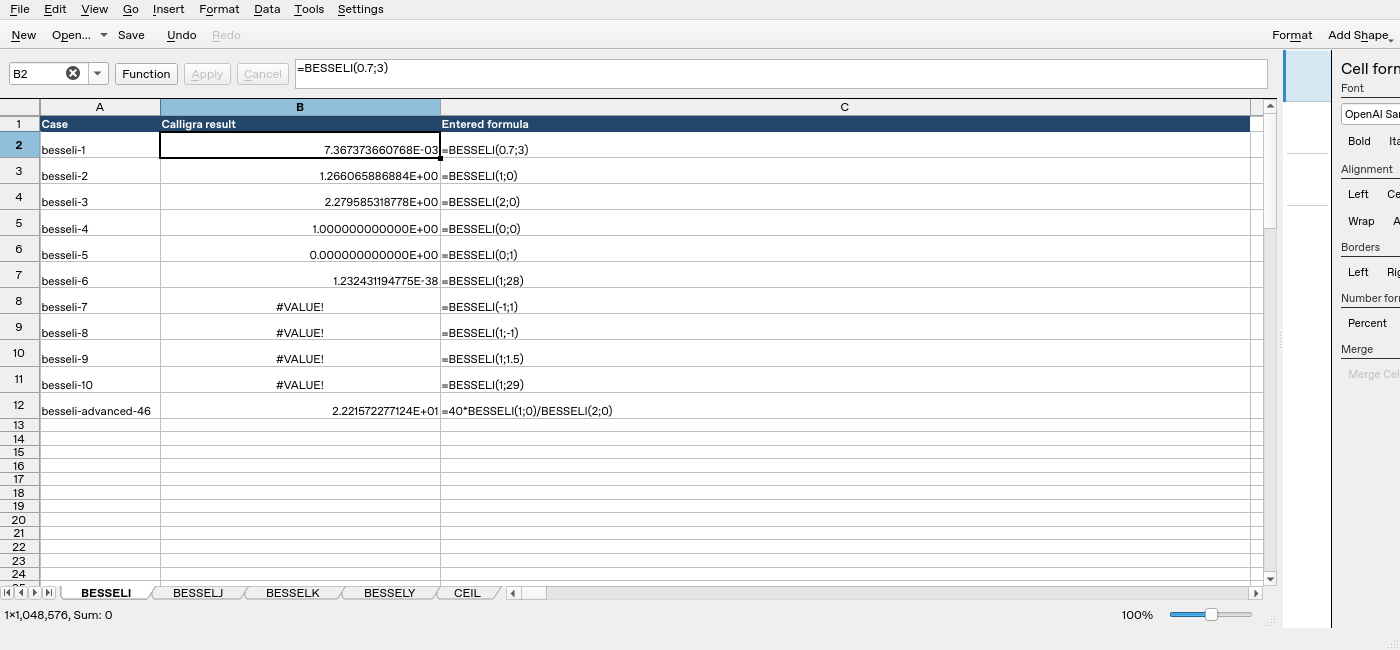
| Formula executed | Native displayed result |
|---|---|
=BESSELI(0.7;3) |
7.367373660768E-03 |
=BESSELI(1;0) |
1.266065886884E+00 |
=BESSELI(2;0) |
2.279585318778E+00 |
=BESSELI(0;0) |
1.000000000000E+00 |
=BESSELI(0;1) |
0.000000000000E+00 |
=BESSELI(1;28) |
1.232431194775E-38 |
=BESSELI(-1;1) |
#VALUE! |
=BESSELI(1;-1) |
#VALUE! |
=BESSELI(1;1.5) |
#VALUE! |
=BESSELI(1;29) |
#VALUE! |
=40*BESSELI(1;0)/BESSELI(2;0) |
2.221572277124E+01 |
The display uses scientific notation: E-03 means multiply by 10⁻³. A small value in scientific notation is not zero.