

CEIL in Calligra Sheets: Round Toward Positive Infinity
Round a number to the next integer in Calligra Sheets, calculate whole packages and time blocks, and handle negative values correctly.
Verification status: Consult the documentation, examples and any stated test scope below. How formula examples are checked
Quick answer: CEIL(x) returns the smallest integer greater than or equal to x. Thus =CEIL(12.5) is expected to return 13, while =CEIL(-12.5) is expected to return -12. A value already at an integer stays there: =CEIL(6) gives 6, not 7. “Up” means toward positive infinity, including for negative inputs. KDE function reference · calculation engine.
Use CEIL when a positive fractional requirement must become a whole count: enough boxes for an order, enough seats for participants, or enough fixed-size time blocks. The function does not know the business policy; it only rounds the number it receives.
Availability and verification status
- Introduced: original introduction is not established.
- Source availability checked: Calligra 25.04.2 and 26.08.2 both register CEIL separately from CEILING. The inspected mathematics and calculation-engine files are byte-identical between these tags.
- Checked October 18, 2026: the KDE handbook and version-pinned implementation.
- Native execution: Calligra Sheets 25.04.2, Linux, October 18, 2026. The native table below records literal formulas recalculated in the application and saved as ODS. The step-by-step cell-reference layouts are explanatory examples, not separately executed layouts. No native 26.08.2 run is claimed.
Sources: 25.04.2 registration and 26.08.2 implementation.
Syntax and argument
=CEIL(x)
| Item | Meaning |
|---|---|
| x | Required numeric value, expression or cell reference to round. |
| Result | An integer-valued number; the implementation returns a floating-point value. |
| Optional arguments | None. There is no significance, decimal-place or mode argument. |
For example, =CEIL(B2/C2) is one argument: the calculated ratio B2/C2. It is not a two-argument call. The generic function class defaults to exactly one argument, and CEIL does not override that count. The function calls the engine’s upward-rounding operation at zero decimal places. Registration and implementation · default argument count.
The handbook describes an integer greater than the input, but that wording should not be read as strictly greater: the implementation uses the mathematical ceiling, so exact integers remain unchanged. The negative examples also establish that “up” does not mean away from zero.
Worked worksheet: how many packages are needed?
Suppose an order needs 17 items and each sealed package contains 6 items. Packages cannot be split, so the answer must be a whole package count.
- Enter
Items neededin A1,Items per packagein B1,Packagesin C1 andItems suppliedin D1. - Enter 17 in A2 and 6 in B2. Keep the unit labels out of these numeric cells.
- In C2, enter
=CEIL(A2/B2). The independently expected result is 3 packages. - In D2, enter
=C2*B2. The independently expected result is 18 items. - In E1 enter
Spare items, then in E2 enter=D2-A2. The expected spare count is 1 item.
The ratio 17 items ÷ 6 items/package is about 2.833333 packages. Rounding toward positive infinity produces 3 complete packages. CEIL does not produce 18 directly because its input is a package count, not an item count.
Add these rows and fill C2:E2 down to row 5:
| Row | A: items needed | B: items/package | Expected C: packages | Expected D: supplied items | Expected E: spare items |
|---|---|---|---|---|---|
| 2 | 17 | 6 | 3 | 18 | 1 |
| 3 | 18 | 6 | 3 | 18 | 0 |
| 4 | 19 | 6 | 4 | 24 | 5 |
| 5 | 0 | 6 | 0 | 0 | 0 |
Row 3 checks the exact-multiple boundary: a full three packages does not become four. Row 4 checks the first item above that boundary. Row 5 is meaningful only if zero demand really should produce zero packages under your ordering policy.
Advanced example: reserve full time blocks
Assume a room can be reserved in whole 60-minute blocks, and preparation plus the event requires 125 minutes. This is a stated planning rule, not an inference about a booking provider.
- In B8 enter 125 and label it
Required minutes. - In B9 enter 60 and label it
Minutes per block. - In B10 enter
=CEIL(B8/B9). Expected result: 3 blocks. - In B11 enter
=B10*B9. Expected result: 180 reserved minutes. - In B12 enter
=B11-B8. Expected result: 55 spare minutes.
A compact equivalent for reserved minutes is =CEIL(B8/B9)*B9. If the input is a spreadsheet time value stored as a fraction of a day rather than a number of minutes, convert it to the intended numeric unit before using this pattern. Mixing 125 minutes with a fraction-of-day block size would give a meaningless count.
Use only a strictly positive block size and a nonnegative duration for this planning example. Negative durations require correcting the source data or an explicitly different policy; CEIL does not validate that model for you.
Negative values and useful boundary checks
| Formula | Independently expected result | Why |
|---|---|---|
=CEIL(12.5) |
13 | Next integer at or above 12.5. |
=CEIL(-12.5) |
-12 | -12 is greater than -12.5. |
=CEIL(-0.2) |
0 | Zero is the least integer at or above -0.2. |
=CEIL(-12) |
-12 | Exact integer remains unchanged. |
=CEIL(0) |
0 | Zero remains zero. |
=CEIL(6) |
6 | No extra increment at an integer boundary. |
The first two are also examples in the KDE handbook. All other rows follow independently from the implemented mathematical ceiling. Display formatting can show an integer with decimal zeros; that does not change its numeric value.
CEIL versus CEILING, ROUND and INT
- CEIL takes one number and rounds toward positive infinity to an integer.
- CEILING is separately registered and can round to a significance with a negative-value mode. For example,
=CEILING(17;6)gives an expected 18 items directly. See the existing Calligra CEILING guide. - ROUND rounds to a selected number of decimal places;
=ROUND(17/6;0)is not a guarantee of sufficient capacity for every demand. See ROUND. - INT is useful for downward integer rounding, which matters particularly for negatives. Compare its documented semantics rather than assuming every integer function behaves like CEIL. See KDE INT.
CEIL is not an alias of CEILING. A one-argument CEILING call may produce the same value in these ordinary examples, but the two functions have different registered signatures. A CEIL formula with a second argument is not the supported way to round to a multiple. Distinct registrations.
Errors and troubleshooting
| Situation | Diagnosis | Correction |
|---|---|---|
=CEIL(12.5;2) |
Two arguments do not match CEIL’s one-argument registration; the generic execution check constructs internal errorVALUE. Native 25.04.2 displayed #VALUE! for this exact case. |
Remove the second argument or choose CEILING when an increment is intended. |
| Package or block size is zero | The division inside CEIL(A2/B2) is undefined. This is an invalid input to the ratio before rounding. |
Validate the denominator as strictly positive. |
| A negative input rounds toward zero | That is expected for a noninteger negative value when rounding toward positive infinity. | Use a function and policy matching your intended direction. |
A cell contains 17 items as text |
Numeric coercion of arbitrary text is not established by this guide. | Put 17 in the numeric cell and the unit in a separate label. |
| A ratio displayed as 3 produces 4 after CEIL | The underlying value may be slightly greater than 3 despite rounded display. The source applies floating-point ceil, without a documented tolerance in this path. |
Inspect more precision and the input arithmetic. Do not subtract an arbitrary epsilon without defining an acceptable business tolerance. |
| Formula appears as literal text | The cell may have text formatting or an initial apostrophe. | Check cell type and re-enter the formula with its leading equals sign. |
Source evidence: argument-count execution check and roundUp implementation. Blank, Boolean and text coercion, localized syntax and other application error cases remain outside the completed tests; the two-argument arity case above was verified in the native-saved workbook.
Compatibility and sources
Do not assume every spreadsheet supports CEIL under this exact name. When sharing a workbook, check the destination application’s function list and test a positive fraction, a negative fraction and an exact integer after reopening. Matching one result does not establish identical signatures or file-format compatibility.
Reviewed October 18, 2026: KDE CEIL handbook, Calligra 26.08.2 mathematics source, Calligra 25.04.2 mathematics source and the calculation engine linked above. Arithmetic expectations remain distinct from the native observations below. The captured run covers Calligra Sheets 25.04.2 and the listed formulas only.
Native verification in Calligra Sheets 25.04.2
On October 18, 2026, the formulas below were loaded into the actual Linux application, recalculated, and saved to an ODS workbook. Results were read from that native-saved workbook, including error display text. The screenshot shows the real application; it was not synthesized. The independent mathematical values earlier in this guide remain reference values, and the native CEIL results below agree with the stated arithmetic expectations.
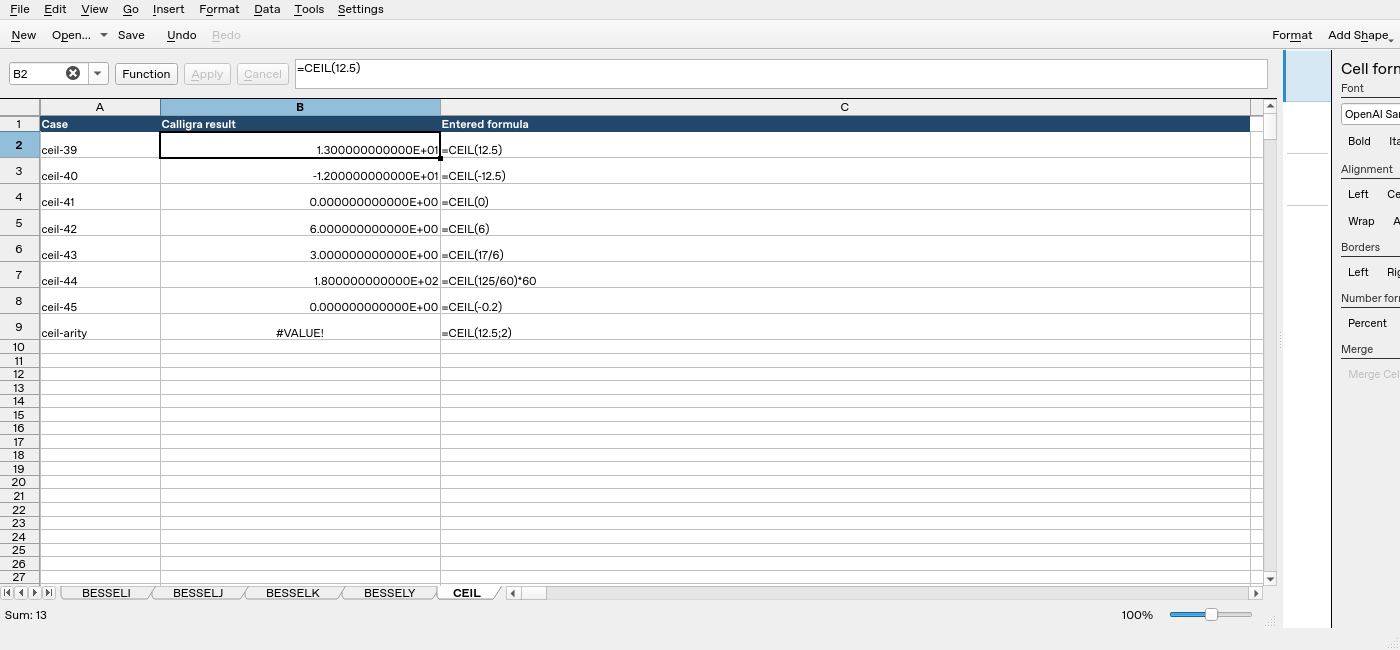
| Formula executed | Native displayed result |
|---|---|
=CEIL(12.5) |
1.300000000000E+01 |
=CEIL(-12.5) |
-1.200000000000E+01 |
=CEIL(0) |
0.000000000000E+00 |
=CEIL(6) |
6.000000000000E+00 |
=CEIL(17/6) |
3.000000000000E+00 |
=CEIL(125/60)*60 |
1.800000000000E+02 |
=CEIL(-0.2) |
0.000000000000E+00 |
=CEIL(12.5;2) |
#VALUE! |
The display uses scientific notation: E-03 means multiply by 10⁻³.