

CONVERT in Calligra Sheets: Convert Measurements With Explicit Unit Codes
Learn Calligra Sheets CONVERT with exact arguments, reproducible inputs, independently checked results and implementation-specific cautions.
Verification status: See the evidence and test scope described in this guide. How formula examples are checked
Quick answer
CONVERT transforms a numeric measurement from one supported unit to another compatible unit. Keep the number and unit code separate: 2500 in one cell and g in another is easier to validate than text 2500 grams. The function covers physical measurements; it is not a currency exchange-rate service.
Syntax and unit codes
=CONVERT(number;from_unit;to_unit)
All three arguments are required; there are no optional defaults. number is numeric, while the two unit arguments are quoted codes or references to cells containing codes. Code spelling and capitalization matter because the implementation looks up exact strings.
Useful source-confirmed codes for the examples are g for grams, m for metres, in for inches, ft for feet, and C, F, K for temperature. Metric prefixes allow kg, cm and km in the relevant families. The lowercase m can be the metre unit by itself or the milli prefix attached to another recognized unit. Do not replace codes with English words or visually similar symbols.
The alias COM.SUN.STAR.SHEET.ADDIN.ANALYSIS.GETCONVERT is registered to the same implementation. It is an import/compatibility spelling, not an additional function requiring a separate guide.
Reproduce a small conversion table
- Enter Number, From, To and Converted into A1:D1.
- Enter the following numbers and text codes in A2:C7. Type unit text into its own cell, without adding a leading equals sign.
- Enter
=CONVERT(A2;B2;C2)in D2 and fill down through D7.
| Row | A: Number | B: From | C: To | Expected D |
|---|---|---|---|---|
| 2 | 2500 | g | kg | 2.5 |
| 3 | 2 | m | cm | 200 |
| 4 | 12 | in | ft | 1 |
| 5 | 32 | F | C | 0 |
| 6 | 20 | C | F | 68 |
| 7 | 273.15 | K | C | 0 |
These independent expectations follow metric scaling, twelve inches per foot and the temperature equations. The inspected source uses the same inch/metre factor 0.0254, temperature offset 273.15 and Fahrenheit ratio 5/9. Selected native cases are recorded below. For floating-point outputs, compare reasonable displayed precision rather than every binary digit.
Temperature illustrates why a generic multiplication factor is insufficient: Celsius to Fahrenheit needs both a scale factor and an offset. CONVERT(20;"C";"F") gives 68, not 36. By contrast, a temperature difference of 20 Celsius degrees corresponds to a difference of 36 Fahrenheit degrees; treating a difference as an absolute temperature would apply an unwanted offset.
Advanced example: normalize mixed distance records
Suppose a project logs three cable lengths: 2 m, 150 cm and 0.001 km. Enter the numeric values in F2:F4 and their codes in G2:G4. Put target code m in J1. In H2 enter:
=CONVERT(F2;G2;$J$1)
Fill down through H4. Expected normalized values are 2, 1.5 and 1 metres. =SUM(H2:H4) should be 4.5. The absolute reference keeps the target unit fixed during fill. Change J1 to cm and the corresponding expected outputs become 200, 150 and 100, totaling 450 centimetres.
Keep both the original columns and the normalized column. A number that has already been converted should not be converted again using its old code. Include the target unit in the total’s heading; the formula’s numeric output carries no automatic human-readable unit label.
Errors and supported-domain checks
=CONVERT(1;"m";"g")asks to convert length into mass. No compatible family succeeds, so the implementation returns an unavailable-value error (#N/Ain conventional English display).- An unknown or incorrectly capitalized code also falls through when no family recognizes both units. Do not interpret that error as zero.
- Names vary: the volume table uses lowercase
lfor litre, while other applications may accept additional spellings. Only use codes established for the target build. - A prefix must leave a recognized base unit. Do not assume every SI expression, compound unit or superscript notation is accepted.
- The function works with floating-point conversion constants; source comments explicitly rule out arbitrary precision. Keep an appropriate number of significant figures for measured inputs.
- Unit conversion does not validate physical plausibility. An output for an impossible measurement is not confirmation that the input makes sense.
- The word
tonis ambiguous in ordinary language. Choose a source-confirmed specific code and definition rather than relying on the label alone.
Compatibility
The KDE CONVERT reference lists supported unit families; the 26.08.2 source contains the actual maps and prefixes. Both were inspected for this guide. Matching function names across programs does not guarantee identical code inventories, prefix spellings or constants. In particular, binary-prefix capitalization and old conversion constants should be checked before transferring precision-sensitive worksheets.
This guide deliberately does not reproduce an exhaustive unit catalogue or promise support for every code in Excel or Calc. Use a small known conversion for each unit pair in an imported workbook, then test the actual data. A successful conversion verifies a unit pair, not the correctness of the original measurement.
Availability and verification
- Release checked: Calligra Sheets 26.08.2, using KDE’s release source package and release information, inspected on October 18, 2026. Relevant locations:
sheets/functions/engineering.cpplines 120–123, prefix/unit maps beginning at 543, temperature map at 862, and dispatcher at 1096. - Introduced: The original introduction version is not established by these sources. Current registration establishes presence in 26.08.2, not the first release.
- Lifecycle: Registered in the inspected release; no retirement or deprecation marker was found in this function’s registration. Retirement (removed support) and deprecation (discouraged but retained support) are different claims; neither is asserted here.
- Native testing: Selected cases were recalculated and saved in Calligra Sheets 25.04.2. The source discussion concerns 26.08.2. Unlisted examples and edge cases remain source-derived or independently calculated.
Related guides and sources
- SUM
- ROUND
- NUMBERVALUE
- Calligra function guide index
- KDE formula entry instructions, checked October 18, 2026. Examples use leading
=and semicolons, with a period for decimal numbers. Confirm regional separators in your installation before pasting.
Selected native results and screenshot
These results were observed in Calligra Sheets 25.04.2, after loading a corrected ODS input, recalculating and saving. Formula references and results were read back from the saved workbook. This is not a 26.08.2 native test or certification of XLSX import behavior. Other examples and unlisted edge cases remain separate source or mathematical evidence.
| Native formula | Observed display |
|---|---|
=CONVERT(2500;"g";"kg") |
2.5000000000 |
=CONVERT(2;"m";"cm") |
200.0000000000 |
=CONVERT(12;"in";"ft") |
1.0000000000 |
=CONVERT(32;"F";"C") |
0.0000000000 |
=CONVERT(20;"C";"F") |
68.0000000000 |
=CONVERT(1;"m";"g") |
#N/A |
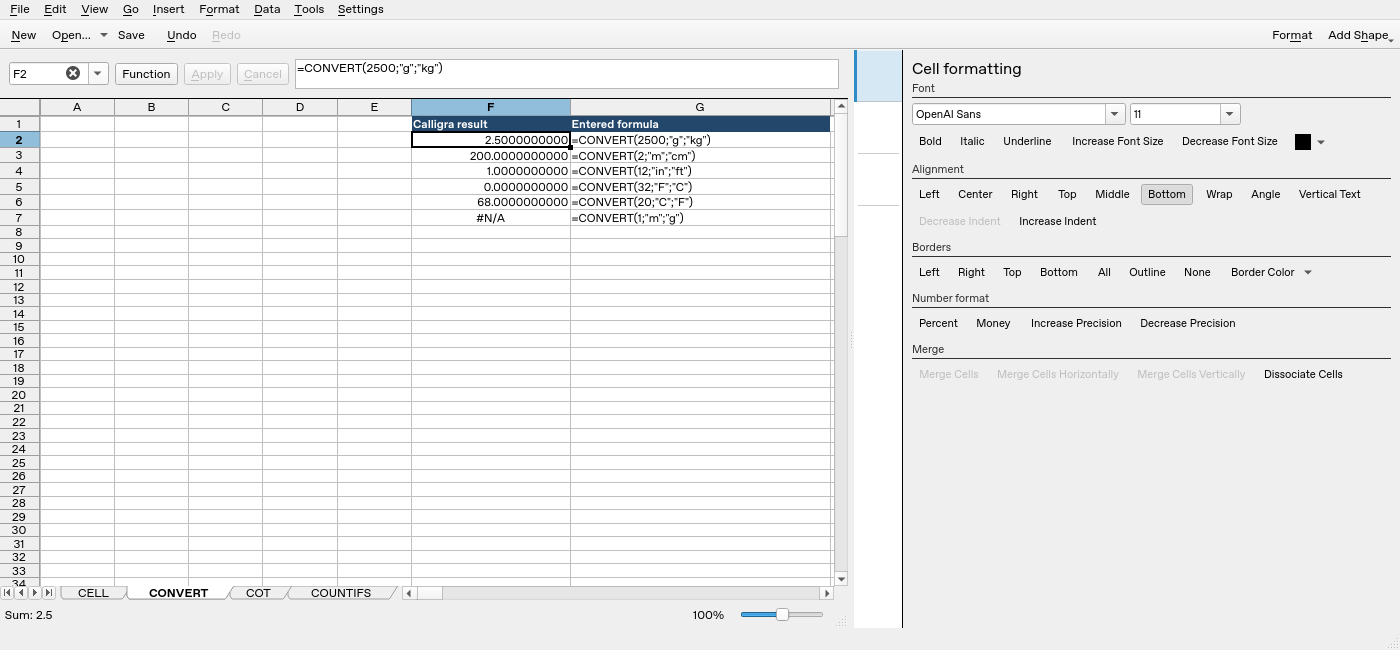
Screenshot: Genuine native 25.04.2 capture. Selected F2 contains =CONVERT(2500;"g";"kg") and displays 2.5000000000. Column F contains application results; column G contains descriptive formula labels. The selected formula is visible in the formula bar; long labels in other rows may be clipped by the panel.