

COT in Calligra Sheets: Calculate a Cotangent From a Radian Angle
Learn Calligra Sheets COT with exact arguments, reproducible inputs, independently checked results and implementation-specific cautions.
Verification status: See the evidence and test scope described in this guide. How formula examples are checked
Quick answer
COT returns cotangent, the reciprocal of tangent. For a right-triangle angle it is the adjacent-side length divided by the opposite-side length. Use it when an angle and the opposite side are known and you need the adjacent side, or when a mathematical model is expressed in cotangents.
Syntax, units and domain
=COT(angle)
There is one required numeric angle in radians, with no optional arguments or default. If your source angle is in degrees, convert it first with RADIANS. COT(45) means cotangent of 45 radians, not cotangent of 45 degrees.
The inspected Calligra 26.08.2 trigonometry module registers COT and evaluates it as 1 / tangent(angle) through the shared calculation engine. This is ordinary cotangent, not inverse tangent, inverse cotangent or hyperbolic cotangent. The mathematical function repeats after π radians and is undefined where sine is zero, including integer multiples of π. At angles very close to these singularities, tiny input differences can produce enormous result differences.
Reproduce a degrees-to-cotangent table
- Enter Degrees, Radians and Cotangent into A1:C1.
- Put 30, 45, 60 and −45 into A2:A5 as numbers.
- Enter
=RADIANS(A2)in B2 and fill down through B5. - Enter
=COT(B2)in C2 and fill down through C5. - Display six decimal places in B and C.
| Row | A: Degrees | Expected B radians | Expected C cotangent |
|---|---|---|---|
| 2 | 30 | 0.523599 | 1.732051 |
| 3 | 45 | 0.785398 | 1.000000 |
| 4 | 60 | 1.047198 | 0.577350 |
| 5 | -45 | -0.785398 | -1.000000 |
These values were independently calculated using Python’s reciprocal tangent after degree conversion and compared with the source operation. Selected native cases are recorded below. Use the underlying B formulas rather than replacing them with the table’s rounded six-digit values; premature rounding changes C.
For a compact version of row 2, use =COT(RADIANS(A2)). Both versions describe the same calculation. The two-column approach makes units visible, which is often more useful when reviewing a model.
Advanced application: find an adjacent distance
A right triangle has an opposite side of 3 metres and an angle of 30° adjacent to the unknown horizontal side. Put 3 in E2 and 30 in F2. The adjacent distance is:
=E2*COT(RADIANS(F2))
Expected: 5.196152 metres. The derivation is adjacent/opposite = cot(angle), so adjacent = opposite × cot(angle). This is a mathematical example, not a safety assessment of a real structure or measuring setup.
As a separate check, =E2/TAN(RADIANS(F2)) should represent the same calculation. If those formulas disagree substantially, inspect the angle units, cell references, text values and numerical precision. Agreement between two formulas sharing the same tangent operation is a consistency check, not an independent validation of the measured input.
To explore sensitivity, change F2 to 5°. The independent expected adjacent distance increases to about 34.290157 metres. A small angle produces a large distance for the same opposite side, so the precision of the measured angle becomes especially important. Keep the original measured angle and its units next to the calculated distance.
Errors and numerical edge cases
- Zero: the implementation computes reciprocal tangent, and the shared division routine explicitly rejects a zero denominator.
=COT(0)therefore has a source-derived division-by-zero error expectation; it is not a valid result of zero. - Multiples of π: mathematically undefined. A floating-point expression such as
PI()is an approximation, so the tangent may be a tiny nonzero number and its reciprocal a huge finite number. Do not expect every equivalent-looking singular input to trigger the same displayed error. - Near π/2: the true cotangent is zero. Floating-point evaluation through reciprocal tangent can display a very small residual rather than exact zero. Use a justified tolerance for comparison.
- Near a singularity: a large magnitude may reflect sensitivity, not a large physical quantity that should be accepted without checking the model.
- Text angles: do not type
30°into a numeric input cell and assume it is a number. Store 30 and record degrees in a heading. - Array and malformed-input behavior: this guide makes no general promise about implicit conversion, arrays, infinities or error coercion. The examples use finite numeric inputs well away from singularities.
Compatibility and alternatives
Calligra’s release source supports COT even when an older handbook inventory omits its entry. The appropriate fallback in an application without this function is the mathematical expression 1/TAN(angle) for valid nonsingular angles; that does not guarantee identical runtime errors or floating-point handling.
ATAN is an inverse trigonometric function and returns an angle from a ratio. COTH is hyperbolic cotangent. Neither is a spelling alternative for COT. During workbook migration, verify that inputs remain radians, the target recognizes the function, and near-singularity checks use a sensible tolerance. Do not compare rounded display strings as if they were exact mathematical values.
Availability and verification
- Release checked: Calligra Sheets 26.08.2, using KDE’s release source package and release information, inspected on October 18, 2026. Relevant locations:
sheets/functions/trig.cpplines 70–71 and 192–195;sheets/engine/ValueCalc.cpptangent wrapper at 927 and division at 283–304. - Introduced: The original introduction version is not established by these sources. Current registration establishes presence in 26.08.2, not the first release.
- Lifecycle: Registered in the inspected release; no retirement or deprecation marker was found in this function’s registration. Retirement (removed support) and deprecation (discouraged but retained support) are different claims; neither is asserted here.
- Native testing: Selected cases were recalculated and saved in Calligra Sheets 25.04.2. The source discussion concerns 26.08.2. Unlisted examples and edge cases remain source-derived or independently calculated.
Related guides and sources
- TAN
- RADIANS
- ATAN
- COTH
- Calligra function guide index
- KDE formula entry instructions, checked October 18, 2026. Examples use leading
=and semicolons, with a period for decimal numbers. Confirm regional separators in your installation before pasting.
Selected native results and screenshot
These results were observed in Calligra Sheets 25.04.2, after loading a corrected ODS input, recalculating and saving. Formula references and results were read back from the saved workbook. This is not a 26.08.2 native test or certification of XLSX import behavior. Other examples and unlisted edge cases remain separate source or mathematical evidence.
| Native formula | Observed display |
|---|---|
=COT(RADIANS(30)) |
1.7320508076 |
=COT(RADIANS(45)) |
1.0000000000 |
=COT(RADIANS(60)) |
0.5773502692 |
=COT(RADIANS(-45)) |
-1.0000000000 |
=COT(0) |
#DIV/0! |
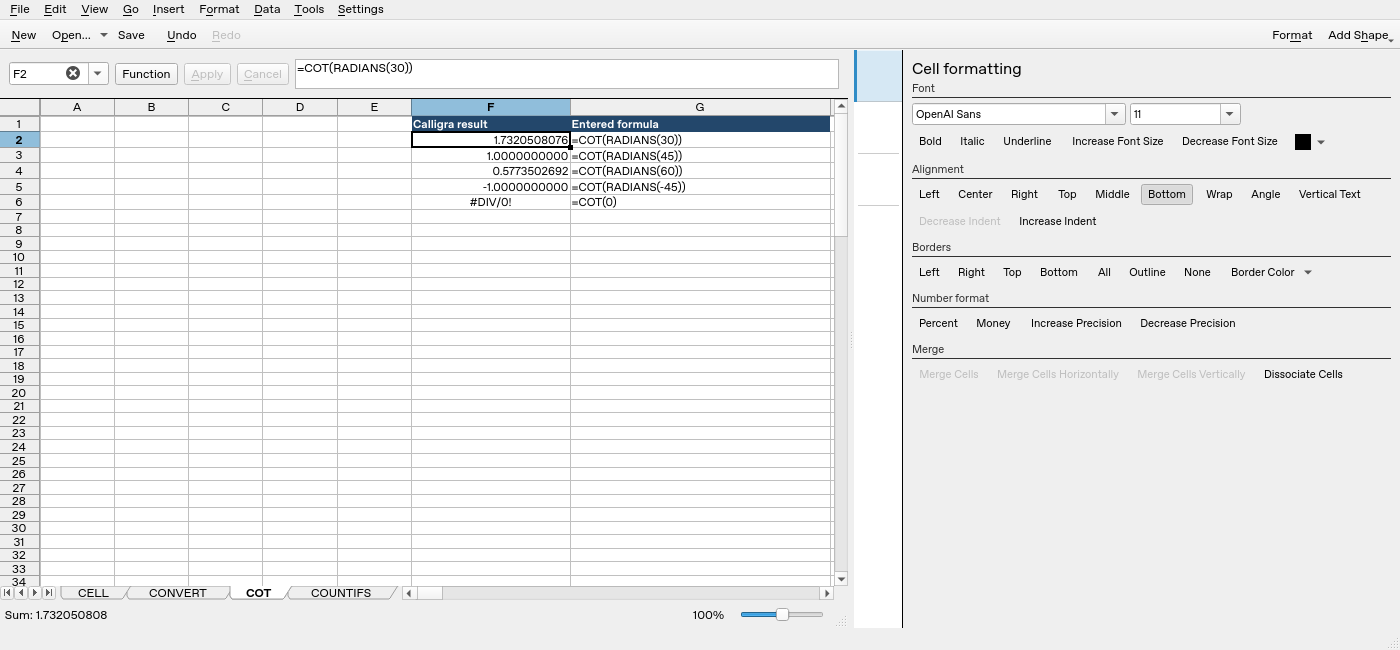
Screenshot: Genuine native 25.04.2 capture. Selected F2 contains =COT(RADIANS(30)) and displays 1.7320508076. Column F contains application results; column G contains descriptive formula labels. The selected formula is visible in the formula bar; long labels in other rows may be clipped by the panel.