

CUMIPMT Function (Calligra Sheets)
Sum loan interest across payment periods in Calligra Sheets, with an independently checked amortization example and a beginning-payment timing caution.
Verification status: See the evidence and test scope described in this guide. How formula examples are checked
Quick answer: =CUMIPMT(0.01;12;1200;1;3;0) is independently expected to return −33.1519817529, the interest outflow for the first three end-of-month payments of a 1,200 loan at 1% per month.
Timing caution: In the inspected Calligra implementation, type 1 does not give zero interest for the first beginning-of-period payment. Treat its nonzero first-period interest as a software-specific limitation, not a textbook annuity-due result.
Availability and verification scope
- Introduced: Original introduction release not established; the inspected release is not an introduction date.
- Available: Registered in Calligra Sheets 26.08.2, verified from first-party released source retrieved on October 18, 2026.
- Retired or deprecated: Neither is established by the inspected sources. The function remains registered; retirement and deprecation are different claims.
- Evidence: Selected formulas were executed in the Calligra Sheets 25.04.2 GUI on October 18, 2026. The native-results section lists those observations separately from independent arithmetic and source analysis. 26.08.2 was source-checked only.
- Entry style: English function names, semicolon argument separators and decimal points. Use DATE constructors instead of ambiguous date text. Optional-argument brackets shown in syntax are not entered literally.
Syntax and arguments
=CUMIPMT(rate; periods; value; start; end; type)
| Argument | Meaning |
|---|---|
| rate | Positive interest rate per payment period, not an unconverted annual percentage |
| periods | Positive total number of payment periods |
| value | Positive initial principal/present value |
| start | First included payment period, starting at 1 |
| end | Last included payment period; both endpoints are included |
| type | Required timing selector: 0 for end-of-period; 1 requests beginning-of-period behavior, subject to the Calligra limitation below |
All six arguments are required; there are no optional defaults. The internal model uses a zero future balance and a constant rate/payment. There is no fee, balloon, irregular-date or variable-rate argument. For a nominal 12% annual rate with monthly periods, use 0.12/12 and the number of months; do not mix monthly rate with annual period counts.
Build a three-payment interest check
On a fresh worksheet, enter these inputs:
| Cell | Label | Value |
|---|---|---|
| B1 | Periodic rate | 0.01 |
| B2 | Total periods | 12 |
| B3 | Initial principal | 1200 |
| B4 | Start period | 1 |
| B5 | End period | 3 |
| B6 | Timing | 0 |
- In B8 enter
=CUMIPMT(B1;B2;B3;B4;B5;B6). - Expect −33.1519817529, or a displayed currency outflow of −33.15 after formatting to two decimals.
- Keep B8 unrounded for reconciliation. The leading minus sign follows the cash-flow convention; it does not mean the lender pays interest to the borrower.
- As an independent control, calculate the level payment and roll forward the opening balance period by period.
The independent level-payment magnitude is 1200 × 0.01 / (1 − 1.01^(−12)) = 106.6185464140. For each end-of-period payment, interest equals opening balance × 1%; the remaining payment reduces principal.
| Period | Opening balance | Interest outflow | Closing balance |
|---|---|---|---|
| 1 | 1200.0000000000 | −12.0000000000 | 1105.3814535860 |
| 2 | 1105.3814535860 | −11.0538145359 | 1009.8167217078 |
| 3 | 1009.8167217078 | −10.0981672171 | 913.2963425109 |
Summing the three signed interest amounts gives the expected CUMIPMT value. These calculations use independent decimal arithmetic. The selected native results below separately agree with them.
Advanced case: split a year without double-counting
For the same loan, periods 4 through 12 have expected interest −46.2705752152. Periods 1 through 12 have expected interest −79.4225569681. The first-three and remaining-nine amounts add to the full-year total within rounding.
Use =CUMIPMT(0.01;12;1200;4;12;0) for the later range. Start/end are inclusive, so using 3 as the second range’s start would count period 3 twice. A single-period call with start=end=1 gives −12, which is a useful boundary control.
A displayed positive expense can be produced by negating the returned total in a separate reporting formula. Preserve the underlying signed calculation so it can reconcile with the negative payment and principal components. Do not add the original 1,200 to this interest total: principal repayment is a different component.
Beginning-of-period behavior differs from the standard model
The source’s interest helper first computes ordinary end-of-period interest. For any nonzero type, it divides that interest by 1+rate, including period 1. Thus =CUMIPMT(0.01;12;1200;1;1;1) is source-predicted to return −11.8811881188, from −12/1.01. A standard annuity-due first payment made immediately would carry zero elapsed-period interest.
The full type-1 range is source-predicted as −78.6361950179, simply the type-0 interest total divided by 1.01. The selected 25.04.2 native run confirmed this implementation behavior; it is not an endorsement of the timing model. Do not use type 1 for a beginning-payment loan without separately reconciling every period to the intended schedule. See interest helper.
Input validation and numerical limits
- The source returns its internal
errorVALUEfor rate ≤ 0, nonpositive periods or principal, start outside 1…periods, end before start, or end beyond periods. The selected zero-rate native test displayed#VALUE!; the other validation branches were source-checked only. A zero-interest loan is mathematically meaningful, but this function rejects rate 0. - Start/end/type pass through integer conversion. Use actual whole-number period inputs; fractional/text conversion is not established by the ordinary examples.
- The body checks whether type conversion produced an error but does not restrict the resulting integer to 0 or 1. Use only those intended choices; arbitrary nonzero type values are not a supported modeling shortcut.
- Positive principal represents borrowed funds received; calculated payments are negative outflows. Negating a result for a presentation label is different from changing the principal sign, which the function rejects.
- The model does not round every payment to cents. A real lender’s cent-rounded schedule can differ slightly; reconcile against the contract’s rounding and final-payment rules.
- Large period ranges run a loop over included payments in the interest calculation. Keep checks bounded and do not interpret successful evaluation as a performance guarantee for enormous inputs.
Compatibility, aliases and related guides
The Financial module registers COM.SUN.STAR.SHEET.ADDIN.ANALYSIS.GETCUMIPMT as an alternate name for CUMIPMT. It invokes the same implementation. An alias registration does not establish a workbook import/export guarantee, identical error behavior in other products or availability in every packaged build.
- PMT calculates the constant payment.
- SUM totals a separately constructed interest schedule.
- POWER supports the independent payment calculation.
- KDE CUMIPMT handbook documents the function interface.
- Released function implementation provides the actual validation and calculation rules.
Selected native results and screenshot
These formulas were recalculated in Calligra Sheets 25.04.2 from a prepared ODS workbook and saved by the application. The table records the native-saved results. Other scenarios remain independent expectations or source analysis unless listed here.
| Entered formula | Native result |
|---|---|
=CUMIPMT(0.01;12;1200;1;1;0) |
-12.0 |
=CUMIPMT(0.01;12;1200;1;3;0) |
-33.1519817529383 |
=CUMIPMT(0.01;12;1200;4;12;0) |
-46.2705752151823 |
=CUMIPMT(0.01;12;1200;1;12;0) |
-79.4225569681206 |
=CUMIPMT(0.01;12;1200;1;1;1) |
-11.8811881188119 |
=CUMIPMT(0.01;12;1200;1;12;1) |
-78.6361950179412 |
=CUMIPMT(0;12;1200;1;12;0) |
#VALUE! |
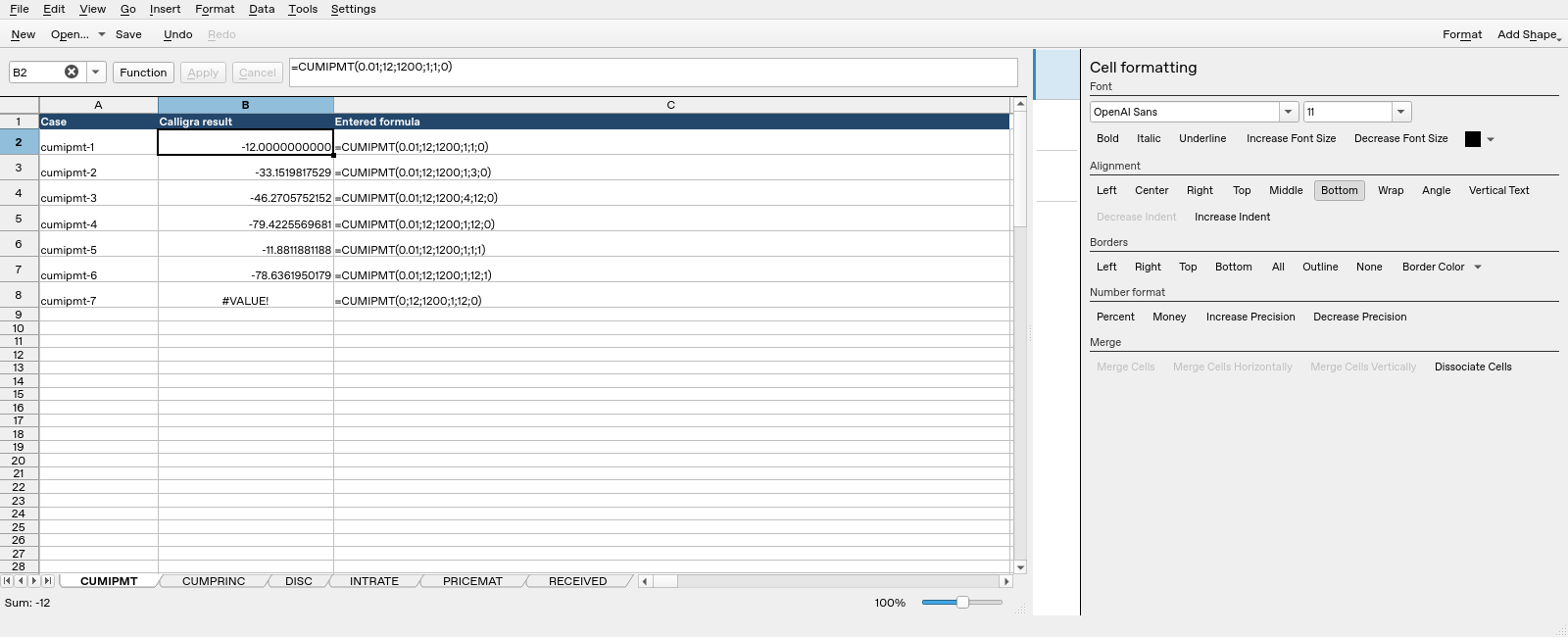
Screenshot: Native Calligra Sheets 25.04.2. Selected cell B2 evaluates =CUMIPMT(0.01;12;1200;1;1;0) and displays -12.0000000000. Column B contains application results; column C contains the corresponding formula text. The type-1 rows also confirm the nonzero first-payment interest described above.
These observations cover only the listed cases in 25.04.2. They do not establish execution in 26.08.2, another locale, general workbook compatibility or the economic validity of unsuitable inputs.