

CUR in Calligra Sheets: Take a Positive Cube Root
Calculate cube roots for volumes and scale factors, with floating-power domain limits.
Verification status: Consult the documentation, examples and any stated test scope below. How formula examples are checked
Quick answer: =CUR(27) returns approximately 3. If a cube has volume 27 cubic metres, its side is 3 metres. CUR calculates a cube root using a floating-point power; it is not a general signed real cube-root routine.
Syntax and domain
=CUR(x)
The single argument is required. For the documented nonnegative domain, x is the number whose cube root you need. There is no optional order argument: use ROOTN for a specified order. A zero input has a zero result, and fractional positive inputs are valid: =CUR(0.125) is 0.5.
The inspected implementation calls the shared power calculation with exponent 1.0/3.0. This is a finite floating approximation to one third. Positive inputs therefore give approximate roots, even when a displayed result looks like an exact integer. Use a tolerance when comparing computed roots; do not assume a direct equality test proves a perfect cube.
Worked worksheet: cube dimensions
- Put
Volume (m³)in A1 and 27 in A2. - Put
Side (m)in B1 and enter=CUR(A2)in B2. - The mathematical reference result is 3 m.
- Put
Surface area (m²)in C1 and enter=6*B2^2in C2. The result is approximately 54 m². - Change A2 to 64. The corresponding side and surface area are approximately 4 m and 96 m².
The unit changes because the cube root of cubic metres is metres. CUR does not inspect unit labels or convert litres to cubic metres. Convert the volume before taking its root: 125 litres is 0.125 m³, giving a side of 0.5 m, not 5 m.
Advanced example: scaling an object
For geometrically similar objects, the linear scale factor is the cube root of the volume ratio. If a prototype volume is 8 litres and the target volume is 27 litres, =CUR(27/8) gives 1.5. Every linear dimension increases by 50%, while surface areas increase by the square of that ratio, 2.25.
This applies to similar shapes with uniform scaling. It does not mean every container holding 27 litres has dimensions 1.5 times those of an arbitrary 8-litre container. Shape and wall thickness assumptions matter independently of the arithmetic.
Negative inputs and troubleshooting
The real cube root of −8 is −2, but a generic floating pow(-8;1/3) does not necessarily implement that real-root branch. CUR’s inspected source does not special-case negative values. Do not use an expected −2 as proof of Calligra’s behavior; the native observations below identify what the tested release actually returns.
If your task intentionally needs signed real cube roots, handle the sign explicitly, for example =-CUR(8) for the known negative input −8. For a cell-based solution, make the sign handling explicit after validating that the input is numeric. Do not silently apply ABS to a negative physical volume, since that would conceal invalid data.
- Zero is a valid mathematical boundary.
- Large or tiny magnitudes may overflow or underflow intermediate floating arithmetic; no extreme-range accuracy guarantee is established here.
- Missing or extra arguments fail the one-argument registration check.
- A result formatted as a whole number can hide a rounding difference. Increase displayed decimals before diagnosing an unexpected comparison.
Related functions and compatibility
POWER exposes general exponentiation, and SQRT calculates a square root. CUR is a Calligra function name; do not assume another spreadsheet recognizes it or preserves its negative-input behavior on import. Test a positive value, zero and any intentionally supported signed value when migrating a workbook.
Version scope and references
Reviewed October 18, 2026. The relevant implementation file and shared numerical/conversion files were compared between official 25.04.2 and 26.08.2 source and are byte-identical. This establishes source equivalence for the inspected code, not identical behavior on every platform or a native test of 26.08.2. The earliest release containing CUR has not been established; these version numbers are not introduction dates.
Mathematical reference values above were calculated independently. The native results below were obtained in Calligra Sheets 25.04.2 on Linux, October 18, 2026; no native 26.08.2 execution is claimed. No unstated locale, import or array-entry behavior is implied.
Negative-input observation
In the tested 25.04.2 application, =CUR(-8) displayed and saved nan (not a number). This is a nonfinite floating result, not the real cube root −2 and not a conventional #VALUE! error string. Do not pass it downstream as a valid finite measurement. This observation does not establish how every other input, platform or import format represents nonfinite values.
Native verification in Calligra Sheets 25.04.2
These formulas were recalculated in the actual application and read back from its completed native-saved workbook. The image is an unmodified application screenshot. The earlier mathematical calculations remain independent references; this table records actual saved results.
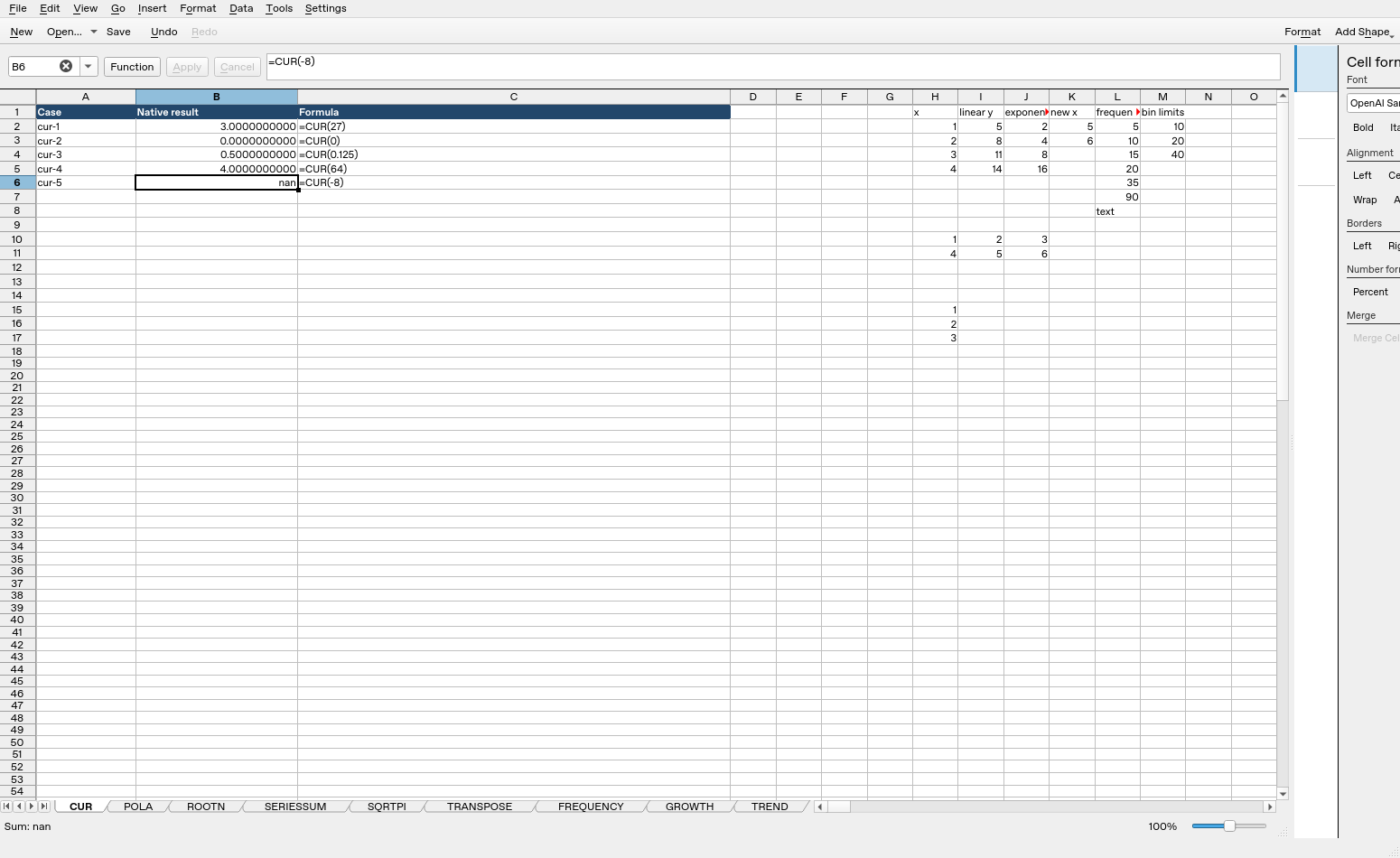
| Formula executed | Native saved result |
|---|---|
=CUR(27) |
3 |
=CUR(0) |
0 |
=CUR(0.125) |
0.5 |
=CUR(64) |
4 |
=CUR(-8) |
nan |
Display formatting may show fewer digits than the saved value. The tested cases do not establish every coercion, extreme magnitude or cross-application import behavior.