

DATE2UNIX in Calligra Sheets: Convert a Spreadsheet Date to Epoch Seconds
Learn Calligra Sheets DATE2UNIX with exact arguments, reproducible inputs, independently checked results and implementation-specific cautions.
Verification status: See the evidence and test scope described in this guide. How formula examples are checked
Quick answer
DATE2UNIX converts a date/time value into seconds from the Unix epoch. Use it to prepare a timestamp for a system that explicitly expects epoch seconds, rather than a spreadsheet day serial or milliseconds. The inspected release has an integer-width limitation; it is not a safe general-purpose converter for arbitrarily distant dates.
Syntax and time interpretation
=DATE2UNIX(date_time)
One argument is required, with no optional timezone or unit argument. Prefer a numeric date constructed with DATE, plus TIME when needed. The source converts its argument to a date/time value, reconstructs it using the document reference date and UTC in Value::asDateTime, then calls toSecsSinceEpoch() and casts the result to int.
Consequently, a numeric worksheet value constructed as midnight represents midnight UTC for this conversion. This does not automatically determine the timezone of an imported local appointment. If an input means local wall-clock time, its meaning must be resolved before using it as a UTC timestamp. Text inputs also depend on date parsing; avoid ambiguous text when reproducibility matters.
Reproduce three known timestamps
- Put these date/time expressions into B2:B4.
- Enter
=DATE2UNIX(B2)in C2 and fill down through C4. - Format C as a number with zero decimal places, not a date.
| Row | Formula for B | Expected C epoch seconds |
|---|---|---|
| 2 | =DATE(1970;1;1) |
0 |
| 3 | =DATE(2000;1;1) |
946684800 |
| 4 | =DATE(2025;1;1)+TIME(12;0;0) |
1735732800 |
These expectations were independently calculated using UTC calendar timestamps and checked against source semantics; selected native cases are reported below. The KDE DATE2UNIX entry includes the year-2000 reference value, but numeric DATE expressions avoid its locale-sensitive date text.
Advanced example: measure an event interval
Put =DATE(2025;1;1)+TIME(12;0;0) in E2 and =DATE(2025;1;1)+TIME(12;15;0) in E3. Then enter:
=DATE2UNIX(E3)-DATE2UNIX(E2)
Expected: 900 seconds, or 15 minutes. Independent worksheet arithmetic (E3-E2)*86400 should represent the same interval for these UTC-interpreted values. Both expressions assume the supplied times have the intended timezone meaning; neither resolves daylight-saving ambiguity in source records.
If a receiving API requires milliseconds, multiplication by 1000 changes units, but does not fix an already out-of-range DATE2UNIX result. Verify the receiving field’s specification before exporting.
Errors, limits and compatibility
- The explicit conversion to
intis an implementation limit. On a 32-bit signed-int build, the positive epoch range ends at 2038-01-19 03:14:07 UTC. Values beyond the representable range must not be trusted; this guide makes no portable overflow-result claim. - Empty and Boolean inputs enter converter branches that can use the current date/time. Do not use blank input as a deterministic zero timestamp.
- Invalid date text can fail conversion. Prefer DATE and TIME expressions over strings with uncertain day/month order.
- The output is seconds, not milliseconds and not days since the spreadsheet’s own reference date.
- No claim is made for fractional-second preservation: the final return is an integer number of seconds.
- Function availability and timestamp behavior vary across spreadsheet products. A formula with the same purpose may need different spelling, epoch arithmetic, timezone handling or range validation elsewhere.
For an export workflow, retain the original date/time, a declared timezone, the converted numeric value and a known control timestamp. This gives reviewers enough context to catch a plausible but shifted timestamp.
Availability and verification
- Release checked: Calligra Sheets 26.08.2, using KDE’s release source package and release information, inspected on October 18, 2026. Relevant locations:
sheets/functions/datetime.cpplines 84–86 and 1124 onward;sheets/engine/Value.cpplines 544–554;ValueConverter.cpplines 330–371. - Introduced: The original introduction version is not established by these sources. Current registration establishes presence in 26.08.2, not the first release.
- Lifecycle: Registered in the inspected release; no retirement or deprecation marker was found in this function’s registration. Retirement (removed support) and deprecation (discouraged but retained support) are different claims; neither is asserted here.
- Native testing: Selected cases were observed in Calligra Sheets 25.04.2, as detailed below. The source discussion concerns 26.08.2; unlisted cases remain source-derived or independently calculated.
Related guides and sources
- DATE
- TIME
- DAY
- Calligra function guide index
- KDE formula entry instructions, checked October 18, 2026. Examples use leading
=and semicolons, with a period for decimal numbers. Confirm regional separators in your installation before pasting.
Selected native results and screenshot
The following results were observed in Calligra Sheets 25.04.2 using an ODS workbook opened, calculated and saved by the application. The formula text below uses worksheet notation; saved ODF reference brackets are omitted for readability. Unlisted examples and edge cases retain their separate source or mathematical evidence.
| Native formula | Observed display |
|---|---|
=DATE2UNIX(DATE(1970;1;1)) |
0.0000000000 |
=DATE2UNIX(DATE(2000;1;1)) |
946684800.0000000000 |
=DATE2UNIX(DATE(2025;1;1)+TIME(12;0;0)) |
1.7357328000e+09 |
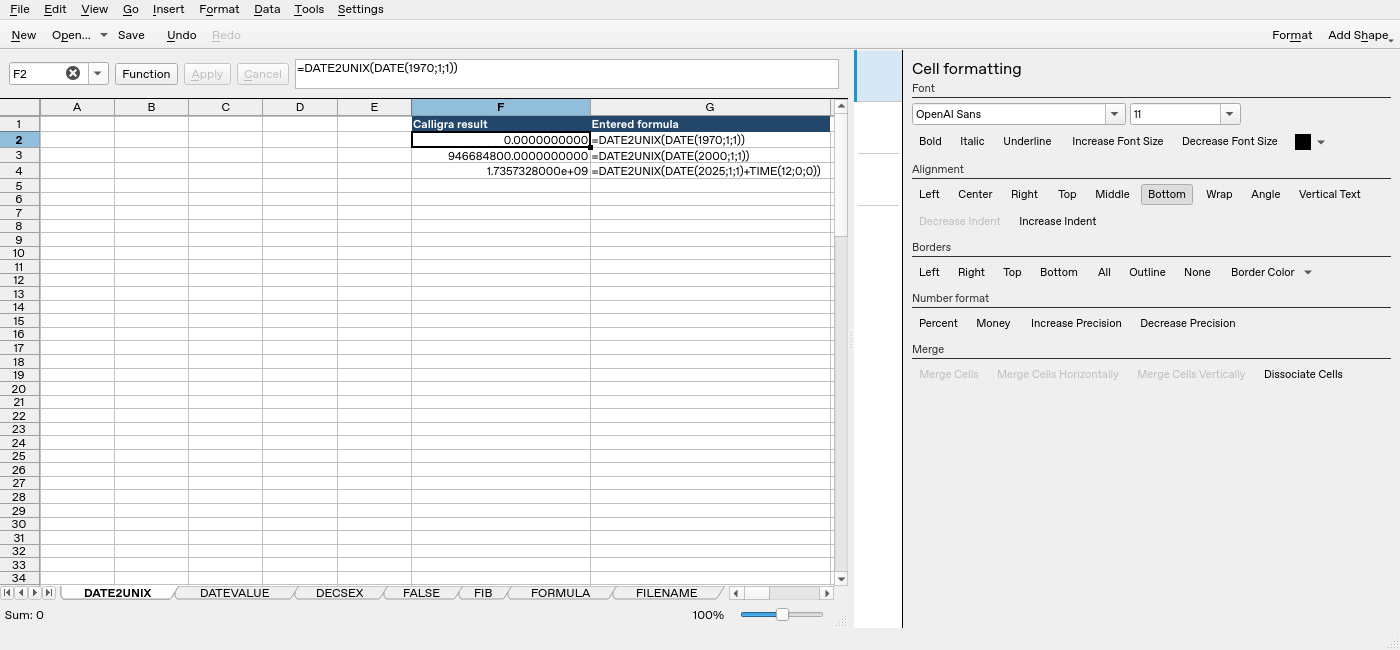
Screenshot: Native 25.04.2 capture with F2 selected. The formula bar shows =DATE2UNIX(DATE(1970;1;1)); column F contains application results. Column G contains descriptive formula labels, some of which are clipped by the formatting panel.