

DECSEX in Calligra Sheets: Convert Decimal Hours to a Time Value
Learn Calligra Sheets DECSEX with exact arguments, reproducible inputs, independently checked results and implementation-specific cautions.
Verification status: See the evidence and test scope described in this guide. How formula examples are checked
Quick answer
DECSEX turns decimal hours into a spreadsheet time value. For example, 1.5 hours is 1 hour 30 minutes, not 1 hour 5 minutes. It is useful when measurements or time sheets store hours as decimals but a report should show hours and minutes.
Syntax and underlying value
=DECSEX(decimal_hours)
One numeric argument is required; no optional arguments or defaults are documented. The 26.08.2 implementation divides the input by 24 and applies a time format through the converter. The underlying quantity is a fraction of a day. This is not a conversion from decimal degrees to degrees/minutes/seconds.
Reproduce three conversions
- Enter Decimal hours and Time into A1:B1.
- Enter 1.5, 2.25 and 0.5 into A2:A4.
- Enter
=DECSEX(A2)in B2 and fill down through B4. - Display B as hours and minutes. To inspect the underlying numbers, duplicate the formulas in C2:C4 and display C as ordinary decimal numbers.
| A: Decimal hours | Expected time | Expected numeric day fraction |
|---|---|---|
| 1.5 | 01:30 | 0.0625 |
| 2.25 | 02:15 | 0.09375 |
| 0.5 | 00:30 | 0.0208333333 |
These expectations were independently calculated; selected native checks are reported below. The fractional part of an hour is multiplied by 60 to find minutes: 0.25 × 60 = 15. It should not be read as twenty-five minutes.
Advanced example: combine a short work log
Three task durations are 1.5, 2.25 and 0.5 hours. =SUM(A2:A4) is 4.25 hours. A report cell can use:
=DECSEX(SUM(A2:A4))
Expected time display: 04:15, with underlying value 4.25/24. Keep the decimal-hour total if another calculation, such as a rate multiplied by hours, needs hours rather than days. Multiplying the time value directly by an hourly rate would be off by a factor of 24 unless you first convert its units.
For long durations, inspect the numeric value and choose a duration display deliberately. A clock-time display can wrap at a day boundary; this guide does not promise a particular elapsed-hours format token across builds or locales.
A handbook discrepancy worth checking
The KDE DECSEX entry shows a result of 7:47 for input 7.8. Decimal-hour arithmetic gives 7 hours 48 minutes, and the inspected implementation stores 7.8/24 = 0.325 before time presentation. The native 25.04.2 check below displays 07:48. Test your installed build rather than copying the handbook’s minute value.
Errors, limits and compatibility
- Keep input numeric. Text such as
1 h 30 mis a different representation and is not established by these examples. - A time display can hide seconds or day components. Inspect the raw fraction when results seem off by a minute or a day.
- Negative hours and totals over 24 hours require a deliberate elapsed-time policy and native format checks; no display guarantee is made here.
- DECSEX is a Calligra-specific name in this guide. For positive ordinary hours, dividing by 24 and applying an appropriate time display describes the mathematical conversion in other spreadsheets, but does not guarantee identical formatting or errors.
- Round for presentation only after deciding the intended precision. Rounding decimal hours before conversion can change the displayed minutes.
Availability and verification
- Release checked: Calligra Sheets 26.08.2, using KDE’s release source package and release information, inspected on October 18, 2026. Relevant locations:
sheets/functions/conversion.cpplines 46–47 and 121–127;sheets/engine/ValueConverter.cpplines 415–451. - Introduced: The original introduction version is not established by these sources. Current registration establishes presence in 26.08.2, not the first release.
- Lifecycle: Registered in the inspected release; no retirement or deprecation marker was found in this function’s registration. Retirement (removed support) and deprecation (discouraged but retained support) are different claims; neither is asserted here.
- Native testing: Selected cases were observed in Calligra Sheets 25.04.2, as detailed below. The source discussion concerns 26.08.2; unlisted cases remain source-derived or independently calculated.
Related guides and sources
- TIME
- HOUR
- MINUTE
- Calligra function guide index
- KDE formula entry instructions, checked October 18, 2026. Examples use leading
=and semicolons, with a period for decimal numbers. Confirm regional separators in your installation before pasting.
Selected native results and screenshot
The following results were observed in Calligra Sheets 25.04.2 using an ODS workbook opened, calculated and saved by the application. The formula text below uses worksheet notation; saved ODF reference brackets are omitted for readability. Unlisted examples and edge cases retain their separate source or mathematical evidence.
| Native formula | Observed display |
|---|---|
=DECSEX(1.5) |
01:30 |
=DECSEX(2.25) |
02:15 |
=DECSEX(7.8) |
07:48 |
The displayed 07:48 for 7.8 hours agrees with independent arithmetic (0.325 day), resolving the handbook’s 7:47 example for this tested build. The first two saved values are 0.0625 and 0.09375 day. The native file serialized the third time as 07 hours, 47 minutes, 60 seconds; its displayed normalized time is 07:48.
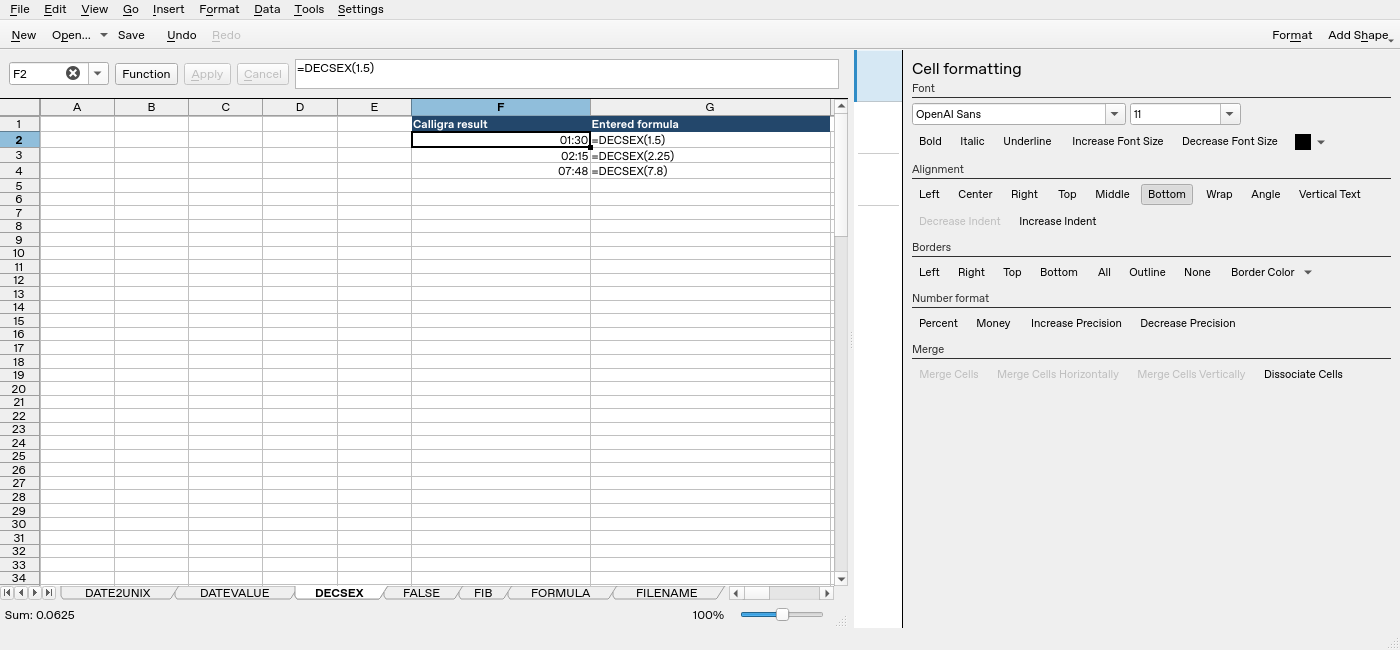
Screenshot: Native 25.04.2 capture with F2 selected. The formula bar shows =DECSEX(1.5); column F contains application results. Column G contains descriptive formula labels, some of which are clipped by the formatting panel.