

DISC Function (Calligra Sheets)
Find a security discount rate in Calligra Sheets, separating redemption-based discount from investment return and documenting Boolean error returns.
Verification status: See the evidence and test scope described in this guide. How formula examples are checked
Quick answer: =DISC(DATE(2025;1;1);DATE(2025;7;1);95;100) is independently expected to return 0.1, or 10% annually under the default basis 0 for these dates.
DISC annualizes the difference between redemption and purchase price relative to redemption. It is not the investment-base return, a compounded annual return or the amount of the discount in currency.
Availability and verification scope
- Introduced: Original introduction release not established; the inspected release is not an introduction date.
- Available: Registered in Calligra Sheets 26.08.2, verified from first-party released source retrieved on October 18, 2026.
- Retired or deprecated: Neither is established by the inspected sources. The function remains registered; retirement and deprecation are different claims.
- Evidence: Selected formulas were executed in the Calligra Sheets 25.04.2 GUI on October 18, 2026. The native-results section lists those observations separately from independent arithmetic and source analysis. 26.08.2 was source-checked only.
- Entry style: English function names, semicolon argument separators and decimal points. Use DATE constructors instead of ambiguous date text. Optional-argument brackets shown in syntax are not entered literally.
Syntax and arguments
=DISC(settlement; maturity; price; redemption[; basis])
| Argument | Role |
|---|---|
| settlement | Date the investment begins |
| maturity | Later redemption date |
| price | Positive purchase price; use the same face-value scale as redemption |
| redemption | Positive amount repaid on that same scale |
| basis | Optional day-count selector, default 0 |
The registration accepts four or five arguments. The source calls the third variable par, while the parameter description identifies it as price per 100 face value. Use purchase price, not automatically 100. A price of 95 and redemption of 100 describe a 5-unit discount; using 950 and 1000 produces the same rate because the ratio is unchanged.
Build the discount-rate example
On a fresh worksheet enter:
| Cell | Value |
|---|---|
| B1 | =DATE(2025;1;1) |
| B2 | =DATE(2025;7;1) |
| B3 | 95 |
| B4 | 100 |
| B5 | 0 |
- Enter
=DISC(B1;B2;B3;B4;B5)in B7. - Expect the numeric result 0.1. Format B7 as a percentage to display 10%.
- Independently calculate the discount fraction
(100−95)/100 = 0.05. - For these ordinary basis-0 dates, the year fraction is 180/360 = 0.5. Divide 0.05 by 0.5 to obtain 0.1.
Percentage formatting changes the display, not the underlying annualized rate. Do not multiply the stored 0.1 by 100 and also apply percentage formatting, which would display 1000%.
Compare actual/365 without changing the price
With explicit basis 3, =DISC(DATE(2025;1;1);DATE(2025;7;1);95;100;3) is independently expected to return 0.1008287292818, about 10.0828729282%. January 1 to July 1, 2025 is 181 actual days, so the calculation is 0.05/(181/365).
The source evaluates (1 − price/redemption) / YEARFRAC(settlement,maturity,basis) through the shared year-fraction helper. Its basis choices are 0 US 30/360, 1 actual-year method, 2 actual/360, 3 actual/365 and 4 European 30/360. This is not the simplified financial date helper used by INTRATE and RECEIVED. Matching basis labels do not ensure matching edge-date fractions across those functions. See year-fraction helper.
Advanced case: distinguish discount from investment return
For price 95, redemption 100 and a half-year fraction, DISC gives (100−95)/100/0.5 = 10%. An investment-base simple annual return instead uses price in the denominator: (100−95)/95/0.5 = 10.5263157895%.
Both calculations describe the same 5-unit gain but use different rate conventions. Label the output “annual discount rate” rather than simply “return” when comparing securities. The larger investment-base percentage is not an inconsistency in arithmetic.
To scale the example, a purchase of 9,500 with redemption of 10,000 has the same discount rate and a 500-unit cash difference. The rate calculation does not include transaction costs, taxes, reinvestment or interim cash flows. Keep any such amounts in a separate cash-flow model rather than changing the interpretation of the DISC denominator.
Boolean FALSE is not a zero discount rate
The inspected body returns Boolean FALSE, rather than a conventional spreadsheet error value, when settlement is later than maturity or when price/redemption is nonpositive. For example, reversing the two dates or setting price to zero is source-predicted to return FALSE. The 25.04.2 native run confirmed both cases as Boolean FALSE; their output type matters.
By contrast, equal positive price and redemption over a positive interval produces the numeric discount rate 0. A downstream formula that coerces FALSE to zero could accidentally hide invalid input as a legitimate zero-rate investment. Validate date order and positive prices explicitly and preserve the distinction between logical FALSE and numeric zero in checks or exports.
Other edge cases and limits
- Settlement equal to maturity is not rejected by the body, but the year fraction becomes zero. The subsequent division’s native error/display is not established here; do not use equal dates.
- Basis is converted to an integer, but the body does not explicitly enforce 0–4. The year-fraction helper sends unrecognized selectors through its default branch. Use only the intended selectors and never treat an accepted number as proof of a valid convention.
- A positive price above redemption gives a negative mathematical discount rate. The function does not reject that merely because the result is negative.
- Invalid date text, fractional selectors, blanks and imported error values require separate native checks. The date constructors above avoid that ambiguity.
- A simple annual discount quote is not an effective compound yield. Converting between quote conventions requires the appropriate formula and assumptions.
Compatibility, aliases and related guides
The Financial module registers COM.SUN.STAR.SHEET.ADDIN.ANALYSIS.GETDISC as an alternate name for DISC. It invokes the same implementation. An alias registration does not establish a workbook import/export guarantee, identical error behavior in other products or availability in every packaged build.
- YEARFRAC explains year-fraction calculations.
- DATE builds explicit date inputs.
- POWER is relevant to a separate compounded-return model, which DISC does not calculate.
- KDE DISC handbook documents the function interface.
- Released function implementation provides the actual validation and calculation rules.
Selected native results and screenshot
These formulas were recalculated in Calligra Sheets 25.04.2 from a prepared ODS workbook and saved by the application. The table records the native-saved results. Other scenarios remain independent expectations or source analysis unless listed here.
| Entered formula | Native result |
|---|---|
=DISC(DATE(2025;1;1);DATE(2025;7;1);95;100) |
0.1 |
=DISC(DATE(2025;1;1);DATE(2025;7;1);95;100;3) |
0.100828729281768 |
=DISC(DATE(2025;1;1);DATE(2025;7;1);100;100;3) |
0.0 |
=DISC(DATE(2025;7;1);DATE(2025;1;1);95;100;3) |
FALSE (Boolean) |
=DISC(DATE(2025;1;1);DATE(2025;7;1);0;100;3) |
FALSE (Boolean) |
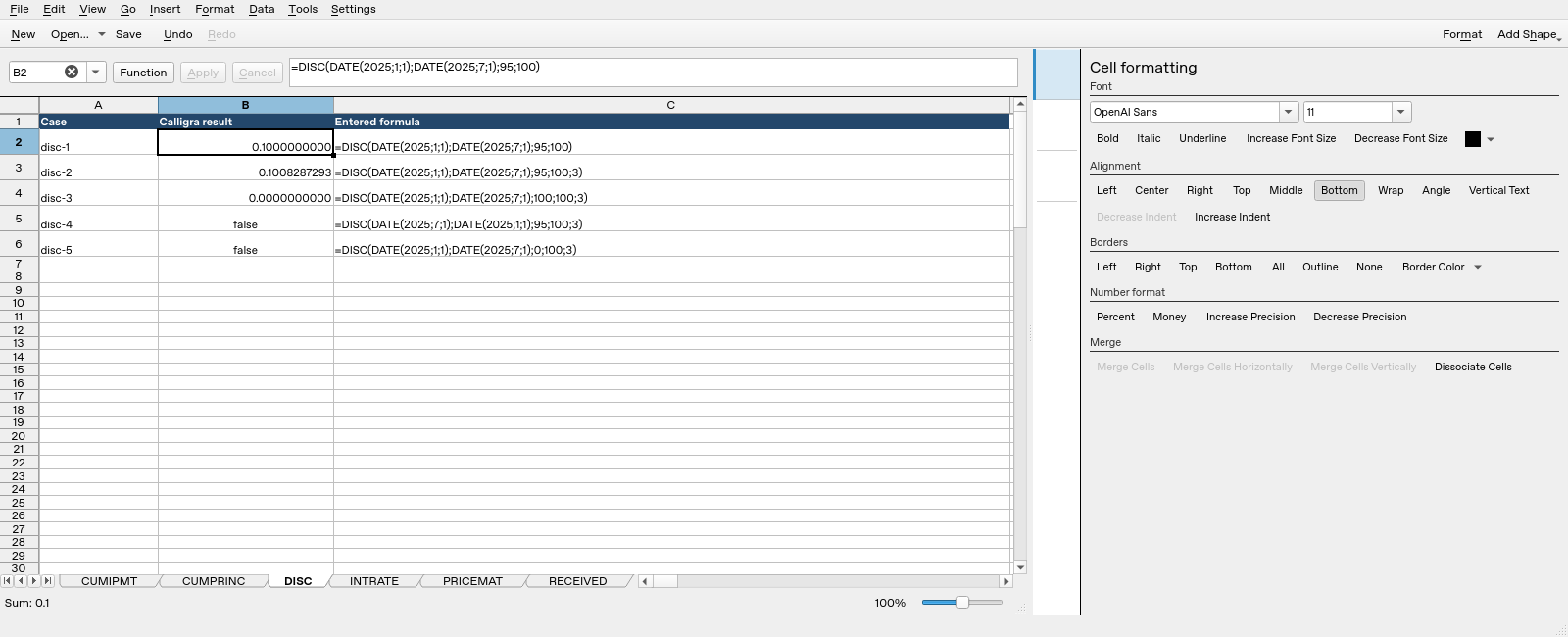
Screenshot: Native Calligra Sheets 25.04.2. Selected cell B2 evaluates =DISC(DATE(2025;1;1);DATE(2025;7;1);95;100) and displays 0.1000000000. Column B contains application results; column C contains the corresponding formula text. The visible false results were saved with Boolean type, distinct from numeric zero.
These observations cover only the listed cases in 25.04.2. They do not establish execution in 26.08.2, another locale, general workbook compatibility or the economic validity of unsuitable inputs.