

FV Function (Calligra Sheets)
Calculate Calligra future value for a starting balance and regular payments, with source-correct syntax, cash-flow signs and payment timing examples.
Verification status: See the evidence and test scope described in this guide. How formula examples are checked
Quick answer: =FV(0.08;2;0;-1000) is independently expected to return 1166.40. It grows a 1,000 starting investment at 8% per period for two periods, with no recurring payment.
Use the released interface: Calligra’s older handbook describes FV(present value;yield;periods), but the inspected implementation uses the annuity interface below. Do not paste that old three-argument order into this release.
Availability and verification scope
- Introduced: Original introduction release not established. The checked release is not an introduction date.
- Available in source: Calligra Sheets 26.08.2, checked against first-party released source retrieved on October 18, 2026.
- Retired or deprecated: Neither retirement nor deprecation is established; the runtime registration remains present.
- Evidence: The selected formulas in the native-results section were executed in Calligra Sheets 25.04.2 on October 18, 2026, and read back from its saved ODS. Other numerical derivations are independent calculations. Version 26.08.2 was source-checked, not executed. These checks do not establish general Excel import or workbook round-trip compatibility.
- Entry style: English function names, semicolon separators and decimal points. Optional-argument brackets are explanatory and are not entered in a formula.
Native results in Calligra Sheets 25.04.2
These selected formulas were recalculated in the native application. Display precision can differ from the independent arithmetic above.
| Formula | Native displayed result |
|---|---|
=FV(0.08;2;0;-1000) |
1166.4000000000 |
=FV(0.01;12;-100) |
1268.2503013197 |
=FV(0.01;12;-100;0;1) |
1280.9328043329 |
=FV(0;12;-100;-1000) |
2200.0000000000 |
=FV(0.01;12;-100;-1000) |
2395.0753314517 |
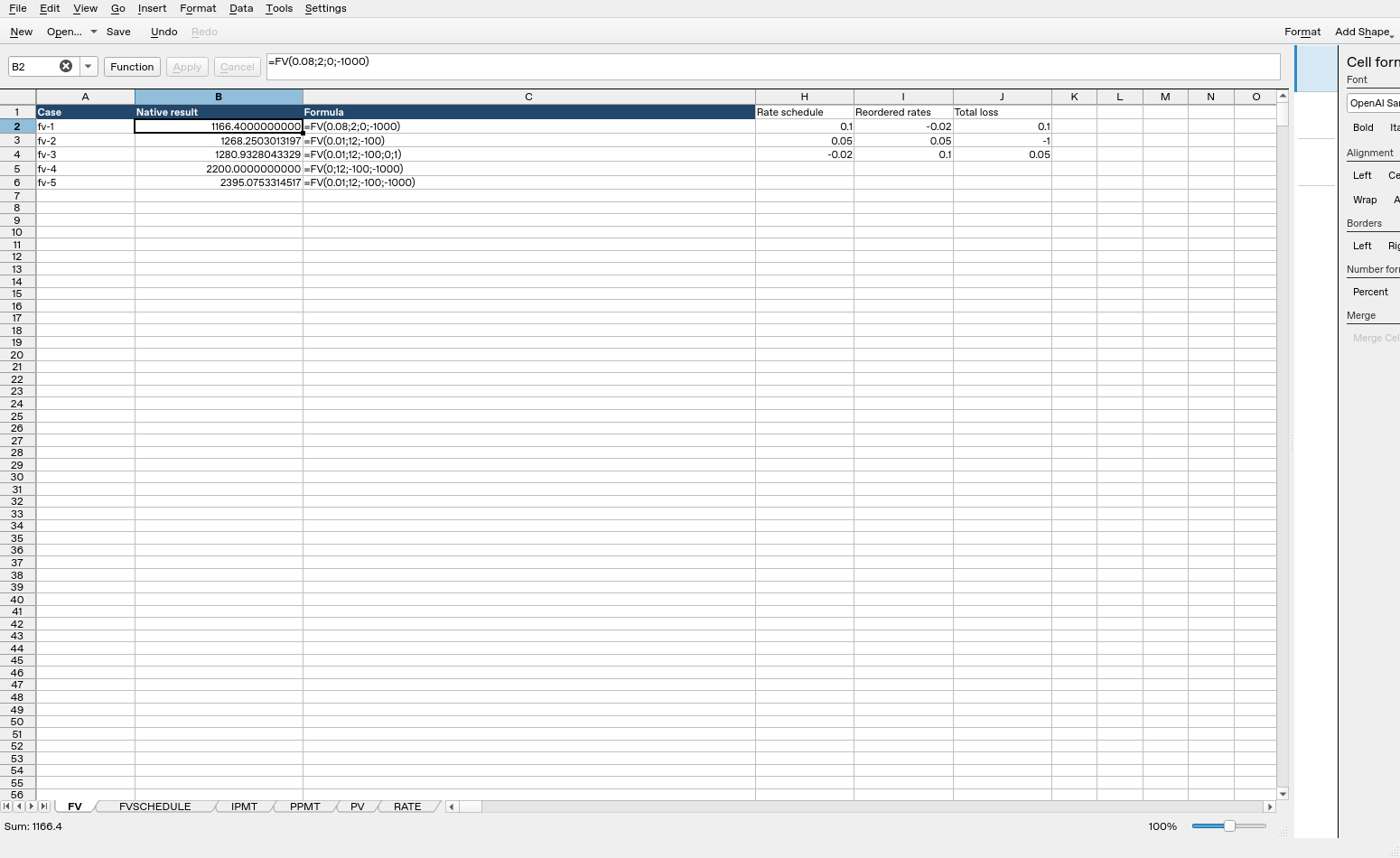
Calligra Sheets 25.04.2: cell B2 evaluates =FV(0.08;2;0;-1000) to 1166.4000000000. Column B contains calculated results; column C shows formula text. Columns were resized and unused columns hidden for readability after the result workbook was saved; the screenshot layout differs from that saved layout, while formulas, inputs and results are unchanged.
Syntax and arguments
=FV(rate; periods; payment[; present_value[; type]])
| Argument | Meaning and default |
|---|---|
| rate | Required interest rate per payment period |
| periods | Required number of equal periods |
| payment | Required constant signed payment each period; use 0 for no recurring payment |
| present_value | Optional signed starting cash flow, default 0 |
| type | Optional timing selector, default 0 for end-of-period; 1 for beginning-of-period |
The registration accepts three through five arguments. Rate and period count must use the same unit: for monthly contributions use a monthly rate and number of months. Negative payments/present value represent money invested or paid out; FV then reports the opposite-signed future cash balance. The default timing is not a statement about the dates of an actual bank product.
The older handbook FV entry does not describe the current implementation’s argument order. The registration and code are decisive for this guide’s syntax. This is a documentation mismatch, not evidence that FV was renamed or retired.
Build a recurring-savings example
On a fresh worksheet put 0.01 in B1, 12 in B2, −100 in B3, 0 in B4 and 0 in B5. Label them periodic rate, periods, contribution, starting cash flow and timing.
- Enter
=FV(B1;B2;B3;B4;B5)in B7. - Independently expect 1268.2503013197, or 1268.25 with currency display.
- The 12 end-period contributions total 1200 of cash invested. The expected difference, approximately 68.2503013197, is growth under the assumed constant periodic rate.
- Keep the unrounded value while checking; currency formatting does not round each intermediate balance.
For r=0.01 and n=12, the contribution accumulation factor is ((1+r)^n−1)/r = 12.6825030132. Multiplying by 100 gives the expected balance. Equivalently, the first contribution grows for 11 periods and the last for zero periods; the sum of those 12 compounded contributions gives the same result.
Beginning versus end of each period
Changing only type to 1 gives =FV(0.01;12;-100;0;1), independently expected 1280.9328043329. Every contribution earns one extra period of interest, so the contribution component is multiplied by 1.01. The increase over type 0 is 12.6825030132.
Do not apply this extra timing factor to the starting balance as well. Present value already compounds over all n periods in either timing mode. The source multiplies the payment component by 1+rate×type, leaving the present-value growth component separate.
Advanced case: combine a starting balance with contributions
Set present_value to −1000 while retaining rate 0.01, periods 12, payment −100 and type 0. =FV(0.01;12;-100;-1000) is independently expected to return 2395.0753314517.
The starting balance grows to 1000×1.01^12 = 1126.8250301320. The contributions grow to 1268.2503013197. Their sum is the expected future value. This decomposition is an effective sign check: entering present_value as +1000 would represent the opposite cash-flow direction and would subtract that accumulated component from the reported future balance.
Zero rate and other boundaries
=FV(0;12;-100;-1000) is independently expected to return 2200, because no growth occurs and the helper explicitly uses n periods as the annuity factor at zero rate. This differs from the inspected PV implementation, which lacks an equivalent zero-rate branch.
The body has no explicit validation restricting type to 0/1, periods to positive integers or the rate to an ordinary financial domain. Use sensible positive period counts, intended timing values and a rate consistent with the model. A returned number for an arbitrary type is not a newly supported timing convention.
Rates at/below −1, fractional periods with a negative growth base, extreme magnitudes and text/error coercion need separate checks. The function does not include fees, taxes, irregular contributions or changing rates. For a changing-rate schedule with no intervening cash flows, FVSCHEDULE is a different interface.
Compatibility and related functions
No explicit alternate function name is registered for this function in the inspected Financial module. Matching a name or mathematical identity does not establish identical coercion, invalid-input behavior, file import/export or availability in every packaged build.
- PMT solves for a regular payment.
- POWER supports the independent growth calculation.
- SUM can total explicitly compounded contributions.
- Released implementation provides the calculation and validation details.