

FVSCHEDULE Function (Calligra Sheets)
Compound a starting amount through a rate schedule in Calligra Sheets, with range setup, negative returns, ordering and total-loss boundaries.
Verification status: See the evidence and test scope described in this guide. How formula examples are checked
Quick answer: with rates 10%, 5%, −2% in H2:H4, =FVSCHEDULE(1000;H2:H4) is independently expected to return 1131.90.
FVSCHEDULE multiplies a starting amount by each successive 1+rate factor. It does not add a payment each period or automatically annualize the result.
Availability and verification scope
- Introduced: Original introduction release not established. The checked release is not an introduction date.
- Available in source: Calligra Sheets 26.08.2, checked against first-party released source retrieved on October 18, 2026.
- Retired or deprecated: Neither retirement nor deprecation is established; the runtime registration remains present.
- Evidence: The selected formulas in the native-results section were executed in Calligra Sheets 25.04.2 on October 18, 2026, and read back from its saved ODS. Other numerical derivations are independent calculations. Version 26.08.2 was source-checked, not executed. These checks do not establish general Excel import or workbook round-trip compatibility.
- Entry style: English function names, semicolon separators and decimal points. Optional-argument brackets are explanatory and are not entered in a formula.
Native results in Calligra Sheets 25.04.2
These selected formulas were recalculated in the native application. Display precision can differ from the independent arithmetic above.
| Formula | Native displayed result |
|---|---|
=FVSCHEDULE(1000;H2:H4) |
1131.9000000000 |
=FVSCHEDULE(1000;I2:I4) |
1131.9000000000 |
=FVSCHEDULE(1000;J2:J4) |
0.0000000000 |
=FVSCHEDULE(-1000;H2:H4) |
-1131.9000000000 |
=FVSCHEDULE(1000;0.1) |
1100.0000000000 |
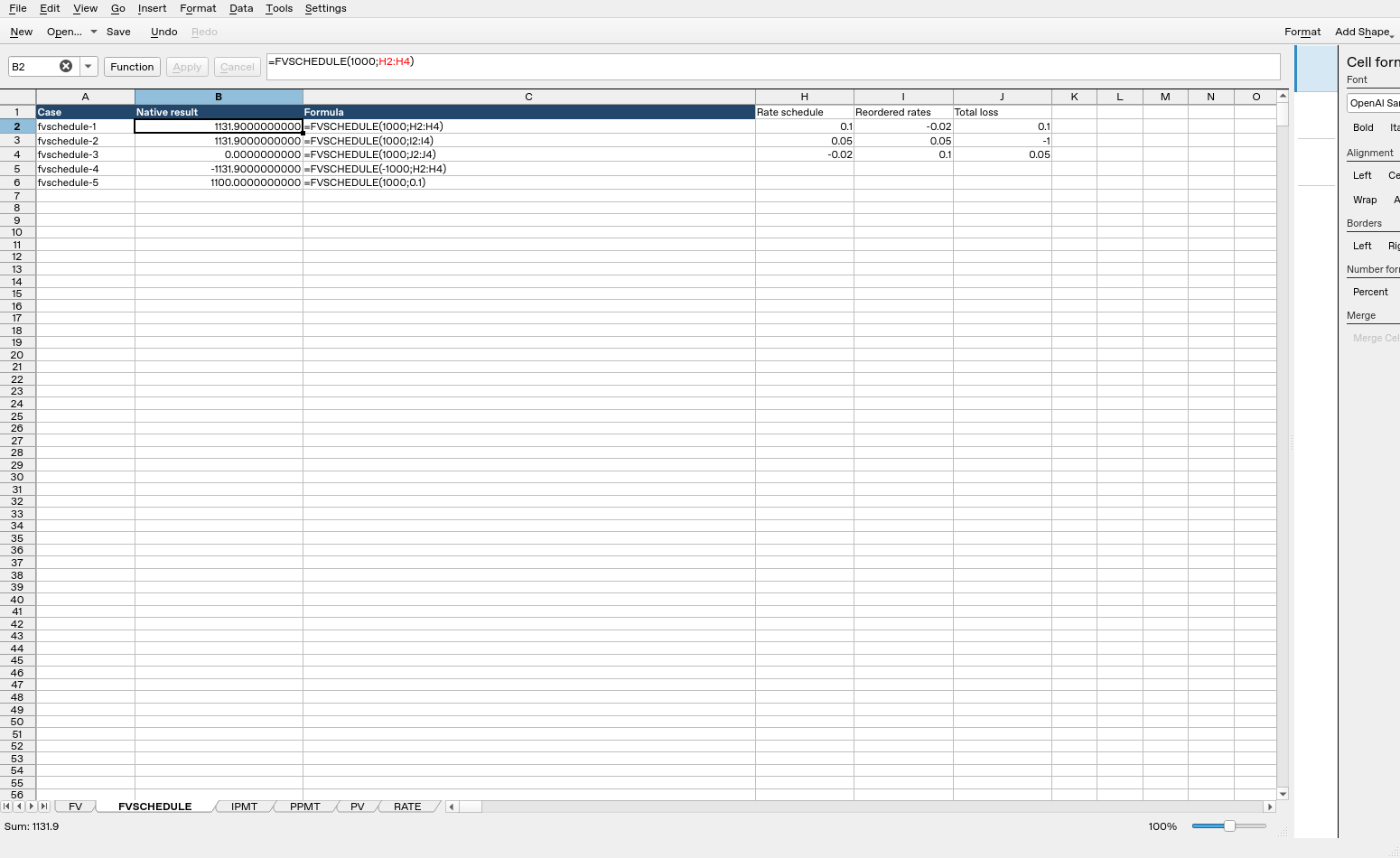
Calligra Sheets 25.04.2: cell B2 evaluates =FVSCHEDULE(1000;H2:H4) to 1131.9000000000. Column B contains calculated results; column C shows formula text. Columns were resized and unused columns hidden for readability after the result workbook was saved; the screenshot layout differs from that saved layout, while formulas, inputs and results are unchanged.
Syntax and arguments
=FVSCHEDULE(principal; schedule)
| Argument | Meaning |
|---|---|
| principal | Required starting amount, carried forward with its existing sign |
| schedule | Required scalar or array/range of periodic decimal rates |
Exactly two arguments are registered, with array acceptance enabled. There are no optional defaults and no payment-timing argument. Unlike FV, the output is not negated under an opposite-cash-flow convention: a positive starting amount normally remains positive when all growth factors are positive.
The inspected financial.xml has no dedicated FVSCHEDULE entry. Availability and syntax here come from the runtime registration and calculation body, rather than an invented handbook section.
Set up a three-period rate schedule
Use a fresh worksheet with these cells:
| Cell | Input |
|---|---|
| H1 | Rate schedule |
| H2 | 0.10 |
| H3 | 0.05 |
| H4 | −0.02 |
| K1 | Starting amount |
| K2 | 1000 |
- Enter
=FVSCHEDULE(K2;H2:H4)in B2. - Independently expect 1131.9. A two-decimal currency format shows 1131.90.
- Calculate the balances separately: after period 1, 1000×1.10 = 1100; after period 2, 1100×1.05 = 1155; after period 3, 1155×0.98 = 1131.90.
- The −2% entry is a loss for that period, not a subtraction of 2 currency units.
Enter 10% as 0.1 or 10%. Entering the number 10 means a 1000% return and multiplies the amount by 11. A plausible output cannot compensate for a wrong rate scale.
Scalar, sign and zero-factor checks
| Formula/input | Independently expected result | Interpretation |
|---|---|---|
=FVSCHEDULE(1000;0.1) |
1100 | One growth period |
=FVSCHEDULE(-1000;H2:H4) |
−1131.9 | Principal sign is preserved |
| Rates 0.1, 0, 0.05 | 1155 | Zero return multiplies by 1 |
| Rates 0.1, −1, 0.05 | 0 | A −100% period makes the amount zero |
The source multiplies every schedule element. It does not explicitly reject a rate below −1; such a rate creates a negative multiplier and may flip the sign. That algebraic result is not an ordinary unlevered investment-return model. Apply your model’s input bounds separately.
Advanced case: final return versus the path of balances
Put −0.02, 0.05, 0.1 in I2:I4. =FVSCHEDULE(1000;I2:I4) has the same mathematical final value 1131.9 because multiplication of the same factors is commutative. However, the intermediate balances differ: the reordered path begins at 980 rather than 1100.
This equality assumes there are no intervening deposits or withdrawals. Once cash is added or removed between periods, ordering changes which rates apply to that cash and the final amount need not agree. FVSCHEDULE has no argument for those external cash flows; build a row-by-row balance model instead.
The total growth factor is 1.1319, so the cumulative return is 13.19%. If, and only if, all three intervals represent equal-length years, an equivalent annual compound rate would be 1.1319^(1/3)−1. FVSCHEDULE itself does not infer interval lengths, return an annualized rate or weight rates by dates.
Range hygiene and limits
Keep only numeric rates in the referenced schedule. Labels belong outside H2:H4. The source iterates over schedule elements without a special documented “ignore text” rule; blank, text, Boolean and embedded-error coercion should be tested explicitly rather than borrowed from another spreadsheet’s help.
A multi-column range also contains multiple elements; do not accidentally include an adjacent amount or note column. Reordering plain numeric factors leaves the ideal final product unchanged, but floating-point multiplication can produce tiny order-dependent rounding differences. Compare using tolerance rather than exact binary equality.
A total-loss factor of zero cannot later recover without a new cash contribution, which this function does not model. A zero starting principal similarly stays zero under finite numeric factors. Extreme products can overflow or underflow; a displayed finite amount is not a universal accuracy guarantee.
Compatibility and related functions
The alternate name COM.SUN.STAR.SHEET.ADDIN.ANALYSIS.GETFVSCHEDULE invokes the same implementation. It does not select a different financial method. Matching a name or mathematical identity does not establish identical coercion, invalid-input behavior, file import/export or availability in every packaged build.
- PRODUCT expresses the related multiplication idea.
- POWER supports an explicitly chosen equivalent-rate calculation.
- SUM is for additive cash flows, not a substitute for compound factors.
- Released implementation provides the calculation and validation details.