

GETPIVOTDATA in Calligra Sheets: Read a Field from the Bottom of a Range
Learn Calligra Sheets GETPIVOTDATA with exact arguments, reproducible inputs, independently checked results and implementation-specific cautions.
Verification status: See the evidence and test scope described in this guide. How formula examples are checked
Quick answer and compatibility limit
Calligra’s inspected GETPIVOTDATA(database; field) takes two arguments and returns the selected column’s value from the bottom row of the supplied range. It is only partially Excel-compatible. It does not implement an arbitrary pivot-field/item query or verify that the input is a pivot table.
Syntax and selection
=GETPIVOTDATA(database; field)
The database is a rectangular range including headers. The field is a case-insensitive header name or a one-based column number. The implementation identifies that column, computes the last row index of the range, and returns the cell at their intersection.
The argument order is range first, field second. Do not paste an Excel-style data-field-first formula with extra field/item pairs and expect equivalent behavior. The KDE GETPIVOTDATA reference documents this reduced interface; the source explicitly labels it partially compatible.
Reproduce with an ordinary summary table
Enter this table in A1:C4:
| Team | Sales | Units |
|---|---|---|
| East | 10 | 2 |
| West | 20 | 3 |
| Total | 30 | 5 |
Then enter:
| Formula | Expected result |
|---|---|
=GETPIVOTDATA(A1:C4;"Sales") |
30 |
=GETPIVOTDATA(A1:C4;3) |
5 |
=GETPIVOTDATA(A1:C3;"Sales") |
20 |
The third result is important: shortening the range returns the West row’s 20, not a grand total of 30. These are direct bottom-row selections. The function is not computing the sum of 10 and 20; the total row already contains 30.
Practical example: a stable summary footer
If an exported summary always ends with a total row, a report cell can retrieve its Sales value through the field header. This can be clearer than hard-coding a column letter, provided the supplied rectangle really ends at the total.
Before relying on that design, confirm the footer label and range boundary. Adding a note or blank row inside the selected rectangle changes which row is returned. Sorting the entire range can also move the total row away from the bottom. A meaningful field header does not protect against a wrong last row.
Errors and unsupported expectations
- An unrecognized header such as
"Missing"returns #VALUE!. - The source does not establish robust checking of oversized numeric field indexes; stay within the supplied columns.
- There is no criteria argument, no field/item-pair filtering, and no pivot-object membership check in this implementation.
- A normal table is sufficient for these examples; no actual pivot table is created or tested here.
- Numeric totals, text and blanks are returned according to the bottom cell’s value, not recalculated from the rows above.
- Registered support is distinct from full compatibility. This function is not a stub, but its working behavior is much narrower than the same name suggests in some other products.
Availability and verification
- Release checked: Calligra Sheets 26.08.2, using KDE’s release source package and release information, inspected on October 18, 2026. Relevant locations:
sheets/functions/database.cpplines 86–89, 99–114 and 533–546. - Introduced: The original introduction version is not established by these sources. Current registration establishes presence in 26.08.2, not the first release.
- Lifecycle: Registered in the inspected release; no retirement or deprecation marker was found in this function’s registration. Retirement (removed support) and deprecation (discouraged but retained support) are different claims; neither is asserted here.
- Native testing: Selected cases were observed in Calligra Sheets 25.04.2, as shown below. The source discussion concerns 26.08.2; other examples and unlisted edge cases remain separate source or mathematical evidence.
Related guides and sources
- SUM
- DSUM
- VLOOKUP
- HLOOKUP
- Calligra function guide index
- KDE formula entry instructions, checked October 18, 2026. Examples use leading
=and semicolons, with a period for decimal numbers. Confirm regional separators in your installation before pasting.
Selected native results and screenshot
These cases were evaluated and saved in Calligra Sheets 25.04.2 using a prepared ODS workbook. The saved formulas and results were read back, with displayed error text taking precedence over numeric error caches. The native checks establish these particular cases, not full cross-product compatibility.
| Native formula | Observed display |
|---|---|
=GETPIVOTDATA(A1:C4;"Sales") |
30.0000000000 |
=GETPIVOTDATA(A1:C4;3) |
5.0000000000 |
=GETPIVOTDATA(A1:C3;"Sales") |
20.0000000000 |
=GETPIVOTDATA(A1:C4;"Missing") |
#VALUE! |
The native test used the ordinary summary range shown, with no pivot object. The shortened range returned 20, confirming bottom-row selection rather than an inferred grand-total query.
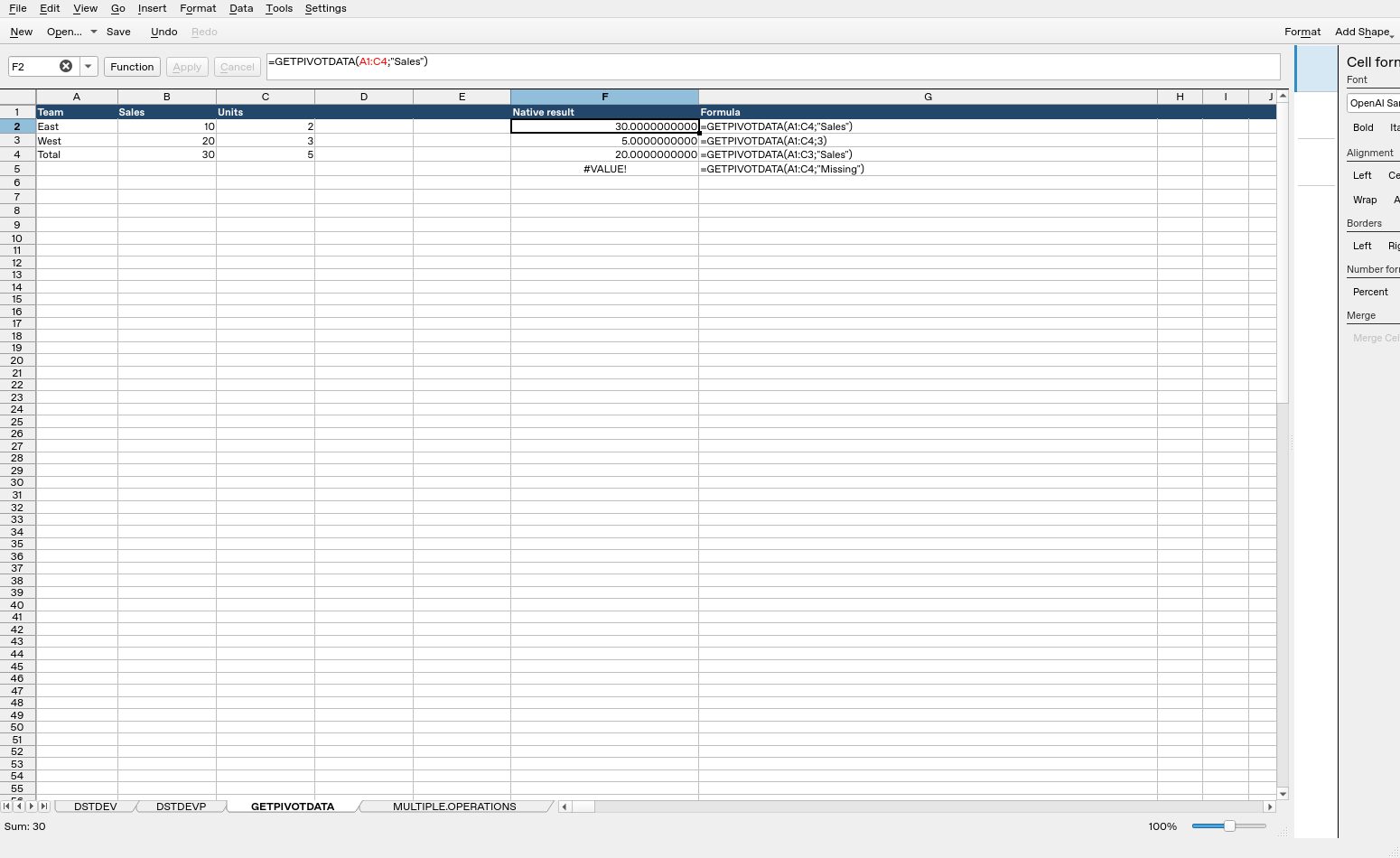
Screenshot: Selected F2 contains =GETPIVOTDATA(A1:C4;"Sales") and displays 30.0000000000. Column F contains application results, and column G contains formula labels. The selected expression is visible in the formula bar.