

INFO in Calligra Sheets: Inspect Non-Sensitive Application Information
Learn Calligra Sheets INFO with exact arguments, reproducible inputs, independently checked results and implementation-specific cautions.
Verification status: See the evidence and test scope described in this guide. How formula examples are checked
Quick answer
INFO reports selected information about the application or calculation environment. The selector determines the result. Use INFO("release") to identify the running application’s version, and avoid sharing environment paths unnecessarily.
Syntax and supported selectors
=INFO(selector)
One text selector is required, with no optional arguments. The implementation lowercases the selector, so "release" and "RELEASE" choose the same branch. Selector text belongs in quotes or in a referenced text cell.
| Selector | Source behavior |
|---|---|
release |
Returns the compiled Calligra version string |
recalc |
Reports automatic or manual calculation mode using localized text |
system |
Reports an operating-system name, subject to the platform query succeeding |
osversion |
Reports operating-system/version information |
directory |
Returns the application’s current working directory |
numfile, memavail, memused, origin and totmem explicitly return value errors in the inspected release. Their familiar names do not establish implemented support. Unsupported selectors are not evidence that the whole INFO function is deprecated.
Reproduce a safe diagnostic
- In B2 enter
=INFO("release"). - Record the actual returned version string. It must describe the running binary, not automatically the 26.08.2 source used to research this guide.
- In B3 enter
=INFO("numfile")and in B4 enter=INFO("memavail"). - The source-derived expectations for B3 and B4 are value errors. There is no invented memory count or open-file count.
The exact B2 value is environment-dependent. The native example below returns 25.04.2, the installed application version; the release source inspected for this guide is 26.08.2.
Practical example: label a support worksheet
An internal diagnostic header can use:
="Calculated with Calligra "&INFO("release")
The result is that prefix followed by the actual release string. Keep a separate written note of the workbook’s last recalculation time if provenance matters: the version label alone does not show when all formula results were calculated.
=INFO("recalc") can help diagnose stale results. Its displayed text is localized and depends on current settings, so avoid hard-coding a comparison against the English word Automatic in a multilingual workbook. Reading the setting does not change it or force recalculation.
Privacy, errors and compatibility
- Do not include
INFO("directory")in a public screenshot without reviewing the returned path; it may reveal usernames or project directories. directoryis a working directory, not a guaranteed workbook filename or workbook folder.- A platform/version string is environment evidence, not a unique machine identity or security assessment.
- Misspelled or unsupported selectors fall through to a value error; do not assume zero means unsupported.
- Another spreadsheet may implement a different selector set and return different wording. Compare each selector used in a migrated report.
The KDE INFO reference provides the function context; the released implementation is the basis for the specific selector limits above. This guide’s suggested screenshot uses only release and unsupported-selector results, avoiding local paths.
Availability and verification
- Release checked: Calligra Sheets 26.08.2, using KDE’s release source package and release information, inspected on October 18, 2026. Relevant locations:
sheets/functions/information.cppINFO registration at 72 and implementation at 164 onward. - Introduced: The original introduction version is not established by these sources. Current registration establishes presence in 26.08.2, not the first release.
- Lifecycle: Registered in the inspected release; no retirement or deprecation marker was found in this function’s registration. Retirement (removed support) and deprecation (discouraged but retained support) are different claims; neither is asserted here.
- Native testing: Selected cases were observed in Calligra Sheets 25.04.2, as detailed below. The source discussion concerns 26.08.2; unlisted cases remain source-derived or independently calculated.
Related guides and sources
- CONCATENATE
- IF
- ISERROR
- Calligra function guide index
- KDE formula entry instructions, checked October 18, 2026. Examples use leading
=and semicolons, with a period for decimal numbers. Confirm regional separators in your installation before pasting.
Selected native results and screenshot
The following results were observed in Calligra Sheets 25.04.2 using an ODS workbook opened, calculated and saved by the application. The formula text below uses worksheet notation; saved ODF reference brackets are omitted for readability. Unlisted examples and edge cases retain their separate source or mathematical evidence.
| Native formula | Observed display |
|---|---|
=INFO("release") |
25.04.2 |
=INFO("numfile") |
#VALUE! |
=INFO("memavail") |
#VALUE! |
The release selector returned 25.04.2, identifying the actual native build. The capture uses only the release and unsupported numeric-information selectors; it contains no directory query.
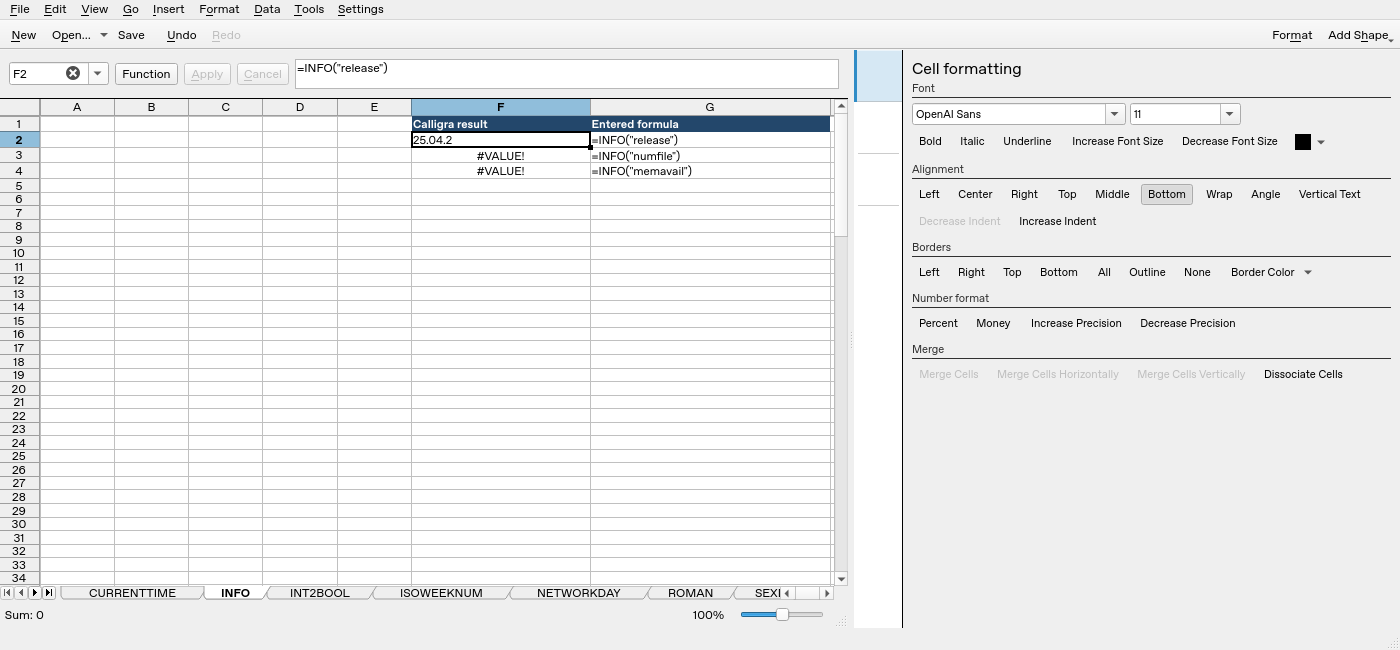
Screenshot: Native 25.04.2 capture with F2 selected. The formula bar shows =INFO("release"); column F contains application results. Column G contains descriptive formula labels, some of which are clipped by the formatting panel.