

INT2BOOL in Calligra Sheets: Convert Numeric Flags to Boolean Values
Learn Calligra Sheets INT2BOOL with exact arguments, reproducible inputs, independently checked results and implementation-specific cautions.
Verification status: See the evidence and test scope described in this guide. How formula examples are checked
Quick answer
INT2BOOL converts a value to a Boolean. In the inspected 26.08.2 implementation, numeric zero becomes false and any nonzero numeric value becomes true. It is therefore not a validator that rejects flags outside 0 and 1.
Syntax and handbook discrepancy
=INT2BOOL(value)
There is one required argument and no optional arguments. For this guide, supply ordinary numeric values. The function delegates to ValueConverter::asBoolean: the integer branch tests zero versus nonzero, and the floating-point branch does the same.
The KDE INT2BOOL handbook says only 0 and 1 are accepted and other values return false. That conflicts with the inspected converter. The expectations below follow the release source; native checks below confirm the nonbinary examples in 25.04.2.
Reproduce numeric conversions
Enter the inputs in A2:A6, then =INT2BOOL(A2) in B2 and fill down.
| Input | Source-derived expected Boolean |
|---|---|
| 0 | false |
| 1 | true |
| 2 | true |
| -1 | true |
| 0.5 | true |
These expectations come from the zero/nonzero branches, with selected native checks reported below. The displayed Boolean word may be localized. A negative number is nonzero; it does not mean false simply because it is below zero.
Advanced case: validate before converting a binary flag
Suppose imported status codes are intended to contain only 0 or 1. Conversion alone would turn a mistaken 2 into true. Use a visible validation formula first:
=OR(A2=0;A2=1)
For the five numeric inputs above, expected results are true, true, false, false, false. Only after validating the allowed domain should a downstream formula use the converted Boolean. Alternatively, if the intended rule is specifically “code equals 1,” write that explicit comparison instead of a generic nonzero conversion.
For a numeric input 1, =IF(INT2BOOL(A2);"Enabled";"Disabled") selects Enabled; for 0 it selects Disabled. Ensure those labels match the meaning of the data rather than treating any nonzero error code as an authorization flag.
Coercion limits and compatibility
- Text input follows a Boolean parser, not the ordinary numeric branch. This guide does not promise that numeric-looking text has the same result as a numeric cell.
- Empty and error values have converter branches that can return false. Do not use INT2BOOL as a reliable error detector.
- Tiny nonzero floating-point residuals are still nonzero; use a justified tolerance if your logical rule is approximate zero.
- Boolean output is different from text
"true"or"false". - A function with the same purpose in another product may coerce values differently. Test 0, 1, a negative number and an invalid input after migration.
Use explicit comparisons when the business rule is known. INT2BOOL is most useful when the intended convention genuinely is zero=false and nonzero=true.
Availability and verification
- Release checked: Calligra Sheets 26.08.2, using KDE’s release source package and release information, inspected on October 18, 2026. Relevant locations:
sheets/functions/conversion.cpplines 68–69 and 257–260;sheets/engine/ValueConverter.cpplines 26–68. - Introduced: The original introduction version is not established by these sources. Current registration establishes presence in 26.08.2, not the first release.
- Lifecycle: Registered in the inspected release; no retirement or deprecation marker was found in this function’s registration. Retirement (removed support) and deprecation (discouraged but retained support) are different claims; neither is asserted here.
- Native testing: Selected cases were observed in Calligra Sheets 25.04.2, as detailed below. The source discussion concerns 26.08.2; unlisted cases remain source-derived or independently calculated.
Related guides and sources
- BOOL2INT
- IF
- OR
- NOT
- Calligra function guide index
- KDE formula entry instructions, checked October 18, 2026. Examples use leading
=and semicolons, with a period for decimal numbers. Confirm regional separators in your installation before pasting.
Selected native results and screenshot
The following results were observed in Calligra Sheets 25.04.2 using an ODS workbook opened, calculated and saved by the application. The formula text below uses worksheet notation; saved ODF reference brackets are omitted for readability. Unlisted examples and edge cases retain their separate source or mathematical evidence.
| Native formula | Observed display |
|---|---|
=INT2BOOL(0) |
false |
=INT2BOOL(1) |
true |
=INT2BOOL(2) |
true |
=INT2BOOL(-1) |
true |
=INT2BOOL(0.5) |
true |
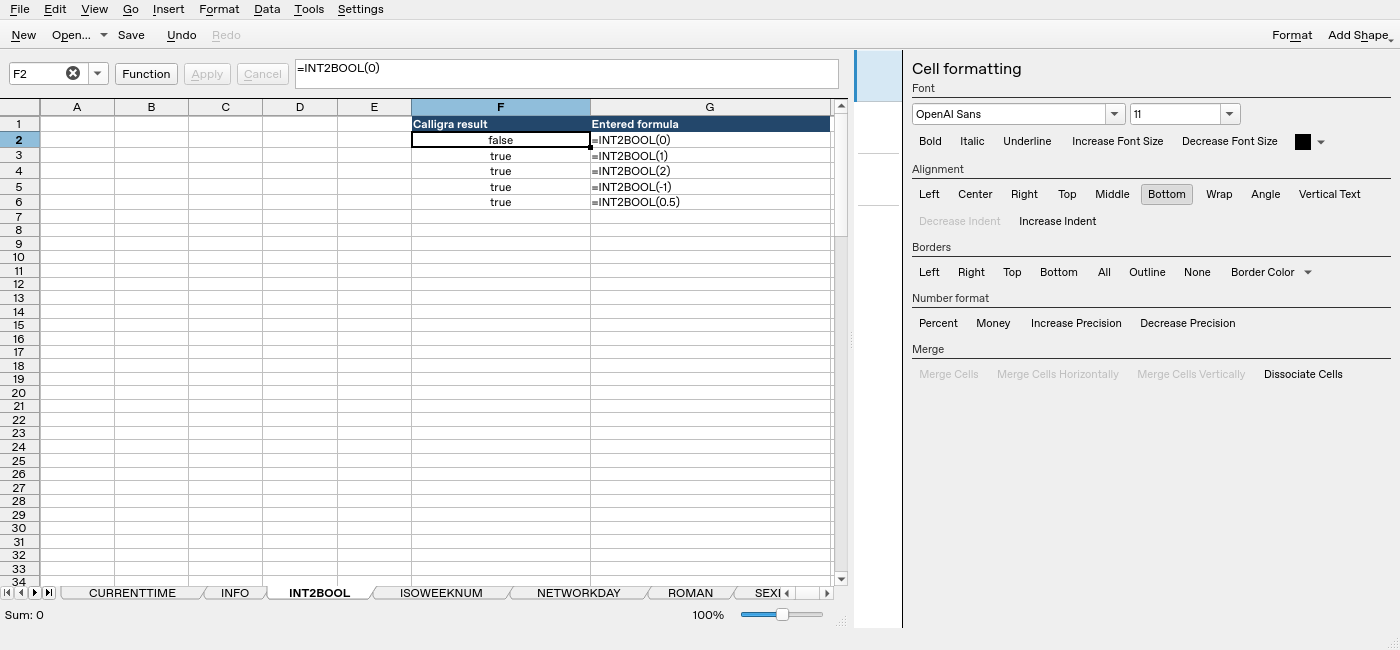
Screenshot: Native 25.04.2 capture with F2 selected. The formula bar shows =INT2BOOL(0); column F contains application results. Column G contains descriptive formula labels, some of which are clipped by the formatting panel.