

ISOWEEKNUM in Calligra Sheets: Inspect Week Numbers and Check Year Boundaries
Learn Calligra Sheets ISOWEEKNUM with exact arguments, reproducible inputs, independently checked results and implementation-specific cautions.
Verification status: See the evidence and test scope described in this guide. How formula examples are checked
Quick answer
ISOWEEKNUM is documented as an ISO-style week-number function, but the inspected Calligra 26.08.2 algorithm has year-boundary discrepancies. Do not assume its output is ISO-compliant merely because of its name. Use the boundary checks below before relying on it for reporting.
Syntax and optional method
=ISOWEEKNUM(date[;method])
The date is required. The released registration accepts one or two arguments, and the implementation defaults method to 2. It accepts integer-converted values 1 or 2 and rejects others with a value error. The handbook presents only the one-argument syntax; the optional method is established by source inspection, not inferred from another spreadsheet.
This guide uses the default method. No universal ISO interpretation is asserted for the alternate method. Construct dates with DATE to avoid locale-dependent text parsing.
Reproduce a boundary audit
- Enter the DATE formulas below in A2:A5.
- Enter
=ISOWEEKNUM(A2)in B2 and fill down. - Compare the returned values with an independent ISO calendar, retaining both the week number and week-year when grouping dates.
| Date formula | Source-derived Calligra expectation | Independent ISO week |
|---|---|---|
=DATE(2025;1;1) |
1 | 1 |
=DATE(2021;1;1) |
1 | 53 of 2020 |
=DATE(2021;1;4) |
2 | 1 of 2021 |
=DATE(2020;12;31) |
1 | 53 of 2020 |
The second column is an implementation-derived prediction. The native checks below confirm the first three dates in 25.04.2; December 31 remains source-derived here. The third was independently checked using Python’s ISO calendar, rather than by copying Calligra’s algorithm. The mismatch is material: combining either output blindly with YEAR(date) can assign records to an incorrect reporting bucket.
Why the source predicts a mismatch
The algorithm anchors its calculation near January 4 and adjusts with the weekday of an adjacent date. For the default method in a year where January 4 falls on Monday, the computed start can shift back a week. It also recalculates late-year values against the following year’s anchor. These branches explain the listed predictions; they do not justify describing them as correct ISO behavior.
The KDE ISOWEEKNUM entry describes ISO weeks as Monday-start weeks whose first week contains the year’s first Thursday. That documented definition is the comparison target, not proof that the current source always implements it correctly.
Practical use: gate a weekly report with control dates
Keep known boundary dates in a separate visible check area alongside the actual report data. Before publishing a weekly summary, compare the application’s returned week numbers with independently established control values. Include a boundary where January 1 belongs to the previous ISO year, and a year with January 4 on Monday.
If those controls disagree, do not relabel the application’s results as ISO weeks. Use a separately verified calendar mapping or another validated calculation for the report. A week number alone is not a unique key: week 1 repeats every year, and the ISO week-year can differ from the ordinary calendar year.
Errors and compatibility
- Invalid dates or method values outside 1–2 return value errors in the inspected function.
- Fractional method values are integer-converted; use explicit integer selectors rather than relying on conversion details.
- A default-method result matching one midyear example does not establish correct behavior at all boundaries.
- WEEKNUM is a different function and may follow another week convention. Substituting it is not an automatic repair.
- Imported workbooks require actual recalculation and control-date checks; cached numbers may hide a difference.
The native checks below reproduce the January 2021 boundary mismatch in 25.04.2. Do not rely on this function as an unqualified ISO reporting solution; validate the dates relevant to your reports in the target build.
Availability and verification
- Release checked: Calligra Sheets 26.08.2, using KDE’s release source package and release information, inspected on October 18, 2026. Relevant locations:
sheets/functions/datetime.cpplines 131–133 and 675–725. - Introduced: The original introduction version is not established by these sources. Current registration establishes presence in 26.08.2, not the first release.
- Lifecycle: Registered in the inspected release; no retirement or deprecation marker was found in this function’s registration. Retirement (removed support) and deprecation (discouraged but retained support) are different claims; neither is asserted here.
- Native testing: Selected cases were observed in Calligra Sheets 25.04.2, as detailed below. The source discussion concerns 26.08.2; unlisted cases remain source-derived or independently calculated.
Related guides and sources
- DATE
- YEAR
- WEEKNUM
- WEEKDAY
- Calligra function guide index
- KDE formula entry instructions, checked October 18, 2026. Examples use leading
=and semicolons, with a period for decimal numbers. Confirm regional separators in your installation before pasting.
Selected native results and screenshot
The following results were observed in Calligra Sheets 25.04.2 using an ODS workbook opened, calculated and saved by the application. The formula text below uses worksheet notation; saved ODF reference brackets are omitted for readability. Unlisted examples and edge cases retain their separate source or mathematical evidence.
| Native formula | Observed display |
|---|---|
=ISOWEEKNUM(DATE(2025;1;1)) |
1.0000000000 |
=ISOWEEKNUM(DATE(2021;1;1)) |
1.0000000000 |
=ISOWEEKNUM(DATE(2021;1;4)) |
2.0000000000 |
=ISOWEEKNUM(DATE(2025;1;1);3) |
#VALUE! |
The January 2021 results are a confirmed compatibility problem in this native build: January 1 returned 1 where ISO assigns week 53 of 2020, and January 4 returned 2 where ISO assigns week 1 of 2021. These observations confirm the source-derived warning above.
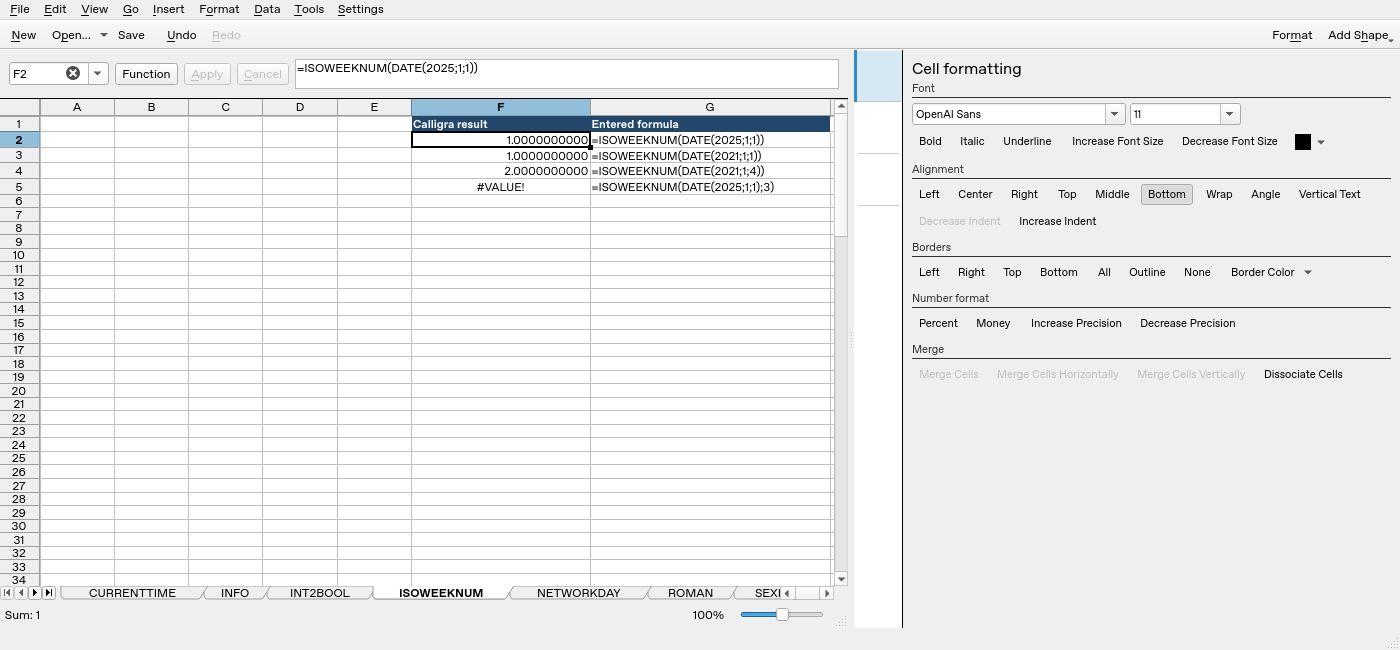
Screenshot: Native 25.04.2 capture with F2 selected. The formula bar shows =ISOWEEKNUM(DATE(2025;1;1)); column F contains application results. Column G contains descriptive formula labels, some of which are clipped by the formatting panel.