

MDETERM in Calligra Sheets: Calculate a Matrix Determinant
Evaluate square-matrix determinants, recognize singular systems and understand numerical and input limits.
Verification status: Consult the documentation, examples and any stated test scope below. How formula examples are checked
Quick answer: MDETERM(matrix) returns the determinant of a square numeric matrix. For the two rows [2, 1] and [1, 1], the determinant is 1, because 2×1 − 1×1 = 1. The function returns one number, not a matrix.
A determinant can help identify a singular coefficient matrix or an area scale in a two-dimensional linear transformation. A nonzero determinant is not a promise that an inverse is numerically reliable: a nearly singular matrix can still be poorly conditioned.
Syntax and dimensions
=MDETERM(matrix)
The one required argument is a square range or matrix-valued expression. There is no optional mode or default range. The source explicitly requires equal row and column counts and at least one row, returning an internal value error otherwise. Input rows and columns are kept in their worksheet order.
Use numeric coefficients without mixed text labels in the range. The implementation converts entries to floating-point rather than enforcing a simple “all text is an error” rule; coercion is not a sensible data-validation strategy for a matrix calculation.
Worked worksheet: test a two-equation coefficient matrix
Consider the equations 2x + y = 7 and x + y = 4. Put only the coefficients into the determinant range:
| Cell | A | B | C |
|---|---|---|---|
| Row 1 | x coefficient | y coefficient | Right side |
| Row 2 | 2 | 1 | 7 |
| Row 3 | 1 | 1 | 4 |
- Enter
=MDETERM(A2:B3)in E2. - Independently expected result: 1.
- Check the arithmetic directly in E3 with
=A2*B3-B2*A3; it also gives 1. - Do not include column C in MDETERM: A2:C3 is a 2×3 augmented matrix, not the square coefficient matrix.
A determinant of 1 says the coefficient matrix is nonsingular in exact arithmetic. The solution is x = 3, y = 1, but MDETERM does not return those unknowns. Use a suitable linear-system method or the separate inverse/product functions for a small illustrative worksheet.
Advanced example: orientation and area scale
For a dimensionless coordinate transformation with rows [1, 2] and [3, 4], the determinant is −2. If the original planar shape has area 6 square metres, the transformed area is |−2| × 6 = 12 square metres. The negative sign describes orientation reversal, not a negative physical area.
Put that matrix in A6:B7, calculate =MDETERM(A6:B7), then =ABS(E6)*6 using its result in E6. These are mathematical model calculations, not a general-purpose CAD area measurement. The interpretation requires that the matrix really be the specified linear coordinate map.
Singular and non-square cases
- Rows [1, 2] and [2, 4] are dependent. Their determinant is 0 because 1×4 − 2×2 = 0.
- A 3×2 range fails the source shape check. Adding more rows does not make a rectangular matrix eligible.
=MDETERM(MUNIT(3))has expected result 1, the determinant of the identity matrix.- A very small nonzero determinant should not be rounded visually to zero and then treated as exact proof of singularity. Conversely, a nonzero floating-point result does not establish a well-conditioned system.
Errors and troubleshooting
A shape error is different from a singular matrix: a valid square singular matrix has determinant 0 rather than an inverse. The determinant computation uses Eigen floating-point operations; there is no fixed maximum-size promise established by this review. Larger matrices can cost more memory and computation, and poorly scaled inputs can magnify numerical issues.
Check that the range excludes labels, includes all intended rows, and preserves matching units in the model. If coefficients have physical units, determinant units depend on the product of those coefficient dimensions; do not automatically label every determinant “square metres.”
Related functions and compatibility
KDE MINVERSE calculates an inverse; KDE MMULT multiplies matrices; KDE MUNIT creates an identity. MDETERM itself produces a scalar and does not require an output array region. Do not borrow another spreadsheet’s error/coercion or dynamic-array rules.
Availability, sources and test scope
Checked October 18, 2026. Original introduction date is unknown. The function is registered in Calligra 26.08.2 source; the relevant mathematics, statistical and information-function source plus numeric engine/converter files are byte-identical in the separately retrieved 25.04.2 source. This establishes source availability in both releases, not an introduction date. Native tests used Calligra Sheets 25.04.2 on Linux, October 18, 2026. The tables below record formulas recalculated in that application and read from its completed saved ODS workbook. Source inspection of 26.08.2 is separate; no native 26.08.2 run is claimed.
Primary references: KDE MDETERM handbook, 26.08.2 function implementation, numeric calculation engine and numeric converter. The handbook is an unversioned living page; the source links identify the inspected release. The native table identifies the exact cases with confirmed application error labels; other source-derived cases are not claimed as runtime tests.
Native verification in Calligra Sheets 25.04.2
The following formulas were recalculated in the actual Linux application on October 18, 2026. Results were checked in the completed native-saved workbook. The screenshot is an unmodified application capture; it is not a simulated worksheet. The model examples above are independent mathematical explanations, and only the formulas below are claimed as executed tests.
Test inputs: H2:I3 contains rows [2, 1] and [1, 1]; H6:I7 contains [1, 2] and [3, 4]; H10:I11 contains the singular rows [1, 2] and [2, 4]; H14:I16 contains [1, 2], [3, 4], [5, 6]. These are the native test coordinates, separate from the illustrative worksheet above.
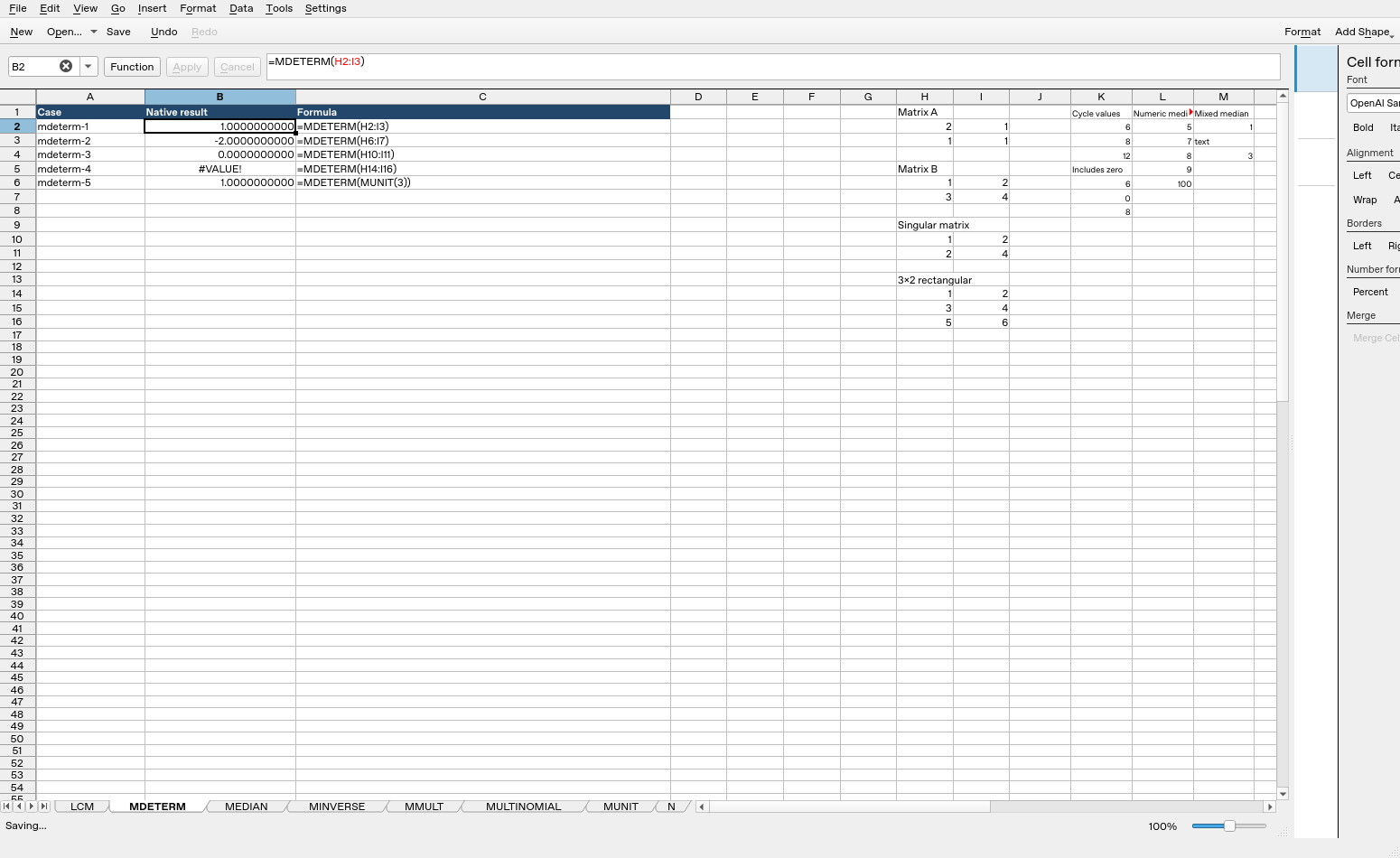
| Formula executed | Native result |
|---|---|
=MDETERM(H2:I3) |
1 |
=MDETERM(H6:I7) |
-2 |
=MDETERM(H10:I11) |
0 |
=MDETERM(H14:I16) |
#VALUE! |
=MDETERM(MUNIT(3)) |
1 |
These observations are specific to the tested release, settings and inputs. They do not establish all coercions, precision limits or cross-application import behavior.