

MEDIAN in Calligra Sheets: Find the Middle Value
Calculate a median for numeric data and check how Calligra handles text, blanks and Boolean values.
Verification status: Consult the documentation, examples and any stated test scope below. How formula examples are checked
Quick answer: =MEDIAN(5;7;8;9;100) has the mathematical result 8. MEDIAN sorts the values conceptually and returns the middle value; with an even count it averages the two middle values. It does not return the middle cell of an unsorted range.
Use a median to describe the center of numeric durations, prices or counts when an extreme observation could pull an arithmetic average away from a typical value. It does not remove outliers, prove a distribution is symmetric or reveal how widely the observations vary.
Syntax and input policy
=MEDIAN(value1; value2; ...)
The registration accepts one or more scalar arguments or ranges. There is no optional percentile or mode. The inspected helper visits each element and converts it to a floating-point value before sorting; it does not contain the common ignore-text-and-blanks filter. Therefore, a clean numeric range is particularly important in Calligra. Numeric zeros are genuine observations, and text/blank coercion can change the sample size and middle position.
Worked worksheet: typical processing time
Enter five processing times in minutes into B2:B6: 5, 7, 8, 9, 100. Put Duration (minutes) in B1, outside the formula’s range.
- Enter
=MEDIAN(B2:B6)in D2. Expected median: 8 minutes. - The sorted sequence is already 5, 7, 8, 9, 100; the third value is 8.
- Enter
=SUM(B2:B6)/5in D3. The independently calculated arithmetic average is 25.8 minutes. - Compare what the two summaries answer: the middle observation is 8, while the long 100-minute case raises the average.
Do not silently delete the 100-minute case just to make the average resemble the median. Investigate whether it is a valid slow job, a recording mistake or a different process.
Even count and an advanced subgroup example
For 2, 4, 8, 10, the middle pair is 4 and 8. =MEDIAN(2;4;8;10) returns an expected 6, even though no observation is 6.
Suppose one team has times [1, 2, 100] and another has [3, 4, 5]. Their medians are 2 and 4; the median of those two medians is 3. The combined six times sort to [1, 2, 3, 4, 5, 100], whose median is 3.5. To report the overall median, combine the underlying observations. Do not average or take the median of subgroup medians and assume it is the pooled answer.
Calligra text, blank and logical-value caveats
| Test data | Source prediction | Why it matters |
|---|---|---|
Numeric values 1 and 3, text text, and one blank in a four-cell range |
0.5 | The helper converts text and blank to zero, so it sorts [0, 0, 1, 3]. |
MEDIAN(1;"text";3) |
1 | Converted sequence is [1, 0, 3], not [1, 3]. |
MEDIAN(TRUE();3;5) |
3 | TRUE is converted to 1 before ordering. |
| No arguments | Internal value error | At least one argument is required. |
These source predictions were confirmed by the native 25.04.2 cases below; they are not generic spreadsheet promises. A blank included by an explicitly selected range can be meaningful even if it looks like unused whitespace. Put labels outside the data range and decide how missing observations should be represented before calculating a median. Do not replace missing measurements with zero unless zero is genuinely measured.
Errors, precision and related functions
The numeric calculation uses floating-point values. For an even sample, the average of the central pair may be fractional even when every input is an integer. Use units appropriate to the data, and round only the final reported result according to a chosen policy.
KDE AVERAGE reports the arithmetic mean; KDE MODE identifies a most frequent value. Neither is synonymous with MEDIAN. Moving a mixed-type range to another spreadsheet can change the result because coercion rules differ; test clean numeric and missing-value cases after transfer.
Availability, sources and test scope
Checked October 18, 2026. Original introduction date is unknown. The function is registered in Calligra 26.08.2 source; the relevant mathematics, statistical and information-function source plus numeric engine/converter files are byte-identical in the separately retrieved 25.04.2 source. This establishes source availability in both releases, not an introduction date. Native tests used Calligra Sheets 25.04.2 on Linux, October 18, 2026. The tables below record formulas recalculated in that application and read from its completed saved ODS workbook. Source inspection of 26.08.2 is separate; no native 26.08.2 run is claimed.
Primary references: KDE MEDIAN handbook, 26.08.2 function implementation, numeric calculation engine and numeric converter. The handbook is an unversioned living page; the source links identify the inspected release. The native table identifies the exact cases with confirmed application error labels; other source-derived cases are not claimed as runtime tests.
Native verification in Calligra Sheets 25.04.2
The following formulas were recalculated in the actual Linux application on October 18, 2026. Results were checked in the completed native-saved workbook. The screenshot is an unmodified application capture; it is not a simulated worksheet. The model examples above are independent mathematical explanations, and only the formulas below are claimed as executed tests.
Native L2:L6 contains 5, 7, 8, 9, 100. M2:M5 contains 1, literal text text, 3 and a genuinely blank cell. The mixed range’s observed 0.5 confirms that these text/blank entries were not ignored in this test.
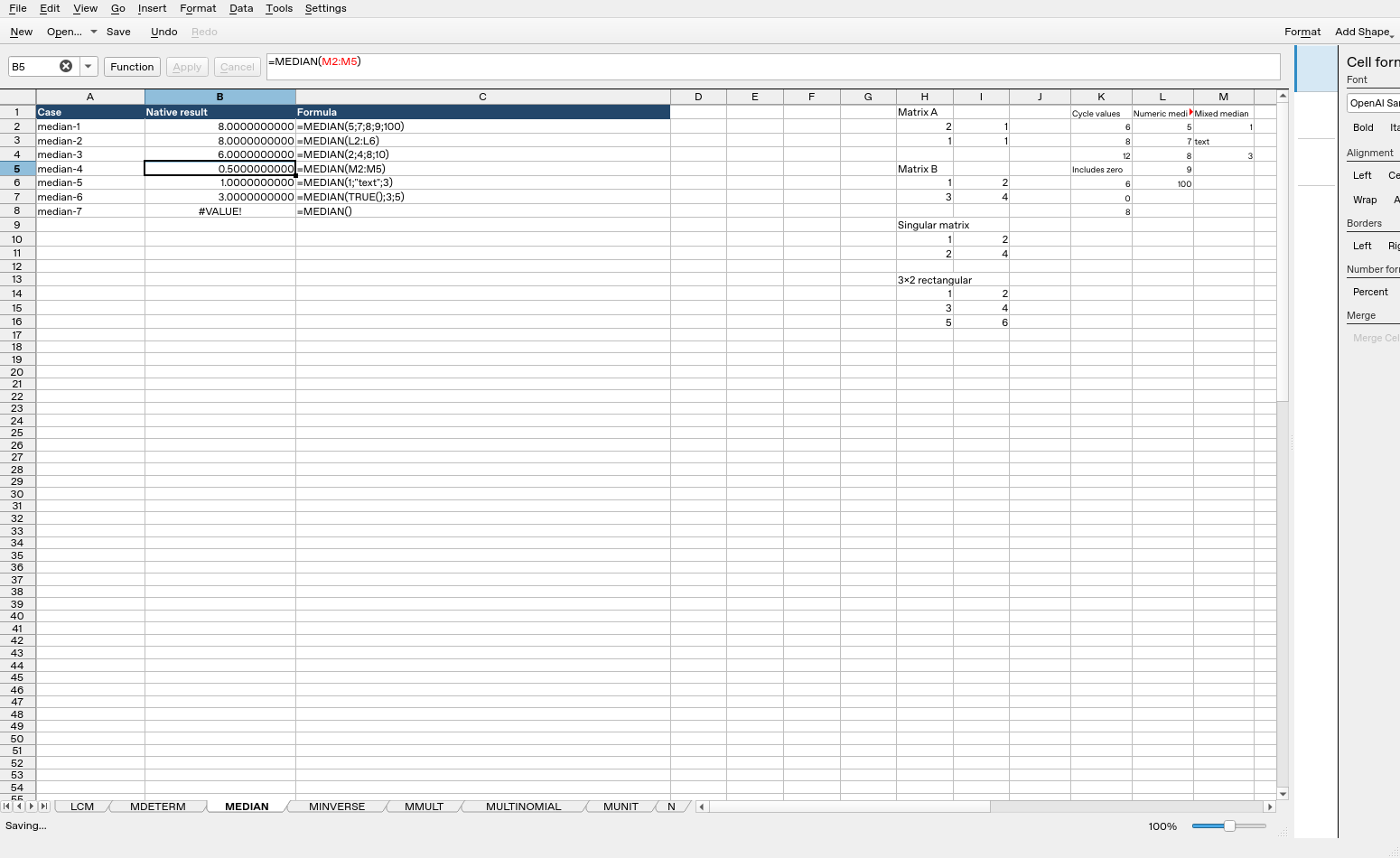
| Formula executed | Native result |
|---|---|
=MEDIAN(5;7;8;9;100) |
8 |
=MEDIAN(L2:L6) |
8 |
=MEDIAN(2;4;8;10) |
6 |
=MEDIAN(M2:M5) |
0.5 |
=MEDIAN(1;"text";3) |
1 |
=MEDIAN(TRUE();3;5) |
3 |
=MEDIAN() |
#VALUE! |
These observations are specific to the tested release, settings and inputs. They do not establish all coercions, precision limits or cross-application import behavior.