

MMULT in Calligra Sheets: Multiply Two Matrices
Multiply compatible matrices with clear row-column order, output dimensions and worked quantities.
Verification status: Consult the documentation, examples and any stated test scope below. How formula examples are checked
Quick answer: MMULT(matrix1; matrix2) performs matrix multiplication. Each output entry is a row of the first matrix dotted with a column of the second. It is not element-by-element multiplication.
For A with rows [2, 1], [1, 1] and B with rows [1, 2], [3, 4], A×B has rows [5, 8], [4, 6]. The upper-left value is 2×1 + 1×3 = 5.
Syntax and dimension rule
=MMULT(matrix1; matrix2)
Both arguments are required numeric ranges or matrix-valued expressions. If the first is m×n and the second is n×p, the result is m×p. The first column count must equal the second row count. The source checks this rule and constructs an internal value error when it fails. There is no default second matrix.
The handbook’s example displays only one matrix argument, but the source registration and function syntax require two. Use the full two-argument formula above. A matrix product usually changes when the arguments are reversed, even if both orders have valid dimensions.
Worked worksheet: costs for two product types
Suppose two products use two ingredients. Rows of A are product types, columns are ingredient quantities per product. Rows of B are ingredient types, columns are two cost scenarios. To keep the arithmetic directly visible, use the following illustrative coefficients:
| Matrix A in A2:B3 | Ingredient 1 per product | Ingredient 2 per product |
|---|---|---|
| Product 1 | 2 | 1 |
| Product 2 | 1 | 1 |
| Matrix B in D2:E3 | Scenario 1 cost per unit | Scenario 2 cost per unit |
|---|---|---|
| Ingredient 1 | 1 | 2 |
| Ingredient 2 | 3 | 4 |
- Reserve G2:H3 for the 2×2 result.
- Enter ordinary scalar formulas in G2:H3: G2
=INDEX(MMULT(A2:B3;D2:E3);1;1), H2=INDEX(MMULT(A2:B3;D2:E3);1;2), G3=INDEX(MMULT(A2:B3;D2:E3);2;1)and H3=INDEX(MMULT(A2:B3;D2:E3);2;2). This is the element-access method verified natively below, with a different illustrative input layout. - Expected output rows are [5, 8] and [4, 6], in currency units per product.
- Check G2 manually: product 1 in scenario 1 costs 2×1 + 1×3 = 5.
- Check H3 manually: product 2 in scenario 2 costs 1×2 + 1×4 = 6.
The columns of A and rows of B must refer to the same ingredients in the same order. Swapping one ingredient order without swapping the corresponding other dimension gives a numerically valid but substantively wrong answer. Label units and dimensions outside the numeric ranges.
Documented array entry and verified element checks
KDE specifies Ctrl+Alt+Enter for displaying the result array across cells. Select the correctly sized clear output area before entry. That shortcut and direct multi-cell output were not verified in this test; the native checks below use scalar INDEX readbacks. Do not assume automatic dynamic spill or another product’s Ctrl+Shift+Enter shortcut.
For an element-level check that does not depend on displaying the full output, =INDEX(MMULT(A2:B3;D2:E3);1;2) has expected value 8. The four row/column combinations give 5, 8, 4 and 6. These scalar checks verify returned matrix elements, not the UI behavior of array entry.
Advanced example: order and inverse checks
Reverse the two matrices: B×A has rows [4, 3] and [10, 7], unlike A×B. For example, its upper-left value is 1×2 + 2×1 = 4. Multiplication order is part of the calculation, not formatting.
If A is invertible, MMULT(A;MINVERSE(A)) should approximate the identity. For A above, the (2;2) entry is 1, and the two off-diagonal entries should be near zero. Checking just the diagonal is insufficient to verify a general identity matrix.
Errors and troubleshooting
- A 2×2 matrix multiplied by a 3×2 matrix has incompatible inner dimensions (2 versus 3) and fails the source check.
- A 3×2 matrix multiplied by a 2×2 matrix is dimensionally valid and returns 3×2, illustrating why order matters.
- The output region must be large enough for all rows and columns. A single displayed result may be only the first element.
- Text or blanks in input ranges can pass through numeric conversion. Prepare a fully numeric matrix; do not rely on a presumed automatic text error.
- Units must cancel or combine meaningfully in each summed product. Adding quantities with incompatible dimensions is a model error even if MMULT returns numbers.
No universal precision bound or maximum matrix size is asserted here. The source uses Eigen’s floating-point matrix multiplication. Large or ill-scaled products may need explicit error analysis.
Related functions and compatibility
KDE MINVERSE provides an inverse, KDE MUNIT an identity matrix, and KDE MDETERM a scalar determinant. Ordinary * is not a substitute for the row-column matrix product. Test both numeric results and array-entry layout after moving workbooks between applications.
Availability, sources and test scope
Checked October 18, 2026. Original introduction date is unknown. The function is registered in Calligra 26.08.2 source; the relevant mathematics, statistical and information-function source plus numeric engine/converter files are byte-identical in the separately retrieved 25.04.2 source. This establishes source availability in both releases, not an introduction date. Native tests used Calligra Sheets 25.04.2 on Linux, October 18, 2026. The tables below record formulas recalculated in that application and read from its completed saved ODS workbook. Source inspection of 26.08.2 is separate; no native 26.08.2 run is claimed.
Primary references: KDE MMULT handbook, 26.08.2 function implementation, numeric calculation engine and numeric converter. The handbook is an unversioned living page; the source links identify the inspected release. The native table identifies the exact cases with confirmed application error labels; other source-derived cases are not claimed as runtime tests.
Array-entry instruction source: KDE matrix function description. This documentation is not itself proof of a successful multi-cell entry in a running application.
Native verification in Calligra Sheets 25.04.2
The following formulas were recalculated in the actual Linux application on October 18, 2026. Results were checked in the completed native-saved workbook. The screenshot is an unmodified application capture; it is not a simulated worksheet. The model examples above are independent mathematical explanations, and only the formulas below are claimed as executed tests.
Array-test boundary: all four 2×2 elements were verified through separate INDEX formulas. Successful direct array entry, automatic spill and the Ctrl+Alt+Enter workflow were not established. The screenshot therefore demonstrates scalar element readbacks, not a multi-cell array output.
Test inputs: H2:I3 contains rows [2, 1] and [1, 1]; H6:I7 contains [1, 2] and [3, 4]; H10:I11 contains the singular rows [1, 2] and [2, 4]; H14:I16 contains [1, 2], [3, 4], [5, 6]. These are the native test coordinates, separate from the illustrative worksheet above.
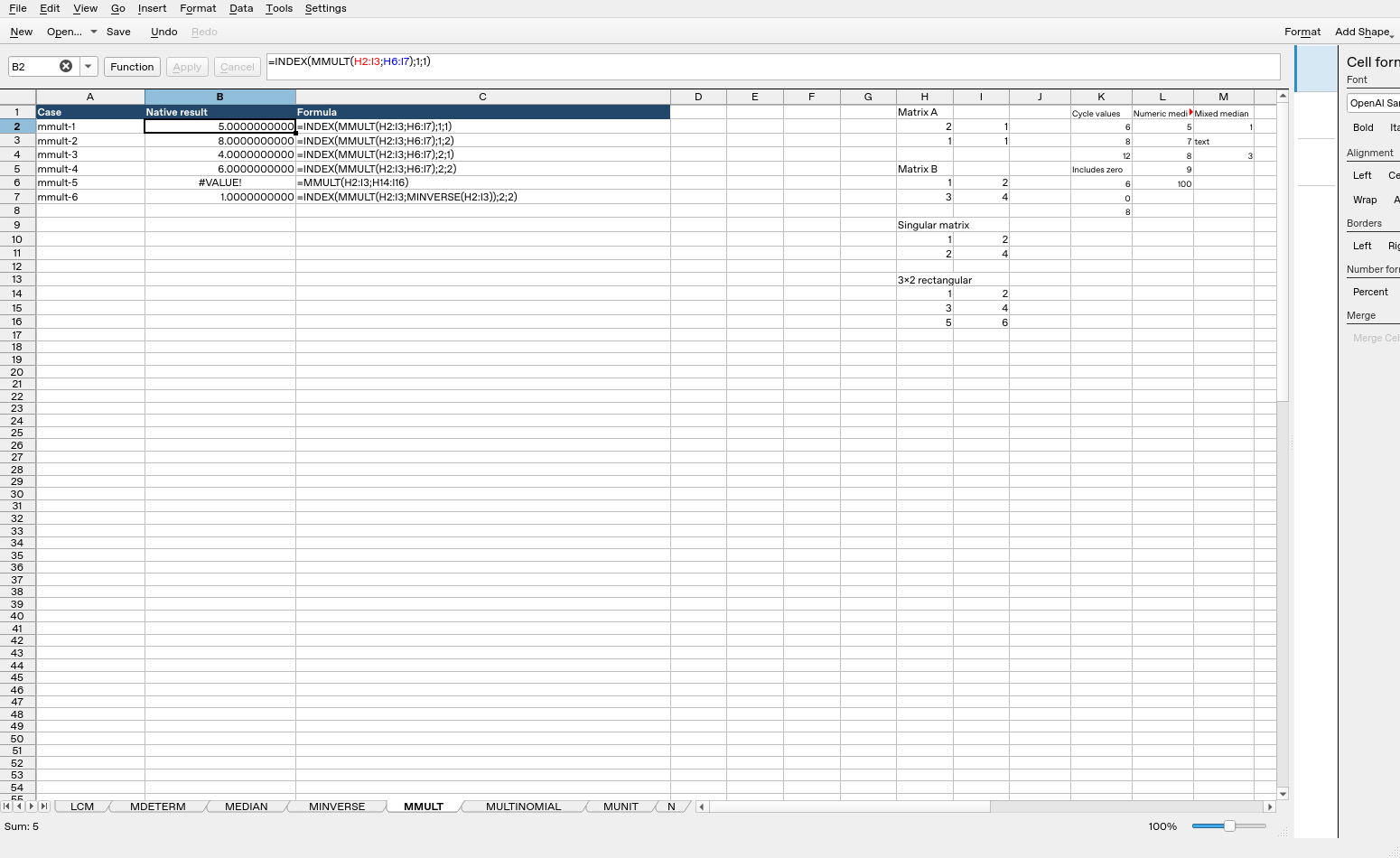
| Formula executed | Native result |
|---|---|
=INDEX(MMULT(H2:I3;H6:I7);1;1) |
5 |
=INDEX(MMULT(H2:I3;H6:I7);1;2) |
8 |
=INDEX(MMULT(H2:I3;H6:I7);2;1) |
4 |
=INDEX(MMULT(H2:I3;H6:I7);2;2) |
6 |
=MMULT(H2:I3;H14:I16) |
#VALUE! |
=INDEX(MMULT(H2:I3;MINVERSE(H2:I3));2;2) |
1 |
These observations are specific to the tested release, settings and inputs. They do not establish all coercions, precision limits or cross-application import behavior.