

MULTINOMIAL in Calligra Sheets: Count Arrangements of Repeated Items
Count distinct arrangements using category counts, with factorial limits and Calligra input caveats.
Verification status: Consult the documentation, examples and any stated test scope below. How formula examples are checked
Quick answer: =MULTINOMIAL(2;1;1) has the independently expected result 12. It counts distinct orderings of four positions containing two identical items of one category and one item from each of two other categories: 4! ÷ (2!×1!×1!) = 12.
The inputs are category counts, not probabilities and not the individual items themselves. For a valid counting problem, each count must be a nonnegative integer. Calligra’s implementation does not reliably enforce that mathematical domain, so validate it yourself rather than assuming invalid inputs will return an error.
Syntax, defaults and factorial interpretation
=MULTINOMIAL(count1; count2; ...)
The source accepts one or more arguments. None has a default. For counts a, b, c, the calculation is (a+b+c)! / (a!b!c!). A single valid count gives 1; zero counts are permitted because 0! = 1. The counts must describe mutually distinguishable categories whose items are interchangeable within each category.
The XML help labels the input as accepting a range, but the source registration does not enable range aggregation in the same way as functions such as LCM. Until a specific range call is natively verified, use explicit scalar counts such as =MULTINOMIAL(B2;B3;B4), not an assumed MULTINOMIAL(B2:B4) replacement.
Worked worksheet: arrange colored tokens
You have two red tokens, one blue token and one green token. Tokens of the same color are indistinguishable.
| Cell | A: category | B: count |
|---|---|---|
| Row 2 | Red | 2 |
| Row 3 | Blue | 1 |
| Row 4 | Green | 1 |
- Enter
=MULTINOMIAL(B2;B3;B4)in D2. - Expected result: 12 distinct sequences.
- Check the arithmetic: four labeled distinct tokens would have 4! = 24 permutations, but swapping the two identical red tokens does not create a different color sequence. Divide by 2! to obtain 12.
- Changing red count to 3 changes the total count and denominator; recompute rather than scaling the prior result linearly.
If individual red tokens have serial numbers that matter, they are no longer indistinguishable for this counting question. Choose categories that match what constitutes a distinct arrangement.
Advanced example: larger category counts
For category counts 3, 4 and 5, =MULTINOMIAL(3;4;5) has expected value 27720. There are 12 total positions, so the calculation is 12!/(3!×4!×5!). This result is a count, not a probability. A probability model additionally requires outcomes and probabilities; the multinomial coefficient alone does not supply them.
=MULTINOMIAL(0;0) gives a mathematical result of 1, representing the single empty arrangement. =MULTINOMIAL(5) also gives 1, because five identical items have only one order when category alone matters.
Calligra fractional and negative-input traps
The implementation computes the sum of the original arguments, applies factorial to that sum, and separately applies factorial to each argument in the denominator. The factorial conversion turns its input into an integer. Consequently, fractional inputs do not necessarily behave like “truncate each count, then calculate a multinomial.”
For MULTINOMIAL(1.5;2.5), the source predicts 4!/(1!×2!) = 12, while first truncating the counts to 1 and 2 would give 3!/(1!×2!) = 3. Neither is a valid count for fractional items; the discrepancy is a reason to reject the inputs, not a useful extension.
For MULTINOMIAL(-1;2), the factorial helper returns −1 for the negative argument, and the source predicts −0.5. A negative fractional arrangement count is mathematically invalid. Do not present a returned numeric result as proof that the inputs were accepted meaningfully.
Limits, errors and troubleshooting
- Validate every count as a nonnegative integer before calculation.
- Factorials grow rapidly. Intermediate factorials can overflow even where a rearranged or logarithmic method could produce a useful answer. This guide does not promise arbitrary-precision counts or a universal safe maximum.
- A rounded display can conceal the loss of integer precision at large magnitudes. Do not use many displayed digits as evidence of exact combinatorial arithmetic.
- Numeric-looking text, blank cells and range inputs have conversion/array behavior outside the ordinary count examples; prefer explicit numeric counts.
- No-argument calls violate the one-or-more-argument registration.
Related functions and compatibility
KDE FACT calculates a factorial. KDE COMBIN counts selections of a fixed size and answers a different question from arranging categories.
The source registers COM.SUN.STAR.SHEET.ADDIN.ANALYSIS.GETMULTINOMIAL as an alternate name for the same function. That does not guarantee another application shares Calligra’s fractional or negative-input behavior. Use the valid integer domain for portable counting models.
Availability, sources and test scope
Checked October 18, 2026. Original introduction date is unknown. The function is registered in Calligra 26.08.2 source; the relevant mathematics, statistical and information-function source plus numeric engine/converter files are byte-identical in the separately retrieved 25.04.2 source. This establishes source availability in both releases, not an introduction date. Native tests used Calligra Sheets 25.04.2 on Linux, October 18, 2026. The tables below record formulas recalculated in that application and read from its completed saved ODS workbook. Source inspection of 26.08.2 is separate; no native 26.08.2 run is claimed.
Primary references: KDE MULTINOMIAL handbook, 26.08.2 function implementation, numeric calculation engine and numeric converter. The handbook is an unversioned living page; the source links identify the inspected release. The native table identifies the exact cases with confirmed application error labels; other source-derived cases are not claimed as runtime tests.
Native verification in Calligra Sheets 25.04.2
The following formulas were recalculated in the actual Linux application on October 18, 2026. Results were checked in the completed native-saved workbook. The screenshot is an unmodified application capture; it is not a simulated worksheet. The model examples above are independent mathematical explanations, and only the formulas below are claimed as executed tests.
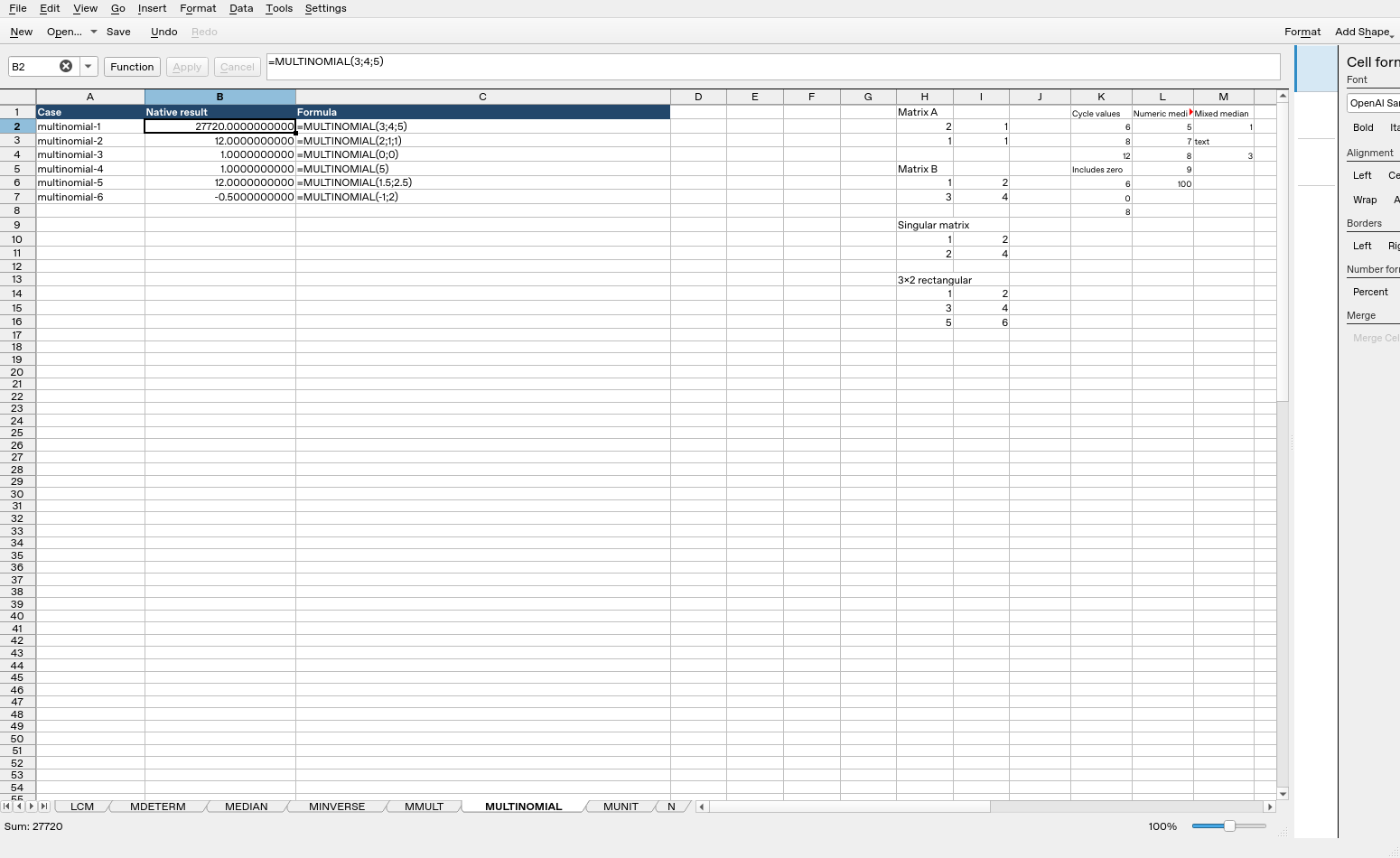
| Formula executed | Native result |
|---|---|
=MULTINOMIAL(3;4;5) |
27720 |
=MULTINOMIAL(2;1;1) |
12 |
=MULTINOMIAL(0;0) |
1 |
=MULTINOMIAL(5) |
1 |
=MULTINOMIAL(1.5;2.5) |
12 |
=MULTINOMIAL(-1;2) |
-0.5 |
These observations are specific to the tested release, settings and inputs. They do not establish all coercions, precision limits or cross-application import behavior.