

MUNIT in Calligra Sheets: Create an Identity Matrix
Create a square identity matrix and verify its diagonal, off-diagonal and multiplication properties.
Verification status: Consult the documentation, examples and any stated test scope below. How formula examples are checked
Quick answer: MUNIT(2) creates a 2×2 identity matrix with rows [1, 0] and [0, 1]. The ones are on the main diagonal; every other entry is zero. It does not create a matrix filled entirely with ones.
An identity matrix leaves a compatible matrix unchanged under multiplication. It is useful for testing a matrix inverse, initializing a neutral linear transformation, or constructing diagonal adjustments.
Syntax and dimension
=MUNIT(dimension)
Exactly one argument is required. It specifies both the row count and the column count of the square result. There is no default dimension or separate second dimension. Use a positive integer: dimension 2 gives four cells, dimension 3 gives nine cells.
The source converts the argument to an integer and rejects a resulting value below 1 with an internal value error. This is a conversion step, not strict validation that the original argument was an integer. A fractional size may be truncated; choose an integer deliberately instead of relying on that behavior.
Worked worksheet: create and inspect a 2×2 identity
- Enter
Dimensionin A1 and 2 in B1. - Reserve a clear D2:E3 output area.
- Enter ordinary scalar formulas: D2
=INDEX(MUNIT(B1);1;1), E2=INDEX(MUNIT(B1);1;2), D3=INDEX(MUNIT(B1);2;1)and E3=INDEX(MUNIT(B1);2;2). The native checks below verify this element-access method with dimension 2 entered literally. - Expected cells: D2 = 1, E2 = 0, D3 = 0, E3 = 1.
- Check all four entries. A single visible 1 is not proof that the whole identity has been displayed.
The element formula =INDEX(MUNIT(2);1;2) should return 0, while =INDEX(MUNIT(2);2;2) should return 1. The INDEX row comes before its column. These are scalar inspections of a returned matrix, not proof of native multi-cell entry.
Optional documented array entry in Calligra
KDE’s help specifies Ctrl+Alt+Enter to show array elements in separate cells. Select an appropriately sized clear region before entering the matrix formula, but note that direct multi-cell output and the keyboard shortcut were not verified here. The native tests below use scalar INDEX formulas. Do not assume an Excel-style dynamic spill or type array braces manually.
If you change the dimension after setting up an output region, check its size again. A 3×3 identity needs nine cells; a 2×2 reserved region is not a complete display of it. Avoid overwriting nearby work when expanding an output.
Advanced example: verify a neutral transformation
Put a numeric matrix A with rows [2, 1] and [1, 1] in A5:B6. Both MMULT(A5:B6;MUNIT(2)) and MMULT(MUNIT(2);A5:B6) have expected rows [2, 1] and [1, 1]. The multiplication dimensions must still match; an identity of the wrong size does not make a product valid.
A second independent check is =MDETERM(MUNIT(3)), whose expected result is 1. The inverse of an identity is also the same identity. These properties make a small identity a useful diagnostic input for matrix formulas.
For a diagonal adjustment, the expression A + λI changes only the diagonal entries when the application evaluates the arrays elementwise. The mathematics is useful, but that array-addition expression was not part of the native tests here; do not infer tested spreadsheet entry behavior from the algebra alone.
Errors, coercion and resource limits
| Input | Source prediction | Advice |
|---|---|---|
MUNIT(0) |
Internal value error | A zero-dimensional output is not supported by this function. |
MUNIT(-1) |
Internal value error | Use a positive dimension. |
MUNIT(2.9) |
Integer conversion predicts a 2×2 result | Enter 2 explicitly if that is the intended size. |
| Very large dimension | Nested loops allocate a square array; no explicit upper cap is shown in this function | Keep dimensions small and appropriate to memory and worksheet size. |
Doubling the dimension quadruples the number of output cells. The absence of a small source limit is not a recommendation to test very large dimensions. This guide’s native fixture uses sizes no larger than 3.
Related functions and compatibility
KDE MINVERSE and KDE MMULT can be checked against an identity. KDE MDETERM returns its determinant. MUNIT produces dimensionless coefficients; it does not attach physical units or infer a model from its size. Check matrix-entry behavior and fractional-input handling separately when moving between spreadsheet applications.
Availability, sources and test scope
Checked October 18, 2026. Original introduction date is unknown. The function is registered in Calligra 26.08.2 source; the relevant mathematics, statistical and information-function source plus numeric engine/converter files are byte-identical in the separately retrieved 25.04.2 source. This establishes source availability in both releases, not an introduction date. Native tests used Calligra Sheets 25.04.2 on Linux, October 18, 2026. The tables below record formulas recalculated in that application and read from its completed saved ODS workbook. Source inspection of 26.08.2 is separate; no native 26.08.2 run is claimed.
Primary references: KDE MUNIT handbook, 26.08.2 function implementation, numeric calculation engine and numeric converter. The handbook is an unversioned living page; the source links identify the inspected release. The native table identifies the exact cases with confirmed application error labels; other source-derived cases are not claimed as runtime tests.
Array-entry instruction source: KDE matrix function description. This documentation is not itself proof of a successful multi-cell entry in a running application.
Native verification in Calligra Sheets 25.04.2
The following formulas were recalculated in the actual Linux application on October 18, 2026. Results were checked in the completed native-saved workbook. The screenshot is an unmodified application capture; it is not a simulated worksheet. The model examples above are independent mathematical explanations, and only the formulas below are claimed as executed tests.
Array-test boundary: all four 2×2 elements were verified through separate INDEX formulas. Successful direct array entry, automatic spill and the Ctrl+Alt+Enter workflow were not established. The screenshot therefore demonstrates scalar element readbacks, not a multi-cell array output.
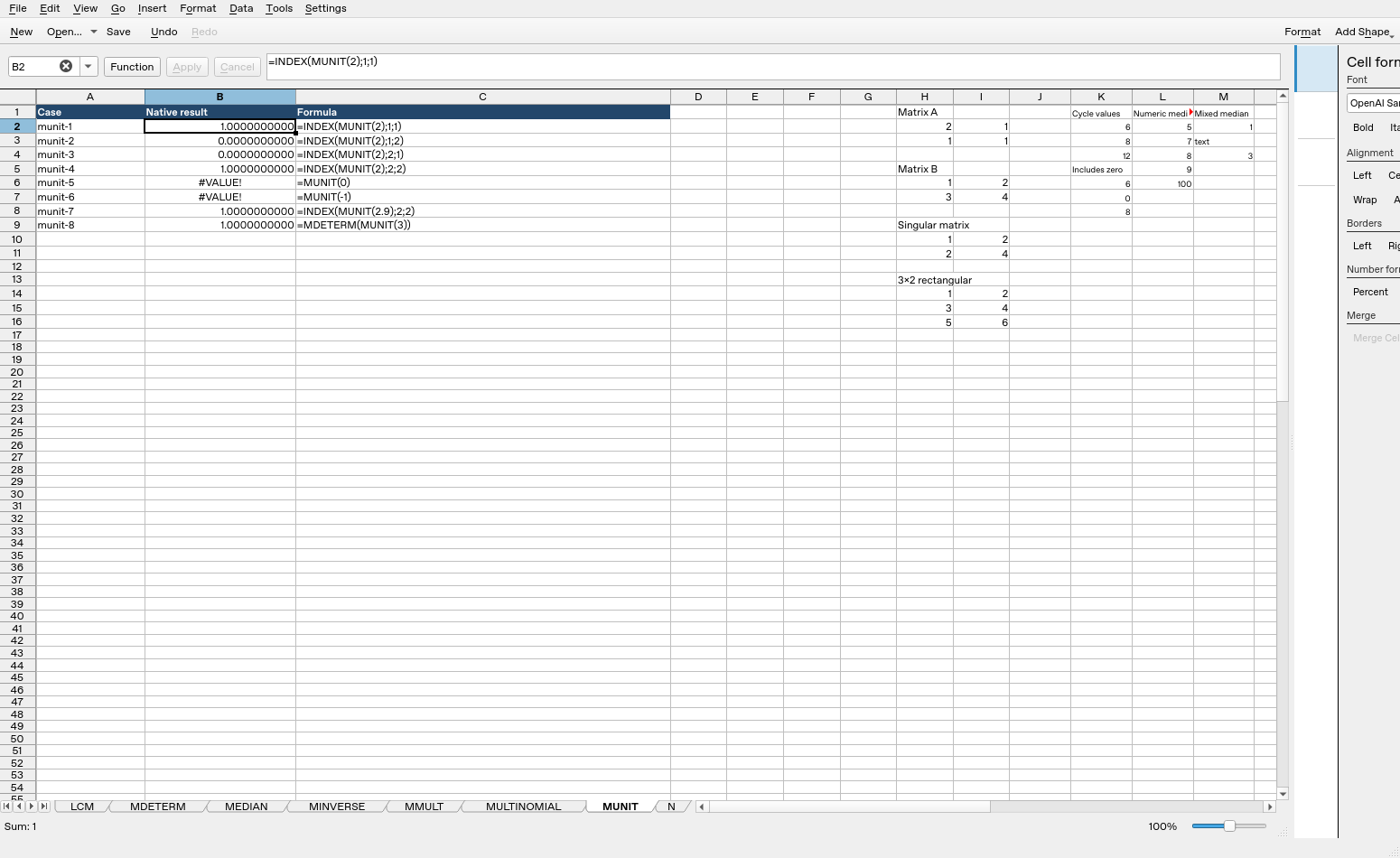
| Formula executed | Native result |
|---|---|
=INDEX(MUNIT(2);1;1) |
1 |
=INDEX(MUNIT(2);1;2) |
0 |
=INDEX(MUNIT(2);2;1) |
0 |
=INDEX(MUNIT(2);2;2) |
1 |
=MUNIT(0) |
#VALUE! |
=MUNIT(-1) |
#VALUE! |
=INDEX(MUNIT(2.9);2;2) |
1 |
=MDETERM(MUNIT(3)) |
1 |
These observations are specific to the tested release, settings and inputs. They do not establish all coercions, precision limits or cross-application import behavior.