

NEGBINOMDIST in Calligra Sheets: Count Failures Before a Success Target
Calculate exact negative-binomial probabilities and distinguish failures from total trials.
Verification status: Consult the documentation, examples and any stated test scope below. How formula examples are checked
Quick answer: =NEGBINOMDIST(2;5;0.55) has an independently calculated result of 0.152872628906, or about 15.29%. It is the probability of exactly 2 failures before the 5th success, when independent trials have constant success probability 0.55.
The total number of trials in that event is 2 + 5 = 7, and the final trial must be a success. This is not the probability of five successes in any order among seven unrestricted trials; the stopping rule matters.
Syntax and valid counting inputs
=NEGBINOMDIST(failures; successes; probability)
All three arguments are required; there is no cumulative flag or default. For the usual counting model:
- failures is a nonnegative integer;
- successes is a strictly positive integer target;
- probability is the constant chance of success on each independent trial, between 0 and 1.
For failures x and success target r, the point probability is C(x+r−1, x) × pʳ × (1−p)ˣ. The combinatorial term arranges the first x+r−1 trials, after which the final success completes the target. The result is a dimensionless probability, not an expected number of attempts.
Worked worksheet: successful operations before a stopping point
Suppose a repeatable operation succeeds with probability 0.55 on each independent attempt, and the process stops when it has five successes.
- Put 2 in A2 labeled
Failures before target. - Put 5 in B2 labeled
Success target. - Put 0.55 in C2 labeled
Success probability. - Enter
=NEGBINOMDIST(A2;B2;C2)in D2. - Expected D2 is 0.152872628906. Format as a percentage for 15.29%.
- In E2 enter
=A2+B2; the event consists of 7 attempts, with the last one successful.
The model requires stable success probability and independent attempts. Learning effects, wear, changing conditions or correlated failures can make it unsuitable.
Advanced example: zero failures and cumulative events
=NEGBINOMDIST(0;3;0.5) has expected probability 0.125: the first three trials all succeed, giving 0.5³. No failure needs to occur before the target.
To calculate at most two failures before five successes, add the probabilities for 0, 1 and 2 failures. For example, use three rows with those failure counts and sum their NEGBINOMDIST results. Do not add a fourth “cumulative” argument; this function is registered with exactly three arguments. A sum over a few explicit cases is transparent, but very long sums may be better handled by a numerically robust cumulative-distribution tool.
Calligra-specific fractional and zero-target behavior
The source converts failures and successes to floating-point values; it does not enforce the integer types described in the handbook. Its multiplication loop runs while an integer-stepped loop variable is less than failures. Thus a positive fractional failure count can effectively cause an extra iteration rather than truncation: NEGBINOMDIST(1.5;2;0.5) is source-predicted to return 0.1875, the same loop count as two failures.
This is an implementation effect, not a valid probability for “one and a half failures.” Fractional success targets are also not rejected by the simple guard. Although noninteger negative-binomial shapes can be mathematically defined in other contexts, this worksheet guide does not claim Calligra implements that broader model reliably.
The source permits a zero success target, but the ordinary stop-on-rth-success interpretation requires r ≥ 1. Validate this explicitly. A numeric return alone is not evidence of valid trial counts.
Import caution in the tested release
An ODS import in the tested 25.04.2 build changed the formula name from NEGBINOMDIST to -BINOMDIST. Those changed formulas do not test the requested function. Entering the full =NEGBINOMDIST(...) formula directly into the application worked, and the saved formula retained the correct name. After opening or reopening an imported workbook, inspect the formula bar; if the name has changed, re-enter the intended formula and verify its result. The successful observations below use direct entry, and unchanged ODS reopening is not guaranteed by these tests.
Errors, boundaries and related functions
Negative failures or successes, or probability outside [0,1], construct an internal value error. With positive success target and p = 1, any positive failure count has probability zero. With p = 0, no finite sequence can achieve the positive success target; the source returns zero for the tested positive-target case.
See KDE BINOMDIST for a fixed total number of trials and KDE POISSON for interval counts. Validate integer inputs before transferring formulas: another spreadsheet may reject or truncate inputs that Calligra’s loop handles differently.
Availability, sources and evidence scope
Checked October 18, 2026. Original introduction date is unknown. NEGBINOMDIST is registered in both inspected source versions, Calligra 25.04.2 and 26.08.2. Their relevant statistical-function, calculation-engine and converter source files are byte-identical. Version inspection establishes availability in those releases, not a first-introduction date or a runtime guarantee for every platform.
Primary sources: KDE NEGBINOMDIST handbook, 26.08.2 implementation, 25.04.2 statistical functions, and numeric converter. Mathematical values above are independent calculations. Native observations below were obtained in Calligra Sheets 25.04.2 on Linux, October 18, 2026; no native 26.08.2 execution is claimed. The handbook is a living reference and can differ from the pinned implementation at the explicitly described boundaries.
Native verification in Calligra Sheets 25.04.2
The following formula results were obtained in the actual application and checked in its completed native-saved workbook. The screenshot is an unmodified application capture. The values in this table are native results; the earlier reference values and model calculations remain separately identified. Small final-digit differences do not make the independent reference a native observation.
All eight formulas below were entered directly into the native formula bar after the import-name issue described above. Formula text as well as the saved result was verified.
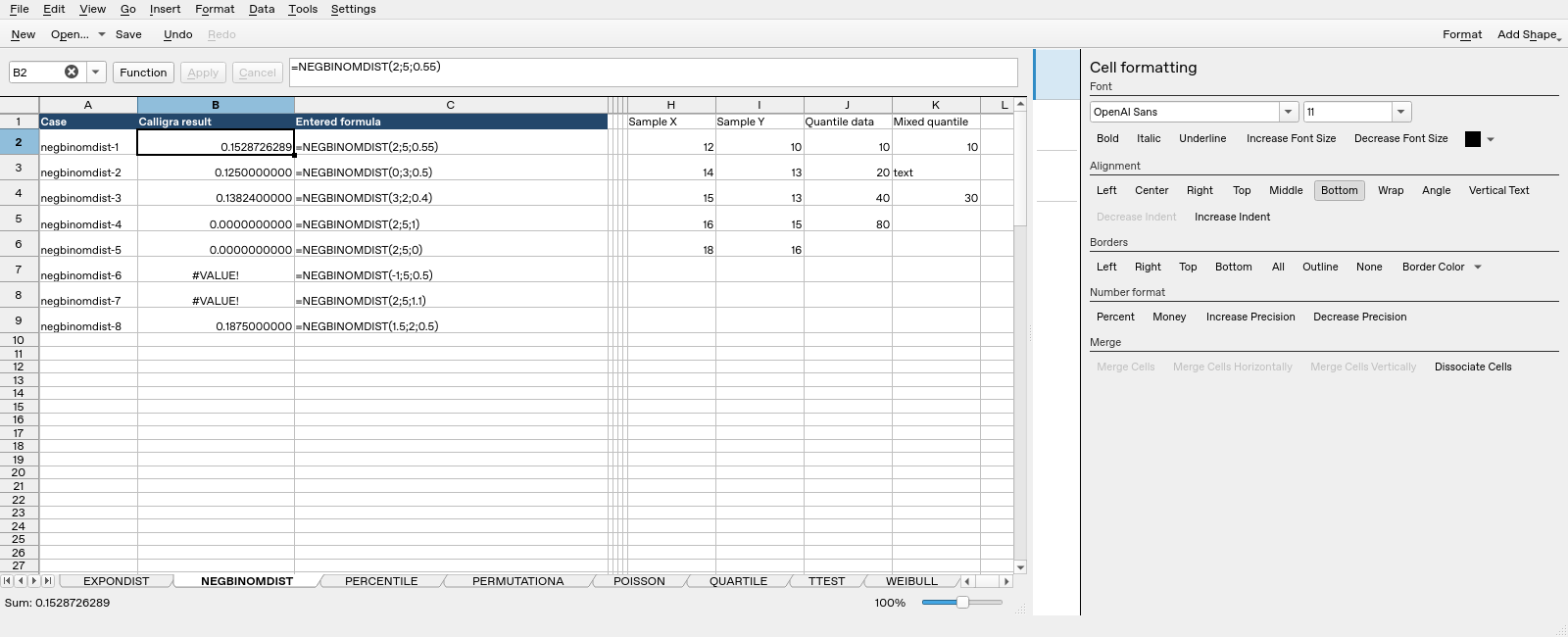
| Formula executed | Native saved result |
|---|---|
=NEGBINOMDIST(2;5;0.55) |
0.15287262890625 |
=NEGBINOMDIST(0;3;0.5) |
0.125 |
=NEGBINOMDIST(3;2;0.4) |
0.13824 |
=NEGBINOMDIST(2;5;1) |
0 |
=NEGBINOMDIST(2;5;0) |
0 |
=NEGBINOMDIST(-1;5;0.5) |
#VALUE! |
=NEGBINOMDIST(2;5;1.1) |
#VALUE! |
=NEGBINOMDIST(1.5;2;0.5) |
0.1875 |
The completed saved values, including error text, determine this table; display rounding can show fewer digits. These tests do not establish all locales, input types, extreme numerical ranges or cross-application import behavior.