

NETWORKDAY in Calligra Sheets: Count Weekdays With Calligra-Specific Endpoints
Learn Calligra Sheets NETWORKDAY with exact arguments, reproducible inputs, independently checked results and implementation-specific cautions.
Verification status: See the evidence and test scope described in this guide. How formula examples are checked
Quick answer
NETWORKDAY counts working weekdays between dates, with behavior that differs from the inclusive NETWORKDAYS convention users may expect from other spreadsheets. In the inspected source, the start date is considered and the end date is excluded. Read the holiday and reverse-interval cautions before using it in a report.
Syntax and argument meanings
=NETWORKDAY(start_date;end_date[;holidays])
The first two dates are required. With no third argument, no holiday adjustment is applied. Saturday and Sunday are excluded by the loop; there is no weekend-mask argument.
The optional third argument has several source paths: a numeric value is treated as a count to subtract, a string is parsed as a single holiday date, and an array has a separate holiday-loading path. This guide recommends neither a numeric date serial nor a holiday range as an interchangeable substitute. The array path has indexing/context concerns and remains outside the worked examples.
The function is singular NETWORKDAY. The apparent long GETNETWORKDAYS alternate-name line in the source is commented out, so it is not evidence of an active alias.
Reproduce endpoint behavior
Enter each formula in a separate cell:
| Formula | Source-derived expected result |
|---|---|
=NETWORKDAY(DATE(2025;1;6);DATE(2025;1;10)) |
4 |
=NETWORKDAY(DATE(2025;1;6);DATE(2025;1;13)) |
5 |
=NETWORKDAY(DATE(2025;1;6);DATE(2025;1;6)) |
0 |
=NETWORKDAY(DATE(2025;1;10);DATE(2025;1;6)) |
4 |
January 6, 2025 is Monday. The first case visits Monday through Thursday and stops before Friday, so it counts four. The second visits a full Monday-to-Sunday interval and counts five. Equal dates run no loop. The reverse interval visits Friday, Thursday, Wednesday and Tuesday, still incrementing a positive count before reaching the excluded Monday endpoint.
These are independently enumerated calendar expectations compared with the implementation, with selected native checks reported below. Do not turn the reverse result into a signed duration by assumption; the loop changes traversal direction without negating the count.
Advanced case: subtract a known adjustment count
For the January 6-to-13 interval above:
=NETWORKDAY(DATE(2025;1;6);DATE(2025;1;13);1)
The source-derived expectation is 4: five weekdays minus one adjustment. This is a count adjustment, not identification of which day was a holiday. You must establish that the adjustment refers to a counted weekday and has not already been applied elsewhere.
Supplying DATE(2025;1;8) as a numeric third argument would enter the numeric-count branch, not the text-date branch. That can subtract a large spreadsheet serial number. Avoid using the familiar date-looking display as evidence that this argument has the intended type.
For a practical schedule, record the interval convention and adjustment separately next to the result. If a business process needs inclusive endpoints, signed reverse results or an audited holiday list, do not silently treat this formula as satisfying those requirements.
Errors and limits
- Invalid date conversions are rejected; DATE expressions reduce ambiguous text parsing.
- A negative numeric adjustment is rejected with a value error in the source.
- A large nonnegative adjustment can make the count negative. The code does not establish that it corresponds to valid holidays inside the interval.
- The loop excludes the end date even when it is a weekday. Adding one indiscriminately does not fix all cases because the endpoint may be a weekend or holiday.
- The optional array path is not covered by these expectations. No universal guarantee for range holiday exclusion is made here.
- Very long intervals use day-by-day traversal in this implementation, rather than an established constant-time formula.
Compatibility
The KDE NETWORKDAY entry describes working-day counting, but its holiday prose is not sufficient to infer the source behavior above. The current source subtracts a numeric adjustment. Another program’s NETWORKDAYS or holiday-range syntax must be compared explicitly, including endpoint inclusivity and reverse-range signs, before replacing a formula.
Availability and verification
- Release checked: Calligra Sheets 26.08.2, using KDE’s release source package and release information, inspected on October 18, 2026. Relevant locations:
sheets/functions/datetime.cpplines 148–152 and 1013–1103. - Introduced: The original introduction version is not established by these sources. Current registration establishes presence in 26.08.2, not the first release.
- Lifecycle: Registered in the inspected release; no retirement or deprecation marker was found in this function’s registration. Retirement (removed support) and deprecation (discouraged but retained support) are different claims; neither is asserted here.
- Native testing: Selected cases were observed in Calligra Sheets 25.04.2, as detailed below. The source discussion concerns 26.08.2; unlisted cases remain source-derived or independently calculated.
Related guides and sources
- DATE
- WEEKDAY
- DAYS
- Calligra function guide index
- KDE formula entry instructions, checked October 18, 2026. Examples use leading
=and semicolons, with a period for decimal numbers. Confirm regional separators in your installation before pasting.
Selected native results and screenshot
The following results were observed in Calligra Sheets 25.04.2 using an ODS workbook opened, calculated and saved by the application. The formula text below uses worksheet notation; saved ODF reference brackets are omitted for readability. Unlisted examples and edge cases retain their separate source or mathematical evidence.
| Native formula | Observed display |
|---|---|
=NETWORKDAY(DATE(2025;1;6);DATE(2025;1;10)) |
4.0000000000 |
=NETWORKDAY(DATE(2025;1;6);DATE(2025;1;13)) |
5.0000000000 |
=NETWORKDAY(DATE(2025;1;6);DATE(2025;1;6)) |
0.0000000000 |
=NETWORKDAY(DATE(2025;1;10);DATE(2025;1;6)) |
4.0000000000 |
=NETWORKDAY(DATE(2025;1;6);DATE(2025;1;13);1) |
4.0000000000 |
These observations confirm the end-excluding interval, positive reverse count, and numeric holiday-count deduction in this build. They do not validate holiday-array inputs.
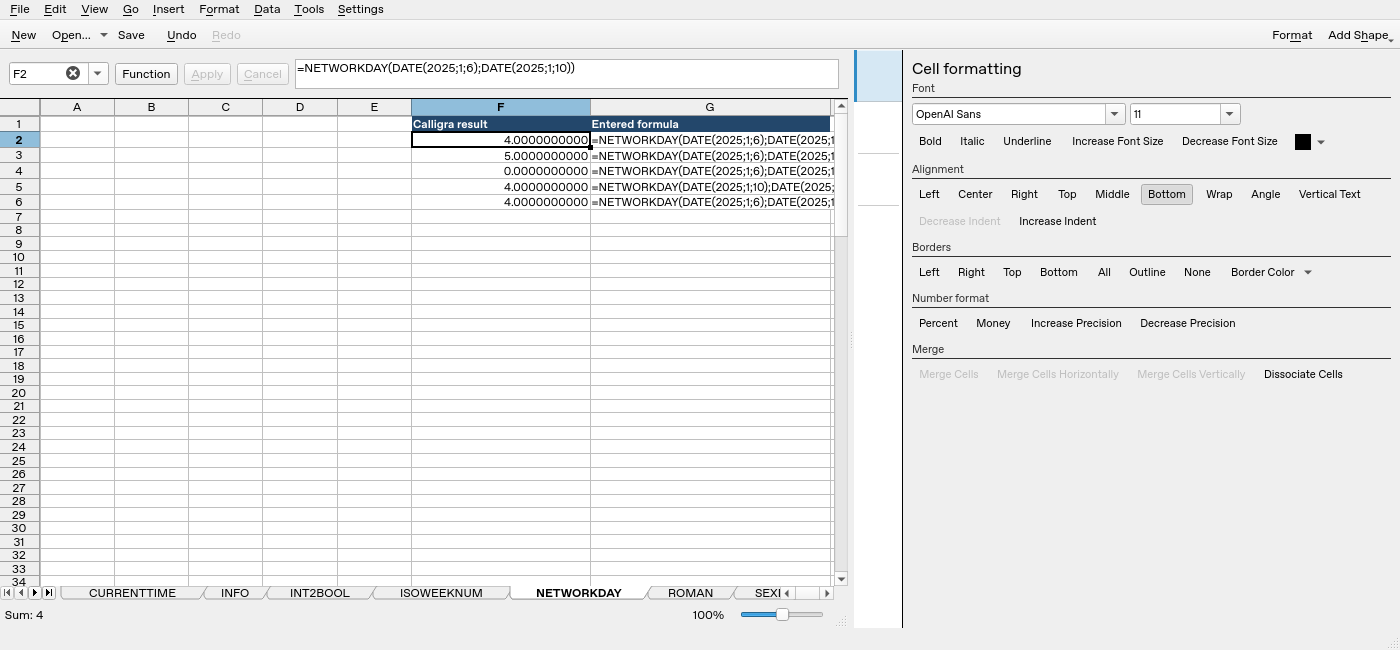
Screenshot: Native 25.04.2 capture with F2 selected. The formula bar shows =NETWORKDAY(DATE(2025;1;6);DATE(2025;1;10)); column F contains application results. Column G contains descriptive formula labels, some of which are clipped by the formatting panel.