

PERCENTILE in Calligra Sheets: Interpolate a Sample Percentile
Find an interpolated sample percentile, handle mixed data and avoid an unsafe endpoint in the inspected implementation.
Verification status: Consult the documentation, examples and any stated test scope below. How formula examples are checked
Quick answer: for the numeric sample 10, 20, 40, 80, PERCENTILE(data;0.25) has the interpolated mathematical value 17.5. The result is in the same units as the observations. The percentile argument is a fraction: 0.25 means the 25th percentile, not 25.
Important endpoint caution: the handbook describes alpha from 0 through 1, but the inspected implementation has an unchecked next-element access at alpha = 1 when the sample contains more than one value. That case was deliberately excluded from execution tests. Use MAX(data) to obtain the largest value; do not rely on this implementation’s multi-value alpha-1 endpoint.
Syntax and interpolation
=PERCENTILE(data; alpha)
Both arguments are required. Data is a numeric range or scalar; alpha is a fractional position. For safe multi-value examples here use 0 ≤ alpha < 1, avoiding values even slightly outside that interval. The source uses the sorted zero-based rank r = alpha×(n−1), then linearly interpolates between adjacent entries.
For four values and alpha = 0.25, r = 0.75. The result lies 75% of the way from the first value 10 to the second value 20: 10 + 0.75×(20−10) = 17.5. This is an interpolation convention, not a guarantee that exactly 25% of observations are strictly below the result in every finite sample with ties.
Worked worksheet: a duration percentile
Enter measured durations 10, 20, 40, 80 in B2:B5, with Duration (minutes) in B1.
- Put 0.25 in D2 and label it
Percentile fraction. - In E2 enter
=PERCENTILE(B2:B5;D2). - Expected E2 is 17.5 minutes.
- Change D2 to 0.5. Expected E2 becomes 30 minutes, halfway between 20 and 40.
- Change D2 to 0.9. Expected E2 becomes 68 minutes, because rank 2.7 lies 70% of the way from 40 to 80.
- Alpha = 0 gives the minimum, 10 minutes. For the maximum, use
=MAX(B2:B5)rather than the unsafe endpoint call noted above.
No data sorting in the worksheet is required; the function sorts its numeric list internally. Keep the label out of the range.
Advanced example: interpreting a threshold
A sample 90th-percentile duration of 68 minutes is a descriptive threshold for these four observations under this interpolation rule. It is not a service-level guarantee, a confidence interval, or a prediction that precisely 90% of future cases will finish by 68 minutes. A four-observation tail estimate is especially unstable.
Use the same percentile definition when comparing reports. “Inclusive” rank interpolation, nearest-rank percentiles and other statistical conventions can produce different answers for the same small dataset. This function follows alpha×(n−1) interpolation in the inspected source; another function with a different suffix or method need not match.
Text, blanks and the handbook discrepancy
The shared list helper converts each range item through the numeric converter. In the test range [10, text, 30, blank], nonnumeric text and blank are both source-predicted to become zero. The sorted list is [0, 0, 10, 30], and its 50th percentile is 5.
The handbook says text is ignored, which is inconsistent with this inspected helper. Use a clean numeric range and inspect the native mixed-data result below rather than importing an ignore-text assumption. A missing measurement is not necessarily a zero measurement; define how to handle it before computing percentiles.
Errors and unsafe boundaries
- Clearly out-of-range alpha such as −0.1 is rejected with an internal value error.
- The source tolerates deviations up to about 10⁻⁹ outside [0,1] before rejecting, but still indexes based on the raw value. That tolerance is not permission to use slightly negative or slightly above-one values; avoid them.
- For more than one data item, alpha = 1 evaluates an expression containing an out-of-range next element even though the interpolation weight is zero. The runtime outcome is unverified and not promised to be an ordinary error.
- A single numeric item uses a separate direct-return branch.
PERCENTILE(10;1)safely follows that branch and should return 10, but this does not establish the multi-item endpoint. - Numeric precision and data cleaning remain separate concerns from selecting a percentile definition.
Related functions
KDE QUARTILE selects predefined positions with separate endpoint branches; KDE MEDIAN selects the middle; KDE MAX supplies the maximum without the unsafe interpolation endpoint. Check range coercion and boundary handling separately when migrating workbooks.
Availability, sources and evidence scope
Checked October 18, 2026. Original introduction date is unknown. PERCENTILE is registered in both inspected source versions, Calligra 25.04.2 and 26.08.2. Their relevant statistical-function, calculation-engine and converter source files are byte-identical. Version inspection establishes availability in those releases, not a first-introduction date or a runtime guarantee for every platform.
Primary sources: KDE PERCENTILE handbook, 26.08.2 implementation, 25.04.2 statistical functions, and numeric converter. Mathematical values above are independent calculations. Native observations below were obtained in Calligra Sheets 25.04.2 on Linux, October 18, 2026; no native 26.08.2 execution is claimed. The handbook is a living reference and can differ from the pinned implementation at the explicitly described boundaries.
Native verification in Calligra Sheets 25.04.2
The following formula results were obtained in the actual application and checked in its completed native-saved workbook. The screenshot is an unmodified application capture. The values in this table are native results; the earlier reference values and model calculations remain separately identified. Small final-digit differences do not make the independent reference a native observation.
Native J2:J5 contains 10, 20, 40, 80. K2:K5 contains 10, literal text text, 30, and a genuinely blank cell. These coordinates differ from the illustrative worksheet layout above.
No multi-item alpha-1 call or slightly out-of-range alpha was executed. The alpha-1 test below uses a single cell only, which takes a separate source branch; it does not establish safety of the multi-item endpoint.
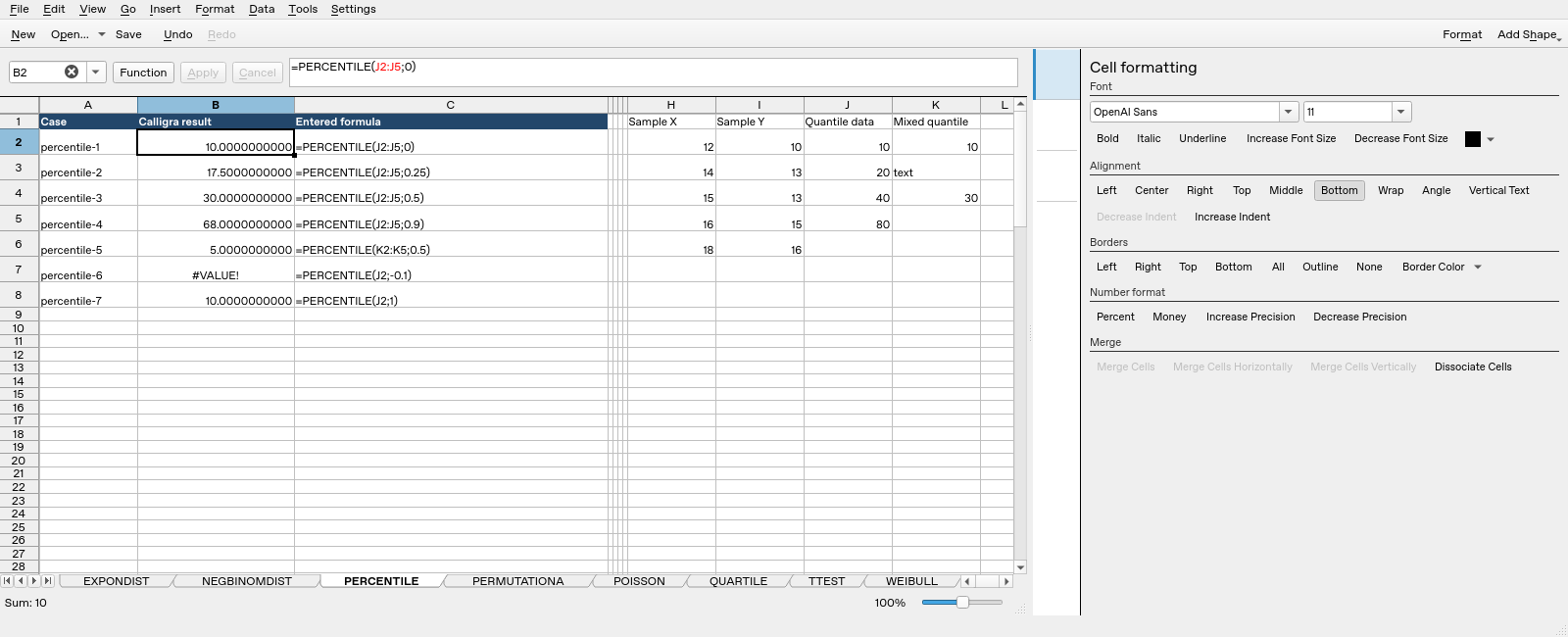
| Formula executed | Native saved result |
|---|---|
=PERCENTILE(J2:J5;0) |
10 |
=PERCENTILE(J2:J5;0.25) |
17.5 |
=PERCENTILE(J2:J5;0.5) |
30 |
=PERCENTILE(J2:J5;0.9) |
68 |
=PERCENTILE(K2:K5;0.5) |
5 |
=PERCENTILE(J2;-0.1) |
#VALUE! |
=PERCENTILE(J2;1) |
10 |
The completed saved values, including error text, determine this table; display rounding can show fewer digits. These tests do not establish all locales, input types, extreme numerical ranges or cross-application import behavior.