

PPMT Function (Calligra Sheets)
Calculate principal in one Calligra loan payment with sign-aware reconciliation, correct defaults and beginning-payment timing limitations.
Verification status: See the evidence and test scope described in this guide. How formula examples are checked
Quick answer: =PPMT(0.01;2;12;1200) is independently expected to return −95.5647318782, the principal portion of payment 2 for a 1,200 loan at 1% per period over 12 periods.
PPMT returns one period’s principal cash flow, not the total payment, cumulative principal or remaining balance. The inspected type-1 path inherits IPMT’s first-payment timing anomaly.
Availability and verification scope
- Introduced: Original introduction release not established. The checked release is not an introduction date.
- Available in source: Calligra Sheets 26.08.2, checked against first-party released source retrieved on October 18, 2026.
- Retired or deprecated: Neither retirement nor deprecation is established; the runtime registration remains present.
- Evidence: The selected formulas in the native-results section were executed in Calligra Sheets 25.04.2 on October 18, 2026, and read back from its saved ODS. Other numerical derivations are independent calculations. Version 26.08.2 was source-checked, not executed. These checks do not establish general Excel import or workbook round-trip compatibility.
- Entry style: English function names, semicolon separators and decimal points. Optional-argument brackets are explanatory and are not entered in a formula.
Native results in Calligra Sheets 25.04.2
These selected formulas were recalculated in the native application. Display precision can differ from the independent arithmetic above.
| Formula | Native displayed result |
|---|---|
=PPMT(0.01;1;12;1200) |
-94.6185464140 |
=PPMT(0.01;2;12;1200) |
-95.5647318782 |
=PPMT(0.01;12;12;1200) |
-105.5629172416 |
=PPMT(0.01;1;12;1200;0;1) |
-93.6817291228 |
=PPMT(0;1;12;1200) |
-100.0000000000 |
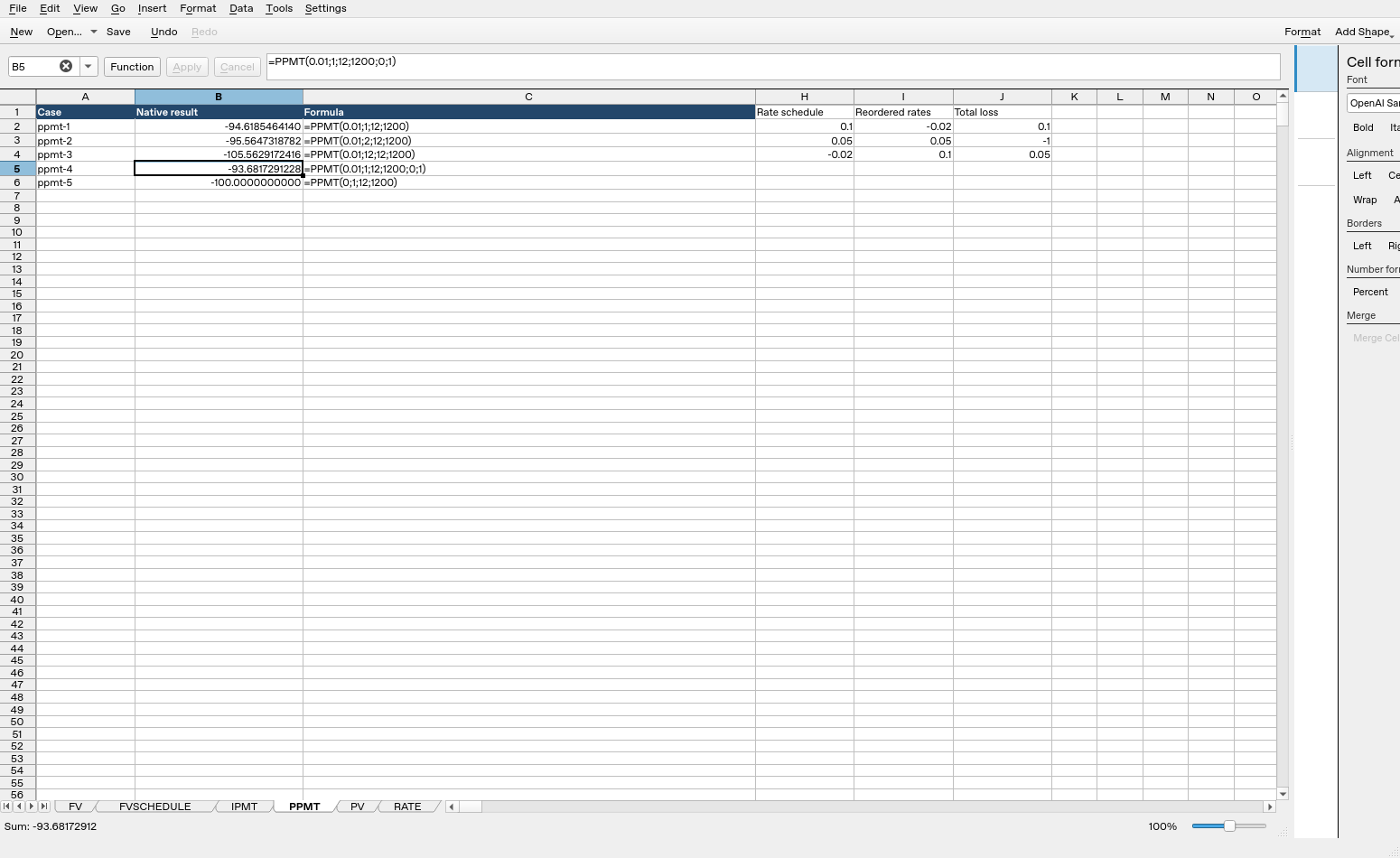
Calligra Sheets 25.04.2: cell B5 evaluates =PPMT(0.01;1;12;1200;0;1) to -93.6817291228. Column B contains calculated results; column C shows formula text. Columns were resized and unused columns hidden for readability after the result workbook was saved; the screenshot layout differs from that saved layout, while formulas, inputs and results are unchanged.
Syntax and arguments
=PPMT(rate; period; periods; present_value[; future_value[; type]])
| Argument | Meaning and default |
|---|---|
| rate | Required interest rate per payment period |
| period | Required payment number; use integers from 1 through periods |
| periods | Required total number of equal payment periods |
| present_value | Required signed initial amount; positive for an ordinary borrowed principal |
| future_value | Optional signed terminal amount, default 0 |
| type | Optional timing selector, default 0 for end-of-period; 1 requests beginning-of-period behavior |
Four through six arguments are accepted. To supply type, include the fifth future_value argument explicitly. The rate unit and period unit must agree. A monthly loan at a nominal annual 12% uses rate 0.12/12, not 0.12 in every monthly period.
Documentation correction: The XML syntax line contains FV = 9, but its prose and actual source use future_value = 0. Nine is not the default for this implementation. Use the registration/body and explicit arguments when reproducing a calculation.
Build a principal-component worksheet
Use a fresh worksheet. Enter 0.01 in B1, 12 in B2 and 1200 in B3. Put payment numbers 1, 2 and 12 in A6:A8. In B6 enter =PPMT($B$1;A6;$B$2;$B$3) and copy down.
| Payment number | Independent principal expectation |
|---|---|
| 1 | −94.6185464140 |
| 2 | −95.5647318782 |
| 12 | −105.5629172416 |
The independent constant signed payment is −106.6185464140. For payment 1, interest is −12, so principal is −106.6185464140 − (−12) = −94.6185464140. The remaining balance becomes 1105.3814535860.
For payment 2, interest is −11.0538145359, so principal is −95.5647318782. More of the constant payment goes toward principal as the balance and interest decline. These figures are supported by a separate decimal-arithmetic amortization recurrence and the selected native results below.
Advanced case: recover the balance from principal rows
Create all 12 period numbers and calculate PPMT for each while keeping the original rate, term and principal fixed. Starting from 1200, add each negative principal amount to the previous balance. After period 1 expect 1105.3814535860; after period 2 expect 1009.8167217078; after period 3 expect 913.2963425109.
The full type-0 principal total is independently −1200 to numerical tolerance. Adding it to the original balance gives zero. This provides a clearer completeness check than comparing only the first and last rows.
Keep payment and interest columns beside principal. Every row should satisfy payment = interest + principal. The implementation itself obtains PPMT by subtracting the shared IPMT result from the payment helper, so this identity alone does not establish the economic correctness of every timing mode. The independent running-balance check remains important.
Type-1 anomaly and its cumulative consequence
For =PPMT(0.01;1;12;1200;0;1), the source-derived expectation is −93.6817291228. The corresponding beginning-payment amount is −106.6185464140/1.01, but the helper also subtracts nonzero first-period interest −12/1.01. A standard immediate first payment would instead be all principal because no period’s interest had accrued.
Summing the source’s type-1 principal components over all 12 periods predicts −1188.1188118812, or −1200/1.01. That leaves a difference of 11.8811881188 from the original principal. It matches the same shared-helper issue in CUMPRINC; agreement across the two interfaces does not repair the schedule.
Use the ordinary type-0 example for a standard end-payment model. For a genuine beginning-payment contract, construct and validate the intended schedule separately rather than treating this discrepancy as cent rounding. See payment helper and interest helper.
Zero-rate case
=PPMT(0;1;12;1200) is independently expected to return −100: the payment helper divides the principal evenly over 12 periods, and the interest component is zero. This individual-payment function therefore differs from CUMPRINC, whose outer validation rejects zero rate.
A specified future_value alters the constant payment and the principal schedule. The default zero represents full amortization; it is not an omitted-data guess. If a terminal balance is intended, enter it explicitly with a consistent cash-flow sign and verify the closing balance against that goal.
Boundaries and model limits
The function body does not enforce the full ordinary loan-input domain. In particular, it does not explicitly reject every period outside 1…periods, unsupported timing value, unsuitable sign or nonpositive term. Use whole valid period numbers and type 0/1 deliberately; do not borrow an error table from another spreadsheet and assume these cases are protected.
A constant-rate, equal-payment schedule has no irregular dates, varying rates, fees or cent-rounded lender adjustments. Keep the original principal and total term fixed when copying the formula down; only the period number should advance. Passing each row’s remaining balance as present_value would define a different loan on every row.
Imported strings, blank cells, fractional periods and extreme rates have not been established by the ordinary examples. Small floating-point residuals are normal in a reconstructed full schedule; a large principal discrepancy in the type-1 example is not such a rounding residual.
Compatibility and related functions
No explicit alternate function name is registered for this function in the inspected Financial module. Matching a name or mathematical identity does not establish identical coercion, invalid-input behavior, file import/export or availability in every packaged build.
- PMT gives the constant payment.
- SUM totals principal components.
- POWER supports a separate balance calculation.
- Released implementation provides the calculation and validation details.