

QUARTILE in Calligra Sheets: Find Quartiles and a Five-Number Summary
Calculate interpolated quartiles and distinguish Calligra flags, missing data and alternative quartile definitions.
Verification status: Consult the documentation, examples and any stated test scope below. How formula examples are checked
Quick answer: for values 10, 20, 40, 80, QUARTILE(data;1) gives the independently expected first quartile 17.5. Flag 2 gives the median 30, and flag 3 gives the third quartile 50. The results use interpolation and need not be observed data values.
Quartiles divide a sorted sample into descriptive positions. Different software or statistical methods can use different quartile conventions, especially for small samples; matching the word “quartile” does not ensure matching numbers.
Syntax and flag meanings
=QUARTILE(data; flag)
Both arguments are required. Data is a numeric range or scalar. There is no omitted flag default.
| Flag | Requested statistic | Result for 10, 20, 40, 80 |
|---|---|---|
| 0 | Minimum | 10 |
| 1 | First quartile, 25th percentile | 17.5 |
| 2 | Median, 50th percentile | 30 |
| 3 | Third quartile, 75th percentile | 50 |
| 4 | Maximum | 80 |
The first and third quartiles use ranks 0.25×(n−1) and 0.75×(n−1), with zero-based indexing and linear interpolation. Minimum and maximum use separate direct endpoint branches; they do not use PERCENTILE’s unsafe next-element access identified in the inspected implementation.
Worked worksheet: summarize delivery durations
Enter 10, 20, 40, 80 in B2:B5 and label B1 Duration (minutes).
- Enter flags 0, 1, 2, 3, 4 in D2:D6.
- In E2 enter
=QUARTILE($B$2:$B$5;D2)and fill down to E6. - Expected results are 10, 17.5, 30, 50, 80 minutes.
- The dollar signs keep the source range fixed while the flag reference advances.
- Check the first quartile manually: rank 0.75 is three-quarters of the way from 10 to 20, yielding 17.5.
- Check the third quartile: rank 2.25 is one-quarter of the way from 40 to 80, yielding 50.
The median 30 is the average of the middle pair 20 and 40, not an observed 30-minute delivery.
Advanced example: interquartile range and screening fences
The interquartile range is Q3−Q1, here 50−17.5 = 32.5 minutes. Using the filled table, enter =E5-E3 to calculate it.
A common exploratory screening rule places fences at Q1−1.5×IQR and Q3+1.5×IQR. For this sample they are −31.25 and 98.75 minutes. None of the four observations is outside those fences. The negative lower fence is a statistical construction, not a plausible negative delivery time.
These fences are a screening convention, not an automatic deletion rule or evidence that every in-fence observation is correct. With only four observations, quartiles and fences are unstable. Investigate context and data quality before labeling records as outliers.
Mixed data and converted flags
The shared helper converts each data item to a floating-point value. A range containing [10, text, 30, blank] is source-predicted to become [10, 0, 30, 0], whose median and flag-2 quartile are 5. Text and missing entries are not safely assumed to be ignored. Put headings outside the selected range and define a missing-data policy.
The flag is converted to an integer. A positive fractional flag such as 1.9 becomes 1, so it selects the first quartile rather than causing a strict invalid-integer error. Use the exact documented integer flags deliberately; a mistyped flag should not silently change the intended statistic.
Errors, endpoints and related functions
A converted flag below 0 or above 4 returns an internal value error; 5 is a safe test of this path. One numeric data item is returned for any valid flag. The source has a no-values error branch, but a selected blank cell can be converted to zero rather than behaving like a truly empty input list.
KDE MEDIAN targets the middle statistic. KDE PERCENTILE permits other fractional positions, with the endpoint caution documented separately. QUARTILE flag 4 uses a direct maximum branch and is not evidence that a PERCENTILE alpha-1 call is safe. Check both interpolation and coercion conventions before comparing results across spreadsheet products.
Availability, sources and evidence scope
Checked October 18, 2026. Original introduction date is unknown. QUARTILE is registered in both inspected source versions, Calligra 25.04.2 and 26.08.2. Their relevant statistical-function, calculation-engine and converter source files are byte-identical. Version inspection establishes availability in those releases, not a first-introduction date or a runtime guarantee for every platform.
Primary sources: KDE QUARTILE handbook, 26.08.2 implementation, 25.04.2 statistical functions, and numeric converter. Mathematical values above are independent calculations. Native observations below were obtained in Calligra Sheets 25.04.2 on Linux, October 18, 2026; no native 26.08.2 execution is claimed. The handbook is a living reference and can differ from the pinned implementation at the explicitly described boundaries.
Native verification in Calligra Sheets 25.04.2
The following formula results were obtained in the actual application and checked in its completed native-saved workbook. The screenshot is an unmodified application capture. The values in this table are native results; the earlier reference values and model calculations remain separately identified. Small final-digit differences do not make the independent reference a native observation.
Native J2:J5 contains 10, 20, 40, 80. K2:K5 contains 10, literal text text, 30, and a genuinely blank cell. These coordinates differ from the illustrative worksheet layout above.
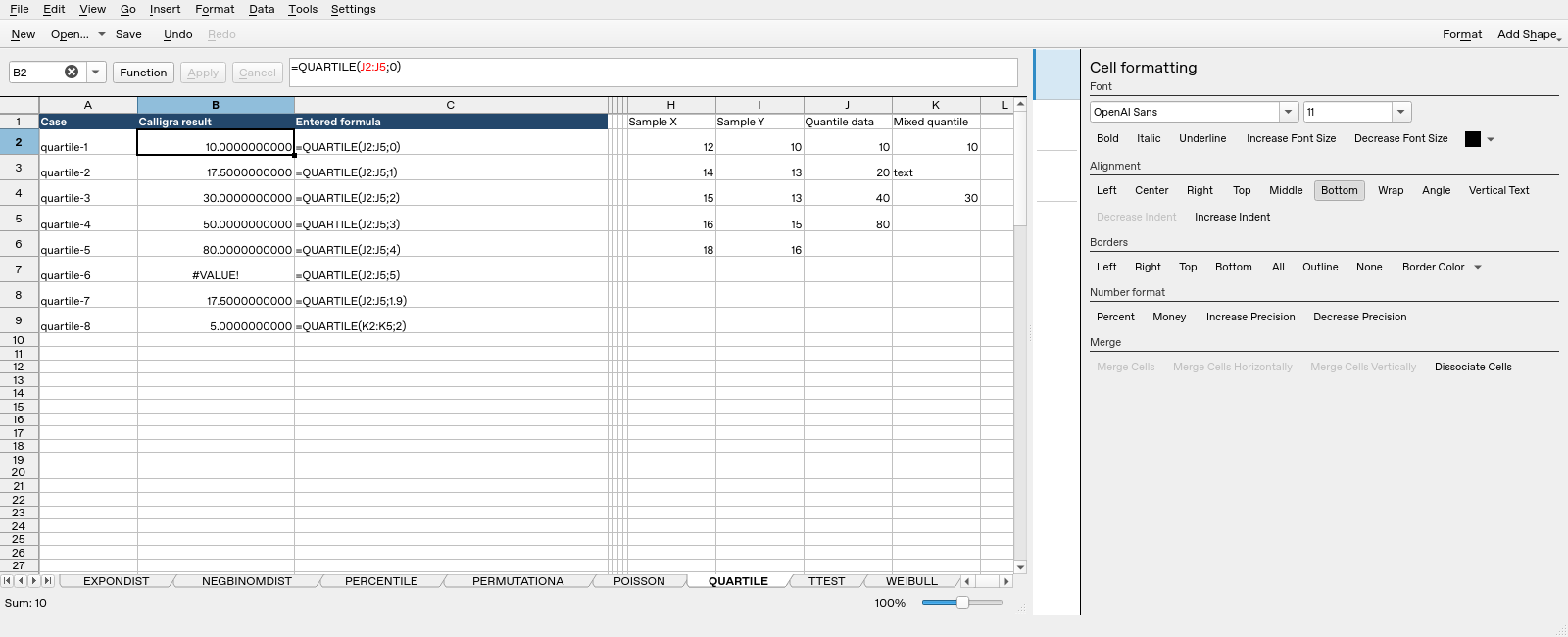
| Formula executed | Native saved result |
|---|---|
=QUARTILE(J2:J5;0) |
10 |
=QUARTILE(J2:J5;1) |
17.5 |
=QUARTILE(J2:J5;2) |
30 |
=QUARTILE(J2:J5;3) |
50 |
=QUARTILE(J2:J5;4) |
80 |
=QUARTILE(J2:J5;5) |
#VALUE! |
=QUARTILE(J2:J5;1.9) |
17.5 |
=QUARTILE(K2:K5;2) |
5 |
The completed saved values, including error text, determine this table; display rounding can show fewer digits. These tests do not establish all locales, input types, extreme numerical ranges or cross-application import behavior.