

RANDBERNOULLI in Calligra Sheets: Understand the Reversed Threshold
Learn Calligra Sheets RANDBERNOULLI with exact arguments, reproducible inputs, independently checked results and implementation-specific cautions.
Verification status: See the evidence and test scope described in this guide. How formula examples are checked
Quick answer and warning
RANDBERNOULLI(p) returns numeric 0 or 1, but the inspected implementation returns 1 when its random sample is greater than p. Treating p as the conventional probability of result 1 therefore reverses the intended event rule. In particular, p=1 gives 0, not a certain success.
Syntax and actual comparison
=RANDBERNOULLI(p)
The function accepts one argument under the default registration. It draws U using the shared helper, with 0 ≤ U < 1, and evaluates U > p. The wrapper does not explicitly reject p outside 0 through 1. Keep ordinary probabilities within that interval, but do not confuse acceptance with correct conventional Bernoulli parameterization.
The KDE RANDBERNOULLI reference describes a Bernoulli generator. The comparison in the release source is the basis for this compatibility warning.
Reproduce a decisive endpoint and a bounded sample
- Enter
=RANDBERNOULLI(1)in A2. Source-derived expected result: 0, because U can never exceed one. - Enter
=RANDBERNOULLI(0.25)in A3. Its next value cannot be predicted; the expected type is numeric 0 or 1. - Check A3 with
=OR(A3=0;A3=1), expected true.
For p=0.25, the rule selects the region above 0.25 rather than below it. A large idealized uniform population would give roughly three quarters ones, but no small worksheet sample is guaranteed to have that proportion. At p=0, a zero random draw still returns zero, so even that boundary should not be described as an unconditional one.
Practical use: audit an imported event simulation
Suppose an imported model labels p=0.25 as a 25% chance of a failure flag equal to one. Do not retain that label with this implementation. First run the p=1 endpoint control and inspect the direction of the event comparison. Preserve a single sampled U in a separate cell if rewriting the rule so the event can be audited against that same value.
A formula such as =IF(A2<0.25;1;0) expresses the intended threshold explicitly when A2 already contains a verified [0,1) sample. With a hypothetical A2=0.1 it returns 1; with A2=0.8 it returns 0. This explains the event rule; it does not certify a random generator.
Limits
- The result is numeric 0/1, not necessarily a Boolean cell value.
- Out-of-range inputs are not established as errors by this wrapper.
- A few observed zeros or ones cannot establish a probability distribution.
- Re-evaluation calls the generator again; no fixed sequence or automatic refresh schedule is promised.
- Registered availability is not evidence that the documented probability interpretation is correct.
Availability and verification
- Release checked: Calligra Sheets 26.08.2, using KDE’s release source package and release information, inspected on October 18, 2026. Relevant locations:
sheets/functions/math.cpplines 186–187 and 750–754;sheets/engine/Function.cpplines 22–30;sheets/engine/ValueCalc.cpplines 746–754. - Introduced: The original introduction version is not established by these sources. Current registration establishes presence in 26.08.2, not the first release.
- Lifecycle: Registered in the inspected release; no retirement or deprecation marker was found in this function’s registration. Retirement (removed support) and deprecation (discouraged but retained support) are different claims; neither is asserted here.
- Native testing: Selected cases were recalculated and saved in Calligra Sheets 25.04.2. The source discussion concerns 26.08.2. Unlisted examples and edge cases remain source-derived or independently calculated.
Related guides and sources
- IF
- OR
- SUM
- AVERAGE
- Calligra function guide index
- KDE formula entry instructions, checked October 18, 2026. Examples use leading
=and semicolons, with a period for decimal numbers. Confirm regional separators in your installation before pasting.
Selected native results and screenshot
These results were observed in Calligra Sheets 25.04.2, using an ODS input evaluated and saved by the native application. Formula references and results were read back from the saved workbook. These are samples from one captured calculation state, not fixed expected future draws or a statistical distribution validation. Reopening or recalculating may produce different samples. The source discussion remains scoped to 26.08.2; native observations are 25.04.2.
| Native formula | Observed display |
|---|---|
=RANDBERNOULLI(1) |
0.0000000000 |
=RANDBERNOULLI(0.25) |
1.0000000000 |
The native endpoint result RANDBERNOULLI(1)=0 confirms the reversed-threshold concern in 25.04.2. The p=0.25 sample happened to be 1; one draw does not establish its frequency.
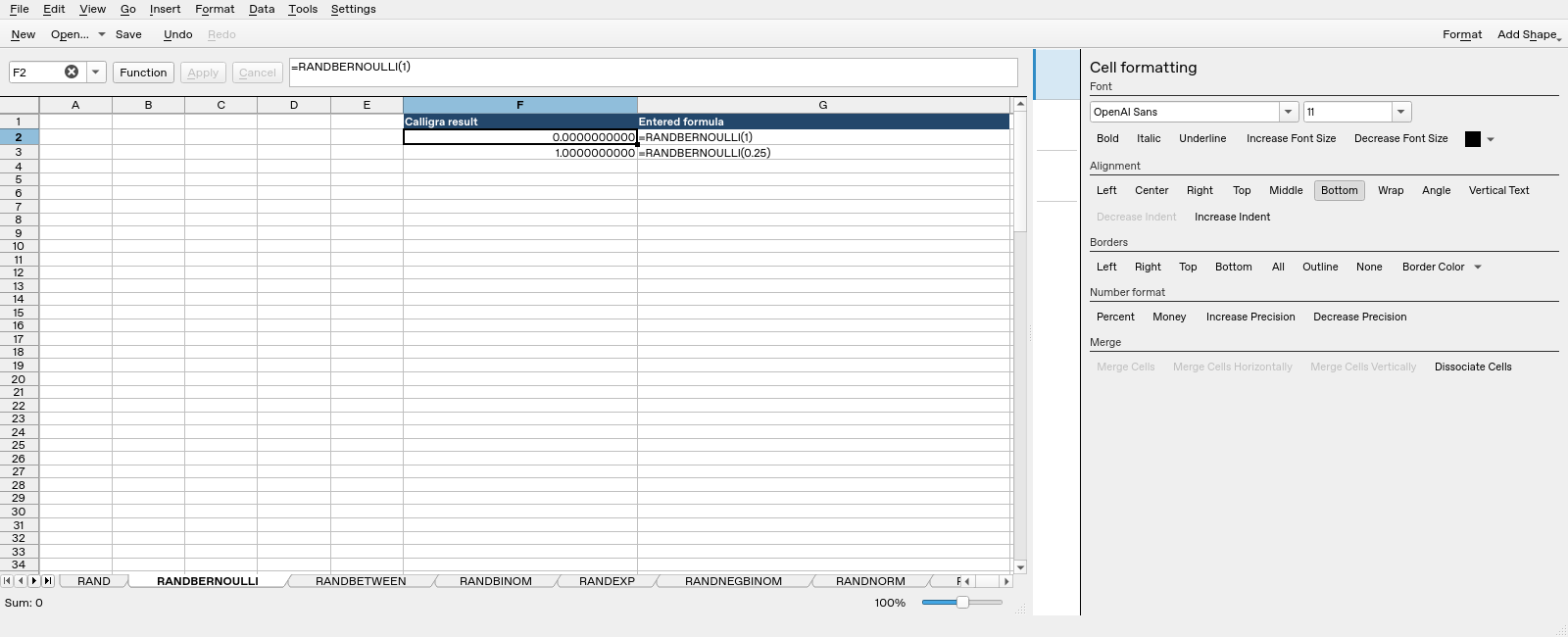
Screenshot: Genuine native 25.04.2 capture. Selected F2 contains =RANDBERNOULLI(1) and displays 0.0000000000. Column F contains application results; column G contains descriptive formula labels. Column G identifies the full formula. The formula bar can be horizontally clipped on longer function names; the saved workbook independently confirms the expression.