

RANDBETWEEN in Calligra Sheets: Check Fractional Outputs and Endpoint Rules
Learn Calligra Sheets RANDBETWEEN with exact arguments, reproducible inputs, independently checked results and implementation-specific cautions.
Verification status: See the evidence and test scope described in this guide. How formula examples are checked
Quick answer and compatibility warning
In the inspected Calligra implementation, RANDBETWEEN(a; b) returns a fractional numeric sample, not necessarily an integer. It orders the bounds internally and computes maximum + (minimum − maximum) × U. For distinct numeric bounds, the source-derived interval is minimum < result ≤ maximum.
Syntax
=RANDBETWEEN(bound1; bound2)
Exactly two arguments are accepted. Their order is normalized by the wrapper, so reversing the bounds does not take the documented error branch claimed by the handbook. Equal bounds return that shared value. There is no rounding-to-integer step in the implementation.
The alternate registration COM.SUN.STAR.SHEET.ADDIN.ANALYSIS.GETRANDBETWEEN maps to this implementation; it is not a separate function with stronger integer guarantees. The KDE RANDBETWEEN entry and the release source disagree on the reversed-bound error behavior.
Reproduce bounds without predicting a draw
| Formula | Source-derived expectation |
|---|---|
=RANDBETWEEN(1;6) |
Numeric result greater than 1 and at most 6; may be fractional |
=RANDBETWEEN(6;1) |
Same numeric interval; not a fixed sample |
=RANDBETWEEN(4;4) |
Exactly 4 |
Put the first formula in A2 and check =AND(A2>1;A2<=6). Display decimals: an integer number format can conceal a fractional value without changing it. The two differently ordered formulas use separate draws, so they need not return the same number.
Practical example: inspect a supposed die simulation
An imported workbook may label RANDBETWEEN(1;6) as a six-sided die. Inspect the raw result before trusting the label. A value such as 3.4, if observed, is in the implementation’s interval but is not a die face. Merely displaying zero decimal places does not fix the underlying distribution.
For a continuous scenario variable bounded by 80 and 120, this function’s mathematical source rule instead gives values above 80 and at most 120. Decide which endpoint convention the model actually needs, record it, and retain sampled values when comparing scenarios. Do not reuse the function as a random row selector without a separately verified integer-selection rule.
Edge cases
- Equal bounds are a useful deterministic control.
- Swapping bounds is accepted by the inspected source, despite the handbook’s error statement.
- Fractional bounds are processed numerically; the wrapper does not enforce integer types.
- Rounding can obscure either endpoint behavior or nonintegral output.
- The function draws on evaluation, with no seed argument or background timer guarantee.
- Bounds checks do not certify uniformity or suitability for a statistical experiment.
Availability and verification
- Release checked: Calligra Sheets 26.08.2, using KDE’s release source package and release information, inspected on October 18, 2026. Relevant locations:
sheets/functions/math.cpplines 188–191 and 809–820;sheets/engine/ValueCalc.cpplines 746–754. - Introduced: The original introduction version is not established by these sources. Current registration establishes presence in 26.08.2, not the first release.
- Lifecycle: Registered in the inspected release; no retirement or deprecation marker was found in this function’s registration. Retirement (removed support) and deprecation (discouraged but retained support) are different claims; neither is asserted here.
- Native testing: Selected cases were recalculated and saved in Calligra Sheets 25.04.2. The source discussion concerns 26.08.2. Unlisted examples and edge cases remain source-derived or independently calculated.
Related guides and sources
- AND
- ROUND
- INT
- IF
- Calligra function guide index
- KDE formula entry instructions, checked October 18, 2026. Examples use leading
=and semicolons, with a period for decimal numbers. Confirm regional separators in your installation before pasting.
Selected native results and screenshot
These results were observed in Calligra Sheets 25.04.2, using an ODS input evaluated and saved by the native application. Formula references and results were read back from the saved workbook. These are samples from one captured calculation state, not fixed expected future draws or a statistical distribution validation. Reopening or recalculating may produce different samples. The source discussion remains scoped to 26.08.2; native observations are 25.04.2.
| Native formula | Observed display |
|---|---|
=RANDBETWEEN(1;6) |
4.3214246854 |
=RANDBETWEEN(6;1) |
4.3176818932 |
=RANDBETWEEN(4;4) |
4.0000000000 |
The fractional native values for both bound orders confirm that this build does not enforce an integer result and does not reject reversed bounds. The equal-bound case returned exactly 4.
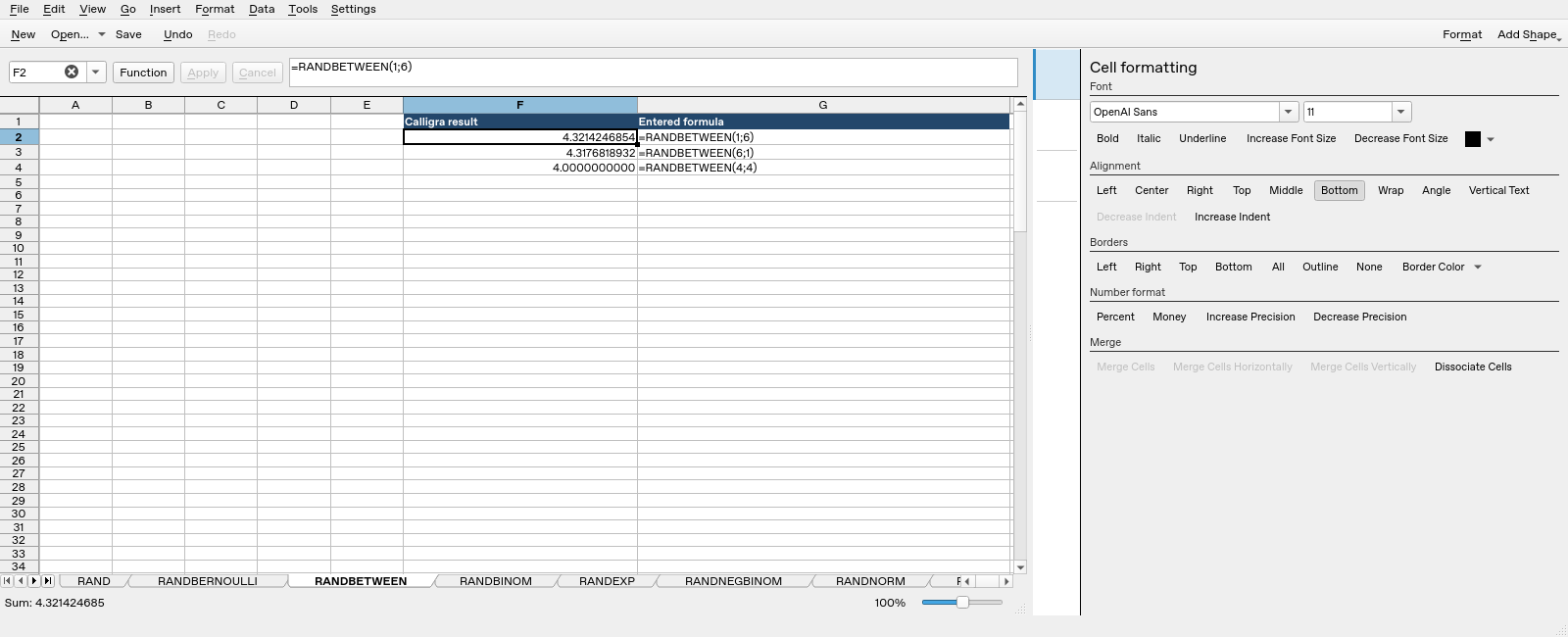
Screenshot: Genuine native 25.04.2 capture. Selected F2 contains =RANDBETWEEN(1;6) and displays 4.3214246854. Column F contains application results; column G contains descriptive formula labels. Column G identifies the full formula. The formula bar can be horizontally clipped on longer function names; the saved workbook independently confirms the expression.