

RANDNEGBINOM in Calligra Sheets: Interpret the Returned Count and Avoid Zero Probability
Learn Calligra Sheets RANDNEGBINOM with exact arguments, reproducible inputs, independently checked results and implementation-specific cautions.
Verification status: See the evidence and test scope described in this guide. How formula examples are checked
Quick answer
RANDNEGBINOM(p; target) samples from the negative-binomial recurrence in the inspected source. Its masses start at p^target, so under the usual success-probability interpretation it counts failures before target successes. The documentation’s “Failures” label for the second parameter can therefore mislead; establish the event convention before using it.
Syntax and implemented distribution convention
=RANDNEGBINOM(p; target)
The registration requires two arguments, even though the KDE RANDNEGBINOM entry includes an abbreviated one-argument syntax/example. The first argument is converted to a probability, and the second to an integer count. Explicit checks reject p outside [0,1] and a negative converted target with #VALUE!.
The initial mass is p^target; successive masses multiply by (target+i)×(1−p)/(i+1). This identifies the conventional number-of-failures-before-target-successes parameterization. It is not a count of all trials; for that interpretation add the target count to a valid sampled failure count.
Reproduce safe controls
| Formula | Expected property |
|---|---|
=RANDNEGBINOM(0.5;3) |
Nonnegative integer; next sample unknown |
=RANDNEGBINOM(1;3) |
0 |
=RANDNEGBINOM(0.5;0) |
0 |
=RANDNEGBINOM(-0.1;3) |
#VALUE! |
The second case has no failures when each trial succeeds. The third is a zero-target implementation control. These deterministic boundaries are different from pretending that the first case must return a fixed count.
For p=0.5 and target=3, independent theoretical arithmetic gives mean failures 3×(1−0.5)/0.5 = 3, and variance 3×(1−0.5)/0.5² = 6. A single result need not equal 3.
Practical example: attempts until three successes
For a model of independent attempts with success probability 0.5, a sampled failure count of 4 would imply 7 total attempts to obtain three successes. The 4 is a hypothetical illustration, not an expected native sample. Keep a sampled value in one cell and add the target count in another, rather than drawing a second random number while calculating the total.
Before using the function in a model, decide whether the output column means failures or total attempts. Confusing these produces a systematic offset even if the random generation itself is otherwise correct.
Safety and numerical limits
- Do not call p=0 with a positive target. The initial mass is zero and the recurrence can remain zero while the loop waits for a positive threshold, causing nontermination.
- Large targets or very small probabilities can similarly underflow the initial mass. The examples deliberately use small, ordinary inputs.
- Negative counts are guarded, but fractional targets are coerced; use explicit whole counts.
- There is no seed argument or reproducible sequence contract in this interface.
- Small sample agreement with bounds does not validate the entire distribution or the recurrence’s numerical tails.
Availability and verification
- Release checked: Calligra Sheets 26.08.2, using KDE’s release source package and release information, inspected on October 18, 2026. Relevant locations:
sheets/functions/math.cpplines 197–199 and 722–748. - Introduced: The original introduction version is not established by these sources. Current registration establishes presence in 26.08.2, not the first release.
- Lifecycle: Registered in the inspected release; no retirement or deprecation marker was found in this function’s registration. Retirement (removed support) and deprecation (discouraged but retained support) are different claims; neither is asserted here.
- Native testing: Selected cases were recalculated and saved in Calligra Sheets 25.04.2. The source discussion concerns 26.08.2. Unlisted examples and edge cases remain source-derived or independently calculated.
Related guides and sources
- AVERAGE
- VAR
- SUM
- IF
- Calligra function guide index
- KDE formula entry instructions, checked October 18, 2026. Examples use leading
=and semicolons, with a period for decimal numbers. Confirm regional separators in your installation before pasting.
Selected native results and screenshot
These results were observed in Calligra Sheets 25.04.2, using an ODS input evaluated and saved by the native application. Formula references and results were read back from the saved workbook. These are samples from one captured calculation state, not fixed expected future draws or a statistical distribution validation. Reopening or recalculating may produce different samples. The source discussion remains scoped to 26.08.2; native observations are 25.04.2.
| Native formula | Observed display |
|---|---|
=RANDNEGBINOM(0.5;3) |
1.0000000000 |
=RANDNEGBINOM(1;3) |
0.0000000000 |
=RANDNEGBINOM(0.5;0) |
0.0000000000 |
=RANDNEGBINOM(-0.1;3) |
#VALUE! |
The sample failure count was 1, while the p=1 and zero-target controls returned 0. The negative probability produced #VALUE!. The potentially nonterminating p=0 positive-target case was not run.
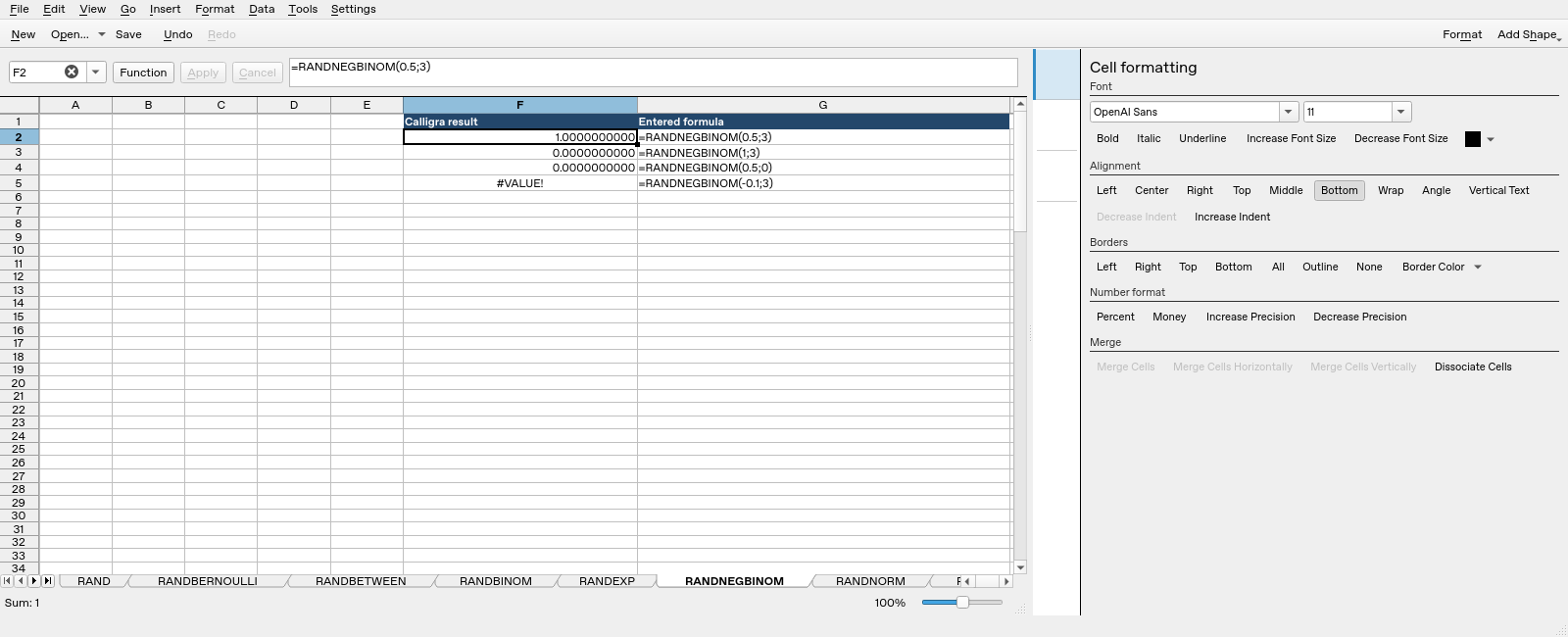
Screenshot: Genuine native 25.04.2 capture. Selected F2 contains =RANDNEGBINOM(0.5;3) and displays 1.0000000000. Column F contains application results; column G contains descriptive formula labels. Column G identifies the full formula. The formula bar can be horizontally clipped on longer function names; the saved workbook independently confirms the expression.