

RATE Function (Calligra Sheets)
Solve a periodic annuity rate in Calligra Sheets using known-root examples, explicit guesses and residual checks without assuming convergence or uniqueness.
Verification status: See the evidence and test scope described in this guide. How formula examples are checked
Quick answer: =RATE(1;-1100;1000) has the independently known solution 0.1, or 10% per period: 1000 grows to the 1100 repayment over one period.
Solver caution: The inspected implementation stops after at most 150 iterations but returns its final iterate even if its convergence/validity flags are not satisfied. A returned number is not by itself proof of a valid or unique rate.
Availability and verification scope
- Introduced: Original introduction release not established. The checked release is not an introduction date.
- Available in source: Calligra Sheets 26.08.2, checked against first-party released source retrieved on October 18, 2026.
- Retired or deprecated: Neither retirement nor deprecation is established; the runtime registration remains present.
- Evidence: The selected formulas in the native-results section were executed in Calligra Sheets 25.04.2 on October 18, 2026, and read back from its saved ODS. Other numerical derivations are independent calculations. Version 26.08.2 was source-checked, not executed. These checks do not establish general Excel import or workbook round-trip compatibility.
- Entry style: English function names, semicolon separators and decimal points. Optional-argument brackets are explanatory and are not entered in a formula.
Native results in Calligra Sheets 25.04.2
These selected formulas were recalculated in the native application. Display precision can differ from the independent arithmetic above.
| Formula | Native displayed result |
|---|---|
=RATE(1;-1100;1000) |
0.1000000000 |
=RATE(2;0;-1000;1210) |
0.1000000000 |
=RATE(12;-106.61854641401005;1200;0;0;0.01) |
0.0100000000 |
=RATE(12;-106.61854641401005;1200;0;0;0.1) |
0.0100000000 |
=RATE(12;-100;1200;0;0;0) |
0.0000000000 |
=RATE(0;-100;1200) |
#VALUE! |
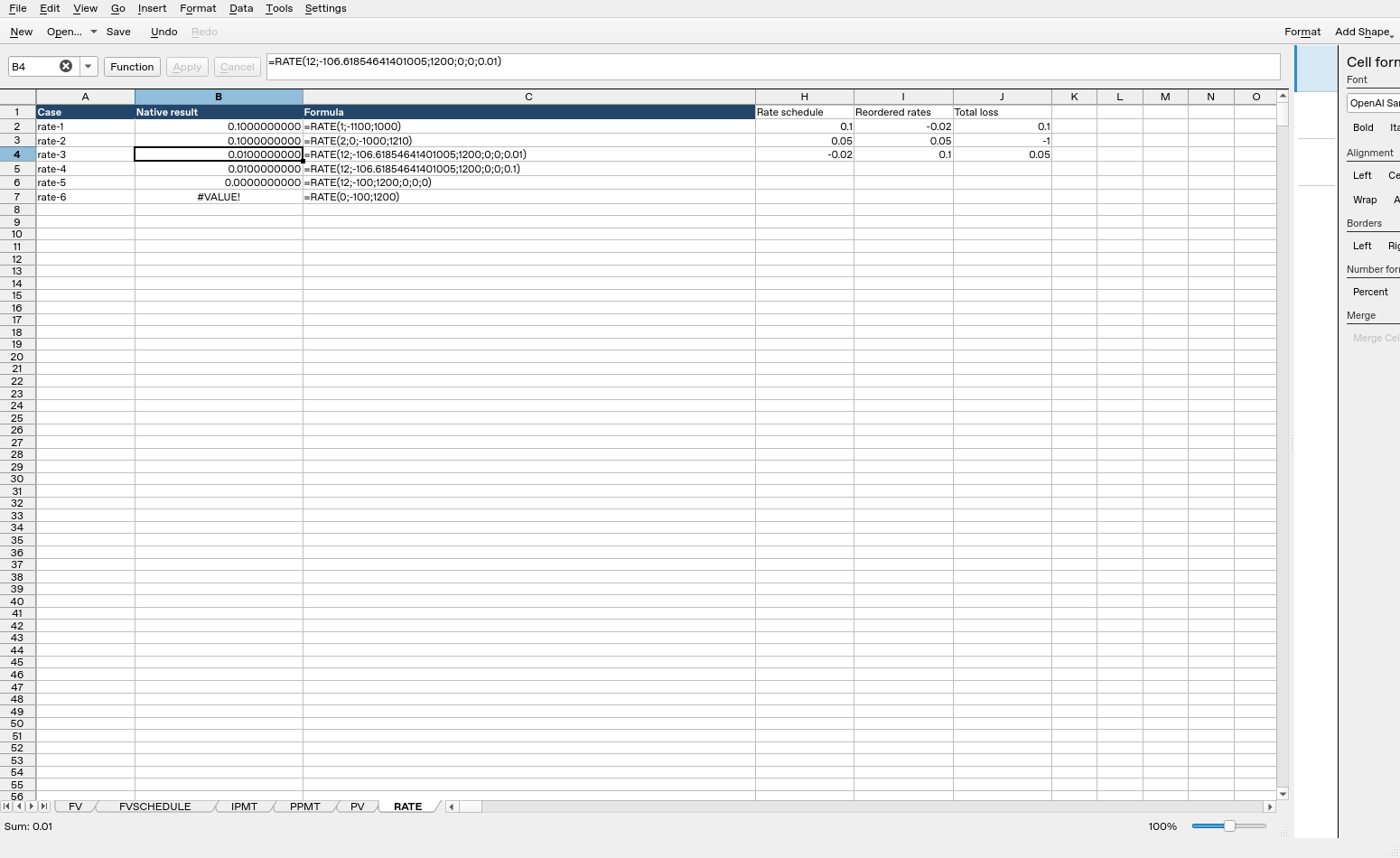
Calligra Sheets 25.04.2: cell B4 evaluates =RATE(12;-106.61854641401005;1200;0;0;0.01) to 0.0100000000. Column B contains calculated results; column C shows formula text. Columns were resized and unused columns hidden for readability after the result workbook was saved; the screenshot layout differs from that saved layout, while formulas, inputs and results are unchanged.
Syntax and arguments
=RATE(periods; payment; present_value[; future_value[; type[; guess]]])
| Argument | Meaning and default |
|---|---|
| periods | Required positive number of equal periods |
| payment | Required constant signed payment per period |
| present_value | Required signed initial cash flow |
| future_value | Optional signed terminal cash flow, default 0 |
| type | Optional timing selector, default 0 for end-of-period; 1 for beginning-of-period |
| guess | Optional starting rate for iteration, default 0.1 |
Three through six arguments are registered. To specify guess, supply the preceding optional arguments explicitly. The output is a rate per supplied period. Monthly periods produce a monthly rate; the function has no independent “annual rate” flag.
Opposite signs usually represent funds received and funds paid. For example, present_value 1200 and payment −106.61854641401005 describe borrowing 1200 and repaying it. RATE does not infer your cash-flow perspective from currency formatting.
Start with a known one-period root
On a fresh worksheet put 1 in B1, −1100 in B2 and 1000 in B3. Enter =RATE(B1;B2;B3) in B5.
The independent equation is 1000×(1+r)−1100=0, giving r=0.1. Percentage formatting should show 10%, but the stored number is 0.1. This case is preferable to starting with an opaque long-term loan because its solution can be verified directly.
For a lump-sum growth case, =RATE(2;0;-1000;1210) has the economically relevant positive solution 0.1: −1000×1.1^2+1210=0. No periodic payment is present. An algebraic equation can have other roots outside the intended financial domain; the example does not establish a universal uniqueness guarantee.
Reproduce a monthly-loan rate
Use 12 periods, payment −106.61854641401005, present value 1200, future value 0 and type 0. Compare:
=RATE(12;-106.61854641401005;1200;0;0;0.01)
=RATE(12;-106.61854641401005;1200;0;0;0.1)
Both have the independent target 0.01, or 1% per month, because the payment was calculated from the 1% ordinary-annuity formula. Agreement from two reasonable guesses would be evidence for this specific case, not proof that every dataset converges or has one root.
The payment input is a rounded decimal representation of the independently calculated payment, so compare within a tolerance rather than demanding an exact bitwise rate of 0.01.
Advanced case: check the residual and annual interpretation
For nonzero r, the general cash-flow residual is:
present_value*(1+r)^periods
+ payment*(1+r*type)*(((1+r)^periods-1)/r)
+ future_value
A suitable solution makes this close to zero. For the 12-period example, substitute the returned rate into 1200*(1+r)^12 - 106.61854641401005*((1+r)^12-1)/r. Inspect the residual in currency units and judge it relative to the cash-flow scale. A small change between solver iterates does not automatically guarantee a small residual.
At r=0, use the limiting residual present_value + payment×periods + future_value instead of dividing by zero. =RATE(12;-100;1200;0;0;0) has the independently known zero root because 1200−12×100=0.
For a monthly rate 0.01, multiplying by 12 gives a nominal annual figure of 12%. Compounding twelve monthly periods gives (1.01)^12−1 = 12.6825030132%. RATE returns neither annual figure automatically. State which annualization convention you mean; there is no promise of reinvestment or of an actual lending quote in these arithmetic conversions.
What the solver checks, and what it does not
The source uses Newton-style updates with a maximum 150 iterations. It can mark a result found when the residual is below 1e−14 or when successive rate estimates differ by less than 1e−7. When the derivative is approximately zero it nudges the estimate instead of dividing by that derivative.
It has separate branches based on the underlying value’s isInteger() classification for periods, not simply whether two visible inputs look mathematically integral. Do not assume every equivalent text/number representation takes exactly the same solver path. Use clean numeric inputs.
Most importantly, the final validity/convergence error return is commented out. The function returns the last estimate regardless of those flags. Unconverged, nonfinite or economically unsuitable results must therefore be checked outside the solver. Do not promise a specific convergence error such as #NUM! when the source does not enforce it.
Validation and practical guardrails
Nonpositive periods explicitly return the internal errorVALUE. The selected native case =RATE(0;-100;1200) displayed #VALUE!. The body does not fully enforce type 0/1 or sensible cash-flow signs. Use intended timing values and inspect the cash-flow equation.
Keep the result finite and within the domain your model allows, use more than one reasonable guess when appropriate, and substitute the result back into the equation. These checks help identify failures but do not prove uniqueness over every possible rate interval. Negative-base powers, fractional periods, extreme guesses and degenerate flows need separate analysis rather than a generic success claim.
Compatibility and related functions
No explicit alternate function name is registered for this function in the inspected Financial module. Matching a name or mathematical identity does not establish identical coercion, invalid-input behavior, file import/export or availability in every packaged build.
- PMT creates a payment from a known rate for a reverse check.
- POWER evaluates the independent residual and annual conversion.
- SUM supports an explicit cash-flow reconciliation.
- Released implementation provides the calculation and validation details.