

ROMAN in Calligra Sheets: Format Small Integers as Classical Roman Numerals
Learn Calligra Sheets ROMAN with exact arguments, reproducible inputs, independently checked results and implementation-specific cautions.
Verification status: See the evidence and test scope described in this guide. How formula examples are checked
Quick answer
ROMAN converts an integer to classical Roman-numeral text, such as 49 to XLIX. Use it for labels, outlines and presentation. Keep the original number for arithmetic and numeric sorting.
Syntax and optional form
=ROMAN(number[;form])
The number is required. The registration accepts an optional second argument, but the 26.08.2 implementation ignores it and always produces its classical form. The source describes zero as the default form. Do not promise the alternate concise styles offered by other spreadsheets.
The implementation integer-converts the first argument and checks the resulting value is between 0 and 3999. Use whole-number inputs to avoid relying on truncation or text conversion. Zero produces empty text, not a historical Roman symbol for zero.
Reproduce a label table
Enter 4, 49, 2026 and 3999 into A2:A5. In B2 enter =ROMAN(A2) and fill down.
| Input | Expected text |
|---|---|
| 4 | IV |
| 49 | XLIX |
| 2026 | MMXXVI |
| 3999 | MMMCMXCIX |
The strings were independently formed using classical subtractive notation and checked against the source lookup tables. Selected native checks are reported below. =ROMAN(49;4) has the same source-derived expectation XLIX because the second argument is ignored; it is not expected to select a more concise representation in this release.
Practical example: generate chapter labels
Put chapter numbers 1, 2 and 3 in D2:D4. Enter this in E2 and fill down:
="Chapter "&ROMAN(D2)
Expected labels are Chapter I, Chapter II and Chapter III. Sort by the numeric D column when order matters, not by the Roman text. A text sort is lexical and does not represent numerical magnitude.
For a round-trip check on these valid positive labels, =ARABIC(ROMAN(D2)) should represent the original number, subject to the separately documented ARABIC implementation. Such a check does not validate all possible nonstandard Roman strings or make empty zero text a valid reverse input.
Errors and portability
=ROMAN(4000)and negative whole numbers are outside the accepted range and return an unavailable-value error in the source.=ROMAN(0)returns an empty string. A cell can therefore look blank while still containing a formula.- Fractions are converted to integers before range checking; supply explicit integers when creating identifiers.
- The output is text. Adding or averaging Roman labels is not the same as operating on their source numbers.
- The optional form parameter is a major migration hazard: a workbook expecting alternate forms can recalculate differently here even though the function name is recognized.
- No claim is made for extended notation above 3999, overbars, lowercase styles or historical variants.
The KDE ROMAN reference establishes the function; release code supplies the ignored-form and zero-value details. These are implementation limits, not a statement that Roman numerals have only one historical convention.
Availability and verification
- Release checked: Calligra Sheets 26.08.2, using KDE’s release source package and release information, inspected on October 18, 2026. Relevant locations:
sheets/functions/conversion.cpplines 54–56 and 151–172. - Introduced: The original introduction version is not established by these sources. Current registration establishes presence in 26.08.2, not the first release.
- Lifecycle: Registered in the inspected release; no retirement or deprecation marker was found in this function’s registration. Retirement (removed support) and deprecation (discouraged but retained support) are different claims; neither is asserted here.
- Native testing: Selected cases were observed in Calligra Sheets 25.04.2, as detailed below. The source discussion concerns 26.08.2; unlisted cases remain source-derived or independently calculated.
Related guides and sources
- ARABIC
- CONCATENATE
- INT
- Calligra function guide index
- KDE formula entry instructions, checked October 18, 2026. Examples use leading
=and semicolons, with a period for decimal numbers. Confirm regional separators in your installation before pasting.
Selected native results and screenshot
The following results were observed in Calligra Sheets 25.04.2 using an ODS workbook opened, calculated and saved by the application. The formula text below uses worksheet notation; saved ODF reference brackets are omitted for readability. Unlisted examples and edge cases retain their separate source or mathematical evidence.
| Native formula | Observed display |
|---|---|
=ROMAN(4) |
IV |
=ROMAN(49) |
XLIX |
=ROMAN(2026) |
MMXXVI |
=ROMAN(49;4) |
XLIX |
=ROMAN(0) |
Empty text |
=ROMAN(4000) |
#N/A |
The optional form value 4 still produced XLIX for 49. Zero returned empty text, while 4000 displayed #N/A.
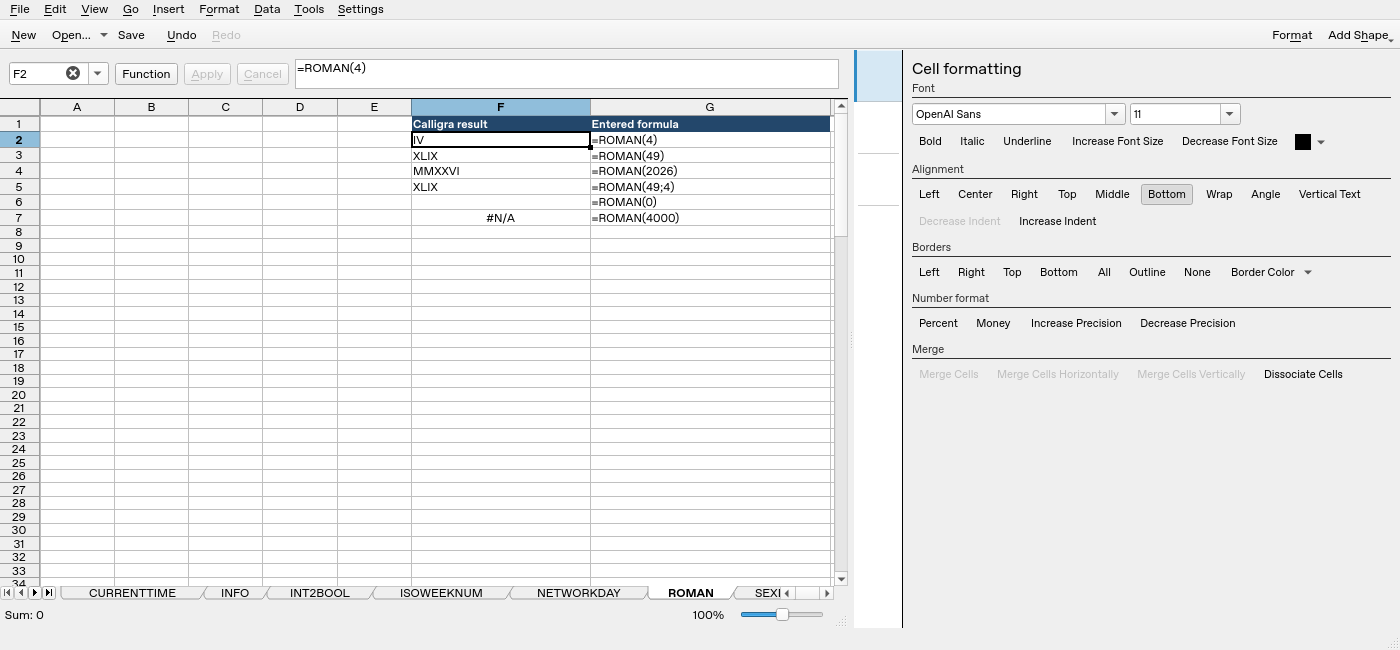
Screenshot: Native 25.04.2 capture with F2 selected. The formula bar shows =ROMAN(4); column F contains application results. Column G contains descriptive formula labels, some of which are clipped by the formatting panel.