

ROOTN in Calligra Sheets: Calculate an nth Root
Use reciprocal exponents for roots and understand zero, negative-order and signed-input limits.
Verification status: Consult the documentation, examples and any stated test scope below. How formula examples are checked
Quick answer: =ROOTN(81;4) has mathematical value 3, the fourth root of 81. Calligra implements ROOTN as x^(1/n), so its behavior follows floating exponentiation rather than a dedicated signed-root algorithm.
Syntax and parameters
=ROOTN(x; n)
Both arguments are required. For an ordinary nth-root problem, use x ≥ 0 and a positive integer n. The implementation also accepts other numeric orders: it does not first restrict n to positive integers. There is no default root order.
- n = 2 gives a square root.
- n = 3 gives a cube root for positive inputs.
- n = −2 means the reciprocal square root:
=ROOTN(16;-2)is 0.25. - n = 0.5 gives exponent 2:
=ROOTN(16;0.5)is 256. Calling this a half-order root can be less clear than writing the equivalent power. - n = 0 attempts division by zero before exponentiation and produces a division error.
Worked worksheet: a compound multiplier
Suppose an index rises from 100 to 146.41 over four equal periods. The constant multiplicative factor per period is the fourth root of the end/start ratio.
- Put 100 in A2, 146.41 in B2 and 4 in C2.
- In D2 enter
=ROOTN(B2/A2;C2). - The mathematical reference factor is 1.1.
- In E2 enter
=D2-1and format as a percentage: 10% per period. - Check the reconstruction with
=A2*D2^C2, approximately 146.41.
The ratio B2/A2 is dimensionless. The period can be a month, production cycle or year, but all four periods must mean the same thing. This formula describes a constant-equivalent multiplier; it does not prove that each observed period actually increased by 10%.
Advanced example: geometric scale versus reciprocal scale
A fourth-power calibration relation has normalized output 81. =ROOTN(81;4) yields a scale factor of 3. If the next formula needs its reciprocal, =ROOTN(81;-4) yields 1/3. This is a useful compact identity for positive values, but the units must follow the original model: taking a root does not make a dimensional quantity dimensionless automatically.
For reproducibility, record both x and n in cells rather than embedding an unexplained decimal exponent. The reconstruction root^n is a useful numerical check for positive x and nonzero n, subject to floating rounding.
Signed inputs and errors
The handbook describes a nonnegative root. The implementation uses the shared floating pow operation without selecting real odd roots for negative x. Thus −8 with order 3 must not be assumed to return −2. In contrast, order 1 uses exponent 1, so a negative value can survive unchanged. The exact native cases below distinguish these situations.
For a deliberately signed real odd-root model, an explicit sign-preserving formula can take the positive magnitude’s root and restore the sign. Only do that when the mathematical problem calls for it. Even-order roots of negative real values do not have real solutions; this guide does not establish complex-number support.
Zero with a positive order gives zero. Zero with a negative order calls for an infinite reciprocal and is outside the finite examples here. Floating overflow, underflow and nonfinite results are not interchangeable with ordinary spreadsheet error values. Validate both the domain and the returned value before downstream use.
Related functions and compatibility
Version scope and references
Reviewed October 18, 2026. The relevant implementation file and shared numerical/conversion files were compared between official 25.04.2 and 26.08.2 source and are byte-identical. This establishes source equivalence for the inspected code, not identical behavior on every platform or a native test of 26.08.2. The earliest release containing ROOTN has not been established; these version numbers are not introduction dates.
Mathematical reference values above were calculated independently. The native results below were obtained in Calligra Sheets 25.04.2 on Linux, October 18, 2026; no native 26.08.2 execution is claimed. No unstated locale, import or array-entry behavior is implied.
Negative-input observation
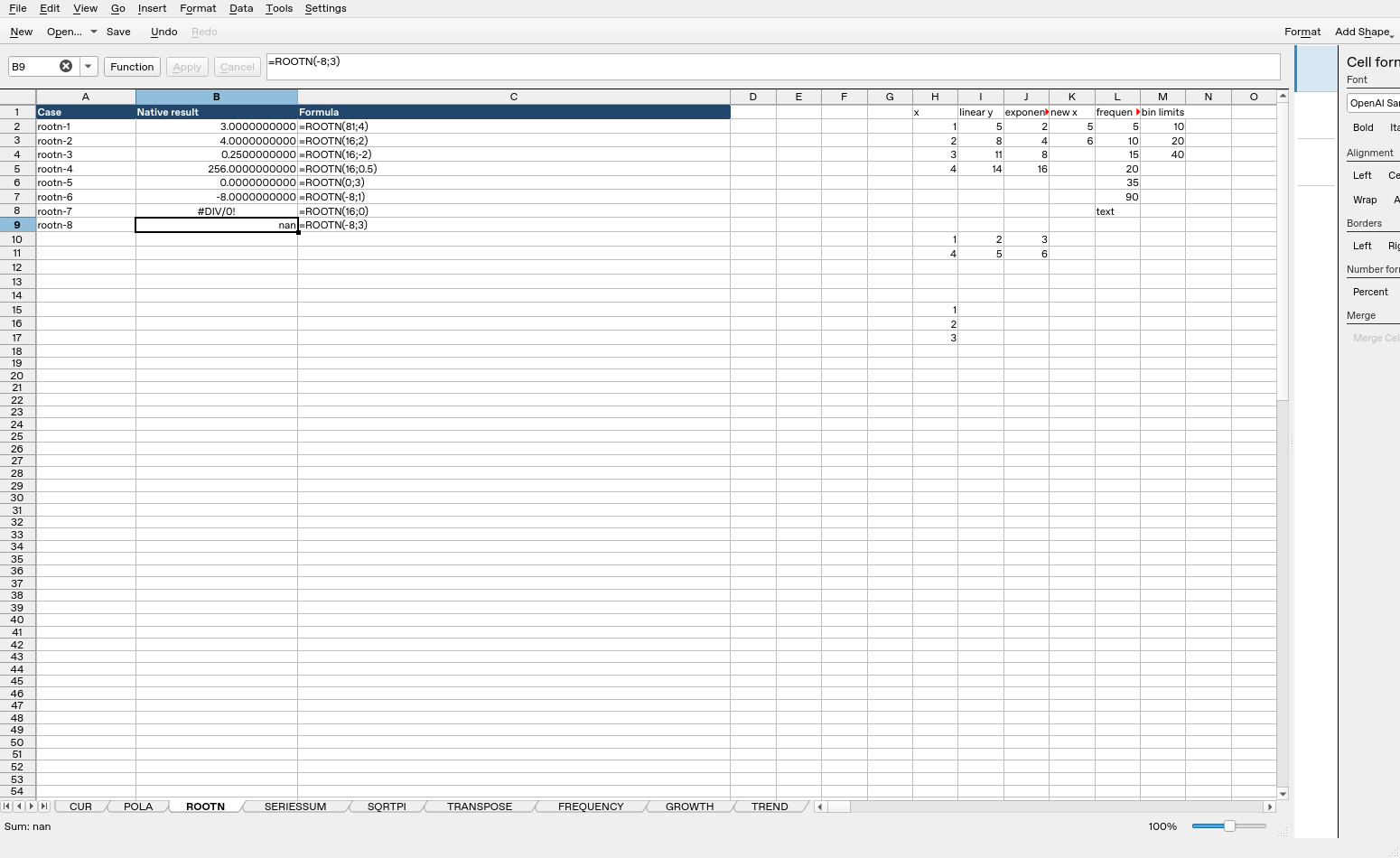
In the tested 25.04.2 application, =ROOTN(-8;3) displayed and saved nan (not a number). This is a nonfinite floating result, not the real cube root −2 and not a conventional #VALUE! error string. Do not pass it downstream as a valid finite measurement. This observation does not establish how every other input, platform or import format represents nonfinite values.
Native verification in Calligra Sheets 25.04.2
These formulas were recalculated in the actual application and read back from its completed native-saved workbook. The image is an unmodified application screenshot. The earlier mathematical calculations remain independent references; this table records actual saved results.
| Formula executed | Native saved result |
|---|---|
=ROOTN(81;4) |
3 |
=ROOTN(16;2) |
4 |
=ROOTN(16;-2) |
0.25 |
=ROOTN(16;0.5) |
256 |
=ROOTN(0;3) |
0 |
=ROOTN(-8;1) |
-8 |
=ROOTN(16;0) |
#DIV/0! |
=ROOTN(-8;3) |
nan |
Display formatting may show fewer digits than the saved value. The tested cases do not establish every coercion, extreme magnitude or cross-application import behavior.