

SERIESSUM in Calligra Sheets: Evaluate a Finite Power Series
Sum coefficient-weighted powers with explicit exponent steps and Calligra zero-case cautions.
Verification status: Consult the documentation, examples and any stated test scope below. How formula examples are checked
Quick answer: with coefficients 1, 2, 3 in H15:H17, =SERIESSUM(2;0;1;H15:H17) returns 17: 1×2⁰ + 2×2¹ + 3×2². The function evaluates a finite supplied list of terms; it does not decide how many terms an infinite series needs.
Syntax and coefficient order
=SERIESSUM(x; n; m; coefficients)
Use all four arguments. x is the base, n the first exponent, m the increment between exponents, and coefficients a one-dimensional numeric range or one numeric coefficient. With coefficients a₀ through aₖ, the result is the sum of aᵢ×x^(n+i×m).
The order of the coefficient cells matters. A vertical range is the clearest reproducible layout. n and m are converted to floating values, so they need not be integers; for fractional exponents keep x positive to avoid real-domain ambiguity. There are no useful omitted defaults.
Source safety caution: registration permits three arguments, but the implementation accesses the fourth. Do not call the three-argument form. Extra arguments are not additional coefficients: only the fourth argument is read as the coefficient collection. Neither behavior should be used as a shortcut for the documented four-argument syntax.
Worked worksheet: polynomial calibration
Use a dimensionless normalized sensor input x and a model y = 1 + 2x + 3x², where y is in calibrated output units.
- Enter 1, 2, 3 in H15, H16, H17.
- Enter 2 in A2 for the normalized input.
- In B2 enter
=SERIESSUM(A2;0;1;H15:H17). - The expected result is 17 output units.
- In C2 check the same calculation with
=H15+H16*A2+H17*A2^2.
If x has physical units rather than being normalized, the coefficients generally need different units so that every term has the same final unit. A spreadsheet will add inconsistent terms without knowing that the model is dimensionally wrong.
Advanced example: odd powers and fractional powers
For x + 2x³ + 3x⁵, keep the coefficients and enter =SERIESSUM(2;1;2;H15:H17). The reference value is 114, from 2 + 16 + 96. The exponent step is 2, so this is not the quadratic model above.
For √x + 2x + 3x^(3/2), use =SERIESSUM(4;0.5;0.5;H15:H17). The result is 34, from 2 + 8 + 24. These finite evaluations say nothing about convergence of an associated infinite series or truncation error. If the coefficients approximate a function, assess the approximation interval and omitted terms separately.
Zero, errors and input quality
The inspected implementation returns a numeric error when x = 0 and n = 0. That affects even an ordinary polynomial with a constant term: the mathematical polynomial value at zero would be its first coefficient, but this implementation rejects the call. Evaluate the known constant term separately when that boundary is required.
For x = 0 and n ≠ 0, the implementation skips its loop and returns zero. This agrees with positive exponents but can conceal a negative-exponent singularity. Restrict zero inputs to models where all relevant exponents are positive; do not treat a returned zero as validation of reciprocal powers at zero.
When m = 0 and x is nonzero, every term has the same exponent. With the example coefficients, =SERIESSUM(2;0;0;H15:H17) gives 6. A scalar coefficient is also possible: =SERIESSUM(2;0;1;3) is 3.
Keep coefficients genuinely numeric. The implementation reads coefficient elements directly as floating values rather than establishing a general text/error propagation contract. Large powers, cancellation between terms and accumulated rounding can reduce numerical reliability; no universal precision bound is implied.
Related functions and compatibility
Version scope and references
Reviewed October 18, 2026. The relevant implementation file and shared numerical/conversion files were compared between official 25.04.2 and 26.08.2 source and are byte-identical. This establishes source equivalence for the inspected code, not identical behavior on every platform or a native test of 26.08.2. The earliest release containing SERIESSUM has not been established; these version numbers are not introduction dates.
Mathematical reference values above were calculated independently. The native results below were obtained in Calligra Sheets 25.04.2 on Linux, October 18, 2026; no native 26.08.2 execution is claimed. No unstated locale, import or array-entry behavior is implied.
Native verification in Calligra Sheets 25.04.2
These formulas were recalculated in the actual application and read back from its completed native-saved workbook. The image is an unmodified application screenshot. The earlier mathematical calculations remain independent references; this table records actual saved results.
Native H15:H17 contains coefficients 1,2,3. Every call has all four arguments; the unsafe missing-coefficient form was not executed.
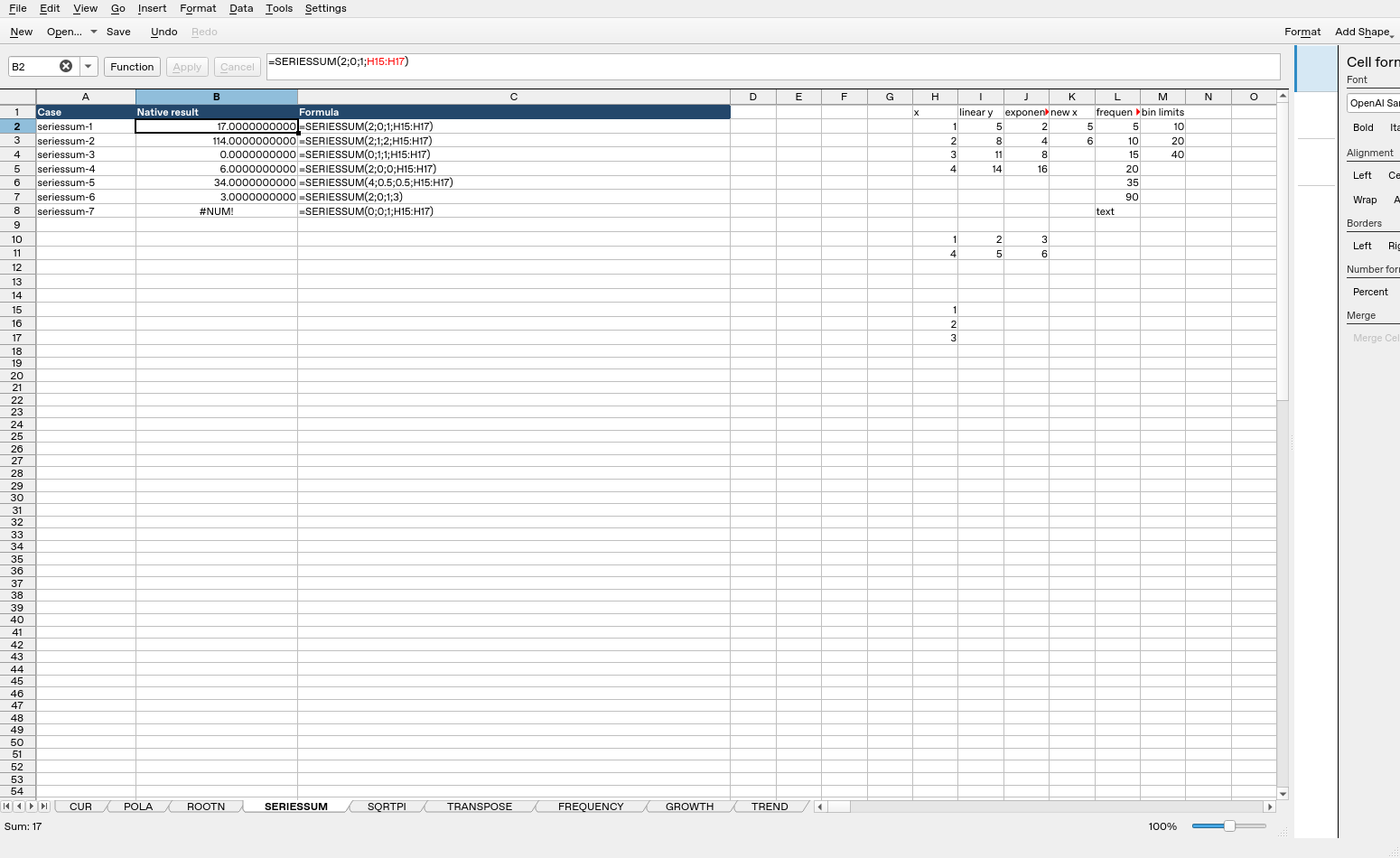
| Formula executed | Native saved result |
|---|---|
=SERIESSUM(2;0;1;H15:H17) |
17 |
=SERIESSUM(2;1;2;H15:H17) |
114 |
=SERIESSUM(0;1;1;H15:H17) |
0 |
=SERIESSUM(2;0;0;H15:H17) |
6 |
=SERIESSUM(4;0.5;0.5;H15:H17) |
34 |
=SERIESSUM(2;0;1;3) |
3 |
=SERIESSUM(0;0;1;H15:H17) |
#NUM! |
Display formatting may show fewer digits than the saved value. The tested cases do not establish every coercion, extreme magnitude or cross-application import behavior.