

SEXDEC in Calligra Sheets: Convert a Time or Hour Components to Decimal Hours
Learn Calligra Sheets SEXDEC with exact arguments, reproducible inputs, independently checked results and implementation-specific cautions.
Verification status: See the evidence and test scope described in this guide. How formula examples are checked
Quick answer
SEXDEC expresses a time quantity as decimal hours. It has two different calling styles: one time value, or separate hours and minutes with optional seconds. Choosing the correct style matters because a single numeric argument is interpreted as a spreadsheet time fraction, not as an already-decimal hour count.
Syntax and defaults
=SEXDEC(time_value)
=SEXDEC(hours;minutes[;seconds])
The registration permits one, two or three arguments. In the one-argument path, the value is converted to a time and multiplied by 24. In the two/three-argument path, the calculation is hours + minutes/60 + seconds/3600. Omitted seconds contribute zero. Hours and minutes are both required in the component form.
Reproduce both calling styles
Enter these formulas separately and display their outputs as ordinary numbers, not clock times:
| Formula | Independent expected decimal hours |
|---|---|
=SEXDEC(TIME(1;30;0)) |
1.5 |
=SEXDEC(1;30) |
1.5 |
=SEXDEC(1;30;30) |
1.5083333333 |
=SEXDEC(0.5) |
12 |
The last case is deliberate. A single numeric 0.5 is half a day, so multiplying by 24 produces twelve hours. To express half an hour using components, use =SEXDEC(0;30), expected 0.5. These expectations follow the source and independent arithmetic; selected native checks are reported below.
Advanced example: price work recorded as components
A work log records 2 hours, 45 minutes and 30 seconds in A2:C2. Put an hourly rate of 40 in D2. Decimal hours are:
=SEXDEC(A2;B2;C2)
Expected: 2.7583333333. Multiplying that result by D2 gives 110.3333333333 before any currency rounding. Keep the hours quantity visible and round the final charge according to the intended billing rule; formatting a cell to two decimals does not necessarily round its stored value.
The component form performs arithmetic on supplied components. It does not by itself establish a validated clock-time domain. For example, 90 minutes contributes 1.5 hours mathematically; decide whether your input form should permit that or require normalized minutes below 60.
Errors, ambiguity and compatibility
- Do not pass a decimal-hour number as the sole argument unless you intend it to be treated as a day fraction.
- Text such as
1:30depends on time parsing; TIME expressions avoid ambiguity for a reproducible example. - A date-time serial can contain a day portion. This guide does not assert a portable behavior for stripping that portion; use a clean time value or explicit components.
- Negative components or oversized totals need an explicit duration policy. The function is not a complete input-validation rule.
- Display the result as a decimal number. A clock format applied to decimal hours can be misleading because spreadsheet time formatting normally expects fractions of days.
- DECSEX performs the opposite unit conversion for ordinary decimal hours. Do not assume all edge cases or display formats round-trip perfectly.
The KDE SEXDEC reference describes the conversion. Other spreadsheet products may require arithmetic instead of this function name; preserve the distinction between time fractions and hour/minute/second components when translating formulas.
Availability and verification
- Release checked: Calligra Sheets 26.08.2, using KDE’s release source package and release information, inspected on October 18, 2026. Relevant locations:
sheets/functions/conversion.cpplines 57–59 and 130–148. - Introduced: The original introduction version is not established by these sources. Current registration establishes presence in 26.08.2, not the first release.
- Lifecycle: Registered in the inspected release; no retirement or deprecation marker was found in this function’s registration. Retirement (removed support) and deprecation (discouraged but retained support) are different claims; neither is asserted here.
- Native testing: Selected cases were observed in Calligra Sheets 25.04.2, as detailed below. The source discussion concerns 26.08.2; unlisted cases remain source-derived or independently calculated.
Related guides and sources
- TIME
- HOUR
- MINUTE
- SECOND
- Calligra function guide index
- KDE formula entry instructions, checked October 18, 2026. Examples use leading
=and semicolons, with a period for decimal numbers. Confirm regional separators in your installation before pasting.
Selected native results and screenshot
The following results were observed in Calligra Sheets 25.04.2 using an ODS workbook opened, calculated and saved by the application. The formula text below uses worksheet notation; saved ODF reference brackets are omitted for readability. Unlisted examples and edge cases retain their separate source or mathematical evidence.
| Native formula | Observed display |
|---|---|
=SEXDEC(TIME(1;30;0)) |
1.5000000000 |
=SEXDEC(1;30) |
1.5000000000 |
=SEXDEC(1;30;30) |
1.5083333333 |
=SEXDEC(0.5) |
12.0000000000 |
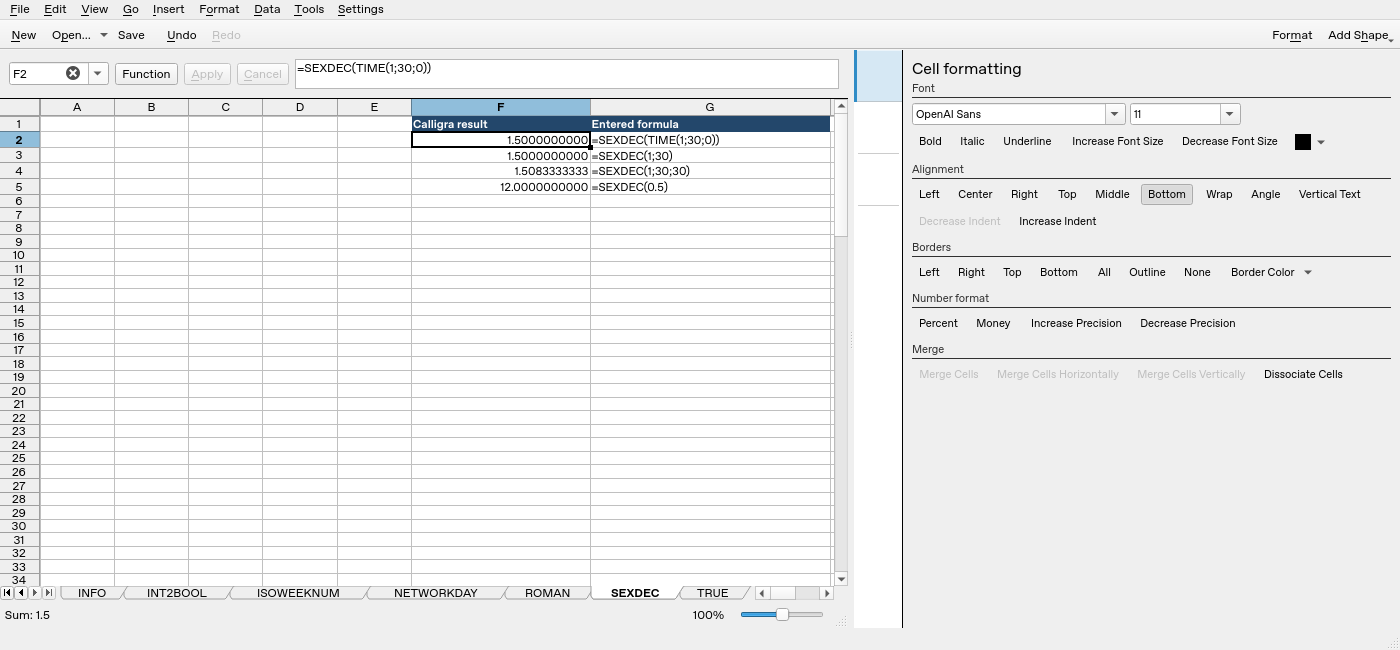
Screenshot: Native 25.04.2 capture with F2 selected. The formula bar shows =SEXDEC(TIME(1;30;0)); column F contains application results. Column G contains descriptive formula labels, some of which are clipped by the formatting panel.