

SHEETS in Calligra Sheets: Count Workbook or Referenced Worksheets
Learn Calligra Sheets SHEETS with exact arguments, reproducible inputs, independently checked results and implementation-specific cautions.
Verification status: See the evidence and test scope described in this guide. How formula examples are checked
Quick answer
SHEETS() returns the workbook’s sheet count. With a valid reference region, SHEETS(reference) counts distinct sheets represented by that region. A normal range confined to one worksheet therefore returns 1, however many cells it contains.
Syntax and defaults
=SHEETS()
=SHEETS(reference)
The argument is optional. No argument means the current workbook’s map count. The implementation collects distinct sheet objects from a valid region, so repeated regions from one sheet do not imply multiple sheets. A scalar argument that does not supply a valid region falls back to the workbook count; it is not a sheet-name search.
The KDE SHEETS documentation establishes the sheet-count purpose. A workbook count is different from the number of open documents or cells in a range.
Reproduce the distinction
- Create a workbook containing exactly two worksheets and verify the tab list.
- On either sheet, put 1 and 2 in A2:A3.
- Enter
=SHEETS()in B2. For this stated workbook, expect 2. - Enter
=SHEETS(A2:A3)in B3. Expect 1, because both cells are on one sheet. - Add a third worksheet and recalculate. The no-argument result should reflect the new count; the same-sheet range result remains 1.
These expectations depend on the workbook structure actually present. Check the actual sheet list before comparing the result with a target count.
Practical example: detect an incomplete report package
Suppose a controlled report package requires exactly five tabs, including its cover and notes. Use =IF(SHEETS()=5;"Count matches";"Check worksheet count") on the cover.
The count is only a coarse check. Five wrongly named or duplicated reports still satisfy it, while a legitimate extra working tab makes it fail. Pair the count with explicit checks of the expected sheet names and contents. Do not describe this formula alone as a completeness certification.
Limits and migration checks
- The source counts the workbook’s map, not an explicitly filtered list of visible tabs. Do not assume a visible-only count.
- A single-sheet range returns one even when the range contains blanks or thousands of cells.
- Text input is not documented here as a valid sheet-name selector. Its fallback count can conceal a mistaken argument.
- Multi-sheet reference syntax varies across applications. This guide’s reproducible examples deliberately use same-sheet references; do not assume imported 3-D notation has identical meaning.
- The function takes zero or one argument. To count cells or rows, use the corresponding cell-count or row-count function instead.
Availability and verification
- Release checked: Calligra Sheets 26.08.2, using KDE’s release source package and release information, inspected on October 18, 2026. Relevant locations:
sheets/functions/reference.cpplines 115–119 and 606–623. - Introduced: The original introduction version is not established by these sources. Current registration establishes presence in 26.08.2, not the first release.
- Lifecycle: Registered in the inspected release; no retirement or deprecation marker was found in this function’s registration. Retirement (removed support) and deprecation (discouraged but retained support) are different claims; neither is asserted here.
- Native testing: Selected cases were recalculated and saved in Calligra Sheets 25.04.2. The source discussion concerns 26.08.2. Unlisted examples and edge cases remain source-derived or independently calculated.
Related guides and sources
- ROWS
- COLUMNS
- COUNT
- IF
- Calligra function guide index
- KDE formula entry instructions, checked October 18, 2026. Examples use leading
=and semicolons, with a period for decimal numbers. Confirm regional separators in your installation before pasting.
Selected native results and screenshot
These results were observed in Calligra Sheets 25.04.2, after loading a corrected ODS input, recalculating and saving. Formula references and results were read back from the saved workbook. This is not a 26.08.2 native test or certification of XLSX import behavior. Other examples and unlisted edge cases remain separate source or mathematical evidence.
| Native formula | Observed display |
|---|---|
=SHEETS() |
8.0000000000 |
=SHEETS(A2:A3) |
1.0000000000 |
=SHEETS("missing") |
8.0000000000 |
The tested workbook contained exactly eight tabs: SHEET, SHEETS, UNIX2DATE, VALUE, XOR, SUBTOTAL, SUMIFS, SUMSQ. The no-argument and scalar-string calls returned 8; the same-sheet A2:A3 reference returned 1. The earlier two-sheet walkthrough is a separate conditional example, not the structure shown here.
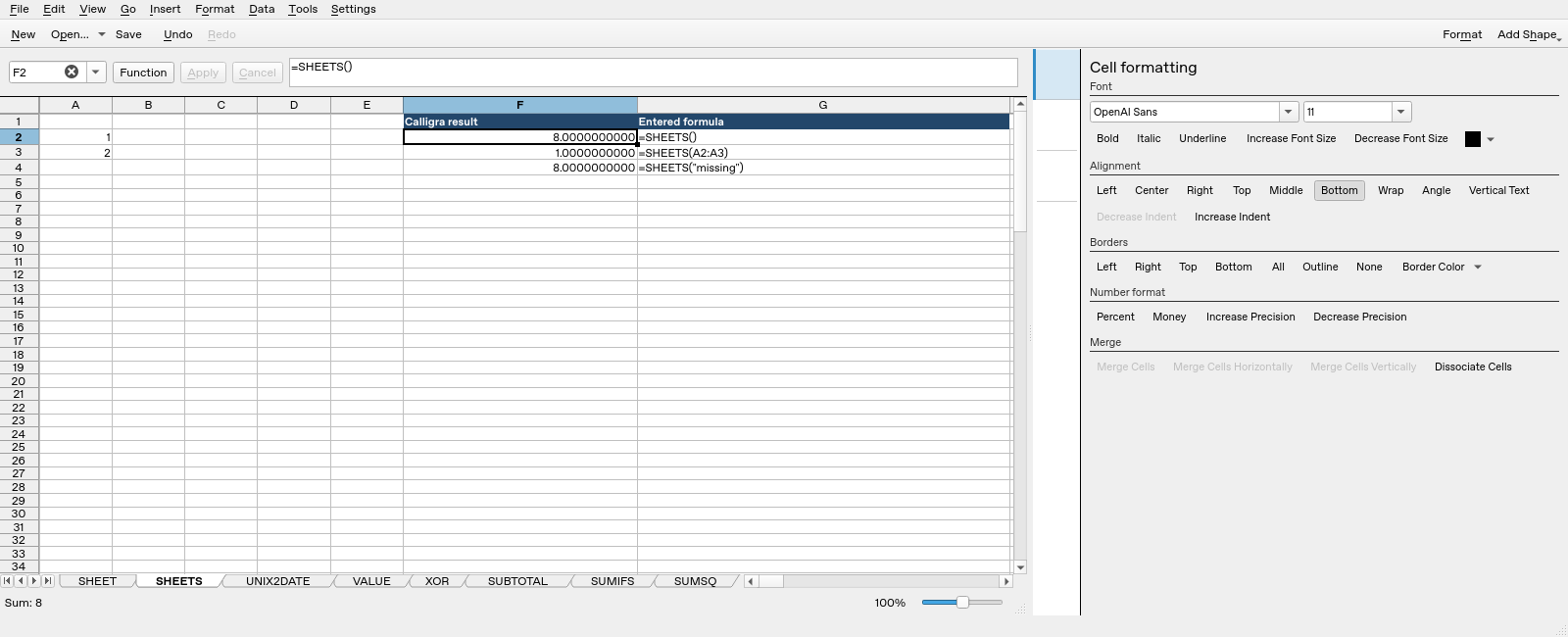
Screenshot: Genuine native 25.04.2 capture. Selected F2 contains =SHEETS() and displays 8.0000000000. Column F contains application results; column G contains descriptive formula labels. The selected formula is visible in the formula bar; long labels in other rows may be clipped by the panel.