

SQRTPI in Calligra Sheets: Calculate the Square Root of x Times Pi
Compute square-root-of-pi factors and apply the correct geometry formula and units.
Verification status: Consult the documentation, examples and any stated test scope below. How formula examples are checked
Quick answer: =SQRTPI(4) returns approximately 3.54490770181, which is √(4π). It does not calculate π×√4, and it does not calculate √(4/π).
Syntax and domain
=SQRTPI(x)
The single argument is required. The documented real domain is x ≥ 0, and the returned square root is nonnegative. There are no optional arguments. The inspected implementation checks x against zero, multiplies it by pi, then takes the square root. A negative input constructs a value error.
Reference values include SQRTPI(0) = 0, SQRTPI(1) ≈ 1.77245385091 and SQRTPI(9) ≈ 5.31736155272. These are floating approximations to mathematical values, not exact symbolic multiples of π.
Worked worksheet: circumference from circle area
For a circle of area A, circumference C = 2√(πA). SQRTPI provides the square-root factor, so the full circumference formula is twice its result.
- Put
Area (m²)in A1 and 4 in A2. - Put
Circumference (m)in B1 and enter=2*SQRTPI(A2)in B2. - The mathematical reference circumference is approximately 7.08981540362 m.
- In C2 enter
=SQRT(A2/PI())to calculate radius, approximately 1.12837916710 m. - Check
=2*PI()*C2, which should agree with B2 within floating precision.
SQRTPI(A2) alone is half the circumference in this application. The radius uses division by π instead, so replacing SQRT(A/PI()) with SQRTPI(A) would be a different formula.
If the area is entered in square centimetres, the resulting length is in centimetres. The function does not read the heading or convert units. Convert 4 m² to 40,000 cm² only if the expected output is also being interpreted in centimetres.
Advanced example: scaling and reconstruction
If the area grows from 4 m² to 9 m², the circumference grows from approximately 7.08981540362 m to 10.6347231054 m. The ratio is √(9/4) = 1.5, not the area ratio 2.25. This is useful when checking whether a geometric report has confused area scaling and length scaling.
For a dimensionless positive input x, squaring SQRTPI(x) and dividing by PI() reconstructs x mathematically. With x = 4, =SQRTPI(4)^2/PI() should be approximately 4. Use a tolerance for numerical checks; a rounded display does not establish bit-for-bit equality.
Errors, boundaries and numerical limits
Zero is valid: a zero-area ideal circle has zero circumference in the formula. Negative area is not a valid geometric input, and SQRTPI(-1) produces a value error in the inspected implementation. Do not repair a negative measurement by taking ABS unless the underlying task explicitly requires an unsigned magnitude.
The multiplication x×π happens before the square root. Consequently, a very large x can overflow at the multiplication even when the final mathematical square root would fit within a floating range. Tiny values can underflow or lose relative precision. The ordinary examples here do not establish a safe bound for every platform or numerical magnitude.
Keep inputs numeric and validate units before applying the formula. Wrong argument count fails the function registration check. If the displayed answer differs only in the last shown digit, increase precision and compare to an appropriate tolerance rather than treating a formatted string as the underlying value.
Related functions and compatibility
SQRT and PI provide an explicit equivalent for ordinary nonnegative inputs: SQRT(x*PI()). POWER is useful when the exponent differs from one half. The explicit equivalent is useful when moving to an application that lacks SQRTPI, but recheck domain errors and extreme-range behavior rather than assuming those are identical.
Version scope and references
Reviewed October 18, 2026. The relevant implementation file and shared numerical/conversion files were compared between official 25.04.2 and 26.08.2 source and are byte-identical. This establishes source equivalence for the inspected code, not identical behavior on every platform or a native test of 26.08.2. The earliest release containing SQRTPI has not been established; these version numbers are not introduction dates.
Mathematical reference values above were calculated independently. The native results below were obtained in Calligra Sheets 25.04.2 on Linux, October 18, 2026; no native 26.08.2 execution is claimed. No unstated locale, import or array-entry behavior is implied.
Native verification in Calligra Sheets 25.04.2
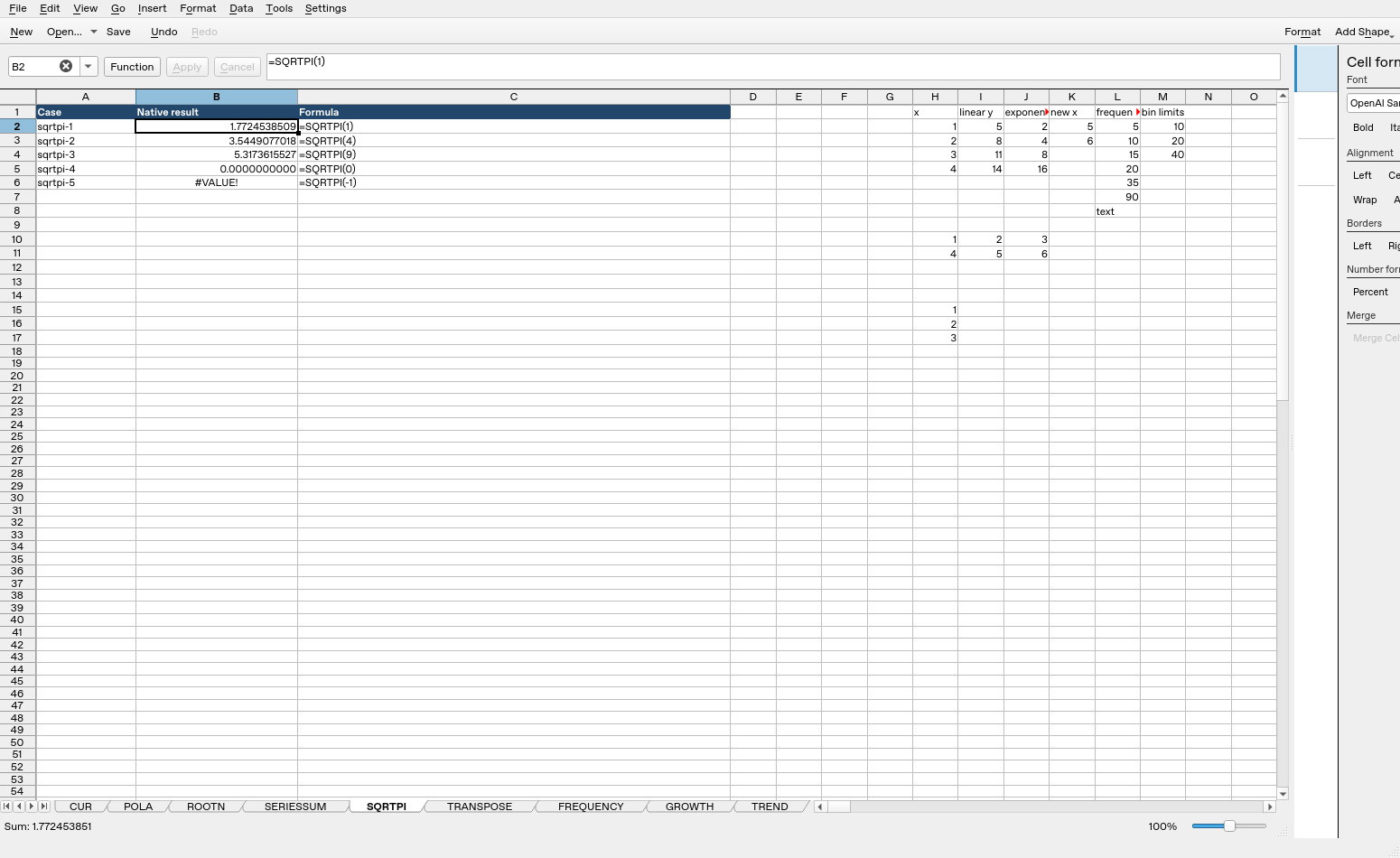
These formulas were recalculated in the actual application and read back from its completed native-saved workbook. The image is an unmodified application screenshot. The earlier mathematical calculations remain independent references; this table records actual saved results.
| Formula executed | Native saved result |
|---|---|
=SQRTPI(1) |
1.77245385090552 |
=SQRTPI(4) |
3.54490770181103 |
=SQRTPI(9) |
5.31736155271655 |
=SQRTPI(0) |
0 |
=SQRTPI(-1) |
#VALUE! |
Display formatting may show fewer digits than the saved value. The tested cases do not establish every coercion, extreme magnitude or cross-application import behavior.