

SUBTOTAL in Calligra Sheets: Aggregate a Range with Hidden-Row Controls
Learn Calligra Sheets SUBTOTAL with exact arguments, reproducible inputs, independently checked results and implementation-specific cautions.
Verification status: See the evidence and test scope described in this guide. How formula examples are checked
Quick answer
SUBTOTAL(code; range) selects an aggregation such as sum or average and skips cells whose formulas contain the text SUBTOTAL. Codes above 100 additionally activate the inspected implementation’s hidden-row check. Use same-sheet rectangular ranges and verify the visibility behavior in the target build; do not transfer filter assumptions from another spreadsheet.
Syntax and selector table
=SUBTOTAL(code; range)
Calligra registers exactly two arguments here: one selector and one data argument. Multiple separate reference arguments are not part of this registered interface.
| Code | Calculation | Hidden-row variant |
|---|---|---|
| 1 | Average | 101 |
| 2 | Numeric count | 102 |
| 3 | Nonempty count | 103 |
| 4 | Maximum | 104 |
| 5 | Minimum | 105 |
| 6 | Product | 106 |
| 7 | Sample standard deviation | 107 |
| 8 | Population standard deviation | 108 |
| 9 | Sum | 109 |
| 10 | Sample variance | 110 |
| 11 | Population variance | 111 |
The code is converted to an integer. If it is greater than 100, the implementation enables exclusion using rowIsHidden and reduces the code modulo 100. Use the conventional values in the table rather than relying on other numbers that happen to map to the same operation. An unrecognized reduced code returns #VALUE!.
Reproduce an ordinary and nested total
- Put 10, 20 and 30 in A2:A4.
- In A5 enter
=SUBTOTAL(9;A2:A4), expected 60. - In C2 enter
=SUBTOTAL(9;A2:A5), expected 60, because the nested subtotal formula is excluded. - In C3 enter
=SUBTOTAL(1;A2:A4), expected 20. - In C4 enter
=SUBTOTAL(109;A2:A4). With all rows visible, expect 60.
The arithmetic is independently checkable: 10+20+30=60 and 60/3=20. The nested exclusion follows the inspected formula scan, not a claim that ordinary SUM would avoid double-counting.
Practical example: visible-row review
With the same inputs, manually hide row 3 and explicitly choose Tools → Recalculate Document (F9). The source predicts that code 9 still includes its 20, while code 109 excludes it: expected totals 60 and 40 respectively. Keep both totals labeled clearly if the workbook is used to reconcile an all-row total with a manually hidden-row view.
A hidden row is not automatically evidence of a filter operation. The inspected SUBTOTAL loop calls rowIsHidden only for the >100 variant and has no separate filter-specific predicate. This guide does not guarantee Excel-style treatment of filtered-out records. Validate any filter workflow independently before using a visible-data total in a report.
Important implementation limits
- Nested exclusion is a case-insensitive substring search of formula text for SUBTOTAL, not a parsed call-tree test. Even an unrelated formula containing that text can be excluded.
- The row and formula scan uses the formula’s sheet context. Cross-sheet data references are outside these worked guarantees.
- Use a real rectangular range so its coordinates are available for visibility and nested-formula checks.
- Statistical selectors need appropriate sample sizes; a sample calculation on too few numeric observations can fail.
- Invalid code 12 produces #VALUE!. Changing the cell’s format does not repair an unsupported selector.
- The KDE SUBTOTAL entry describes the family of aggregations; the release implementation is the basis for these product-specific restrictions.
Availability and verification
- Release checked: Calligra Sheets 26.08.2, using KDE’s release source package and release information, inspected on October 18, 2026. Relevant locations:
sheets/functions/math.cpplines 324–328 and 1233–1327. - Introduced: The original introduction version is not established by these sources. Current registration establishes presence in 26.08.2, not the first release.
- Lifecycle: Registered in the inspected release; no retirement or deprecation marker was found in this function’s registration. Retirement (removed support) and deprecation (discouraged but retained support) are different claims; neither is asserted here.
- Native testing: Selected cases were recalculated and saved in Calligra Sheets 25.04.2. The source discussion concerns 26.08.2. Unlisted examples and edge cases remain source-derived or independently calculated.
Related guides and sources
- SUM
- AVERAGE
- COUNT
- COUNTA
- Calligra function guide index
- KDE formula entry instructions, checked October 18, 2026. Examples use leading
=and semicolons, with a period for decimal numbers. Confirm regional separators in your installation before pasting.
Selected native results and screenshot
These results were observed in Calligra Sheets 25.04.2, after loading a corrected ODS input, recalculating and saving. Formula references and results were read back from the saved workbook. This is not a 26.08.2 native test or certification of XLSX import behavior. Other examples and unlisted edge cases remain separate source or mathematical evidence.
| Native formula | Observed display |
|---|---|
=SUBTOTAL(9;A2:A4) |
60.0000000000 |
=SUBTOTAL(1;A2:A4) |
20.0000000000 |
=SUBTOTAL(109;A2:A4) |
60.0000000000 |
=SUBTOTAL(9;A2:A5) |
60.0000000000 |
=SUBTOTAL(12;A2:A4) |
#VALUE! |
Native manual-hide check
The table above records the all-visible state. In a separate native 25.04.2 check, row 3 (containing 20) was manually hidden and Tools → Recalculate Document (F9) was used. Code 9 remained 60, while code 109 became 40, excluding that row. Hiding the row alone initially left the displayed 109 result at its cached 60, so explicit recalculation is an important part of this procedure. The recalculated values were then saved and read back. This test did not apply a filter.
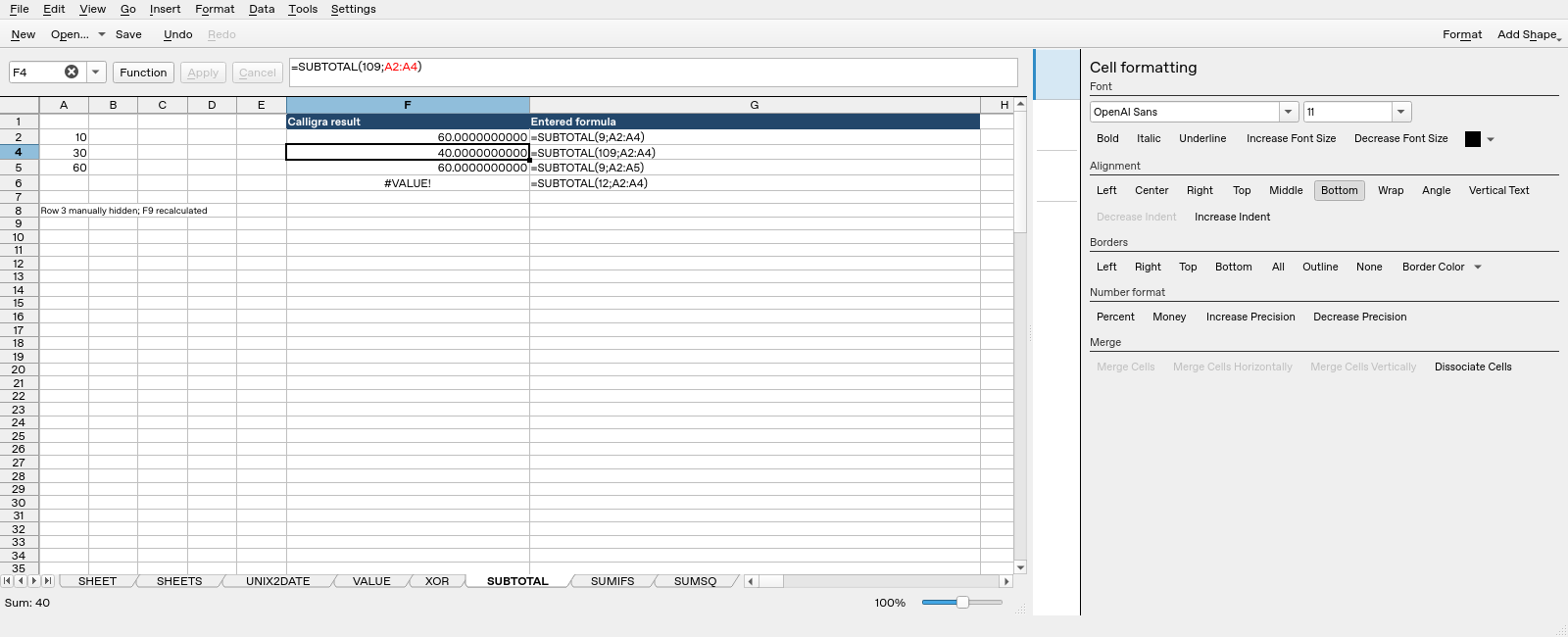
Screenshot: The hidden-row state, with selected F4 containing =SUBTOTAL(109;A2:A4) and displaying 40. F2 above it displays 60 for code 9. Row headers jump from 2 to 4, identifying the hidden row; A8 records the manual-hide and F9 steps. Column F holds application results and G shows formula labels.