

SUMSQ in Calligra Sheets: Add Squares Without Losing Negative Inputs
Learn Calligra Sheets SUMSQ with exact arguments, reproducible inputs, independently checked results and implementation-specific cautions.
Verification status: See the evidence and test scope described in this guide. How formula examples are checked
Quick answer
SUMSQ(number1; number2; …) returns the sum of the squares of the supplied numeric values. For -3 and 4, it returns 25: (-3)²+4²=9+16. It does not square the total, which would instead give (-3+4)²=1.
Syntax and input treatment
=SUMSQ(value1; value2; ...)
=SUMSQ(range)
At least one argument is required. The registration accepts arrays and ranges, and the sum-of-squares walker squares eligible values before adding them. The inspected walker skips empty, string and error elements, but does include Boolean values through numeric conversion. True therefore contributes 1 and false contributes 0.
Do not silently assume another product’s treatment of text or Boolean arguments. A literal quoted "5" is text in this interface, not automatically a numeric 5 for the walker.
Reproduce the calculation
- Enter -3, 4 and 0 in A2:A4.
- Enter
=SUMSQ(A2:A4)in B2. Expected result: 25. - Enter
=SUMSQ(3;4)in B3. Expected result: 25. - Enter
=SUMSQ(-3;4;TRUE())in B4. Expected result: 26. - Enter
=SUMSQ("5";3)in B5. Expected result: 9, because the string is skipped.
These values were independently calculated by squaring and adding the eligible inputs. The KDE SUMSQ reference describes the sum-of-squares operation; the source walker supplies the Boolean and text distinctions.
Practical example: summarize prediction errors
Suppose errors in three numeric observations are -3, 4 and 0. Their sum of squared errors is 25. The mean squared error is 25/3, approximately 8.3333333333; the root mean square is =SQRT(SUMSQ(A2:A4)/COUNT(A2:A4)), approximately 2.8867513459.
This formula assumes the error range contains only genuine numeric observations. If Boolean values appear, SUMSQ can include their contribution while COUNT’s numeric-only behavior can produce a different denominator policy. Clean the data and define missing-observation handling before using the result as a statistical metric.
A zero total indicates all included real numeric values are zero, but it does not prove the source range contained valid observations: ignored strings can also leave a zero accumulator. Retain an observation-count check.
Edge cases and compatibility
- Negative values become nonnegative when squared; do not take absolute values merely to remove their signs first.
- Large magnitudes can overflow or lose floating-point precision. Squaring amplifies scale differences.
- Empty and text elements are skipped by the walker; numeric-looking text needs deliberate conversion if it should count.
- Error elements are skipped inside the walker, but direct error arguments may be handled by the formula evaluator before the function executes. Do not treat SUMSQ as a general error-suppression contract.
- Do not confuse SUMSQ with paired-range functions for squares of differences or differences of squares.
Availability and verification
- Release checked: Calligra Sheets 26.08.2, using KDE’s release source package and release information, inspected on October 18, 2026. Relevant locations:
sheets/functions/math.cpplines 339–342 and 626–631;sheets/engine/ValueCalc.cpplines 79–84. - Introduced: The original introduction version is not established by these sources. Current registration establishes presence in 26.08.2, not the first release.
- Lifecycle: Registered in the inspected release; no retirement or deprecation marker was found in this function’s registration. Retirement (removed support) and deprecation (discouraged but retained support) are different claims; neither is asserted here.
- Native testing: Selected cases were recalculated and saved in Calligra Sheets 25.04.2. The source discussion concerns 26.08.2. Unlisted examples and edge cases remain source-derived or independently calculated.
Related guides and sources
- SUM
- SUMXMY2
- SQRT
- COUNT
- Calligra function guide index
- KDE formula entry instructions, checked October 18, 2026. Examples use leading
=and semicolons, with a period for decimal numbers. Confirm regional separators in your installation before pasting.
Selected native results and screenshot
These results were observed in Calligra Sheets 25.04.2, after loading a corrected ODS input, recalculating and saving. Formula references and results were read back from the saved workbook. This is not a 26.08.2 native test or certification of XLSX import behavior. Other examples and unlisted edge cases remain separate source or mathematical evidence.
| Native formula | Observed display |
|---|---|
=SUMSQ(A2:A4) |
25.0000000000 |
=SUMSQ(3;4) |
25.0000000000 |
=SUMSQ(-3;4;TRUE()) |
26.0000000000 |
=SUMSQ("5";3) |
9.0000000000 |
The native result 26 includes the Boolean true contribution, and the quoted string “5” was skipped in the result 9. These distinguish the tested input policy from generic spreadsheet assumptions.
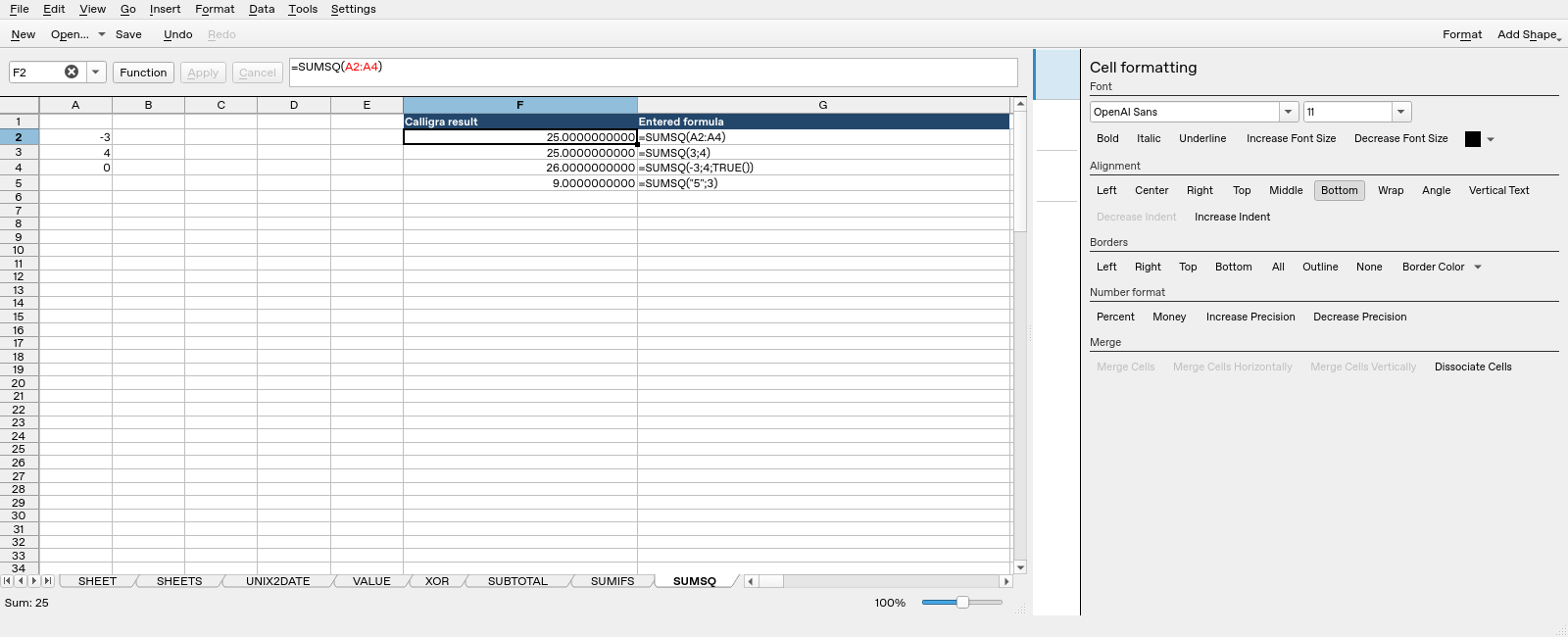
Screenshot: Genuine native 25.04.2 capture. Selected F2 contains =SUMSQ(A2:A4) and displays 25.0000000000. Column F contains application results; column G contains descriptive formula labels. The selected formula is visible in the formula bar; long labels in other rows may be clipped by the panel.