

TBILLPRICE Function (Calligra Sheets)
Use Calligra Treasury-bill price calculations with explicit inclusive 30/360 rules, month-end examples and implementation limits.
Verification status: See the evidence and test scope described in this guide. How formula examples are checked
Quick answer: =TBILLPRICE(DATE(2025;1;1);DATE(2025;4;1);0.05) is independently expected to return approximately 98.7361111111.
Availability and verification scope
- Introduced: Original introduction release is not established. A checked release is not an introduction date.
- Source checked: Calligra Sheets 26.08.2, first-party implementation retrieved on October 18, 2026.
- Retired or deprecated: Neither is established. The function remains registered in the inspected source.
- Numerical evidence: The selected formulas below were executed in Calligra Sheets 25.04.2 on October 18, 2026, with formulas and results read back from a native-saved ODS. Independent calculations provide separate checks. Version 26.08.2 was source-checked only; these selected cases do not establish general import/export or cross-version runtime compatibility.
- Entry style: English names, semicolon separators, decimal points and
DATE(year;month;day)values. Brackets in syntax indicate optional arguments; do not type them.
Purpose and actual day-count behavior
TBILLPRICE calculates price per 100 face value from a discount rate. A rate is a decimal: enter 0.05 for 5%. Price is a per-100 quote: enter 99 for a security costing 99 per 100 face value.
Calligra-specific limitation: the inspected Treasury-bill functions do not simply use actual calendar days. They use US/NASD-style 30/360 calculations with an inclusive-day adjustment. TBILLPRICE moves maturity forward by one calendar day before calculating the 30/360 fraction or day count. These two operations can differ at month end. Do not substitute this implementation for a market quotation convention without independently checking the day count.
Syntax and arguments
=TBILLPRICE(settlement; maturity; discount)
| Argument | Meaning |
|---|---|
| settlement | Date the bill is purchased or settled |
| maturity | Stated redemption date |
| discount | Annual discount rate, expressed as a decimal |
Exactly three arguments are registered. There is no basis argument. Use real dates constructed with DATE or date-valued cells; passing ambiguous text dates can change parsing with locale. The hard-coded redemption basis is 100.
Step-by-step: January 1 to April 1
- On a fresh worksheet enter
=DATE(2025;1;1)in A2 and=DATE(2025;4;1)in B2. - Enter 0.05 in C2 for a 5% discount rate.
- Enter
=TBILLPRICE(A2;B2;C2)in D2. - Format D2 as a number with several decimal places; it is a price quote, not a percent.
The source day count is 91: three 30-day months plus the inclusive adjustment. Actual calendar time from January 1 to April 1 is 90 days in 2025. That one-day difference is part of the implementation, not a rounding artifact.
The independent calculations for the three related outputs are:
price = 100*(1 − discount*91/360)
bond_equivalent_yield = 365*discount/(360 − discount*91)
price_based_yield = (100/price − 1)*360/91
With discount 0.05, price is 98.7361111111111. The two yield formulas use different annualizing constants, 365 and 360. Thus the same starting discount rate does not imply all three functions return the same percentage. The comparison cases below preserve the full independently calculated values rather than rounding the input price prematurely.
Advanced case: a month-end discrepancy
Use settlement January 31, 2025 and maturity February 28, 2025. TBILLEQ and TBILLPRICE first move maturity to March 1. With US days360, January 31 is adjusted to day 30, producing 31 days to March 1. At discount 0.05, TBILLPRICE therefore computes 100*(1−0.05*31/360).
TBILLYIELD instead calculates days360 from January 31 to February 28, obtaining 28, then adds 1 to get 29. At price 99 its yield is (100/99−1)*360/29. This means a price calculated by TBILLPRICE need not map back through TBILLYIELD under one common day fraction at month-end boundaries. Check both the date adjustment and the annualizing constant when reconciling differences.
For a position with face amount 10,000, multiply a per-100 price by 100 to obtain the model’s purchase amount before fees. Do not multiply a rate by the face amount and call the result the quoted price. Taxes, fees, reinvestment and contractual settlement rules are outside these functions.
Errors and boundary cases
TBILLPRICE has unusually incomplete validation. It obtains YEARFRAC using the adjusted maturity, then rejects the case whenever that fraction is exactly an integer. For January 1 to December 31, 2025, adjusted maturity is January 1, 2026; the year fraction is exactly 1, so the source returns internal errorVALUE. A fractional period longer than a year is not rejected by this particular integer test merely because of its length.
The intended date/rate validation is commented out. Discount 0 consequently produces price 100 for the ordinary fractional-year example. Negative discount or reversed dates should not be treated as validated financial inputs simply because a number is returned; YEARFRAC may swap reversed dates. Do not infer the usual “maturity within one year” rule from this implementation’s observed numeric output.
Reproducible comparison cases
Enter each formula on a fresh worksheet. Format numeric results with at least ten decimal places before comparing; percentage formatting multiplies the displayed number by 100. The errors for these selected formulas were also observed in the native application.
| Formula | Independent or source-derived expectation |
|---|---|
=TBILLPRICE(DATE(2025;1;1);DATE(2025;4;1);0.05) |
98.73611111111111 |
=TBILLPRICE(DATE(2025;1;31);DATE(2025;2;28);0.05) |
99.56944444444444 |
=TBILLPRICE(DATE(2025;1;1);DATE(2025;4;1);0) |
100.0 |
=TBILLPRICE(DATE(2025;1;1);DATE(2025;12;31);0.05) |
#VALUE! — Integer year fraction rejected, despite ordinary-looking maturity |
Native results in Calligra Sheets 25.04.2
These selected formulas were recalculated in the native application. The formulas below use worksheet notation; native ODS range references may serialize differently. Display precision can differ from the independent arithmetic.
| Formula | Native displayed result |
|---|---|
=TBILLPRICE(DATE(2025;1;1);DATE(2025;4;1);0.05) |
98.7361111111 |
=TBILLPRICE(DATE(2025;1;31);DATE(2025;2;28);0.05) |
99.5694444444 |
=TBILLPRICE(DATE(2025;1;1);DATE(2025;4;1);0) |
100.0000000000 |
=TBILLPRICE(DATE(2025;1;1);DATE(2025;12;31);0.05) |
#VALUE! |
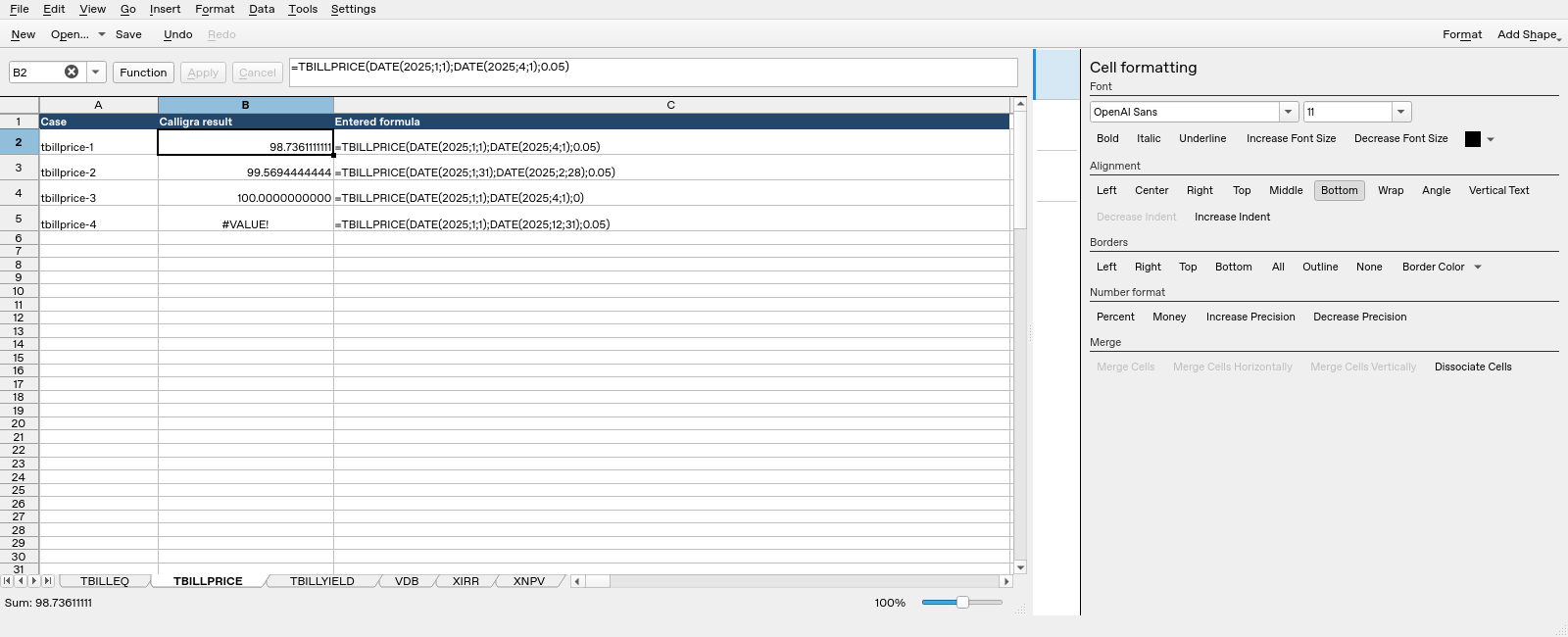
Calligra Sheets 25.04.2: selected cell B2 evaluates =TBILLPRICE(DATE(2025;1;1);DATE(2025;4;1);0.05) and displays 98.7361111111. Column B contains calculated results; column C shows entered formula text.
Compatibility and related functions
The registered alternate spelling is COM.SUN.STAR.SHEET.ADDIN.ANALYSIS.GETTBILLPRICE. It uses the same handler; it is not a separate calculation. Matching names in other spreadsheet products do not guarantee matching argument order, day counts, validation or file-import behavior. This guide does not establish general XLSX/ODS round-trip compatibility. Check a small workbook with known results before relying on a migrated model.
Related guides: DURATION and PDURATION cover compound-growth periods; PMT handles equal periodic payments; DATE constructs date values. Keep investment returns and asset depreciation in separate models.
First-party references
- Calligra released function implementation, including the actual argument reads and return expressions.
- Calligra function descriptions, useful for terminology but subordinate to the inspected implementation where they differ.
- Calligra year-fraction implementation, relevant to basis-dependent year fractions.
References checked October 18, 2026. Numerical examples are spreadsheet calculations, not a recommendation to buy, sell or price a particular security without checking its contractual terms.