

UNIX2DATE in Calligra Sheets: Convert Epoch Seconds to a Spreadsheet Date
Learn Calligra Sheets UNIX2DATE with exact arguments, reproducible inputs, independently checked results and implementation-specific cautions.
Verification status: See the evidence and test scope described in this guide. How formula examples are checked
Quick answer
UNIX2DATE(seconds) converts integer Unix seconds since 1970-01-01 00:00:00 UTC to Calligra’s date/time value. Apply date-and-time formatting to read it; a numeric cell format can show the underlying spreadsheet serial instead.
Syntax and units
=UNIX2DATE(seconds)
Exactly one argument is accepted. The implementation converts it to an integer, sets a QDateTime to UTC, sets its seconds since the epoch, and builds the spreadsheet value using the document’s calculation settings. There is no timezone argument. A millisecond timestamp must first be converted to seconds; passing milliseconds directly changes the magnitude by a factor of 1000.
Do not rely on this function to validate arbitrary text. Its integer converter can turn an unparseable string into zero. Use clean numeric whole seconds and preserve the original input for review. Fractional seconds are not preserved by the integer conversion.
Reproduce three calendar controls
- Put 0, 946684800 and 1735732800 into A2:A4.
- In B2 enter
=UNIX2DATE(A2)and fill down. - Display B2:B4 with both date and time; use a separate numeric display when checking serials.
| Seconds | Expected UTC calendar value | Serial with default 1899-12-30 reference |
|---|---|---|
| 0 | 1970-01-01 00:00 | 25569 |
| 946684800 | 2000-01-01 00:00 | 36526 |
| 1735732800 | 2025-01-01 12:00 | 45658.5 |
These were independently calculated from UTC calendar arithmetic. The serial column depends on the document’s reference date; the calendar interpretation is the primary control. =YEAR(UNIX2DATE(946684800)) should return 2000.
Practical example: compare event times
For numeric timestamps 1735732800 and 1735736400 in A2:A3, the difference is 3600 seconds. The corresponding spreadsheet dates differ by 3600/86400 = 1/24 day. To report elapsed hours, use =(UNIX2DATE(A3)-UNIX2DATE(A2))*24, expected 1.
Keep the source timezone convention attached to the data. Unix seconds identify an instant, while a displayed spreadsheet date may not carry an explicit timezone label. This conversion is not a daylight-saving or regional-time conversion tool.
Errors and boundaries
- The epoch input is seconds, not milliseconds and not an Excel-style day serial.
- Locale-formatted numeric text is less robust than numeric cells.
- The inspected wrapper uses the engine’s integer conversion. Do not extrapolate the small controls above into guaranteed extreme-date, overflow or subsecond support.
- A date-only format hides the noon in the third example; it does not mean the time was discarded.
- Negative epochs and another document reference date should be tested before production use.
- The KDE UNIX2DATE entry describes the conversion; the inspected source makes its UTC construction explicit.
Availability and verification
- Release checked: Calligra Sheets 26.08.2, using KDE’s release source package and release information, inspected on October 18, 2026. Relevant locations:
sheets/functions/datetime.cpplines 170–172 and 1110–1121;sheets/engine/ValueConverter.cppinteger conversion. - Introduced: The original introduction version is not established by these sources. Current registration establishes presence in 26.08.2, not the first release.
- Lifecycle: Registered in the inspected release; no retirement or deprecation marker was found in this function’s registration. Retirement (removed support) and deprecation (discouraged but retained support) are different claims; neither is asserted here.
- Native testing: Selected cases were recalculated and saved in Calligra Sheets 25.04.2. The source discussion concerns 26.08.2. Unlisted examples and edge cases remain source-derived or independently calculated.
Related guides and sources
- DATE
- TIME
- YEAR
- Calligra function guide index
- KDE formula entry instructions, checked October 18, 2026. Examples use leading
=and semicolons, with a period for decimal numbers. Confirm regional separators in your installation before pasting.
Selected native results and screenshot
These results were observed in Calligra Sheets 25.04.2, after loading a corrected ODS input, recalculating and saving. Formula references and results were read back from the saved workbook. This is not a 26.08.2 native test or certification of XLSX import behavior. Other examples and unlisted edge cases remain separate source or mathematical evidence.
| Native formula | Observed display |
|---|---|
=UNIX2DATE(0) |
1970-01-01T00:00:00 |
=UNIX2DATE(946684800) |
2000-01-01T00:00:00 |
=UNIX2DATE(1735732800) |
2025-01-01T12:00:00 |
=YEAR(UNIX2DATE(946684800)) |
2000.0000000000 |
=N(UNIX2DATE(0)) |
25569 |
=N(UNIX2DATE(946684800)) |
36526 |
=N(UNIX2DATE(1735732800)) |
45658.5 |
The native date/time displays were 1970-01-01T00:00:00, 2000-01-01T00:00:00 and 2025-01-01T12:00:00. Additional native N(UNIX2DATE(…)) readbacks below the primary examples returned 25569, 36526 and 45658.5, confirming the serial values as well as their presentation.
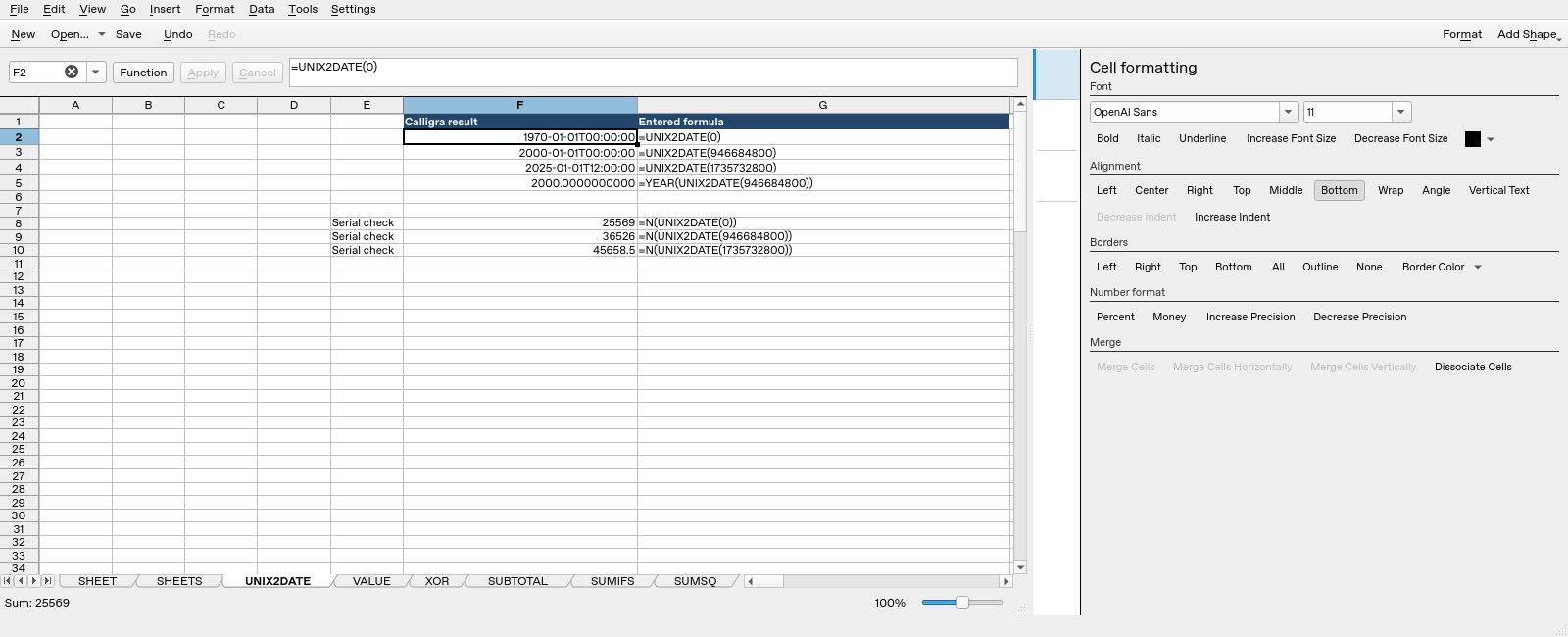
Screenshot: Genuine native 25.04.2 capture. Selected F2 contains =UNIX2DATE(0) and displays 1970-01-01T00:00:00. Column F contains application results; column G contains descriptive formula labels. The selected formula is visible in the formula bar; long labels in other rows may be clipped by the panel.