

VALUE in Calligra Sheets: Convert Parsed Text to a Number
Learn Calligra Sheets VALUE with exact arguments, reproducible inputs, independently checked results and implementation-specific cautions.
Verification status: See the evidence and test scope described in this guide. How formula examples are checked
Quick answer
VALUE(value) uses Calligra’s floating-number converter. Numeric text can become a number, but unparseable text becomes zero in the inspected implementation. Do not use this function alone to prove that imported text was valid numeric data.
Syntax and conversion rules
=VALUE(value)
Exactly one argument is accepted. Numeric input is retained numerically. Boolean true becomes 1 and false becomes 0; an empty value becomes 0. Text is passed to the document parser. If that parsed value is not numeric, the converter supplies 0 rather than requesting an error result.
Parsing depends on regional settings. The examples use a period decimal separator. Quoted text and cell references are accepted as inputs, but a currency mark, thousands separator or date-looking string should be tested in the document locale rather than assumed portable.
Reproduce a safe control set
Enter the following formulas in separate cells:
| Formula | Source-derived expected result |
|---|---|
=VALUE("125") |
125 |
=VALUE("-12.5") |
-12.5 in a period-decimal locale |
=VALUE("not a number") |
0 |
=VALUE(TRUE()) |
1 |
The first two expectations follow ordinary number parsing; the last two follow the converter branches. The KDE VALUE reference describes numeric conversion, while the source establishes this important invalid-text behavior.
Practical example: convert an imported quantity cautiously
Keep the original imported quantity text in A2. Put =VALUE(A2) in B2, and if the confirmed numeric quantity is 125 with a unit rate of 2.4 in C2, =B2*C2 gives 300.
Do not discard A2 after conversion. A blank, a genuine zero and an unparseable label can all lead to zero in B2. If zero is unexpected, flag it for inspection rather than silently dropping the row. A check such as =IF(B2=0;"Review source";"Converted nonzero") is a triage label, not a validator: legitimate zeros also require interpretation, and nonzero results do not prove the text had the intended units.
Troubleshooting and compatibility
- If a decimal value changes magnitude or becomes zero, inspect the locale and raw text first.
ISNUMBER(VALUE(A2))cannot validate the original string when failure itself returns numeric zero.- Avoid relying on generic Excel error-handling recipes that assume invalid text necessarily produces #VALUE! here.
- A numeric-looking cell may already hold a number; converting it again does not establish its provenance.
- This guide does not promise how every error-valued expression reaches the converter, because formula evaluation can propagate errors before the wrapper executes.
- For date strings, use a date-specific interpretation and verify it separately; ordinary number conversion is not a timezone conversion.
Availability and verification
- Release checked: Calligra Sheets 26.08.2, using KDE’s release source package and release information, inspected on October 18, 2026. Relevant locations:
sheets/functions/text.cpplines 105–107 and 740–744;sheets/engine/ValueConverter.cpplines 117–159. - Introduced: The original introduction version is not established by these sources. Current registration establishes presence in 26.08.2, not the first release.
- Lifecycle: Registered in the inspected release; no retirement or deprecation marker was found in this function’s registration. Retirement (removed support) and deprecation (discouraged but retained support) are different claims; neither is asserted here.
- Native testing: Selected cases were recalculated and saved in Calligra Sheets 25.04.2. The source discussion concerns 26.08.2. Unlisted examples and edge cases remain source-derived or independently calculated.
Related guides and sources
- ISNUMBER
- IF
- IFERROR
- SUM
- Calligra function guide index
- KDE formula entry instructions, checked October 18, 2026. Examples use leading
=and semicolons, with a period for decimal numbers. Confirm regional separators in your installation before pasting.
Selected native results and screenshot
These results were observed in Calligra Sheets 25.04.2, after loading a corrected ODS input, recalculating and saving. Formula references and results were read back from the saved workbook. This is not a 26.08.2 native test or certification of XLSX import behavior. Other examples and unlisted edge cases remain separate source or mathematical evidence.
| Native formula | Observed display |
|---|---|
=VALUE("125") |
125.0000000000 |
=VALUE("-12.5") |
-12.5000000000 |
=VALUE("not a number") |
0.0000000000 |
=VALUE(TRUE()) |
1.0000000000 |
The invalid-text call returned numeric 0 in the tested build, confirming why a numeric result alone does not validate the imported text.
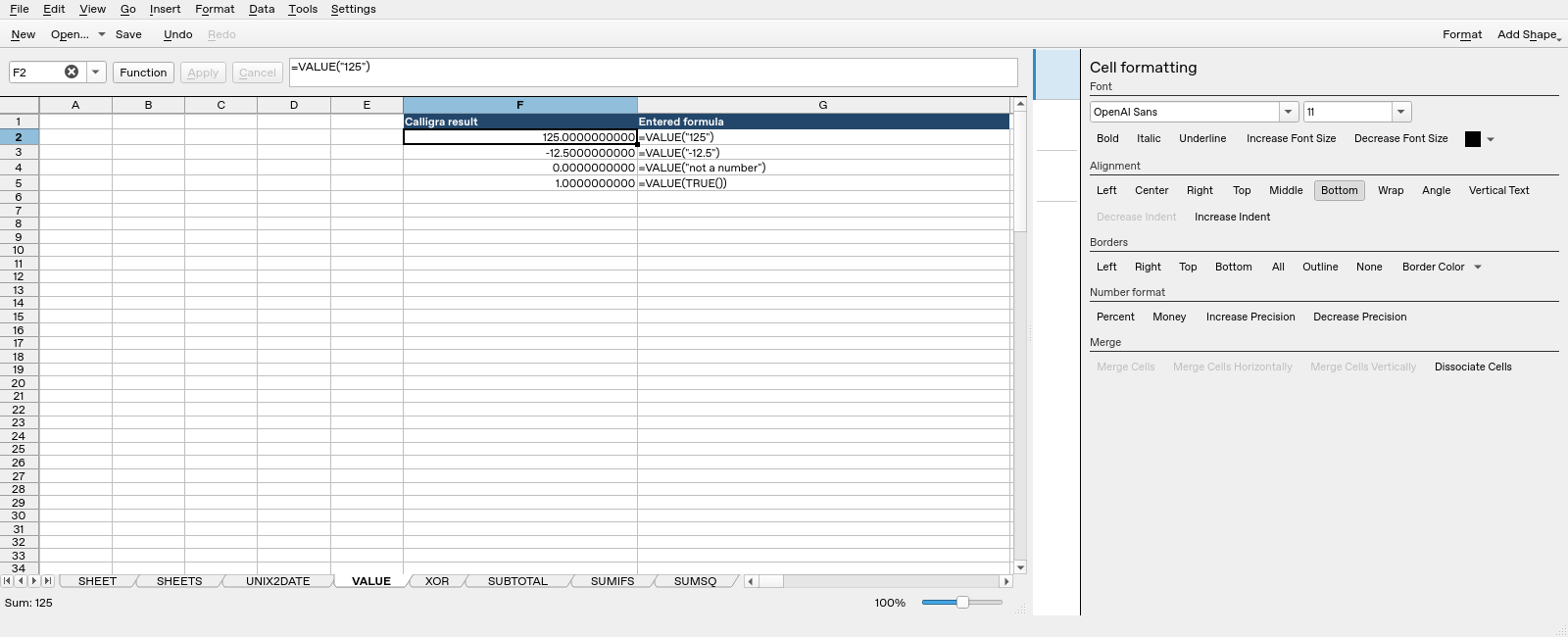
Screenshot: Genuine native 25.04.2 capture. Selected F2 contains =VALUE("125") and displays 125.0000000000. Column F contains application results; column G contains descriptive formula labels. The selected formula is visible in the formula bar; long labels in other rows may be clipped by the panel.