

VDB Function (Calligra Sheets)
Calculate variable declining-balance depreciation in Calligra Sheets with explicit factor, switching behavior and fractional-period examples.
Verification status: See the evidence and test scope described in this guide. How formula examples are checked
Quick answer: =VDB(1000;100;5;0;1;2) is independently expected to return approximately 400.
Availability and verification scope
- Introduced: Original introduction release is not established. A checked release is not an introduction date.
- Source checked: Calligra Sheets 26.08.2, first-party implementation retrieved on October 18, 2026.
- Retired or deprecated: Neither is established. The function remains registered in the inspected source.
- Numerical evidence: The selected formulas below were executed in Calligra Sheets 25.04.2 on October 18, 2026, with formulas and results read back from a native-saved ODS. Independent calculations provide separate checks. Version 26.08.2 was source-checked only; these selected cases do not establish general import/export or cross-version runtime compatibility.
- Entry style: English names, semicolon separators, decimal points and
DATE(year;month;day)values. Brackets in syntax indicate optional arguments; do not type them.
Purpose and an important optional-argument defect
VDB returns depreciation over a period interval, using declining balance and, unless disabled, a switch to straight-line depreciation when that produces the larger charge. Its output is a depreciation amount in the same currency units as cost and salvage. It is not the ending book value.
Always supply the sixth argument, the depreciation factor, in the inspected release. Although registration accepts five through seven arguments and the body initializes factor to 2, its optional-factor condition is args.count() >= 5 before reading args[5]. For a five-argument call that index lies beyond the supplied arguments. The intended default is therefore not reliable. This guide uses explicit factor 2 and makes no claim that the five-argument form safely defaults to double declining balance.
Syntax and arguments
=VDB(cost; salvage; life; start_period; end_period; factor[; no_switch])
| Argument | Meaning |
|---|---|
| cost | Original nonnegative asset cost |
| salvage | Residual value, normally between 0 and cost |
| life | Useful life in consistent period units |
| start_period | Beginning of the depreciation interval, normally 0 or greater |
| end_period | End of the interval, no later than life |
| factor | Explicit positive declining-balance factor; use 2 for double declining balance |
| no_switch | Optional integer-converted flag, default 0; nonzero disables straight-line switching |
The seventh flag can be easy to reverse: 0 allows switching, while 1 means no switch. The source comment’s “straight-line depreciation” wording should not override the actual flag branches. Use 0 or 1 explicitly when comparing schedules.
Step-by-step: depreciate a 1,000 asset
- Put cost 1000, salvage 100 and life 5 in A2:C2.
- Enter
=VDB(A2;B2;C2;0;1;2)in D2. - The independent first-period depreciation is 400: 1000 × 2/5.
- Ending book value after that first period is
=A2-D2, or 600. - Enter
=VDB(A2;B2;C2;0;5;2)in E2. The independent full-life depreciation is 900, leaving salvage 100.
For the same example with no switching, the period amounts are 400, 240, 144, 86.4 and 29.6. The last amount is limited so the book value does not fall below salvage. Adding the five charges independently confirms the total 900. Retain enough decimal precision during the calculation; round only under your accounting policy rather than assuming the function rounds each charge to cents.
Advanced case: show when switching matters
Set salvage to 0 and keep cost 1000, life 5 and factor 2. After three periods, book value is 216. Without switching, periods four and five charge 86.4 and 51.84, totaling 138.24 and leaving 77.76.
With switching allowed, straight-line depreciation over the two remaining periods is 216/2 = 108 per period. That exceeds the declining-balance charge, so the remaining two-period amount is 216. Compare =VDB(1000;0;5;3;5;2) with =VDB(1000;0;5;3;5;2;1). A higher depreciation total in the first formula is a consequence of the switch, not a change in asset cost.
For a fractional interval without switching, =VDB(1000;100;5;0;0.5;2;1) charges half the first-period amount, or 200. The switching branch has additional adjustments for fractional starts at or beyond half-life when factor exceeds 1. Do not extrapolate every fractional-period result by merely multiplying a whole-year amount; validate the actual start and end interval.
Validation and safe modeling limits
The wrapper rejects negative cost, end before start, end beyond life, salvage above cost and nonpositive factor with internal errorVALUE. It does not comprehensively reject negative salvage, nonpositive life or negative start periods. Loop bounds are derived from floor/ceiling and converted to unsigned integers; malformed negative periods can therefore cause much worse behavior than a simple helpful cell error.
Keep cost and salvage nonnegative, life positive, and 0 <= start <= end <= life; use modest real-world period counts. Do not use malformed period inputs to test error handling in a production workbook. The examples use small, bounded intervals and explicitly supplied factor. No five-argument runtime behavior is claimed.
Depreciation methods and rounding requirements can depend on accounting policy and jurisdiction. VDB is a numerical tool, not a determination that a particular depreciation method is permitted for tax or reporting purposes. Keep the chosen policy, rate and salvage assumptions visible next to the model.
Reproducible comparison cases
Enter each formula on a fresh worksheet. Format numeric results with at least ten decimal places before comparing; percentage formatting multiplies the displayed number by 100. The errors for these selected formulas were also observed in the native application.
| Formula | Independent or source-derived expectation |
|---|---|
=VDB(1000;100;5;0;1;2) |
400 |
=VDB(1000;100;5;0;5;2) |
900 |
=VDB(1000;100;5;0;5;2;1) |
900 |
=VDB(1000;0;5;3;5;2) |
216 |
=VDB(1000;0;5;3;5;2;1) |
138.24 |
=VDB(1000;100;5;0;0.5;2;1) |
200 |
=VDB(1000;100;5;0;1;0) |
#VALUE! |
Native results in Calligra Sheets 25.04.2
These selected formulas were recalculated in the native application. The formulas below use worksheet notation; native ODS range references may serialize differently. Display precision can differ from the independent arithmetic.
| Formula | Native displayed result |
|---|---|
=VDB(1000;100;5;0;1;2) |
400.0000000000 |
=VDB(1000;100;5;0;5;2) |
900.0000000000 |
=VDB(1000;100;5;0;5;2;1) |
900.0000000000 |
=VDB(1000;0;5;3;5;2) |
216.0000000000 |
=VDB(1000;0;5;3;5;2;1) |
138.2400000000 |
=VDB(1000;100;5;0;0.5;2;1) |
200.0000000000 |
=VDB(1000;100;5;0;1;0) |
#VALUE! |
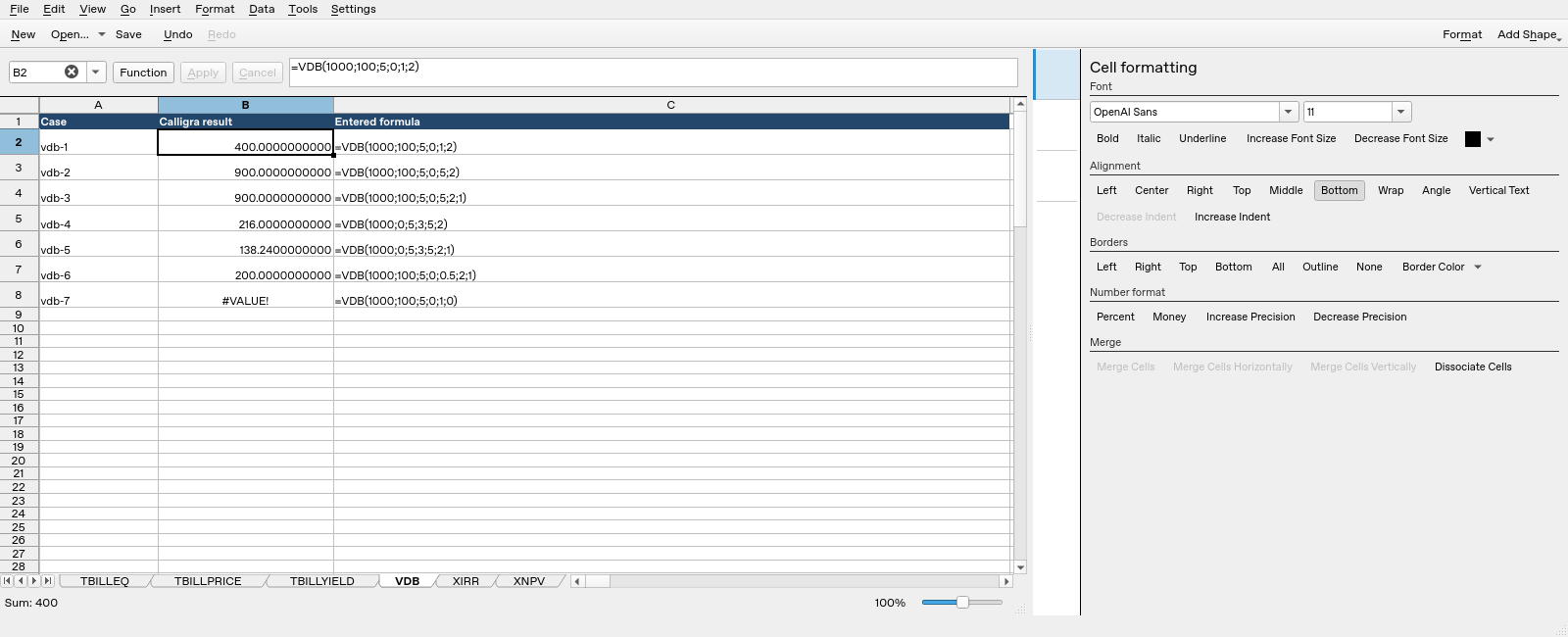
Calligra Sheets 25.04.2: selected cell B2 evaluates =VDB(1000;100;5;0;1;2) and displays 400.0000000000. Column B contains calculated results; column C shows entered formula text.
Compatibility and related functions
No alternate spelling is registered for this name. Matching names in other spreadsheet products do not guarantee matching argument order, day counts, validation or file-import behavior. This guide does not establish general XLSX/ODS round-trip compatibility. Check a small workbook with known results before relying on a migrated model.
Related guides: DURATION and PDURATION cover compound-growth periods; PMT handles equal periodic payments; DATE constructs date values. Keep investment returns and asset depreciation in separate models.
First-party references
- Calligra released function implementation, including the actual argument reads and return expressions.
- Calligra function descriptions, useful for terminology but subordinate to the inspected implementation where they differ.
- Calligra year-fraction implementation, relevant to basis-dependent year fractions.
References checked October 18, 2026. Numerical examples are spreadsheet calculations, not a recommendation to buy, sell or price a particular security without checking its contractual terms.