

WEIBULL in Calligra Sheets: Model a Lifetime Distribution
Calculate Weibull cumulative probability and density using shape and scale parameters with consistent units.
Verification status: Consult the documentation, examples and any stated test scope below. How formula examples are checked
Quick answer: =WEIBULL(100;2;200;1) has an independently calculated value of 0.221199216929. Under a Weibull lifetime model with shape 2 and scale 200 hours, it is the probability of a lifetime of at most 100 hours, about 22.12%.
With the last argument 0, the result is a density, approximately 0.00389400391536 per hour. It is not the probability of failure at exactly the 100-hour instant.
Syntax, shape, scale and units
=WEIBULL(x; alpha; beta; cumulative)
All four arguments are required; none has a default.
| Argument | Meaning | Restrictions |
|---|---|---|
| x | Lifetime or nonnegative model variable | Same units as beta; x ≥ 0. |
| alpha | Shape parameter | Dimensionless, strictly positive. |
| beta | Scale parameter | Same units as x, strictly positive. |
| cumulative | 0 for density, 1 for cumulative probability | Source branches on zero versus nonzero. |
The cumulative distribution is 1 − exp(−(x/beta)^alpha). Scale is not generally the mean. For every positive shape, beta marks the point at which the cumulative probability is 1 − exp(−1), about 63.21%. With shape 1, beta is also the exponential mean.
Worked worksheet: an illustrative component-life model
Assume shape = 2 and scale = 200 hours have been supplied by a justified model. WEIBULL evaluates these parameters; it does not fit them from lifetime observations.
- Put 100 in A2 labeled
Time (hours). - Put 2 in B2 labeled
Shapeand 200 in C2 labeledScale (hours). - Enter
=WEIBULL(A2;B2;C2;1)in D2. - Expected D2 is 0.221199216929, or 22.12% failed by that time under the model.
- In E2 enter
=1-D2. Expected survival probability is 0.778800783071, or 77.88%. - In F2 enter
=WEIBULL(A2;B2;C2;0). Expected density is 0.00389400391536 per hour.
A model probability is not a guarantee about a particular component. Censoring, selection bias and operating conditions matter when estimating lifetime parameters; those fitting issues are outside this evaluation formula.
Advanced example: the exponential special case
For alpha = 1 and beta = 200 hours, =WEIBULL(100;1;200;1) has expected value 0.393469340287. It matches an exponential model with rate 1/200 per hour, evaluated at 100 hours.
Changing shape while keeping scale fixed changes more than a label. Shape greater than 1 corresponds to an increasing Weibull hazard; shape below 1 corresponds to a decreasing hazard; shape 1 gives constant hazard. This is a property of the chosen distribution, not evidence that any particular device’s hazard follows that pattern.
For an interval (a,b], calculate F(b)−F(a) using two cumulative calls. Do not multiply the density at one endpoint by a wide interval and assume it is exact. If time units change from hours to days, change both x and beta consistently while leaving dimensionless alpha unchanged.
Boundaries and errors
- x < 0, alpha ≤ 0 or beta ≤ 0 triggers the source’s internal value-error path.
- At x = 0 and positive parameters, cumulative probability is mathematically 0.
- For shape 2, the density at zero is 0; the application result for that specific case is listed separately below.
- For shape 1, the mathematical zero density is 1/beta. For shapes below 1, the density diverges at zero. The application’s exact handling of those other zero-density cases was not verified here; do not generalize the shape-2 check.
- Any nonzero cumulative argument takes the cumulative branch, but use explicit 0 or 1 for readable formulas.
The source computes direct powers and exponentials. Extreme ratios, very small cumulative probabilities or large shapes may expose underflow, overflow or cancellation. No universal numerical-accuracy bound is promised by these modest test cases.
Related functions and compatibility
KDE EXPONDIST is the shape-1 special case with rate = 1/beta. KDE GAMMADIST is a different family, not a substitute based solely on both having shape parameters. When sharing formulas, verify parameter order, shape/scale versus rate convention, and density versus cumulative mode. A correctly typed formula can still use the wrong physical unit or distribution model.
Availability, sources and evidence scope
Checked October 18, 2026. Original introduction date is unknown. WEIBULL is registered in both inspected source versions, Calligra 25.04.2 and 26.08.2. Their relevant statistical-function, calculation-engine and converter source files are byte-identical. Version inspection establishes availability in those releases, not a first-introduction date or a runtime guarantee for every platform.
Primary sources: KDE WEIBULL handbook, 26.08.2 implementation, 25.04.2 statistical functions, and numeric converter. Mathematical values above are independent calculations. Native observations below were obtained in Calligra Sheets 25.04.2 on Linux, October 18, 2026; no native 26.08.2 execution is claimed. The handbook is a living reference and can differ from the pinned implementation at the explicitly described boundaries.
Native verification in Calligra Sheets 25.04.2
The following formula results were obtained in the actual application and checked in its completed native-saved workbook. The screenshot is an unmodified application capture. The values in this table are native results; the earlier reference values and model calculations remain separately identified. Small final-digit differences do not make the independent reference a native observation.
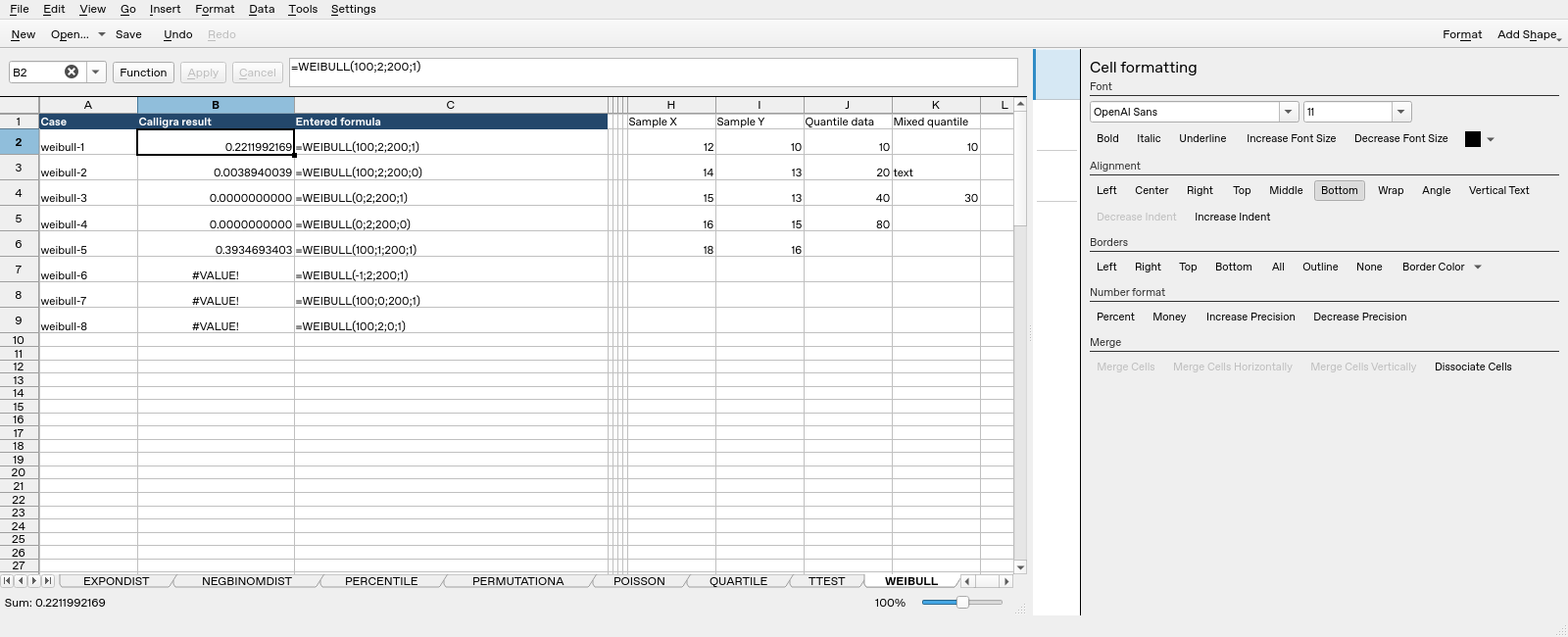
| Formula executed | Native saved result |
|---|---|
=WEIBULL(100;2;200;1) |
0.221199216928595 |
=WEIBULL(100;2;200;0) |
0.00389400391535702 |
=WEIBULL(0;2;200;1) |
0 |
=WEIBULL(0;2;200;0) |
0 |
=WEIBULL(100;1;200;1) |
0.393469340287367 |
=WEIBULL(-1;2;200;1) |
#VALUE! |
=WEIBULL(100;0;200;1) |
#VALUE! |
=WEIBULL(100;2;0;1) |
#VALUE! |
The completed saved values, including error text, determine this table; display rounding can show fewer digits. These tests do not establish all locales, input types, extreme numerical ranges or cross-application import behavior.