

XNPV Function (Calligra Sheets)
Use dated cash flows in Calligra XNPV with actual/365 equations, range examples and discount-rate validation limits.
Verification status: See the evidence and test scope described in this guide. How formula examples are checked
Quick answer: =XNPV(0.1;H2:H3;I2:I3) is independently expected to return approximately 0.
Availability and verification scope
- Introduced: Original introduction release is not established. A checked release is not an introduction date.
- Source checked: Calligra Sheets 26.08.2, first-party implementation retrieved on October 18, 2026.
- Retired or deprecated: Neither is established. The function remains registered in the inspected source.
- Numerical evidence: The selected formulas below were executed in Calligra Sheets 25.04.2 on October 18, 2026, with formulas and results read back from a native-saved ODS. Independent calculations provide separate checks. Version 26.08.2 was source-checked only; these selected cases do not establish general import/export or cross-version runtime compatibility.
- Entry style: English names, semicolon separators, decimal points and
DATE(year;month;day)values. Brackets in syntax indicate optional arguments; do not type them.
Purpose and syntax
XNPV discounts a dated cash-flow series at an annual rate and returns its net present value. Dates need not be equally spaced. Cash outflows are negative and inflows positive. The functions use actual calendar-day offsets divided by 365, including when an interval contains a leap day; there is no optional day-count basis.
=XNPV(rate; values; dates)
| Argument | Meaning |
|---|---|
| rate | Annual discount rate, e.g. 0.1 for 10% |
| values | Range of signed cash flows |
| dates | Matching date range, paired by position |
The function accepts exactly three arguments, and its value/date arguments accept ranges. Both ranges must contain the same number of elements and at least two entries. The first date is the reference date; keep rows paired when sorting. Use actual date-valued cells, not date-looking text labels.
Step-by-step: a one-year investment
On a fresh worksheet enter these cells:
| Cell | Entry |
|---|---|
| H1 | Cash flow |
| I1 | Date |
| H2 | -1000 |
| I2 | =DATE(2025;1;1) |
| H3 | 1100 |
| I3 | =DATE(2026;1;1) |
Enter =XNPV(0.1;H2:H3;I2:I3) in B2. The independent expectation is 0. The dates are exactly 365 days apart. The discounted equation is therefore −1000 + 1100/(1+r); at r=0.1 the inflow is worth 1000, exactly offsetting the outflow.
The general residual is:
sum(value_i / (1+rate)^((date_i−first_date)/365))
The initial cash flow has exponent zero, so it is included immediately rather than discounted one full period. This differs from periodic conventions that assume every supplied cash flow occurs at the end of a period. Dates determine the exponent, not the row number.
Advanced example: three dated cash flows
Enter −1000, 550 and 605 in J2:J4. In K2:K4 enter DATE formulas for January 1 of 2025, 2026 and 2027. The day offsets are 0, 365 and 730. At rate 0.1 the two positive present values are 550/1.1 = 500 and 605/1.1^2 = 500. Together they offset the initial −1000 exactly.
Use =XNPV(0.1;J2:J4;K2:K4) to obtain the independent expected value 0. At rate 0, XNPV reduces to the signed cash-flow sum; the one-year example then gives 100.
Move a real payment date only when the underlying transaction date changes. Moving the receipt later generally lowers its present value for a positive discount rate. Simply sorting one column without the other changes which amount belongs to which date and silently changes the financial model.
Rate-domain limitation and input errors
The intended real-valued financial model normally uses a rate greater than −1. The inspected function first increments the supplied rate by 1 and then tests whether that incremented value is less than −1. Thus the actual explicit error guard corresponds to an original rate below −2, not the usual lower bound of −1. Do not rely on this check to reject every invalid financial rate.
At a supplied rate of −1 the discount base is zero; rates between −2 and −1 produce a negative base, which can be invalid for fractional day exponents. The source does not comprehensively guard the resulting divisions and powers. Use a sensible rate greater than −1 and independently check finite results. This guide does not claim native outputs for these dangerous-domain cases.
Mismatched value/date counts or fewer than two pairs explicitly return internal errorVALUE. Each loop date is converted; conversion errors are propagated, and an invalid resulting date returns internal errorNUM. The source does not require chronological sorting or enforce that every date follows the first. Earlier dates can produce negative exponents, so keep the first date and intended valuation reference explicit.
Practical interpretation
For the one-year example, changing the discount rate from 10% to 20% gives −1000+1100/1.2, or −83.3333333333. A negative NPV means the modeled inflows do not cover the modeled outflow at that chosen discount rate. It does not independently determine an appropriate risk-adjusted rate or whether an investment should be made.
The first date is the reference date. If you want value at another valuation date, re-express the model consistently rather than assuming that reordering arbitrary rows is harmless. Keep cash-flow/date pairs intact, separate actual cash transactions from estimates, and state the chosen rate beside the formula. Fees, taxes and missing cash flows affect the result only if they are included in the supplied amounts.
Reproducible comparison cases
Enter each formula on a fresh worksheet. Format numeric results with at least ten decimal places before comparing; percentage formatting multiplies the displayed number by 100. The errors for these selected formulas were also observed in the native application.
| Formula | Independent or source-derived expectation |
|---|---|
=XNPV(0.1;H2:H3;I2:I3) |
0.0 |
=XNPV(0;H2:H3;I2:I3) |
100.0 |
=XNPV(0.1;J2:J4;K2:K4) |
0.0 |
=XNPV(0.2;H2:H3;I2:I3) |
-83.33333333333333 |
=XNPV(0.1;H2:H3;I2:I4) |
#VALUE! |
Native results in Calligra Sheets 25.04.2
These selected formulas were recalculated in the native application. The formulas below use worksheet notation; native ODS range references may serialize differently. Display precision can differ from the independent arithmetic.
| Formula | Native-saved formatted result |
|---|---|
=XNPV(0.1;H2:H3;I2:I3) |
0.0000000000 |
=XNPV(0;H2:H3;I2:I3) |
100.0000000000 |
=XNPV(0.1;J2:J4;K2:K4) |
0.0000000000 |
=XNPV(0.2;H2:H3;I2:I3) |
-83.3333333333 |
=XNPV(0.1;H2:H3;I2:I4) |
#VALUE! |
The date inputs in I2:I4 and K2:K4 are actual DATE formulas. The screenshot uses numeric formatting, so January 1 of 2025, 2026 and 2027 appears as serials 45658, 46023 and 46388. These are calculated date serials, not typed date labels. The DATE formulas and resulting serials were verified in the saved workbook.
Floating-point zero: the first case has an exact mathematical NPV of zero, but the native saved result is approximately −1.13686837721616 × 10⁻¹³. The saved ODS formatted text is 0.0000000000; the screenshot shows 0.000000 at six decimal places. Treat it as a small rounding residual, not exact machine zero; use a sensible absolute/relative tolerance when checking an XIRR residual.
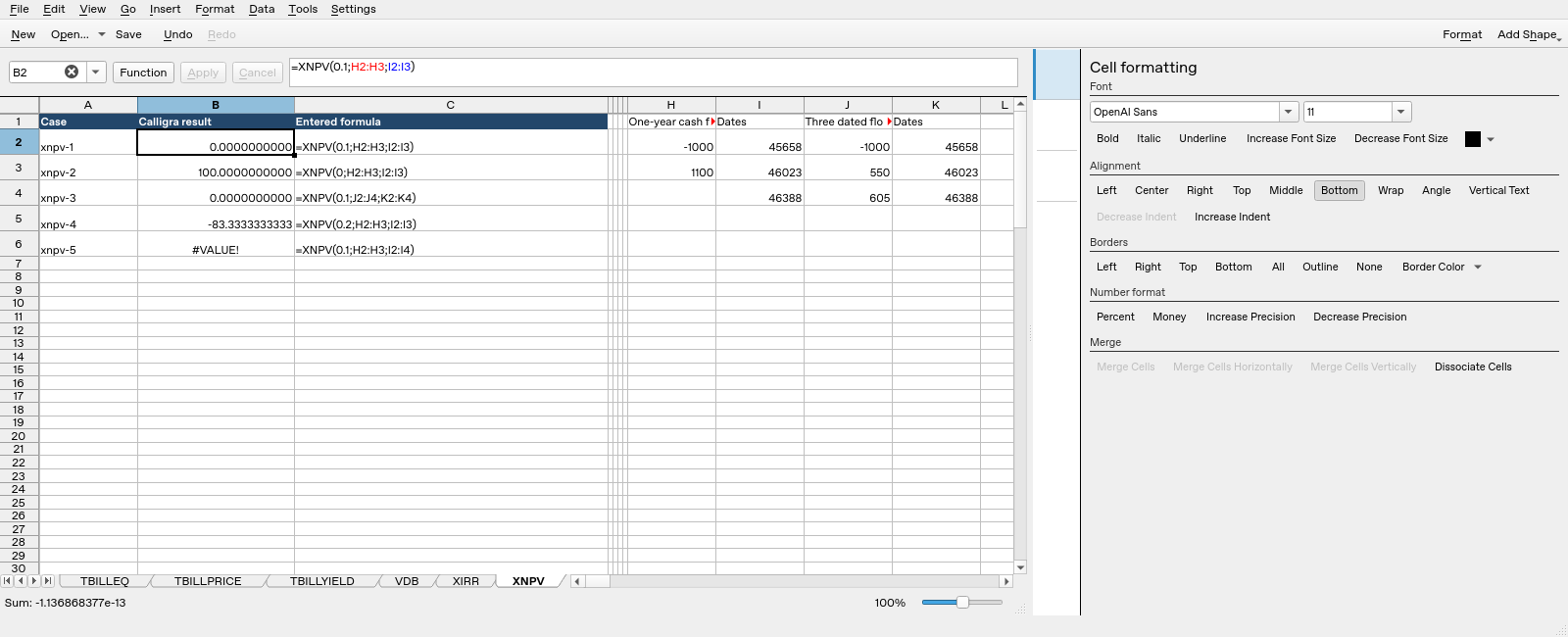
Calligra Sheets 25.04.2: selected cell B2 evaluates =XNPV(0.1;H2:H3;I2:I3) and displays 0.000000 (six decimal places). Column B contains calculated results; column C shows entered formula text. The date-input columns show numeric serials rather than formatted calendar dates.
Compatibility and related functions
The registered alternate spelling is COM.SUN.STAR.SHEET.ADDIN.ANALYSIS.GETXNPV. It uses the same handler; it is not a separate calculation. Matching names in other spreadsheet products do not guarantee matching argument order, day counts, validation or file-import behavior. This guide does not establish general XLSX/ODS round-trip compatibility. Check a small workbook with known results before relying on a migrated model.
Related guides: DURATION and PDURATION cover compound-growth periods; PMT handles equal periodic payments; DATE constructs date values. Keep investment returns and asset depreciation in separate models.
First-party references
- Calligra released function implementation, including the actual argument reads and return expressions.
- Calligra function descriptions, useful for terminology but subordinate to the inspected implementation where they differ.
- Calligra year-fraction implementation, relevant to basis-dependent year fractions.
References checked October 18, 2026. Numerical examples are spreadsheet calculations, not a recommendation to buy, sell or price a particular security without checking its contractual terms.